

- Local time
- 12:02 AM
- Messages
- 715
Yesterday I was having a problem I could not solve, so I restored Windows to an earlier time (prior to IE 9 being installed). Everything seemed to go well. I then updated everything and installed IE9.
Here is what the "Google Toolbar" looks like now.

As you can see there is no way to search using Google.
IF I the "X" at the Google Toolbar here is what I see:
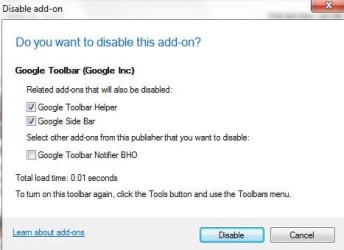
I have not changed that.
If I right-click on the "Favorites Star" at the top right, I get this.
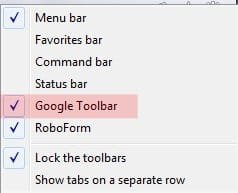
As far as I can see the Toolbar is turned on and should be working, except I CANNOT search using Google.
Does anyone have a suggestion as to how to correct this?
I do have a Macrium image that was made on 4/19/2011 that I could restore when everything was working, but I wanted to avoid that if possible.
Thanks inadvance
Here is what the "Google Toolbar" looks like now.
As you can see there is no way to search using Google.
IF I the "X" at the Google Toolbar here is what I see:
I have not changed that.
If I right-click on the "Favorites Star" at the top right, I get this.
As far as I can see the Toolbar is turned on and should be working, except I CANNOT search using Google.
Does anyone have a suggestion as to how to correct this?
I do have a Macrium image that was made on 4/19/2011 that I could restore when everything was working, but I wanted to avoid that if possible.
Thanks inadvance
My Computer
- OS
- Windows 7 Pro
- CPU
- Intel(R) Pentium(R) Duel CPU E2200 2.20 Ghz
- Motherboard
- GA-G41M-ES2L
- Memory
- 4 gb 2.96 Usable
- Graphics Card(s)
- Onboard
- Sound Card
- Onboard
- Hard Drives
- 2 - 1TB WD Sata Drives


