IE 9 favorites bar keep resorting

tjmoes

New member
Local time
4:59 PM
Messages
15
IE 9 favorites bar keep resorting to alphabetical order when i put favs in front of all others on the bar, i have to put a 1- in front of the name to keep them where i want but they are still listed alphabetical, this happened it seems after a couple of updates.
how to fix would be appreciated?
ted
 

My Computer My Computer

At a glance

Win7 Pro
OS
Win7 Pro
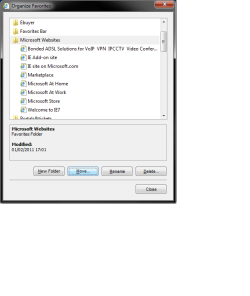
IN internet Explorer, Click on the Favorites tab, Click on The drop down arrow: then select Organize Favorites
Untitled.png

Then click on MOVE, This will then let you put them in any order you want
Untitled2.png
 

My Computer My Computer

At a glance

Windows 7 Home Premium 64 BitCore I7 1155 3.4GHZ8GB DDR 1600
Computer Manufacturer/Model Number
Cooler Master
OS
Windows 7 Home Premium 64 Bit
CPU
Core I7 1155 3.4GHZ
Memory
8GB DDR 1600
Hard Drives
64 GB SSD - OS
1TB - DATA
PSU
340 Watt Corsair
Case
Cooler Master
Cooling
Cooler Master
that just moves them around in the folder
 

My Computer My Computer

At a glance

Win7 Pro
OS
Win7 Pro
If I open my Favorites and drag and drop, When I close IE and then re-open - they stay where I put them.

If yours changes back when you re-open IE, Try reseting IE, Click tools, Internet Options, Advanced tab, Then press reset, don't worry, no favorites will be removed.
 

My Computer My Computer

At a glance

Windows 7 Home Premium 64 BitCore I7 1155 3.4GHZ8GB DDR 1600
Computer Manufacturer/Model Number
Cooler Master
OS
Windows 7 Home Premium 64 Bit
CPU
Core I7 1155 3.4GHZ
Memory
8GB DDR 1600
Hard Drives
64 GB SSD - OS
1TB - DATA
PSU
340 Watt Corsair
Case
Cooler Master
Cooling
Cooler Master
i not concerned about the favorites folder, it is the bar that stays alphabetical, did the reset thing didnt help.
 

My Computer My Computer

At a glance

Win7 Pro
OS
Win7 Pro
Can you take a screen shot, I'm slightly confused, Do you mean the Favirotes BAR, that goes right acros the top of IE?
 

My Computer My Computer

At a glance

Windows 7 Home Premium 64 BitCore I7 1155 3.4GHZ8GB DDR 1600
Computer Manufacturer/Model Number
Cooler Master
OS
Windows 7 Home Premium 64 Bit
CPU
Core I7 1155 3.4GHZ
Memory
8GB DDR 1600
Hard Drives
64 GB SSD - OS
1TB - DATA
PSU
340 Watt Corsair
Case
Cooler Master
Cooling
Cooler Master
yes
 

My Computer My Computer

At a glance

Win7 Pro
OS
Win7 Pro
Ok,

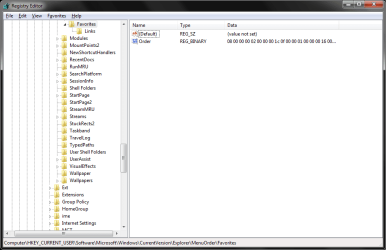
Click Start, In the search box, Type Regedit, Then browse to:

[-HKEY_CURRENT_USER\Software\Microsoft\Windows\CurrentVersion\Explorer\MenuOrder\Favorites]

Let me know what the Default Value is set to?.

Untitled.png
 

My Computer My Computer

At a glance

Windows 7 Home Premium 64 BitCore I7 1155 3.4GHZ8GB DDR 1600
Computer Manufacturer/Model Number
Cooler Master
OS
Windows 7 Home Premium 64 Bit
CPU
Core I7 1155 3.4GHZ
Memory
8GB DDR 1600
Hard Drives
64 GB SSD - OS
1TB - DATA
PSU
340 Watt Corsair
Case
Cooler Master
Cooling
Cooler Master
not set and othr win7 puter same way but am able to resort
 
Last edited:

My Computer My Computer

At a glance

Win7 Pro
OS
Win7 Pro
Back
Top