IE 9 Has Stopped Working

Duchess

New member
Member
Local time
5:03 PM
Messages
70
Location
New Jersey
I've been seeing IE has stopped working more and more frequently. Today I've seen it twice. Other than changing default browsers or going back to version 8, can anything be done to fix IE9 so it will stop closing? :cry:

Duchess (Gloria)
 

My Computer

Computer Manufacturer/Model Number
Dell Inspiron 400
OS
Windows 7 Home Premium 64-bit
CPU
AMD Athlon
Motherboard
Dell 03D1TV
Memory
3.00 GB
Graphics Card(s)
ATI Radeon HD3200
Sound Card
ATI High Definition
Monitor(s) Displays
Samsung SyncMaster
Hard Drives
527 GB
PSU
unknown
Case
unknown
Cooling
unknown
You can also try to run IE without any addons and see if the performance improves. There is a shortcut in the Start Menu (probably under Accessories).

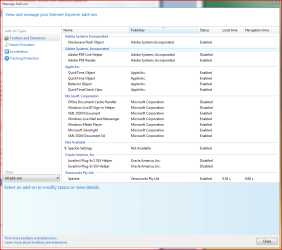
Also, be sure to check if there are any plugins that load slowly and bog down its performance. You can do that by clicking the Capture.PNG icon and going to Manage addons. Under Toolbars and Extensions look at the bottom left of the windows with a drop-down list under "Show" and choose to show "All addons" then look through the list of installed addons and disable any that take either a long time to load or navigate (Load and Navigation Times). If you're not sure which addons to disable, here's a snippy of my own addons installed:

addonsnippy.PNG
 

My Computer

Computer type
Laptop
Computer Manufacturer/Model Number
Custom
OS
Windows 7 Home Premium x64
CPU
Intel Core i5 2500K
Motherboard
MSI MS-7750
Memory
8GB DDR3
Graphics Card(s)
nVidia GeForce GTX650 Ti BOOST
Sound Card
Realtek
Monitor(s) Displays
21' Philips
Screen Resolution
Full HD
Hard Drives
1TB
PSU
500W
IE 9 has stopped working

Hi Duchess,

My name is Mekh and I work for the Social Media and Community Team at Dell. Other than the two options you have mentioned, one other way is to Restore IE to Default Settings.
Check the below KB article how how to reset IE.
http://www.sevenforums.com/tutorials/1222-internet-explorer-reset.html

Hope this helps.

Regards,
Mekh
Dell Social Media Responder.

I, recently, had a Micro. IE tech do a remote control of my desktop. She was trying to find out why IE9 was having that IE has stopped working problem. She tried every thing she knew and failed to find a reason. She performed an IE reset and that failed. After about 2 hours, she gave up and stated that she would kick my problem upstairs and would send me an email if and when a solution was found.

So I won't be doing a reset again any time soon. Thanks for the suggestion but that's already been tried.

Gloria
 

My Computer

Computer Manufacturer/Model Number
Dell Inspiron 400
OS
Windows 7 Home Premium 64-bit
CPU
AMD Athlon
Motherboard
Dell 03D1TV
Memory
3.00 GB
Graphics Card(s)
ATI Radeon HD3200
Sound Card
ATI High Definition
Monitor(s) Displays
Samsung SyncMaster
Hard Drives
527 GB
PSU
unknown
Case
unknown
Cooling
unknown
Last edited:

My Computer

Computer type
PC/Desktop
OS
Windows 10 Home x64
CPU
INTEL Core i5-750 Quad-Core 3.37GHz
Motherboard
ASUS P7P55D
Memory
HyperX Fury Black Series 8GB (2 x 4GB) 1866Mhz
Graphics Card(s)
EVGA GeForce GTX 750 Superclocked 1GB 128-Bit GDDR5
Monitor(s) Displays
LG 32MA68HY 32" IPS
Screen Resolution
1920 x 1080
Hard Drives
Samsung 840 Evo 120GB, SEAGATE 500GB Barracuda® 7200.12, SATA 3 Gb/s, 7200 RPM, 16MB cache
PSU
ANTEC TruePower New TP-550, 80 PLUS, 550W
Case
ANTEC Three Hundred Illusion
Cooling
COOLER MASTER Hyper 212 Plus, 4 x 120mm 1 x 140mm Noctua's
Internet Speed
85 + Mbps
Antivirus
Avast
Browser
Vivaldi
Hi, over the last 2 weeks, I have started getting the same issue as Duchess, and have done all the advised. Including the software rendering change and disabling add ons. I have now found that the only one that works is to disable the Adobe Shockwave Player add-on, but that means I cannot watch any video. I generally use the BBC news site(BBC News - Rare white tiger cubs unveiled at Czech Republic zoo) to watch video reports, but cannot watch without the flash player add on, and if it's on each time I click another video it stops working.
The only update I can see in the last couple of weeks is the Flash player one of 11.4.402.265, but I can't seem to revert back to the one before.
One constant seems to be the error as below:
Can anyone see the problem and how to solve it.
many thanks
1st time user Si1verfox
Problem Event Name: BEX
Application Name: iexplore.exe
Application Version: 9.0.8112.16448
Application Timestamp: 4fecf1b7
Fault Module Name: StackHash_3597
Fault Module Version: 0.0.0.0
Fault Module Timestamp: 00000000
Exception Offset: 7474c9f1
Exception Code: c0000005
Exception Data: 00000008
OS Version: 6.1.7601.2.1.0.256.48
Locale ID: 2057
Additional Information 1: 3597
Additional Information 2: 3597c31010c86d2765350bffe3a6632f
Additional Information 3: b28e
Additional Information 4: b28ec503d694c4dda893356d1d58e925

 

My Computer

Computer Manufacturer/Model Number
Dell Vostro 3550
OS
Win 7 64bit Pro
CPU
i5-2410
Memory
8gb
Back
Top