IE 9 Problems

lsufrontier

New member
Power User
Local time
9:29 AM
Messages
215
I downloaded the beta but I am having probelems with it. Does anyone know what would causes pictures, videos, and ads to not load or view properly? On some websites they like go in and out and disappear. Also on some of the forums I view when I scroll grey boxes appear and mess up the page. Thanks
 

My Computer

Computer Manufacturer/Model Number
HP
OS
Windows 7
If a website isn't displayed properly, click the "Compatibility View" (if available) to reload the page. It should be displayed properly.

Also, I have noticed that IE9b doesn't always load pages "immediately", but displays it all at once, when it caches most of it. Perhaps that is another reason you get such bugs.
 

My Computer

Computer type
Laptop
Computer Manufacturer/Model Number
Custom
OS
Windows 7 Home Premium x64
CPU
Intel Core i5 2500K
Motherboard
MSI MS-7750
Memory
8GB DDR3
Graphics Card(s)
nVidia GeForce GTX650 Ti BOOST
Sound Card
Realtek
Monitor(s) Displays
21' Philips
Screen Resolution
Full HD
Hard Drives
1TB
PSU
500W
I have tried the compatibilty view and it still does it. Do you know what would cause videos and pictures not to load? Thanks
 

My Computer

Computer Manufacturer/Model Number
HP
OS
Windows 7
Could you send me the link to one of such websites so that I could see for myself, please?
 

My Computer

Computer type
Laptop
Computer Manufacturer/Model Number
Custom
OS
Windows 7 Home Premium x64
CPU
Intel Core i5 2500K
Motherboard
MSI MS-7750
Memory
8GB DDR3
Graphics Card(s)
nVidia GeForce GTX650 Ti BOOST
Sound Card
Realtek
Monitor(s) Displays
21' Philips
Screen Resolution
Full HD
Hard Drives
1TB
PSU
500W
Both websites contain Flash ads and pics. Update Flash.
 

My Computer

Computer type
Laptop
Computer Manufacturer/Model Number
Custom
OS
Windows 7 Home Premium x64
CPU
Intel Core i5 2500K
Motherboard
MSI MS-7750
Memory
8GB DDR3
Graphics Card(s)
nVidia GeForce GTX650 Ti BOOST
Sound Card
Realtek
Monitor(s) Displays
21' Philips
Screen Resolution
Full HD
Hard Drives
1TB
PSU
500W
Ok so I installed the flash "square" and it did not correct the problem and I installed flash 10.1. I dont know what flash to install or which one I even have installed. Thanks
 

My Computer

Computer Manufacturer/Model Number
HP
OS
Windows 7
You should really update your system specs in your profile. Are you using 32bit or 64bit Win7?
 

My Computer

Computer type
Laptop
Computer Manufacturer/Model Number
Custom
OS
Windows 7 Home Premium x64
CPU
Intel Core i5 2500K
Motherboard
MSI MS-7750
Memory
8GB DDR3
Graphics Card(s)
nVidia GeForce GTX650 Ti BOOST
Sound Card
Realtek
Monitor(s) Displays
21' Philips
Screen Resolution
Full HD
Hard Drives
1TB
PSU
500W
64 bit
 

My Computer

Computer Manufacturer/Model Number
HP
OS
Windows 7
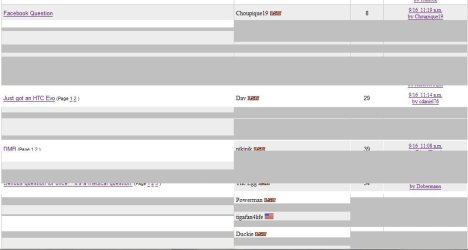
That is what I see.
 

Attachments

  • Capture.JPG
    Capture.JPG
    41.4 KB · Views: 93

My Computer

Computer Manufacturer/Model Number
HP
OS
Windows 7
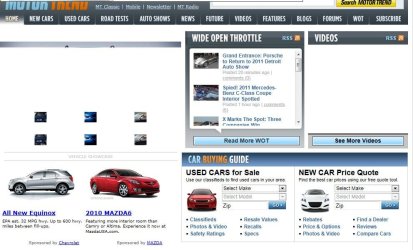
and this
 

Attachments

  • Capture.JPG
    Capture.JPG
    88 KB · Views: 13

My Computer

Computer Manufacturer/Model Number
HP
OS
Windows 7
Just today I have updated Flash from Adobe, installing the "regular" version instead of that "Square" thing, already tested it and it works fine.

Download Adobe - Products : Adobe Shockwave Player as well if you don't have it, then start IE again, click on the gear icon -> Manage add-ons and see if flash+shockwave is Enabled. I'm afraid that's all the help I can provide for now, as I never used 64bit in my life.

EDIT- from your screenshots, it's definitely Flash. Uninstall "square" and try to download the regular version + Shokwave.
 

My Computer

Computer type
Laptop
Computer Manufacturer/Model Number
Custom
OS
Windows 7 Home Premium x64
CPU
Intel Core i5 2500K
Motherboard
MSI MS-7750
Memory
8GB DDR3
Graphics Card(s)
nVidia GeForce GTX650 Ti BOOST
Sound Card
Realtek
Monitor(s) Displays
21' Philips
Screen Resolution
Full HD
Hard Drives
1TB
PSU
500W
Ok when installing the shockwave player should I install the full or slim version and should I install ActiveX or EXE?
 

My Computer

Computer Manufacturer/Model Number
HP
OS
Windows 7
I'm not sure what the difference is, but go for the ActiveX.
 

My Computer

Computer type
Laptop
Computer Manufacturer/Model Number
Custom
OS
Windows 7 Home Premium x64
CPU
Intel Core i5 2500K
Motherboard
MSI MS-7750
Memory
8GB DDR3
Graphics Card(s)
nVidia GeForce GTX650 Ti BOOST
Sound Card
Realtek
Monitor(s) Displays
21' Philips
Screen Resolution
Full HD
Hard Drives
1TB
PSU
500W
Ok thanks. Any idea whether I should go with the slim or full install?
 

My Computer

Computer Manufacturer/Model Number
HP
OS
Windows 7
Try full.

If the problems persist, you can reinstall IE, or just click the gear icon, go to Internet Options -> Advanced -> reset IE. If you already set up bookmarks and feeds, don't check "delete personal settings".
 

My Computer

Computer type
Laptop
Computer Manufacturer/Model Number
Custom
OS
Windows 7 Home Premium x64
CPU
Intel Core i5 2500K
Motherboard
MSI MS-7750
Memory
8GB DDR3
Graphics Card(s)
nVidia GeForce GTX650 Ti BOOST
Sound Card
Realtek
Monitor(s) Displays
21' Philips
Screen Resolution
Full HD
Hard Drives
1TB
PSU
500W
Ok so I uninstalled all of the adobe software and reinstalled the 64-bit flash and now everything seems to be working properly excpet for websites wanting to run the shockwave flash b/c I haven't installed it again yet. Thanks
 

My Computer

Computer Manufacturer/Model Number
HP
OS
Windows 7
No problem, glad I could help ;)
 

My Computer

Computer type
Laptop
Computer Manufacturer/Model Number
Custom
OS
Windows 7 Home Premium x64
CPU
Intel Core i5 2500K
Motherboard
MSI MS-7750
Memory
8GB DDR3
Graphics Card(s)
nVidia GeForce GTX650 Ti BOOST
Sound Card
Realtek
Monitor(s) Displays
21' Philips
Screen Resolution
Full HD
Hard Drives
1TB
PSU
500W
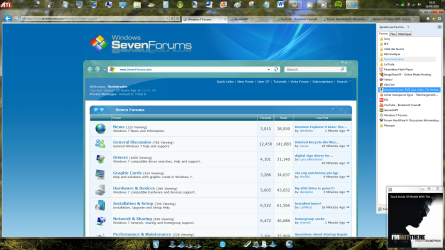
For me everything is fine except the favicon in the tabs: in my favorites it's ok but in tabs it's the IE icon.
 

Attachments

  • Sans titre.png
    Sans titre.png
    299 KB · Views: 25

My Computer

OS
Windows Seven Familiale Premium 64
CPU
i5 520
Memory
4Gb
Graphics Card(s)
ATI Radeon HD 5650
Screen Resolution
1920x1080
I can only assume that you haven't cached the web pages completely/logged in or something, I didn't experience any issues with favicons, apart from the old problem in IE8 not recognizing some favicons at all, even though they are displayed in other browsers.
 

My Computer

Computer type
Laptop
Computer Manufacturer/Model Number
Custom
OS
Windows 7 Home Premium x64
CPU
Intel Core i5 2500K
Motherboard
MSI MS-7750
Memory
8GB DDR3
Graphics Card(s)
nVidia GeForce GTX650 Ti BOOST
Sound Card
Realtek
Monitor(s) Displays
21' Philips
Screen Resolution
Full HD
Hard Drives
1TB
PSU
500W
Back
Top