IE browser generates "Application not found" error if set as default.

Northville Dave

New member
Local time
6:59 AM
Messages
4
IE browser generates "Application not found" error if set as default.

I'm running Win 7 (32bit) HP SP1. I'm having the same problem whether using IE8 or IE9.

If I set IE as my default browser I get an "Application not found" error whenever I click on a link which should open in a browser. Other browsers work just fine.

Makes no matter whether I use the IE > Tools > Internet Options to set IE as the default browser or Control Panel > Set Default programs I get the same error.
I am unable to use Default Programs > Set Associations to make IE default for HTTP, etc. because the IE icon is missing from the selection screens.

I tend to believe that restoring this icon is part of fixing the problem.

Google searches have led me to many suggested fixes (registry mods, etc.) but nothing has helped.

Does anyone have any idea how to fix this problem?

Dave
 

My Computer

Computer type
PC/Desktop
Computer Manufacturer/Model Number
Custom build, aka Dave's MiniC
OS
Microsoft Windows 7 Home Premium 64-bit 7601 Multiprocessor Free Service Pack 1
CPU
Intel(R) Pentium(R) CPU G630 @ 2.70GHz
Motherboard
Foxconn H67S/H61SP
Memory
8.00 GB
Graphics Card(s)
Intel(R) HD Graphics
Sound Card
(1) Realtek High Definition Audio (2) HDTV Stick NTSC/FM C
Screen Resolution
1920 x 1080 x 32 bits (4294967296 colors) @ 59 Hz
Hard Drives
(1) INTEL SSDSC2CT240A3 ATA Device (2) WD My Passport 0740 USB Device
Dave, welcome to Sevenforums!

Try reseting IE. It will ask if you want to keep your settings: go to Internet options, click the Advanced tab, and click reset down at the bottom
 

My Computer

Computer type
PC/Desktop
Computer Manufacturer/Model Number
Custom Asus Build
OS
Microsoft Windows 8.1 Pro 64-bit
CPU
Intel(R) Core(TM) i3-4130 CPU @ 3.40GHz
Motherboard
B85M-E
Memory
8.00 GB
Graphics Card(s)
None
Sound Card
Realtek High Definition Audio
Monitor(s) Displays
Asus 23.6" Monitor
Screen Resolution
1920 x 1080 x 32 bits (4294967296 colors) @ 60 Hz
Hard Drives
INTEL SSDSC2BW180A4
Samsung SSD 840 PRO Series
PSU
Seasonic S12II-380Bronze
Case
Lian Li
Cooling
Fan, Passive
Keyboard
Logitech K120
Mouse
Microsoft Touch Mouse
Internet Speed
4ms Ping, 19.0 Mbps Download, 19.0 Mbps Upload
Antivirus
Eset Endpoint
Browser
Internet Explorer, Chrome
Hi Dusty -

Thanks for the reply. Resetting to the defaults does not help.

I've even switched from IE9 back to IE8 and the problem still persists.

Dave
 

My Computer

Computer type
PC/Desktop
Computer Manufacturer/Model Number
Custom build, aka Dave's MiniC
OS
Microsoft Windows 7 Home Premium 64-bit 7601 Multiprocessor Free Service Pack 1
CPU
Intel(R) Pentium(R) CPU G630 @ 2.70GHz
Motherboard
Foxconn H67S/H61SP
Memory
8.00 GB
Graphics Card(s)
Intel(R) HD Graphics
Sound Card
(1) Realtek High Definition Audio (2) HDTV Stick NTSC/FM C
Screen Resolution
1920 x 1080 x 32 bits (4294967296 colors) @ 59 Hz
Hard Drives
(1) INTEL SSDSC2CT240A3 ATA Device (2) WD My Passport 0740 USB Device
Alrighty, try an SFC scan: http://www.sevenforums.com/tutorials/1538-sfc-scannow-command-system-file-checker.html

Failing that, and if you have the right CDs as described within, try a repair install: http://www.sevenforums.com/tutorials/3413-repair-install.html - to see just what this will change, read about it in the tutorial
--------------------------
Tutorials created by Brink

Make sure your computer is virus free. Run your fully updated antivirus for a full scan. You might consider installing Malwarebytes along side it for a secondary full scan to make sure you checked everything.

Can you install all important updates for IE9?
 

My Computer

Computer type
PC/Desktop
Computer Manufacturer/Model Number
Custom Asus Build
OS
Microsoft Windows 8.1 Pro 64-bit
CPU
Intel(R) Core(TM) i3-4130 CPU @ 3.40GHz
Motherboard
B85M-E
Memory
8.00 GB
Graphics Card(s)
None
Sound Card
Realtek High Definition Audio
Monitor(s) Displays
Asus 23.6" Monitor
Screen Resolution
1920 x 1080 x 32 bits (4294967296 colors) @ 60 Hz
Hard Drives
INTEL SSDSC2BW180A4
Samsung SSD 840 PRO Series
PSU
Seasonic S12II-380Bronze
Case
Lian Li
Cooling
Fan, Passive
Keyboard
Logitech K120
Mouse
Microsoft Touch Mouse
Internet Speed
4ms Ping, 19.0 Mbps Download, 19.0 Mbps Upload
Antivirus
Eset Endpoint
Browser
Internet Explorer, Chrome
Hi Dusty -

I've tried SFC and various virus checks to no avail. I don't really want to chance a repair install because nothing is broken except IE and it is only broken when selected as my default browser.

Things work fine if I use Chrome or FireFox as my default browser. IE also works fine except I must manually insert the url for live links found in emails, etc. if I want them to open in IE.

It's been this way for several months now and is only a minor annoyance, but I lie awake nights trying to figure out how to fix it! :confused:

Dave
 

My Computer

Computer type
PC/Desktop
Computer Manufacturer/Model Number
Custom build, aka Dave's MiniC
OS
Microsoft Windows 7 Home Premium 64-bit 7601 Multiprocessor Free Service Pack 1
CPU
Intel(R) Pentium(R) CPU G630 @ 2.70GHz
Motherboard
Foxconn H67S/H61SP
Memory
8.00 GB
Graphics Card(s)
Intel(R) HD Graphics
Sound Card
(1) Realtek High Definition Audio (2) HDTV Stick NTSC/FM C
Screen Resolution
1920 x 1080 x 32 bits (4294967296 colors) @ 59 Hz
Hard Drives
(1) INTEL SSDSC2CT240A3 ATA Device (2) WD My Passport 0740 USB Device
Please tell me the name of your antivirus program and any other antispyware, etc. programs you have installed, including security-related addons.

Even if you have don this, please do again:
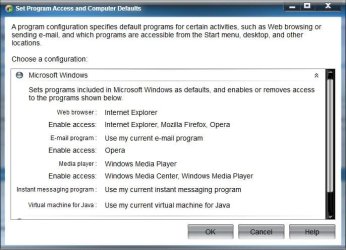
Go to Default programs and click set your default programs. Set IE as default. Go back to Default programs and click set program access and computer defaults. Expand Custom and make sure IE is selected, and it also has the check box to enable access to it.

Make sure IE isn't turned off in features:
Control Panel->Programs and Features->Turn Windows Features on or off

Understandably the repair install can be daunting, but it does work very well at fixing things, I tested it myself. If you need, you can print out the instructions. Doing it is completely up to you, but it may help your situation, if you have the right CDs.
 

My Computer

Computer type
PC/Desktop
Computer Manufacturer/Model Number
Custom Asus Build
OS
Microsoft Windows 8.1 Pro 64-bit
CPU
Intel(R) Core(TM) i3-4130 CPU @ 3.40GHz
Motherboard
B85M-E
Memory
8.00 GB
Graphics Card(s)
None
Sound Card
Realtek High Definition Audio
Monitor(s) Displays
Asus 23.6" Monitor
Screen Resolution
1920 x 1080 x 32 bits (4294967296 colors) @ 60 Hz
Hard Drives
INTEL SSDSC2BW180A4
Samsung SSD 840 PRO Series
PSU
Seasonic S12II-380Bronze
Case
Lian Li
Cooling
Fan, Passive
Keyboard
Logitech K120
Mouse
Microsoft Touch Mouse
Internet Speed
4ms Ping, 19.0 Mbps Download, 19.0 Mbps Upload
Antivirus
Eset Endpoint
Browser
Internet Explorer, Chrome
Dusty asks: Please tell me the name of your antivirus program and any other antispyware, etc. programs you have installed, including security-related addons.

Dave replies: I'm running MSE, Windows firewall, Secunia PSI & WinPatrol full time. From time to time I use a web based virus scan whose name escapes me right now.

Dusty asks:
Even if you have don this, please do again:
Go to Default programs and click set your default programs. Set IE as default. Go back to Default programs and click set program access and computer defaults. Expand Custom and make sure IE is selected, and it also has the check box to enable access to it. Make sure IE isn't turned off in features:
Control Panel->Programs and Features->Turn Windows Features on or off

Dave replies:
Did all that once again - a rather odd thing happens when I expand "Custom" - if I select any browser button and come back later w/o making other changes the selection has reverted back to "Use my current web browser"???

I currently have three browsers installed - IE, Chrome and FireFox. I can change all the default browser settings from within each browser everything works except for the IE problem stated above.

Can you shed some light on this problem/symptom:

When I try to associate a program with HTTP, HTTPS or ftp protocols I can only select Chrome or Firefox - the IE icon is missing! When IE is the default Browser this screen says "Unknown application". Why is the IE icon missing? A registry error, perhaps? My gut feeling tells me that the problem won't be fixed until I get the IE icon to appear there.

Any ideas how I can get the icon to appear? Doing so might not provide a complete fix, but would be some progress.

Re: a repair install - the machine with the problem, my laptop, mirrors my desktop machine. I have highly customized the Win7 OS on these machines to my liking and use various tools to keep things in sync. I don't want to jeopardize things over this minor issue.

Dave
 

My Computer

Computer type
PC/Desktop
Computer Manufacturer/Model Number
Custom build, aka Dave's MiniC
OS
Microsoft Windows 7 Home Premium 64-bit 7601 Multiprocessor Free Service Pack 1
CPU
Intel(R) Pentium(R) CPU G630 @ 2.70GHz
Motherboard
Foxconn H67S/H61SP
Memory
8.00 GB
Graphics Card(s)
Intel(R) HD Graphics
Sound Card
(1) Realtek High Definition Audio (2) HDTV Stick NTSC/FM C
Screen Resolution
1920 x 1080 x 32 bits (4294967296 colors) @ 59 Hz
Hard Drives
(1) INTEL SSDSC2CT240A3 ATA Device (2) WD My Passport 0740 USB Device
Haha, at first I thought this was an "I already told you that" thing. Sometimes I don't pay attention... that story is for another time...

Alrighty mate. Unfortunately, I have come to the end of my knowledge. I do believe that some of those customizations might have had a part in your misfortune. I also think all of your IE problems are interlinked. Windows 7 wasn't intended to be customized outside of its pre-built settings. You may have to live with this minor issue, as you say. I wouldn't be suprised if you come across some other complications in the future, not fully realized just yet. But, I wish you well, and am really sorry I couldn't help you further.

As an aside, I would be very careful of malware when downloading customizations off the internet. Cheers!
 

My Computer

Computer type
PC/Desktop
Computer Manufacturer/Model Number
Custom Asus Build
OS
Microsoft Windows 8.1 Pro 64-bit
CPU
Intel(R) Core(TM) i3-4130 CPU @ 3.40GHz
Motherboard
B85M-E
Memory
8.00 GB
Graphics Card(s)
None
Sound Card
Realtek High Definition Audio
Monitor(s) Displays
Asus 23.6" Monitor
Screen Resolution
1920 x 1080 x 32 bits (4294967296 colors) @ 60 Hz
Hard Drives
INTEL SSDSC2BW180A4
Samsung SSD 840 PRO Series
PSU
Seasonic S12II-380Bronze
Case
Lian Li
Cooling
Fan, Passive
Keyboard
Logitech K120
Mouse
Microsoft Touch Mouse
Internet Speed
4ms Ping, 19.0 Mbps Download, 19.0 Mbps Upload
Antivirus
Eset Endpoint
Browser
Internet Explorer, Chrome
A process monitor log, run while attempting to open a link and then saved / zipped and uploaded will help.
 

My Computer

Computer type
PC/Desktop
Computer Manufacturer/Model Number
Custom
OS
Windows 10 Pro x64
CPU
Intel Core i7 4790K @ 4.5GHz
Motherboard
Asus Maximus Hero VII
Memory
32GB DDR3
Graphics Card(s)
Nvidia GeForce GTX970
Sound Card
Realtek HD Audio
Screen Resolution
1920x1200
Hard Drives
1x Samsung 250GB SSD
4x WD RE 2TB (RAIDZ)
PSU
Corsair AX760i
Case
Fractal Design Define R4
Cooling
Noctua NH-D15

My Computer

Computer type
PC/Desktop
OS
Windows 10 Home x64
CPU
INTEL Core i5-750 Quad-Core 3.37GHz
Motherboard
ASUS P7P55D
Memory
HyperX Fury Black Series 8GB (2 x 4GB) 1866Mhz
Graphics Card(s)
EVGA GeForce GTX 750 Superclocked 1GB 128-Bit GDDR5
Monitor(s) Displays
LG 32MA68HY 32" IPS
Screen Resolution
1920 x 1080
Hard Drives
Samsung 840 Evo 120GB, SEAGATE 500GB Barracuda® 7200.12, SATA 3 Gb/s, 7200 RPM, 16MB cache
PSU
ANTEC TruePower New TP-550, 80 PLUS, 550W
Case
ANTEC Three Hundred Illusion
Cooling
COOLER MASTER Hyper 212 Plus, 4 x 120mm 1 x 140mm Noctua's
Internet Speed
85 + Mbps
Antivirus
Avast
Browser
Vivaldi
Back
Top