
IE Connection Problem

CTerrian

New member
Local time
5:12 PM
Messages
21
Location
Atlanta Area
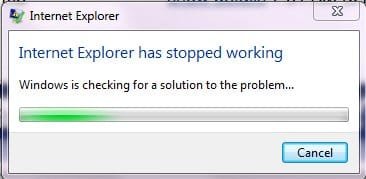
I've been using Win7 and IE8 for a while now, and lately I've been getting this dialog every morning:
 

Attachments

  • problem.jpg
    problem.jpg
    11.1 KB · Views: 12

My Computer

Computer Manufacturer/Model Number
Custom Build
OS
Windows 7
CPU
AMD Phenom II X2 550 Black Edition Callisto 3.1GHz
Motherboard
ASUS M3N72-D
Memory
G.Skill 4 GB, DDR2-1066 (PC2-8500)
Graphics Card(s)
GeForce 8800
Sound Card
SB Audigy
Cooling
Sunbeam Freezer
I've been using Win7 and IE8 for a while now, and lately I've been getting this dialog every morning:

which build are you using?
 

My Computer

Computer Manufacturer/Model Number
tw33k
OS
Windows 7 Ultimate (x64) SP1
CPU
Intel 3770k 4.6GHz
Motherboard
ASUS Maximus V Formula
Memory
8GB (2x 4GB) Crucial Ballistix
Graphics Card(s)
Sapphire 7950 (1060/1600)
Sound Card
On Board Realtek HD Audio
Monitor(s) Displays
27" Acer B273HU (via HDMI)
Screen Resolution
2048 x 1152
Hard Drives
Crucial M4 128GB
2TB WD Black
1TB Samsung F3 SATA
1TB WD Elite External
2TB WD USB 3.0
PSU
Corsair AX750 Gold
Case
Corsair Obsidian 800DW
Cooling
Corsair H100 (2x AP-121/2x UK-3000 push/pull)
Keyboard
Microsoft Wireless 5000
Mouse
Microsoft Wireless 5000
Internet Speed
5mb/s
Other Info
Logitech z-2300 2.1 speakers
Lamptron FC-5 v2
Build 7100

It only appears for about 5 seconds. Now I'm thinking this may have something to do with my home page. I use "igoogle" which I have many "gadgets", so I'm thinking it maybe a gadget causing this.

But this just started this week, and I haven't made any changes to my home page.
 

My Computer

Computer Manufacturer/Model Number
Custom Build
OS
Windows 7
CPU
AMD Phenom II X2 550 Black Edition Callisto 3.1GHz
Motherboard
ASUS M3N72-D
Memory
G.Skill 4 GB, DDR2-1066 (PC2-8500)
Graphics Card(s)
GeForce 8800
Sound Card
SB Audigy
Cooling
Sunbeam Freezer
Build 7100

It only appears for about 5 seconds. Now I'm thinking this may have something to do with my home page. I use "igoogle" which I have many "gadgets", so I'm thinking it maybe a gadget causing this.

But this just started this week, and I haven't made any changes to my home page.

i use igoogle as well but in firefox. thinking back, i did have some probs with ie8 on an older build (can't remember which one) but updating to the rtm solved this (for me at least)
 

My Computer

Computer Manufacturer/Model Number
tw33k
OS
Windows 7 Ultimate (x64) SP1
CPU
Intel 3770k 4.6GHz
Motherboard
ASUS Maximus V Formula
Memory
8GB (2x 4GB) Crucial Ballistix
Graphics Card(s)
Sapphire 7950 (1060/1600)
Sound Card
On Board Realtek HD Audio
Monitor(s) Displays
27" Acer B273HU (via HDMI)
Screen Resolution
2048 x 1152
Hard Drives
Crucial M4 128GB
2TB WD Black
1TB Samsung F3 SATA
1TB WD Elite External
2TB WD USB 3.0
PSU
Corsair AX750 Gold
Case
Corsair Obsidian 800DW
Cooling
Corsair H100 (2x AP-121/2x UK-3000 push/pull)
Keyboard
Microsoft Wireless 5000
Mouse
Microsoft Wireless 5000
Internet Speed
5mb/s
Other Info
Logitech z-2300 2.1 speakers
Lamptron FC-5 v2
Build 7100

It only appears for about 5 seconds. Now I'm thinking this may have something to do with my home page. I use "igoogle" which I have many "gadgets", so I'm thinking it maybe a gadget causing this.

But this just started this week, and I haven't made any changes to my home page.

CT

Could you go into event viewer (type event viewer in search) and see if there are any errors relating to this problem. If there are could you take a pic of it and upload to us here. If you need help with uploading let us know

Ken
 

My Computer

Computer Manufacturer/Model Number
HP Pavillion dv-7 1005 Tx
OS
Win 8 Release candidate 8400
CPU
[email protected]
Memory
4 gigs
Graphics Card(s)
Nvidia 9600M
Sound Card
HD built-in
Monitor(s) Displays
17" Wxga
Screen Resolution
1440x900
Cooling
none
Internet Speed
45Mb down 5Mb up
In addition to Ziazag's post, Open IE, go to Tools>Internet Options>Advanced>Reset. Hope this helps,Dinesh.
 

My Computer

Computer Manufacturer/Model Number
Samsung NP530U4B-S02IN
OS
Windows® 8 Pro (64-bit)
CPU
Intel® Core™ i5 Processor 2467M (1.60GHz, 3MB L3 Cache)
Motherboard
Samsung Electronics
Memory
6GB DDR3 System Memory at 1,333MHz (on BD 4GB + 2GB x 1)
Graphics Card(s)
AMD Radeon™ HD7550M 1GB DDR3 (Ext. Graphic)
Sound Card
Realtek High Definition Audio
Monitor(s) Displays
35.56cm (14.0) SuperBright 300nit HD LED Display
Screen Resolution
1366x768
Hard Drives
1TB S-ATA II Hard Drive (5400RPM) with ExpressCache 16GB SSD
Internet Speed
sucks
Antivirus
Microsoft Security Essentials
Browser
Google Chrome (Sync enabled)
When I had this problem, I have disabled Windows Live Messenger at startup and it worked.
click start orb-> type msconfig and untick Win.Live Messenger under startup tab. HTH.
 

My Computer

Computer Manufacturer/Model Number
Acer Aspire 5750
OS
Windows 7 Home Premium 64bit
CPU
Intel Core i3-2310M
Motherboard
Acer OEM
Memory
8GB
Graphics Card(s)
Intel HD3000
Screen Resolution
1366x768
Hard Drives
320GB Toshiba
I already have Messenger disabled. It's the first thing I did when loading Windows. ;)
I did look at the Event Viewer, and fould a bunch of errors. Seems to be from Skype.
errorevent.jpg
 

My Computer

Computer Manufacturer/Model Number
Custom Build
OS
Windows 7
CPU
AMD Phenom II X2 550 Black Edition Callisto 3.1GHz
Motherboard
ASUS M3N72-D
Memory
G.Skill 4 GB, DDR2-1066 (PC2-8500)
Graphics Card(s)
GeForce 8800
Sound Card
SB Audigy
Cooling
Sunbeam Freezer
I already have Messenger disabled. It's the first thing I did when loading Windows. ;)
I did look at the Event Viewer, and fould a bunch of errors. Seems to be from Skype.
errorevent.jpg

Two things i would recommend.

Fisrt uninstall skype and remove the skypeIEPlugin.dll, and second go into cpanel>system>advanced system props>settings>performance options>data execution properties> make sure dep is on.

hope this helps

Ken
 

My Computer

Computer Manufacturer/Model Number
HP Pavillion dv-7 1005 Tx
OS
Win 8 Release candidate 8400
CPU
[email protected]
Memory
4 gigs
Graphics Card(s)
Nvidia 9600M
Sound Card
HD built-in
Monitor(s) Displays
17" Wxga
Screen Resolution
1440x900
Cooling
none
Internet Speed
45Mb down 5Mb up
I already have Messenger disabled. It's the first thing I did when loading Windows. ;)
I did look at the Event Viewer, and fould a bunch of errors. Seems to be from Skype.
errorevent.jpg

The error seemed to be caused by a faulty skype IE plugin.
Disable the plugin or uninstall skype. That should fix your problem.
 

My Computer

Computer Manufacturer/Model Number
Custom made
OS
Window 7 build 7600, Xp pro(VM)
CPU
Amd Athlon 2000 xp+
Motherboard
Asus x series
Memory
kingstone(1gb+256MB)
Graphics Card(s)
Nvdia 6200(256 mb+255mb(shared))
Sound Card
soundmax
Monitor(s) Displays
Lg Flatron w1943
Screen Resolution
1360x768
Hard Drives
segate 80GB
Case
i-ball
Keyboard
i-ball
Mouse
i-ball
Internet Speed
256kbps up and 256 kbps down
Back
Top