IE problem for Win7 32 bit

gonnatwl

New member
Local time
10:56 PM
Messages
4
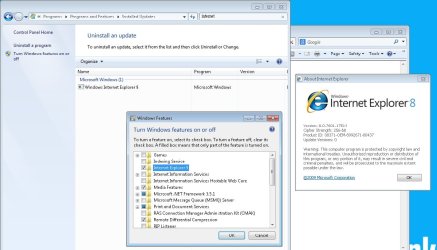
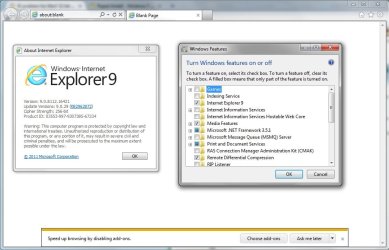
I would like to upgrade my IE 8 to IE 9, but cant. Then I check "Turn Windows features on or off", it shows IE9. I cant upgrade my ie even I install a more latest one such as IE10, IE11, still hv errors but change the number from 9 to 10 / 11. Check the about in ie is still IE8. What can i do and please help? :cry:
 

My Computer

Computer type
Laptop
Computer Manufacturer/Model Number
LENOVO
OS
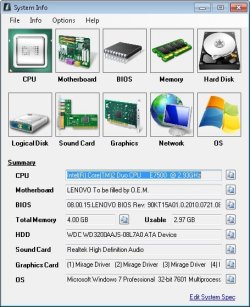
Microsoft Windows 7 Professional 32-bit
CPU
Intel(R) Core(TM)2 Duo CPU E7500 @ 2.93GHz
Motherboard
LENOVO To be filled by O.E.M.
Memory
4.00 GB
Graphics Card(s)
Mirage Driver
Sound Card
Realtek High Definition Audio
Monitor(s) Displays
ViewSonic
Screen Resolution
1280 x 1024 x 32 bits (4294967296 colors) @ 60 Hz
Hard Drives
WDC WD3200AAJS-08L7A0 ATA Device
Keyboard
Compaq
Mouse
HP
Internet Speed
50Mbps
Antivirus
Symantec
Browser
IE8

My Computer

Computer type
PC/Desktop
Computer Manufacturer/Model Number
Dell optiplex 740
OS
Win 7 Home Premium SP1 32 bit
CPU
AMD Athlon 64 X2 5000B
Motherboard
Dell Inc. 0YP696 (Socket M2 )
Memory
4.00 GB Dual-Channel DDR2 @ 370MHz (6-6-6-18)
Graphics Card(s)
Acer E181H (1366x768@60Hz) 64MB GeForce 6150 LE (Dell)
Sound Card
SigmaTel High Definition Audio CODEC
Monitor(s) Displays
Acer E181H (1366x768@60Hz) 64MB GeForce 6150 LE (Dell)
Hard Drives
699GB Seagate ST375064 0NS SCSI Disk Device (ATA)
Case
Mini tower
Internet Speed
Ping 36 ms, Download 57.71 mbps , Upload 11.79mbps
Antivirus
Free Avast. Pro paid Mbam , Free Sas
Browser
Palemoon .
Hi and welcome to SevenForums,
After filling in your system spec's please refer to this threads posting instructions,
http://www.sevenforums.com/windows-updates-activation/264840-windows-update-posting-instructions.html

Issues installing windows updates,
http://windows.microsoft.com/en-us/windows7/what-is-the-system-update-readiness-tool
http://support.microsoft.com/mats/windows_update/
Mr. Fixit,
http://support.microsoft.com/gp/windows-update-issues/en-us

Have you attempted to use the Update your browser from the msn site which is usually located on the top of the msn page ?
MSN.com
Or
http://windows.microsoft.com/en-GB/internet-explorer/download-ie
 

My Computer

Computer type
PC/Desktop
Computer Manufacturer/Model Number
Custom assembled by me :}
OS
Win-7-Pro64bit 7-H-Prem-64bit
CPU
i7-5930K 2nd i9-9940x both water blocked VRM's too
Motherboard
ASUS SABERTOOTH X99 2nd ASUS x299 Apex
Memory
Trident-z 3200C14 2nd Trident-z 3600C16
Graphics Card(s)
EVGA 1080ti ftw3 2nd Titan Xp both water blocked
Sound Card
Built-in Realtek
Monitor(s) Displays
1-AOC G2460PG 24"G-Sync 144Hz/ 2nd 1-ASUS VG248QE 24" 144Hz
Screen Resolution
1920 x 1080 144Hz
Hard Drives
2-Samsung M.2 Evo & Evo Plus
2-Samsung 850 EVO 500GB SSD's/ 3-2.5 W.D. Black 1tb-&3-1tb/3-3.5 WD Black 1tb hdd's
PSU
EVGA SuperNOVA 1000-P2 2nd 1200-P2
Case
2-Corsair Obsidian Series 450D Black ATX Mid Tower
Cooling
Custom water loops
Keyboard
Logitech G710+/ 2nd Logitech G910
Mouse
2-RedDragon M901 Perdition 16400 dpi Gaming mouse = wired
Internet Speed
Comcast Ping 19ms 89.31mbps download speed 6.12mbps upload
Antivirus
Malwarebytes Pro/ Superantispyware Pro
Browser
FireFox & Pale moon
Other Info
2nd ASUS X299 Apex/Intel i9-9940x with Custom water loop/7H-Prem-x64/Corsair 450D case/Ram Trident-z 3600C16 4x8gb / Samsung970Evo plus 500gb SSD/Dual ssd EZ swap evo/PSU EVGA SuperNova 1200w-P2 80+Platinum/GPU Titan Xp /8-ML-140 on push-pull on 2-280GTX rads
ThrashZone and Yard Dog, thank you so much for your replies. I am new in here and hope can get help.:p
Here is my CBS.
View attachment 327277
6.jpg

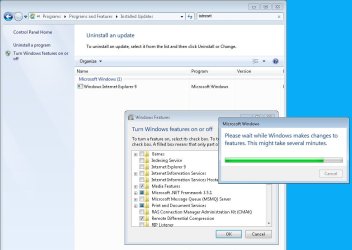
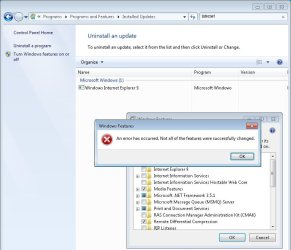
Using ie8 but ie9 is shown, and cant be up or downgrade
1.jpg
2.jpg
3.jpg

Even i used command:

FORFILES /P %WINDIR%\servicing\Packages /M Microsoft-Windows-InternetExplorer-*9.*.mum /c "cmd /c echo Uninstalling package @fname && start /w pkgmgr /up:@fname /norestart"

But access denied:cry:

4.jpg
5.jpg

So, seek for exerts here:geek:
 

My Computer

Computer type
Laptop
Computer Manufacturer/Model Number
LENOVO
OS
Microsoft Windows 7 Professional 32-bit
CPU
Intel(R) Core(TM)2 Duo CPU E7500 @ 2.93GHz
Motherboard
LENOVO To be filled by O.E.M.
Memory
4.00 GB
Graphics Card(s)
Mirage Driver
Sound Card
Realtek High Definition Audio
Monitor(s) Displays
ViewSonic
Screen Resolution
1280 x 1024 x 32 bits (4294967296 colors) @ 60 Hz
Hard Drives
WDC WD3200AAJS-08L7A0 ATA Device
Keyboard
Compaq
Mouse
HP
Internet Speed
50Mbps
Antivirus
Symantec
Browser
IE8
Please complete the request from post #2 by Yard Dog.
 

My Computer

Computer type
PC/Desktop
Computer Manufacturer/Model Number
Home made Desktop
OS
Windows 10 Pro. 64/ version 1709 Windows 7 Pro/64
CPU
Intel i7-6800K @ 4.3
Motherboard
ASUS X-99 Deluxe II
Memory
Corsair Platinum 16 gig @2400
Graphics Card(s)
EVGA GTX 1070 OC
Monitor(s) Displays
Asus 27" LED LCD/VE278Q
Screen Resolution
1920-1080 or 1280-720 HDMI
Hard Drives
INTEL SSD 730-240 Gb Sata 3.0/
PSU
EVGA Platium 1200W
Case
Phanteks Luxe Tempered Glass 8 fans/ one radiator
Cooling
XSPC/ Water Cooled CPU
Keyboard
Das 4 Professional
Mouse
Logitech M705/MX Anywhere 2-S
Internet Speed
100 mbits
Antivirus
Microsoft Security Essentials/ Malwarebytes Premium 3.0/ SAS
Browser
I.E. 11 default/Firefox/ ISP Time Warner Cable/Spectrum
Other Info
LG BluRay Burner/
Sound system-KLipsch-THX/
Icy Dock ssd Hot Swap bays.

My Computer

Computer type
PC/Desktop
Computer Manufacturer/Model Number
Custom assembled by me :}
OS
Win-7-Pro64bit 7-H-Prem-64bit
CPU
i7-5930K 2nd i9-9940x both water blocked VRM's too
Motherboard
ASUS SABERTOOTH X99 2nd ASUS x299 Apex
Memory
Trident-z 3200C14 2nd Trident-z 3600C16
Graphics Card(s)
EVGA 1080ti ftw3 2nd Titan Xp both water blocked
Sound Card
Built-in Realtek
Monitor(s) Displays
1-AOC G2460PG 24"G-Sync 144Hz/ 2nd 1-ASUS VG248QE 24" 144Hz
Screen Resolution
1920 x 1080 144Hz
Hard Drives
2-Samsung M.2 Evo & Evo Plus
2-Samsung 850 EVO 500GB SSD's/ 3-2.5 W.D. Black 1tb-&3-1tb/3-3.5 WD Black 1tb hdd's
PSU
EVGA SuperNOVA 1000-P2 2nd 1200-P2
Case
2-Corsair Obsidian Series 450D Black ATX Mid Tower
Cooling
Custom water loops
Keyboard
Logitech G710+/ 2nd Logitech G910
Mouse
2-RedDragon M901 Perdition 16400 dpi Gaming mouse = wired
Internet Speed
Comcast Ping 19ms 89.31mbps download speed 6.12mbps upload
Antivirus
Malwarebytes Pro/ Superantispyware Pro
Browser
FireFox & Pale moon
Other Info
2nd ASUS X299 Apex/Intel i9-9940x with Custom water loop/7H-Prem-x64/Corsair 450D case/Ram Trident-z 3600C16 4x8gb / Samsung970Evo plus 500gb SSD/Dual ssd EZ swap evo/PSU EVGA SuperNova 1200w-P2 80+Platinum/GPU Titan Xp /8-ML-140 on push-pull on 2-280GTX rads
To be honest gonnatwl, when I see a member trying all sorts of things before asking for help, I'm concerned about the effectiveness of trouble shooting.

The easiest thing to do at this point, rather than try to unravel what was done is to perform a Repair install.

Read the tutorial and ask any questions BEFORE doing anything.

http://www.sevenforums.com/tutorials/3413-repair-install.html

Pay attention to the highlighted by color boxes
tut[Boxes].png
 

My Computer

Computer type
Laptop
Computer Manufacturer/Model Number
HP Pavilion dv6-6c10us
OS
x64 (6.3.9600) Win8.1 Pro & soon dual boot x64 (6.1.7601) Win7_SP1 HomePrem
CPU
AMD A6-3420M APU with Radeon(tm) HD Graphics
Motherboard
Hewlett-Packard 1805
Memory
6.00 GB
Graphics Card(s)
AMD Radeon(TM) HD 6520G
Sound Card
(1) AMD High Definition Audio Device (2) IDT High Definiti
Monitor(s) Displays
HP W2072a 20" LCD (1600 x 900) @ 60 Hz
Screen Resolution
1366 x 768 x 32 bits (4294967296 colors) @ 60 Hz
Hard Drives
ST640LM0 00 HM641JI SATA Disk Device
Keyboard
Logitech k520 wireless KB
Mouse
Logitech m320 wireless mouse (bundled with KB)
Internet Speed
15/5 | 54 MB Wireless 'n'
Antivirus
Realtime: Defender or Avast | On-demand: Malwarebytes, ESET
Browser
IE 11 on Win8, IE 10 on win 7
Other Info
Media: [Gimp, Audacity, VLC] || Comm: [WEmail 2012, Skype] || Productivity: [OpenOffice,| Textpad] || Utils: [Sysinternals, cCleaner, Speccy, Defraggler]

My Computer

Computer type
Laptop
Computer Manufacturer/Model Number
LENOVO
OS
Microsoft Windows 7 Professional 32-bit
CPU
Intel(R) Core(TM)2 Duo CPU E7500 @ 2.93GHz
Motherboard
LENOVO To be filled by O.E.M.
Memory
4.00 GB
Graphics Card(s)
Mirage Driver
Sound Card
Realtek High Definition Audio
Monitor(s) Displays
ViewSonic
Screen Resolution
1280 x 1024 x 32 bits (4294967296 colors) @ 60 Hz
Hard Drives
WDC WD3200AAJS-08L7A0 ATA Device
Keyboard
Compaq
Mouse
HP
Internet Speed
50Mbps
Antivirus
Symantec
Browser
IE8
Thank you for filling out your specs.
How about reading through the thread again and let us know what you have tried and or done.

Slartybart post #7 seems to me the quickest way to fix your problem to me also.
 

My Computer

Computer type
PC/Desktop
Computer Manufacturer/Model Number
Home made Desktop
OS
Windows 10 Pro. 64/ version 1709 Windows 7 Pro/64
CPU
Intel i7-6800K @ 4.3
Motherboard
ASUS X-99 Deluxe II
Memory
Corsair Platinum 16 gig @2400
Graphics Card(s)
EVGA GTX 1070 OC
Monitor(s) Displays
Asus 27" LED LCD/VE278Q
Screen Resolution
1920-1080 or 1280-720 HDMI
Hard Drives
INTEL SSD 730-240 Gb Sata 3.0/
PSU
EVGA Platium 1200W
Case
Phanteks Luxe Tempered Glass 8 fans/ one radiator
Cooling
XSPC/ Water Cooled CPU
Keyboard
Das 4 Professional
Mouse
Logitech M705/MX Anywhere 2-S
Internet Speed
100 mbits
Antivirus
Microsoft Security Essentials/ Malwarebytes Premium 3.0/ SAS
Browser
I.E. 11 default/Firefox/ ISP Time Warner Cable/Spectrum
Other Info
LG BluRay Burner/
Sound system-KLipsch-THX/
Icy Dock ssd Hot Swap bays.
Thanks Layback Bear reminded me to do post #7 and reli reli thanks the solution gave by Slartybart!!
Seems fixed my problem, i checked i can upgrade or downgrade the IE whatever i want.

10.jpg

One more thing is ...this takes time (ard 3 hrs) and i hv to reinstall all my updates afterward, but it's good to be fixed :)

Btw, may i know much more detail about the process it did? I wanna shorten the time spend because i hv more than 500 pcs to fix~:o


=========================================
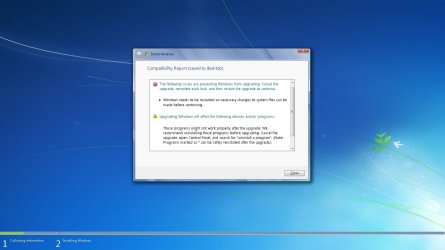
I got this before PC fixed, just reboot and try again then it works!
9.jpg
 

My Computer

Computer type
Laptop
Computer Manufacturer/Model Number
LENOVO
OS
Microsoft Windows 7 Professional 32-bit
CPU
Intel(R) Core(TM)2 Duo CPU E7500 @ 2.93GHz
Motherboard
LENOVO To be filled by O.E.M.
Memory
4.00 GB
Graphics Card(s)
Mirage Driver
Sound Card
Realtek High Definition Audio
Monitor(s) Displays
ViewSonic
Screen Resolution
1280 x 1024 x 32 bits (4294967296 colors) @ 60 Hz
Hard Drives
WDC WD3200AAJS-08L7A0 ATA Device
Keyboard
Compaq
Mouse
HP
Internet Speed
50Mbps
Antivirus
Symantec
Browser
IE8
Glad to hear you got it sorted. The message is just telling you that thre are files in use and a restart will release them so Windows can complete the upgrade.

500 computers!
edit: Please provide background on how 500 computers got in this state.

I don't think you want to go the Repair Install on all of them. I suggested it for one machine, yours, mainly because you said that your tried a few things trying to resolve the issue. Rather than trouble shoot the issue and changes ("fixes") step-by-step the most expedient was a Repair install.

I also don't think you experimented on all 500 machines, more than likely you sought a solution and will apply it to those machines. I could be wrong ;)

I suggest that you pick one of the 500 machines and we can work though the steps. I'll need your help by providing meaningful feedback (screen shots or logs). There were a few requests or suggestions that were not fully satisfied in this thread. There was also at least one misstep, turning IE on or off.

The methodology I use is simple, do one thing at a time and don't deviate from the path. It takes time to read the logs and do any research necessary. We're not logged on all the time, so that adds to the delay. Sometimes the time difference makes one step two days long by the time it is communicated, then executed and the results are posted, then the member 23 hours away reads it and responds. It's not real time support.

The hardest part for members on this side of your monitor is when the member on the other side does something that wasn't suggested. The hardest part for members on their side of the monitor is waiting for the next step.

Depending on the feedback you provide, I might call on other members to review the output. Let's see what can be done to fix the next machine and go from there.

Bill
.

 
Last edited:

My Computer

Computer type
Laptop
Computer Manufacturer/Model Number
HP Pavilion dv6-6c10us
OS
x64 (6.3.9600) Win8.1 Pro & soon dual boot x64 (6.1.7601) Win7_SP1 HomePrem
CPU
AMD A6-3420M APU with Radeon(tm) HD Graphics
Motherboard
Hewlett-Packard 1805
Memory
6.00 GB
Graphics Card(s)
AMD Radeon(TM) HD 6520G
Sound Card
(1) AMD High Definition Audio Device (2) IDT High Definiti
Monitor(s) Displays
HP W2072a 20" LCD (1600 x 900) @ 60 Hz
Screen Resolution
1366 x 768 x 32 bits (4294967296 colors) @ 60 Hz
Hard Drives
ST640LM0 00 HM641JI SATA Disk Device
Keyboard
Logitech k520 wireless KB
Mouse
Logitech m320 wireless mouse (bundled with KB)
Internet Speed
15/5 | 54 MB Wireless 'n'
Antivirus
Realtime: Defender or Avast | On-demand: Malwarebytes, ESET
Browser
IE 11 on Win8, IE 10 on win 7
Other Info
Media: [Gimp, Audacity, VLC] || Comm: [WEmail 2012, Skype] || Productivity: [OpenOffice,| Textpad] || Utils: [Sysinternals, cCleaner, Speccy, Defraggler]
A repair install basically installs Windows without affecting User data.

It's also referred to an In place upgrade. Its' a process similar to upgrading from say Vista to Windows 7, except you're "upgrading" from Windows 7 to Windows 7. It is a way to overwrite the previous Windows 7 install - that's why any 3rd party programs have to be re-installed.

Is there a way to preserve those 3rd party programs?
Nope.

Is there a way to decrease the number of Windows Updates?
Yes, there are a few ways. But it's just as easy to run Windows Update (WU) and it is, in my opinion, better to apply updates through WU, including your device drivers.

Bill
.
 

My Computer

Computer type
Laptop
Computer Manufacturer/Model Number
HP Pavilion dv6-6c10us
OS
x64 (6.3.9600) Win8.1 Pro & soon dual boot x64 (6.1.7601) Win7_SP1 HomePrem
CPU
AMD A6-3420M APU with Radeon(tm) HD Graphics
Motherboard
Hewlett-Packard 1805
Memory
6.00 GB
Graphics Card(s)
AMD Radeon(TM) HD 6520G
Sound Card
(1) AMD High Definition Audio Device (2) IDT High Definiti
Monitor(s) Displays
HP W2072a 20" LCD (1600 x 900) @ 60 Hz
Screen Resolution
1366 x 768 x 32 bits (4294967296 colors) @ 60 Hz
Hard Drives
ST640LM0 00 HM641JI SATA Disk Device
Keyboard
Logitech k520 wireless KB
Mouse
Logitech m320 wireless mouse (bundled with KB)
Internet Speed
15/5 | 54 MB Wireless 'n'
Antivirus
Realtime: Defender or Avast | On-demand: Malwarebytes, ESET
Browser
IE 11 on Win8, IE 10 on win 7
Other Info
Media: [Gimp, Audacity, VLC] || Comm: [WEmail 2012, Skype] || Productivity: [OpenOffice,| Textpad] || Utils: [Sysinternals, cCleaner, Speccy, Defraggler]
Back
Top