
You are using an out of date browser. It may not display this or other websites correctly.
You should upgrade or use an alternative browser.
You should upgrade or use an alternative browser.
IE Slow Loading Page
- Thread starter rdb
- Start date

Welcome to Seven Forums rdb. The easy answer would be to remove the updates for IE from February and see if that corrects it. You can then install one, and test. If you install both again, and the problem does not return, you are good to go. If one or the other installs ok , you can leave it. You could then hide the other, but obviously it was released for a reason  You could do a search on the one that causes the issue, and see if there are others experiencing the same thing.
Start> In search box type Windows Update> Enter> In the left pane, click View update history
You should find the same 2 IE updates as I have KB2797052 and KB2792100 . At top or Windows update page click on To remove an update see Installed Updates
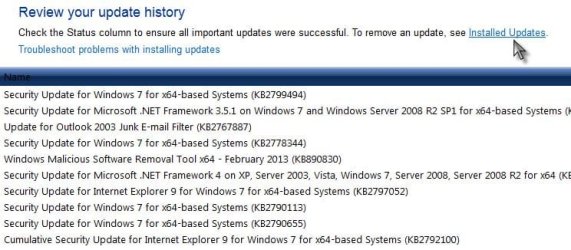
The installed updates page will open, paste the KB numbers from above into the search box upper right. The update will display. Click on it, a popup will appear asking you if you want to uninstall it, choose yes. Remove one, then test. If still slow, remove the other and test again.
You could then go to Windows Update and reinstall the update that didn't affect the speed again. I would update both again, as they may work the 2nd time. If not, uninstall the offending one again. Obviously this isn't the best fix, as the security update is something you want, but if the update itself is the cause, the choice is to keep it and deal with the speed. Post back if the updates are not the cause.
A Guy
You could do a search on the one that causes the issue, and see if there are others experiencing the same thing. Start> In search box type Windows Update> Enter> In the left pane, click View update history
You should find the same 2 IE updates as I have KB2797052 and KB2792100 . At top or Windows update page click on To remove an update see Installed Updates
The installed updates page will open, paste the KB numbers from above into the search box upper right. The update will display. Click on it, a popup will appear asking you if you want to uninstall it, choose yes. Remove one, then test. If still slow, remove the other and test again.
You could then go to Windows Update and reinstall the update that didn't affect the speed again. I would update both again, as they may work the 2nd time. If not, uninstall the offending one again. Obviously this isn't the best fix, as the security update is something you want, but if the update itself is the cause, the choice is to keep it and deal with the speed. Post back if the updates are not the cause.
A Guy
My Computer
- Computer type
- PC/Desktop
- OS
- Windows 10 Home x64
- CPU
- INTEL Core i5-750 Quad-Core 3.37GHz
- Motherboard
- ASUS P7P55D
- Memory
- HyperX Fury Black Series 8GB (2 x 4GB) 1866Mhz
- Graphics Card(s)
- EVGA GeForce GTX 750 Superclocked 1GB 128-Bit GDDR5
- Monitor(s) Displays
- LG 32MA68HY 32" IPS
- Screen Resolution
- 1920 x 1080
- Hard Drives
- Samsung 840 Evo 120GB, SEAGATE 500GB Barracuda® 7200.12, SATA 3 Gb/s, 7200 RPM, 16MB cache
- PSU
- ANTEC TruePower New TP-550, 80 PLUS, 550W
- Case
- ANTEC Three Hundred Illusion
- Cooling
- COOLER MASTER Hyper 212 Plus, 4 x 120mm 1 x 140mm Noctua's
- Internet Speed
- 85 + Mbps
- Antivirus
- Avast
- Browser
- Vivaldi
OK, so not caused by the updates  I would suggest a clean start to see if something is conflicting.
http://www.sevenforums.com/tutorial...ation-conflicts-performing-clean-startup.html
You only mention IE 9 x64. Is x86 working fine? Other browsers? Or is it all browsers?
A Guy
I would suggest a clean start to see if something is conflicting.http://www.sevenforums.com/tutorial...ation-conflicts-performing-clean-startup.html
You only mention IE 9 x64. Is x86 working fine? Other browsers? Or is it all browsers?
A Guy
My Computer
- Computer type
- PC/Desktop
- OS
- Windows 10 Home x64
- CPU
- INTEL Core i5-750 Quad-Core 3.37GHz
- Motherboard
- ASUS P7P55D
- Memory
- HyperX Fury Black Series 8GB (2 x 4GB) 1866Mhz
- Graphics Card(s)
- EVGA GeForce GTX 750 Superclocked 1GB 128-Bit GDDR5
- Monitor(s) Displays
- LG 32MA68HY 32" IPS
- Screen Resolution
- 1920 x 1080
- Hard Drives
- Samsung 840 Evo 120GB, SEAGATE 500GB Barracuda® 7200.12, SATA 3 Gb/s, 7200 RPM, 16MB cache
- PSU
- ANTEC TruePower New TP-550, 80 PLUS, 550W
- Case
- ANTEC Three Hundred Illusion
- Cooling
- COOLER MASTER Hyper 212 Plus, 4 x 120mm 1 x 140mm Noctua's
- Internet Speed
- 85 + Mbps
- Antivirus
- Avast
- Browser
- Vivaldi
Did the clean start..no help. Still loads web pages slow.
IE 32bit works flawlessly
My other browser, Mozilla's Seamonkey also works flawlessly. I only use the two. Or I should say 3. I switched from 32bit to 64bit because.....newer is better?
rdb
IE 32bit works flawlessly
My other browser, Mozilla's Seamonkey also works flawlessly. I only use the two. Or I should say 3. I switched from 32bit to 64bit because.....newer is better?
rdb
My Computer
- OS
- windows7 Pro 64bit
There is better support for x64 then before (Flash, Java), but I am not sure if IE9 x64 is up to snuff (I have never used it, but then Opera is my default, and the x86 version). Perhaps look at the troubleshooting steps on this thread?
x64 version of IE9 on Windows 7(x64) is really slow - Microsoft Community
IE10 final will also be released soon, they do have a Release Preview
Download Internet Explorer 10 Release Preview
Some here use it and like it. Again, since I rarely use IE, I haven't bothered.
A Guy
x64 version of IE9 on Windows 7(x64) is really slow - Microsoft Community
IE10 final will also be released soon, they do have a Release Preview
Download Internet Explorer 10 Release Preview
Some here use it and like it. Again, since I rarely use IE, I haven't bothered.
A Guy
My Computer
- Computer type
- PC/Desktop
- OS
- Windows 10 Home x64
- CPU
- INTEL Core i5-750 Quad-Core 3.37GHz
- Motherboard
- ASUS P7P55D
- Memory
- HyperX Fury Black Series 8GB (2 x 4GB) 1866Mhz
- Graphics Card(s)
- EVGA GeForce GTX 750 Superclocked 1GB 128-Bit GDDR5
- Monitor(s) Displays
- LG 32MA68HY 32" IPS
- Screen Resolution
- 1920 x 1080
- Hard Drives
- Samsung 840 Evo 120GB, SEAGATE 500GB Barracuda® 7200.12, SATA 3 Gb/s, 7200 RPM, 16MB cache
- PSU
- ANTEC TruePower New TP-550, 80 PLUS, 550W
- Case
- ANTEC Three Hundred Illusion
- Cooling
- COOLER MASTER Hyper 212 Plus, 4 x 120mm 1 x 140mm Noctua's
- Internet Speed
- 85 + Mbps
- Antivirus
- Avast
- Browser
- Vivaldi
Well, thanks A Guy for your help. I guess I'll just switch back to the 32bit version as I only use IE sporadically on sites that require it. My default is Mozilla's Seamonkey. IE is too risky anyway.
rdb
rdb
My Computer
- OS
- windows7 Pro 64bit
Have you tried running it without add-ons?
http://www.sevenforums.com/tutorial...able-disable-toolbars-extensions-add-ons.html
A Guy
http://www.sevenforums.com/tutorial...able-disable-toolbars-extensions-add-ons.html
A Guy
My Computer
- Computer type
- PC/Desktop
- OS
- Windows 10 Home x64
- CPU
- INTEL Core i5-750 Quad-Core 3.37GHz
- Motherboard
- ASUS P7P55D
- Memory
- HyperX Fury Black Series 8GB (2 x 4GB) 1866Mhz
- Graphics Card(s)
- EVGA GeForce GTX 750 Superclocked 1GB 128-Bit GDDR5
- Monitor(s) Displays
- LG 32MA68HY 32" IPS
- Screen Resolution
- 1920 x 1080
- Hard Drives
- Samsung 840 Evo 120GB, SEAGATE 500GB Barracuda® 7200.12, SATA 3 Gb/s, 7200 RPM, 16MB cache
- PSU
- ANTEC TruePower New TP-550, 80 PLUS, 550W
- Case
- ANTEC Three Hundred Illusion
- Cooling
- COOLER MASTER Hyper 212 Plus, 4 x 120mm 1 x 140mm Noctua's
- Internet Speed
- 85 + Mbps
- Antivirus
- Avast
- Browser
- Vivaldi
A Guy:
No I havn't tried running without add ons but I"ll tell you something I stumbled accross. When I said IE 32bit worked flawlessly I was starting it from the Internet Explorer folder. After my last post that I was switching to 32bit IE I created a shortcut onto my desktop. The first time I used it IE loaded pages slowly! If I start IE from the IE folder it works great. I went to the 64bit IE folder and started it from there also. 64bit IE worked flawlessly! Neither 32bit or 64bit will work right from a shortcut. I tried pinning to the taskbar, placing a shortcut into quicklaunch and on the desktop. They will not work from any of those places. I also created a shortcut in IE folder and that works great from there.
This has got me stumped.
rdb
No I havn't tried running without add ons but I"ll tell you something I stumbled accross. When I said IE 32bit worked flawlessly I was starting it from the Internet Explorer folder. After my last post that I was switching to 32bit IE I created a shortcut onto my desktop. The first time I used it IE loaded pages slowly! If I start IE from the IE folder it works great. I went to the 64bit IE folder and started it from there also. 64bit IE worked flawlessly! Neither 32bit or 64bit will work right from a shortcut. I tried pinning to the taskbar, placing a shortcut into quicklaunch and on the desktop. They will not work from any of those places. I also created a shortcut in IE folder and that works great from there.
This has got me stumped.
rdb
My Computer
- OS
- windows7 Pro 64bit
Try launching from Start> All Programs, or pin it to start, see if that works. A Guy
My Computer
- Computer type
- PC/Desktop
- OS
- Windows 10 Home x64
- CPU
- INTEL Core i5-750 Quad-Core 3.37GHz
- Motherboard
- ASUS P7P55D
- Memory
- HyperX Fury Black Series 8GB (2 x 4GB) 1866Mhz
- Graphics Card(s)
- EVGA GeForce GTX 750 Superclocked 1GB 128-Bit GDDR5
- Monitor(s) Displays
- LG 32MA68HY 32" IPS
- Screen Resolution
- 1920 x 1080
- Hard Drives
- Samsung 840 Evo 120GB, SEAGATE 500GB Barracuda® 7200.12, SATA 3 Gb/s, 7200 RPM, 16MB cache
- PSU
- ANTEC TruePower New TP-550, 80 PLUS, 550W
- Case
- ANTEC Three Hundred Illusion
- Cooling
- COOLER MASTER Hyper 212 Plus, 4 x 120mm 1 x 140mm Noctua's
- Internet Speed
- 85 + Mbps
- Antivirus
- Avast
- Browser
- Vivaldi
Hmmm, how did you create the desktop shortcut? Right click, create shortcut in IE folder, then drag shortcut to desktop? Right click, Copy, in IE folder, then paste to desktop? If you right click the shortcut, Properties, what is the path?
A Guy
A Guy
My Computer
- Computer type
- PC/Desktop
- OS
- Windows 10 Home x64
- CPU
- INTEL Core i5-750 Quad-Core 3.37GHz
- Motherboard
- ASUS P7P55D
- Memory
- HyperX Fury Black Series 8GB (2 x 4GB) 1866Mhz
- Graphics Card(s)
- EVGA GeForce GTX 750 Superclocked 1GB 128-Bit GDDR5
- Monitor(s) Displays
- LG 32MA68HY 32" IPS
- Screen Resolution
- 1920 x 1080
- Hard Drives
- Samsung 840 Evo 120GB, SEAGATE 500GB Barracuda® 7200.12, SATA 3 Gb/s, 7200 RPM, 16MB cache
- PSU
- ANTEC TruePower New TP-550, 80 PLUS, 550W
- Case
- ANTEC Three Hundred Illusion
- Cooling
- COOLER MASTER Hyper 212 Plus, 4 x 120mm 1 x 140mm Noctua's
- Internet Speed
- 85 + Mbps
- Antivirus
- Avast
- Browser
- Vivaldi
Hmmm, how did you create the desktop shortcut? Right click, create shortcut in IE folder, then drag shortcut to desktop? Right click, Copy, in IE folder, then paste to desktop? If you right click the shortcut, Properties, what is the path?
A Guy
Yes, sort of. Everything except after dragging to desktop I copied it "here". (The desktop.) The option "copy in IE folder" was not there. I used a non-windows explorer file manager to create the shortcut as above I even did the the steps in windows explorer which when I right clicked on IE.exe and selected create shortcut (in IE folder) a window popped up informing me that Windows couldn't create a shortcut here, would I like to place it on the desktop? I said yes. still loaded pages slow.
Here's the path in properties: C:\Program Files (x86)\Internet Explorer\iexplore.exe
I was re-reading my posts and in the one where I tried placing a shortcut in various places, and I said a shortcut created in IE folder worked great....well, that seems to be wrong. Clicking on that shortcut will load pages slowly also. Apparently, I got a wire crossed after trying so many different shortcuts. Sorry. Hope I'm not muddying the waters here.
rdb
My Computer
- OS
- windows7 Pro 64bit

LazyLizard
Banned
Interesting post.
I usually create shortcuts by right click > Send to > Desktop (create shortcut). But saying yes to placing shortcut on desktop doesn't sound wrong.
A tiny idea I got and why I am posting is: In this scenario I'd next consult the Windows event log (right click Computer > manage) right after you open a slow instance of IE to see for any errors or warnings relating to IE occur.
Experimenting with settings in the shortcut itself and IE add-ons might also be a way to go.
Keep us posted.
I usually create shortcuts by right click > Send to > Desktop (create shortcut). But saying yes to placing shortcut on desktop doesn't sound wrong.
A tiny idea I got and why I am posting is: In this scenario I'd next consult the Windows event log (right click Computer > manage) right after you open a slow instance of IE to see for any errors or warnings relating to IE occur.
Experimenting with settings in the shortcut itself and IE add-ons might also be a way to go.
Keep us posted.
My Computer
- Computer type
- PC/Desktop
- Computer Manufacturer/Model Number
- Custom Built
- OS
- Windows 7 HP 64Bit
- CPU
- AMD Athlon
- Motherboard
- Asus M2N-SLI Deluxe
- Memory
- Geil PC2-6400 2GB
- Graphics Card(s)
- ATI Radeon x1550
- Screen Resolution
- 1600x1050
- Hard Drives
- WD 640 GB
- Antivirus
- Trendmicro
Can we confirm no matter how you launch IE, x86 or x64, it is slow? And that launching from the exe in the IE folders are not working correctly? I am somewhat confused now. A Guy
My Computer
- Computer type
- PC/Desktop
- OS
- Windows 10 Home x64
- CPU
- INTEL Core i5-750 Quad-Core 3.37GHz
- Motherboard
- ASUS P7P55D
- Memory
- HyperX Fury Black Series 8GB (2 x 4GB) 1866Mhz
- Graphics Card(s)
- EVGA GeForce GTX 750 Superclocked 1GB 128-Bit GDDR5
- Monitor(s) Displays
- LG 32MA68HY 32" IPS
- Screen Resolution
- 1920 x 1080
- Hard Drives
- Samsung 840 Evo 120GB, SEAGATE 500GB Barracuda® 7200.12, SATA 3 Gb/s, 7200 RPM, 16MB cache
- PSU
- ANTEC TruePower New TP-550, 80 PLUS, 550W
- Case
- ANTEC Three Hundred Illusion
- Cooling
- COOLER MASTER Hyper 212 Plus, 4 x 120mm 1 x 140mm Noctua's
- Internet Speed
- 85 + Mbps
- Antivirus
- Avast
- Browser
- Vivaldi

- Local time
- 4:16 PM
- Messages
- 8,608
What anti-virus and firewall are you using?
My Computer
- Computer type
- PC/Desktop
- Computer Manufacturer/Model Number
- Bruce ... somewhere in his 40's
- OS
- Windows 7 Ultimate 32bit SP1
- CPU
- Intel(R) Core(TM)2 Quad CPU @ 2.40GHz, 2400 MHz
- Motherboard
- INTEL/D975XBX2
- Memory
- 4 GB
- Graphics Card(s)
- ATI Radeon HD 2600 Pro
- Monitor(s) Displays
- Samsung SyncMaster 914v
- Screen Resolution
- 1280 x 1024
- Hard Drives
- 2/500GB each ... ST3500630AS ATA Device.
One is not connected
- PSU
- Rocketfish 700 W
- Case
- G.Skill Gigabyte Chassis
- Keyboard
- Standard PS/2 Keyboard
- Mouse
- Microsoft PS/2 Mouse
- Internet Speed
- DSL
- Antivirus
- Avira Internet Security
- Browser
- IE 11
- Other Info
- ATI HDMI Audio
Can we confirm no matter how you launch IE, x86 or x64, it is slow? And that launching from the exe in the IE folders are not working correctly? I am somewhat confused now. A Guy
Sorry for the confusion. Launching IE from any shortcut, i.e. start menu, desktop, quick launch or within the IE folder, will cause slow loading. Launching the exe in the x86 or x64 folders IE loads pages as it should...fast.
Jacee: I'm using Comodo firewall and Avast anti-virus. Both are configured to allow IE.
LazyLizard: No postings of errors for IE were seen in event log.
rdb
My Computer
- OS
- windows7 Pro 64bit