IE10 browser hijacked. Unable to load firewall or download programs.

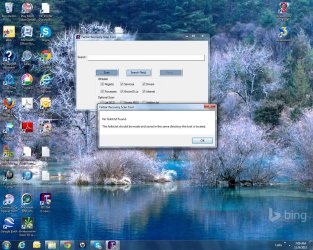
Now I see the FRST.exe file - thank you for persisting.

And I see the fixlist.txt file.

Please click on the button named FIX in the FRST tool. If you get an error, take/post another please screenshot with that error showing.
 

My Computer My Computer

At a glance

W7 Pro SP1 64biti78GBIntel HD Graphics
Computer type
Laptop
Computer Manufacturer/Model Number
Employer provided Dell Latitude
OS
W7 Pro SP1 64bit
CPU
i7
Memory
8GB
Graphics Card(s)
Intel HD Graphics
Hard Drives
crappy SSD
Antivirus
Employer mandated Symantec Endpoint Protection
Browser
Pale Moon 64bit, IE11 64bit & Chrome 64bit
ok- Here you go. Nofixlist.jpg
 

My Computer My Computer

At a glance

Windows 7
Computer type
PC/Desktop
Computer Manufacturer/Model Number
HP
OS
Windows 7
Antivirus
Microsoft
Browser
IE10
Doh!
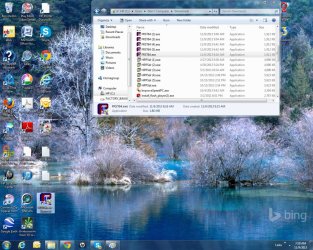
I'm not doing too well in the I SPY game and I failed to notice that the shortcut/icon on your desktop is a shortcut and not the actual file. Please close the FRST tool and move the file named FRST.exe to your desktop. If you do not know where the file is located, then look in the folder named downloads:

C:\Users\username\Downloads
 

My Computer My Computer

At a glance

W7 Pro SP1 64biti78GBIntel HD Graphics
Computer type
Laptop
Computer Manufacturer/Model Number
Employer provided Dell Latitude
OS
W7 Pro SP1 64bit
CPU
i7
Memory
8GB
Graphics Card(s)
Intel HD Graphics
Hard Drives
crappy SSD
Antivirus
Employer mandated Symantec Endpoint Protection
Browser
Pale Moon 64bit, IE11 64bit & Chrome 64bit
ok- Please let me know if I did it right. ThanksDesktop.jpg
 

My Computer My Computer

At a glance

Windows 7
Computer type
PC/Desktop
Computer Manufacturer/Model Number
HP
OS
Windows 7
Antivirus
Microsoft
Browser
IE10
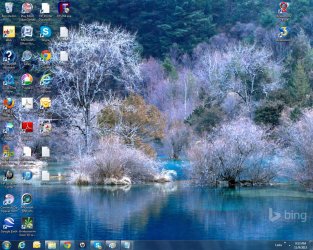
Nope- I didn't- but THIS time I did! desktop.jpg
 

My Computer My Computer

At a glance

Windows 7
Computer type
PC/Desktop
Computer Manufacturer/Model Number
HP
OS
Windows 7
Antivirus
Microsoft
Browser
IE10
We are getting there - thanks for putting up with my long winding road.

On your desktop...
[column three from the left and row nine from the top]
...please right click on the shortcut/icon for the FRST.exe tool
...select Delete from the context menu
...confirm the delete action and let that shortcut go into the recycle bin.


On you desktop...
[column four from the left and row 1 from the top]
Double click on that file named FRST.exe.


Once the FRST tool opens...
...click on the button named Fix.
 

My Computer My Computer

At a glance

W7 Pro SP1 64biti78GBIntel HD Graphics
Computer type
Laptop
Computer Manufacturer/Model Number
Employer provided Dell Latitude
OS
W7 Pro SP1 64bit
CPU
i7
Memory
8GB
Graphics Card(s)
Intel HD Graphics
Hard Drives
crappy SSD
Antivirus
Employer mandated Symantec Endpoint Protection
Browser
Pale Moon 64bit, IE11 64bit & Chrome 64bit
alright-still an error. Fixlist error.jpg
 

My Computer My Computer

At a glance

Windows 7
Computer type
PC/Desktop
Computer Manufacturer/Model Number
HP
OS
Windows 7
Antivirus
Microsoft
Browser
IE10
I do not see a file named fixlist.txt on your desktop.

I do see a file named fixlog.txt

FRST.png
 

My Computer My Computer

At a glance

W7 Pro SP1 64biti78GBIntel HD Graphics
Computer type
Laptop
Computer Manufacturer/Model Number
Employer provided Dell Latitude
OS
W7 Pro SP1 64bit
CPU
i7
Memory
8GB
Graphics Card(s)
Intel HD Graphics
Hard Drives
crappy SSD
Antivirus
Employer mandated Symantec Endpoint Protection
Browser
Pale Moon 64bit, IE11 64bit & Chrome 64bit
check row 4- should all be ok now? Row 4.jpg
 

My Computer My Computer

At a glance

Windows 7
Computer type
PC/Desktop
Computer Manufacturer/Model Number
HP
OS
Windows 7
Antivirus
Microsoft
Browser
IE10
Ok:
row one, the FRST.exe file
row two, a fixlog.txt file
row three, a fixlist.txt file :-)

Let's see if it will run now.
Please open the FRST.exe tool and press the button named Fix.
 

My Computer My Computer

At a glance

W7 Pro SP1 64biti78GBIntel HD Graphics
Computer type
Laptop
Computer Manufacturer/Model Number
Employer provided Dell Latitude
OS
W7 Pro SP1 64bit
CPU
i7
Memory
8GB
Graphics Card(s)
Intel HD Graphics
Hard Drives
crappy SSD
Antivirus
Employer mandated Symantec Endpoint Protection
Browser
Pale Moon 64bit, IE11 64bit & Chrome 64bit

My Computer My Computer

At a glance

Windows 7
Computer type
PC/Desktop
Computer Manufacturer/Model Number
HP
OS
Windows 7
Antivirus
Microsoft
Browser
IE10
You are welcome.

Now we'll wait on cottonball to look at the file.


:::goes back to lurking:::
 

My Computer My Computer

At a glance

W7 Pro SP1 64biti78GBIntel HD Graphics
Computer type
Laptop
Computer Manufacturer/Model Number
Employer provided Dell Latitude
OS
W7 Pro SP1 64bit
CPU
i7
Memory
8GB
Graphics Card(s)
Intel HD Graphics
Hard Drives
crappy SSD
Antivirus
Employer mandated Symantec Endpoint Protection
Browser
Pale Moon 64bit, IE11 64bit & Chrome 64bit
Thank you VERY much!
 

My Computer My Computer

At a glance

Windows 7
Computer type
PC/Desktop
Computer Manufacturer/Model Number
HP
OS
Windows 7
Antivirus
Microsoft
Browser
IE10
Let's press on with some cleaning, and see if you can download the following programs...

:info: Please download the Temporary File Cleaner (TFC)
http://oldtimer.geekstogo.com/TFC.exe
Save to your Desktop.
Save any work in progress!! TFC closes open applications and removes unsaved work!! Close all windows.
Right-click TFC.exe and select: Run as Administrator
If prompted, click Yes to reboot.


:info: Next, download AdwCleaner to the Desktop.
http://www.bleepingcomputer.com/download/adwcleaner/
•Close all open programs and internet browsers.
•Double-click on AdwCleaner.exe to run the tool.
•Click the Scan button and wait for the process to complete.

If you find entries or programs you wish to keep, please uncheck them.
Click on the Clean button to remove the rest, and follow the prompts.

A report automatically opens after the scan is finished.

:ar: Please post the content of C:\AdwCleaner[Sn].txt your reply.


:info: Next, please download a new copy of Malwarebytes Anti-Malware:
Malwarebytes Anti-Malware Download
Save to the Desktop
Double-click the downloaded MBAM file to run it.

When the installation begins, follow the prompts in the setup process.
Do not make any changes to default settings and when the program has finished installing, make sure only the following options are checked:
>Update Malwarebytes’ Anti-Malware
>Launch Malwarebytes’ Anti-Malware
Uncheck:
>Enable free trial of Malwarebytes Anti-Malware PRO
Click on the Finish button.

If an update is found, the program automatically updates itself.
At the program console, on the Scanner tab, and select: Perform Quick Scan

Next, click on the Scan button.

When the Malwarebytes scan is completed, click on: Show Results
When presented with a screen showing the malware detected, make sure everything is Checked, and click on: Remove Selected

When removal is completed, a report opens in Notepad.

:ar: Please copy/paste the entire contents of the MBAM report in your reply.

Note: If MBAM encounters a file that is difficult to remove, you are asked to reboot the computer so MBAM can proceed with the disinfection process. If asked to restart the computer, please do so immediately. Failure to reboot normally (not into safe mode) prevents MBAM from removing all the malware.

 

My Computer My Computer

At a glance

Windows 7 Home Premium
Computer type
PC/Desktop
Computer Manufacturer/Model Number
An ol' eMachines
OS
Windows 7 Home Premium
Internet Speed
Fine for me...I'm retired!

My Computer My Computer

At a glance

Windows 7
Computer type
PC/Desktop
Computer Manufacturer/Model Number
HP
OS
Windows 7
Antivirus
Microsoft
Browser
IE10
Still can't get firewall up.
 

My Computer My Computer

At a glance

Windows 7
Computer type
PC/Desktop
Computer Manufacturer/Model Number
HP
OS
Windows 7
Antivirus
Microsoft
Browser
IE10

My Computer My Computer

At a glance

Windows 7 Ultimate 32bit SP1Intel(R) Core(TM)2 Quad CPU @ 2.40GHz, 2400 MHz4 GBATI Radeon HD 2600 Pro
Computer type
PC/Desktop
Computer Manufacturer/Model Number
Bruce ... somewhere in his 40's
OS
Windows 7 Ultimate 32bit SP1
CPU
Intel(R) Core(TM)2 Quad CPU @ 2.40GHz, 2400 MHz
Motherboard
INTEL/D975XBX2
Memory
4 GB
Graphics Card(s)
ATI Radeon HD 2600 Pro
Monitor(s) Displays
Samsung SyncMaster 914v
Screen Resolution
1280 x 1024
Hard Drives
2/500GB each ... ST3500630AS ATA Device.
One is not connected
PSU
Rocketfish 700 W
Case
G.Skill Gigabyte Chassis
Keyboard
Standard PS/2 Keyboard
Mouse
Microsoft PS/2 Mouse
Internet Speed
DSL
Antivirus
Avira Internet Security
Browser
IE 11
Other Info
ATI HDMI Audio

My Computer My Computer

At a glance

Windows 7 Home Premium
Computer type
PC/Desktop
Computer Manufacturer/Model Number
An ol' eMachines
OS
Windows 7 Home Premium
Internet Speed
Fine for me...I'm retired!
Back
Top