IE11 for Windows 7 Globally Available

Brink

Administrator
Staff member
Local time
10:52 AM
Messages
74,883
Location
Oklahoma
Internet Explorer 11 (IE11) is available worldwide in 95 languages for download today. We will begin automatically updating Windows 7 customers to IE11 in the weeks ahead, starting today with customers running the IE11 Developer and Release Previews. With this final release, IE11 brings the same leading standards support--with improved performance, security, privacy, and reliability that consumers enjoy on Windows 8.1—to Windows 7 customers.

And with Windows 8.1, IE11 delivers the best experience of your sites and apps together. IE11 on Windows 8.1 delivers an experience that is fast, fluid and perfect for touch - the best Web experience on any tablet.

30% faster for real world Web sites

With IE11 we continue delivering the best performance for real world Web sites on your Windows device. IE11 on Windows 7 improves performance across the board with faster page loading, faster interactivity, and faster JavaScript performance, while reducing CPU usage and improving battery life on mobile PCs.

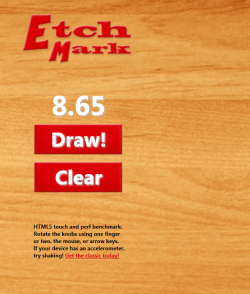
You can experience IE11’s leading performance first hand with demos on the IE Test Drive site where you’ll find examples of hardware accelerated rendering, interactivity, touch, and real world site patterns. EtchMark is a new test drive demo that’s an entertaining HTML5 retro-drawing experience, one that also enables you measure your browser’s performance.

6102.ifwgafcab_2D00_image1_5F00_760x456.png

Enjoy a fun, retro-drawing experience and test your browser’s performance with EtchMark

EtchMark shows some of what is possible on the Web today, using a broad range of technologies available to developers in IE11, including HTML5, CSS3, SVG Filters, touch, orientation events, pointer events, power efficiency, and more. EtchMark shows how IE11 makes the most of the device you have, enabling control with one or two fingers for touch as well as with the mouse. On tablets with device orientation support, you can shake the device to erase, or use orientation lock to keep EtchMark locked in the same position independent of how you are holding it.

EtchMark uses standards-based mark-up for interoperability across browsers and makes the most of fully hardware-accelerated browsers like IE11 on both Windows 7 and Windows 8.1, with consistent performance across a wide range of Windows devices including tablets like the Surface 2.


Leading JavaScript performance

IE11 advances JavaScript performance, while ensuring compatibility, interoperability, and security. On Windows 7, IE11 is 9% faster than IE10, which is nearly 30% faster than the nearest competitive browser.


2870.ifwgafcab_2D00_image2_5F00_760x478.png

IE11 extends its leadership in Javascript performance, so real-world sites are faster

The updated Chakra JIT compiler in IE11 supports more optimizations including inline caches for polymorphic property access, in-lining of functions at polymorphic call sites, and compilation support for specific ECMAScript5 constructs like getters/setters, so even more code is JIT’ed and less time is spent in JavaScript computation. Garbage collection utilizes the background thread much more efficiently, substantially reducing the frequency and amount of time the UI thread is blocked doing garbage collection.

You can experience these improvements in the new Popcorn test drive demo, which uses getters/setters to enforce types and mutate properties. In the past we’ve seen developers shy away from getters/setters because of the belief that they incur too high a cost on performance. With the improvements in IE11, getters/setters are now fast enough for many use cases.


Fast, world-ready Web applications

IE11 includes support for the well-defined and commonly used features of the emerging ECMAScript 6 standard including let, const, Map, Set, and WeakMap, as well as __proto__ for improved interoperability. IE11 also supports the ECMAScript Internationalization API (version 1.0), which enables culture aware sorting, number formatting, date and time formatting to be performed efficiently in JavaScript without having to round-trip to the server.

0207.ifwgafcab_2D00_image3_5F00_760x456.png

IE11's new internationalization APIs enable rich, world-ready Web applications without plug-ins

The World Data demo showcases how developers can utilize some of the new internationalization APIs for displaying and converting data to use native currencies, and date and time formats to create and deliver rich, world-ready Web applications without taking dependencies on plug-ins for delivering such experiences to users.

In addition to raw performance improvements of real world sites, IE11 includes improvements to make common browsing activities faster. IE11’s improved frequent sites algorithms make getting to your favorite sites faster. Similarly, improvements in form editing controls to preserve formatting make copy-paste from Office and other apps faster and more accurate.


Faster development with 25 new and improved modern Web standards

For developers, IE11 brings increased support for modern Web standards powered by hardware acceleration to enable a new class of compelling applications and fast and fluid Web browsing. IE11 adds support for over 25 new or improved modern Web standards beyond IE10.

Developers can build next-generation experiences with professional-quality Web video, and hyper-fast 2D and 3D Web technologies that make the most of the underlying hardware. IE11 supports real world standards and compatibility, and new developer tools enable developers to build high-performance Web experiences on Windows devices. Here are just a few examples of how the Web is better for developers with IE11:

Debug faster with new F12 developer tools. IE11 supports the latest standards and frameworks actively used by Web developers. Brand new F12 tools in IE enable iterative, visual debugging and tuning of Web sites. Modern.IE enables cross-browser testing, no matter where you choose to develop.

Hardware-accelerated 3D Web graphics. Interoperable WebGL experiences run on all devices, taking advantage of GPU acceleration. IE11 scans for unsafe WebGL content and implements a software-based renderer to complement the GPU. With Windows, graphics subsystem failures are not fatal, and WebGL continues to run. With IE11, your 3D experiences can access device orientation to create new interaction opportunities for immersive Web content.

The existing Web continues to work – even better: IE11 is interoperable with existing sites, which just run faster and look better in IE. Of course, intranet sites and apps continue to run in IE11, which supports Compatibility View.

Enable professional-quality video experiences on the Web. IE11 enables HTML5 video without plugins. IE11 supports the latest standards for closed captioning, streaming that adapts to available network bandwidth, and rights management—so all your video content can be as good as the professionals. Power-efficient video streaming in Windows 8.1 extends battery life for Web video.
You can read more at the IE Developer Center and the updated IE11 Guide for Developers about the full set of new and improved Web standards supported in IE11 – listed below with links to the specifications.


Best experience of your sites and apps together

IE11 puts your Web sites first, delivering the best Web on Windows across a full range of devices and screen size
s that is equally great for touch, mouse, and keyboard. You can have as many open tabs as you want, and side-by-side browsing with your favorite sites and Windows Store apps together. Here’s a quick look at some of the thinking behind the user experience of the browser from a few of the engineers who helped build IE11 for Windows 8.1.


See some of the thinking behind the browser experience in IE11 and Windows 8.1

The opportunities continue for HTML5 to make both Web sites and applications better. Those opportunities are exciting for everyone on the Web. As with IE11 on Windows 8.1, this release brings high performance HTML5 development to Windows 7.

For developers building on HTML5, now is time to ready your sites for IE11. Developers can use the recently updated modern.IE to test and verify your sites, using a wizard that scans a Web page URL for common interoperability problems and suggests ideas for how to address those issues to improve the user experience across modern and older browsers.

On behalf of the individuals and companies who have worked with us to deliver this product, and the many people at Microsoft who have built it, thank you for your feedback and for using IE11.

Rob Mauceri and Sandeep Singhal
Group Program Managers, Internet Explorer

aggbug.aspx
More...


   Note
-IE (web site) Download link: Internet Explorer 11 for Windows 7


-MS Download Center (choose your appropriate language):

ie_symbol_clr_56x56.png
Internet Explorer 11 for Windows 7 32-bit


ie_symbol_clr_56x56.png
Internet Explorer 11 for Windows 7 64-bit Edition and Windows Server 2008 R2 64-bit Edition


-Internet Explorer 11 Language Packs for Windows 7 and Windows Server 2008 R2:
The Internet Explorer 11 Language Packs install language specific resource files, allowing users to view the user interface (UI) of Internet explorer 11 in a different supported language. To use these language packs, you must install the matching OS language pack on Windows before proceeding.

Internet Explorer 11 Language Packs


-Internet Explorer Administration Kit 11:
Internet Explorer Administration Kit 11 (IEAK 11) simplifies the creation, deployment, and management of customized Internet Explorer 11 packages. It can be used to configure the out-of-box Internet Explorer 11 experience, and to manage user settings after deployment.

Download IEAK 11


Last edited:

My Computer My Computer

At a glance

64-bit Windows 11 Pro for WorkstationsIntel i7-8700K OC'd to 5 GHz64 GB (4x16GB) G.SKILL TridentZ RGB DDR4 3600...ASUS ROG-STRIX-GTX1080TI-O11G-GAMING
Computer type
PC/Desktop
Computer Manufacturer/Model Number
Self built custom
OS
64-bit Windows 11 Pro for Workstations
CPU
Intel i7-8700K OC'd to 5 GHz
Motherboard
ASUS ROG Maximus XI Formula Z390
Memory
64 GB (4x16GB) G.SKILL TridentZ RGB DDR4 3600 MHz
Graphics Card(s)
ASUS ROG-STRIX-GTX1080TI-O11G-GAMING
Sound Card
Integrated
Monitor(s) Displays
2 x Samsung Odyssey G7 27"
Screen Resolution
2560x1440
Hard Drives
1TB Samsung 990 PRO M.2,
4TB Samsung 990 PRO PRO M.2,
TerraMaster F8 SSD Plus NAS
PSU
Seasonic Prime Titanium 850W
Case
Thermaltake Core P3
Cooling
Corsair Hydro H115i
Keyboard
Logitech wireless K800
Mouse
Logitech MX Master 4
Internet Speed
2 Gb/s Download and 100 Mb/s Upload
Antivirus
Malwarebyte Anti-Malware Premium
Browser
Google Chrome
Other Info
Logitech Z625 speaker system,
Logitech BRIO 4K Pro webcam,
HP Color LaserJet Pro MFP M477fdn,
APC SMART-UPS RT 1000 XL - SURT1000XLI,
Galaxy S23 Plus phone
I'll update mine later. I'm still on the Release Preview. Hopefully, MS fixes most of the bugs with the RTM :)
 

My Computer My Computer

At a glance

Windows 7 Professional x64 SP1Intel® Pentium® 4 @ 2.26 GHz, Intel Core i7-2...512MB Dual channel DDR SDRAM @ 400MHz 2.5-3-3...Intel 82865G, Nvidia GeForce 520M Graphics
Computer type
Laptop
Computer Manufacturer/Model Number
Dell Optiplex SX270, Lenovo Z470
OS
Windows 7 Professional x64 SP1
CPU
Intel® Pentium® 4 @ 2.26 GHz, Intel Core i7-2670QM @ 2.20 GH
Motherboard
Dell, Lenovo
Memory
512MB Dual channel DDR SDRAM @ 400MHz 2.5-3-3-7, 8 GB DDR3
Graphics Card(s)
Intel 82865G, Nvidia GeForce 520M Graphics
Sound Card
SoundMax Integrated Audio, Integrated HD Audio
Monitor(s) Displays
LG W1952
Screen Resolution
1440x900, 1366 x 768
Hard Drives
40 GB 2.5" IDE 4200 RPM HDD, 500 GB 5400 RPM Sata 1.5 + 32 GB SSD
PSU
Dell 145 Watt, Lenovo 120 Watt Power Adapter
Case
Optiplex SX270 Small Form Factor, Laptop
Cooling
Dell Proprietary Air Cooling, Stock laptop cooling
Keyboard
Dell SK-8125 USB Keyboard
Mouse
Dell PS/2 2 button ball mouse with wheel scroll
Internet Speed
300 Mbit down / 20 Mbps up Time Warner Cable
Antivirus
MSE, Malwarebytes Scanner
Browser
Internet (Aizawa) Explorer 11
Other Info
Running Windows Server 2012 Datacenter on a virtual machine to run Metro Apps.
I'm looking forward to IE11 but will wait a few months to download and install, like I did with IE10, until the worst of the inevitable bugs have been worked out.
 

My Computer My Computer

At a glance

Win 7 Ultimate 64 bitIntel i7-3930KKingston HyperX Genesis 32GB Kit (8x4GB Modul...MSI R7850 Twin Frozr 2GD5/OC Radeon HD 7850 2...
Computer type
PC/Desktop
Computer Manufacturer/Model Number
Custom Build
OS
Win 7 Ultimate 64 bit
CPU
Intel i7-3930K
Motherboard
ASUS P9X79 WS
Memory
Kingston HyperX Genesis 32GB Kit (8x4GB Modules) 1600MHz DDR
Graphics Card(s)
MSI R7850 Twin Frozr 2GD5/OC Radeon HD 7850 2GB 256-bit GDDR
Sound Card
Asus Xonar Essence STX
Monitor(s) Displays
3x Asus VG248QE 24", Vizio 32" TV
Screen Resolution
1920 x 1080, ?
Hard Drives
Samsung 128GB 840 Pro SSD (1),
Samsung 4TB 850 EVO SSDs (4)
Samsung 4TB 850 EVO SSDs (16) external backup drives used in 2.5" hot swap bays in the computer.
PSU
Corsair HX750w
Case
Antec Two Hundred v2 (modified)
Cooling
Cooler Master GeminII S524 120mm (fan replaced with a 140mm)
Keyboard
Logitech G510s
Mouse
Logitech M525 (two in use)
Internet Speed
=< 32Mbps down, 8Mbps up
Antivirus
AVAST!, MBAM, SAS, Spybot S&D (all but MBAM free) Glary Util
Browser
IE11
Other Info
LSI 9211-8i HBA card (8 SATA III ports), 2.5" & 3.5" Hot Swap Bays, HooToo HT-CR001 PCI-E to USB 3.0 Internal Hub + 6 Slot Card Reader, and LG Model CH12LS28 BD-ROM Optical Drive. Also, ScanSnap S1500 ADF duplexing scanner, Canon 9000F flat bed scanner, Corsair SP2500 2.1 speakers, Samsung CLP 415nw laser color printer, Cyberpower PP2200SW UPS
I downloaded and updated just a few minutes ago, and haven't seen any problems so far. But, I haven't been playing around with it for that long, either. :)
 

My Computer My Computer

At a glance

Windows 7 UltimateAMD Sempron LE-1150 2.0 GhzATi Radeon HD 3650
OS
Windows 7 Ultimate
CPU
AMD Sempron LE-1150 2.0 Ghz
Motherboard
Gigabyte GA-M61PME-S2
Graphics Card(s)
ATi Radeon HD 3650
Sound Card
Realtek HD Onboard Audio
Monitor(s) Displays
HP 1702
Screen Resolution
1280x1024
Keyboard
Logitech Wireless
Mouse
Logitech Wireless
Internet Speed
7 MB DSL
Looks quite nice to me. Loading faster than IE10 and no crashes since 2hours.

EtchMark gave me a result, but i've no others to compare with.;)
 

Attachments

  • Capture.PNG
    Capture.PNG
    128.7 KB · Views: 238

My Computer My Computer

At a glance

Windows 7 Professional SP1 - x64 [Non-UEFI Boot]Ivy Bridge Core i5 3570K (Delidded)G.Skill "Ares" DDR3 PC3-12800 - 1600MHz (16Gb)Asus Dual-RX480-O4G
Computer type
PC/Desktop
Computer Manufacturer/Model Number
Custom Build
OS
Windows 7 Professional SP1 - x64 [Non-UEFI Boot]
CPU
Ivy Bridge Core i5 3570K (Delidded)
Motherboard
Asus P8Z77-V LE PLUS
Memory
G.Skill "Ares" DDR3 PC3-12800 - 1600MHz (16Gb)
Graphics Card(s)
Asus Dual-RX480-O4G
Sound Card
Creative Sound Blaster Z w/5.1 sound system
Monitor(s) Displays
Asus IPS 23"
Screen Resolution
16/9
Hard Drives
Internal:
500Go Sata 6Gb/s (x2)
500Go Sata 3Gb/s (x2)
SSD 60Go Sata 6Gb/s
PSU
In Win C 900W Series 80+ Platinum
Case
Thermaltake Chaser A71
Cooling
Custom Water Cooling Loop
Keyboard
Cooler Master QuickFire XTi
Mouse
Razer Imperator 2012 (4G)
Antivirus
MSE
Browser
IE 11.0.xxx Rtm
Other Info
"Raid0" with Intel Smart Response Technology (HDD/SSD)
As I was mentioning on the 11 preview thread the IE Blog wsa the place to follow to know just when the final version would be available. All I have to do is replace the preview which I have been waiting for! :D Just caught the caught the Computerworld report which didn't take long to see either. Microsoft ships IE11 for Windows 7 - Computerworld
 

My Computers My Computers

  • At a glance

    W7 Ultimate x64/W10 Pro x64/W11 Pro Triple Bo...AMD Phenom II X4 975 Deneb 3.6ghz - 965 2nd r...Kingston Hyper X DDR3 1600 1.5v 16gb - Hyper ...MSI HD Radeon 5750 1gb - MSI HD Radeon 6450 o...
    Computer type
    PC/Desktop
    Computer Manufacturer/Model Number
    Custom builds = 2
    OS
    W7 Ultimate x64/W10 Pro x64/W11 Pro Triple Boot - Main PC W7 Remote PC Micro ATX W7 Pro x64/W11 Pro
    CPU
    AMD Phenom II X4 975 Deneb 3.6ghz - 965 2nd remote pc
    Motherboard
    Gigabyte GA-790XTA-UD4-Gigabyte GA-880GM-D2H remote pc
    Memory
    Kingston Hyper X DDR3 1600 1.5v 16gb - Hyper X Fury 8gb 2nd
    Graphics Card(s)
    MSI HD Radeon 5750 1gb - MSI HD Radeon 6450 on mini tower
    Sound Card
    Creative Labs X-Fi Xtreme Audio P - Realtek onooard 2nd case
    Monitor(s) Displays
    ASUS VW199T-P 19" HP 2082a Main-HP 2082a 20" remote pc
    Screen Resolution
    Asus 1440x900 - HP 1600x900
    Hard Drives
    WD Black 1TB HD per OS W7, W10, and pending W11 presently on 500gb OS Drive - Pending Triple 1TB HDs for Spanned Storage/backup volume
    Single 2TB external USB enclosure, single 1TB System 7 Host/Boot drive, Pending 8TB external HD for system image b
    PSU
    Corsair 750TX - primary / Corsair CX600 - second
    Case
    Antec 900-2 - SSD compatible / NZXT Vulcan mini tower
    Cooling
    Zalman CNPS9900A
    Keyboard
    AZIO L70 Backlit Letters Gaming - ONN Cordless/USB
    Mouse
    MSI DS200 Programmable, Logitech Cordless
    Internet Speed
    30mbps upgrade - primary hard wired - mini tower usb WiFi
    Antivirus
    GFI VIPRE Internet Security 2014 on W7 2016 beta on W10,
    Browser
    Cyberfox, WaterFox 64bit FF variants, FireFox x64, Pale Moon
    Other Info
    Accomdata fan cooled usb 2.0 PIDE/Sata II, III external enclosure.
    Sambient usb/eSata PATA/Sata II, III external enclosure.
  • At a glance

    W7 Pro x64/W11 ProAMD Deneb 3.6ghz - 965Kingston Hyper X Fury 8gbMSI HD Radeon 6450 DVI Output
    Computer type
    PC/Desktop
    System Manufacturer/Model Number
    CUSTOM ASSEMBLY
    OS
    W7 Pro x64/W11 Pro
    CPU
    AMD Deneb 3.6ghz - 965
    Motherboard
    Gigabyte GA-880GM-D2H remote pc
    Memory
    Kingston Hyper X Fury 8gb
    Graphics Card(s)
    MSI HD Radeon 6450 DVI Output
    Sound Card
    Realtek onooard Creative or Other separate PENDING
    Monitor(s) Displays
    VIZIO 32" LCD TV Separate LCD Pending
    Screen Resolution
    1600x1080
    Hard Drives
    WD 500GB OS Host/Boot WD Green 1TB Storage/Backup
    PSU
    Corsair 600W - THERMALTAKE 600W spare case
    Case
    NZXT Vulcan mini tower
    Cooling
    Twin 120mm Top Fans - 240mm Side Cover
    Keyboard
    ONN Cordless/USB Logitech Cordless
    Mouse
    ONN USB/Cordless - Logitech Cordless
    Internet Speed
    DSL 5G
    Browser
    MS Edge, FireFox, WaterFox x64, FireFox Nightly
    Other Info
    OS Testing-Remote Access to Main TeamViewer
For anyone wanting to hold off on seeing 11 go on at this time however they would want to grab the blocker tool before they end up seeing the automatic update to 11.

Here I just downloaded the final 4 times for folders on 4 HDs two storage and one separate partition on my system image drive in case I plan a host drive wipe. I back up the back ups including whichever browsers I want to continue using if I perform a clean install. Once I get the finished 11 on a new image once again! :D
 

My Computers My Computers

  • At a glance

    W7 Ultimate x64/W10 Pro x64/W11 Pro Triple Bo...AMD Phenom II X4 975 Deneb 3.6ghz - 965 2nd r...Kingston Hyper X DDR3 1600 1.5v 16gb - Hyper ...MSI HD Radeon 5750 1gb - MSI HD Radeon 6450 o...
    Computer type
    PC/Desktop
    Computer Manufacturer/Model Number
    Custom builds = 2
    OS
    W7 Ultimate x64/W10 Pro x64/W11 Pro Triple Boot - Main PC W7 Remote PC Micro ATX W7 Pro x64/W11 Pro
    CPU
    AMD Phenom II X4 975 Deneb 3.6ghz - 965 2nd remote pc
    Motherboard
    Gigabyte GA-790XTA-UD4-Gigabyte GA-880GM-D2H remote pc
    Memory
    Kingston Hyper X DDR3 1600 1.5v 16gb - Hyper X Fury 8gb 2nd
    Graphics Card(s)
    MSI HD Radeon 5750 1gb - MSI HD Radeon 6450 on mini tower
    Sound Card
    Creative Labs X-Fi Xtreme Audio P - Realtek onooard 2nd case
    Monitor(s) Displays
    ASUS VW199T-P 19" HP 2082a Main-HP 2082a 20" remote pc
    Screen Resolution
    Asus 1440x900 - HP 1600x900
    Hard Drives
    WD Black 1TB HD per OS W7, W10, and pending W11 presently on 500gb OS Drive - Pending Triple 1TB HDs for Spanned Storage/backup volume
    Single 2TB external USB enclosure, single 1TB System 7 Host/Boot drive, Pending 8TB external HD for system image b
    PSU
    Corsair 750TX - primary / Corsair CX600 - second
    Case
    Antec 900-2 - SSD compatible / NZXT Vulcan mini tower
    Cooling
    Zalman CNPS9900A
    Keyboard
    AZIO L70 Backlit Letters Gaming - ONN Cordless/USB
    Mouse
    MSI DS200 Programmable, Logitech Cordless
    Internet Speed
    30mbps upgrade - primary hard wired - mini tower usb WiFi
    Antivirus
    GFI VIPRE Internet Security 2014 on W7 2016 beta on W10,
    Browser
    Cyberfox, WaterFox 64bit FF variants, FireFox x64, Pale Moon
    Other Info
    Accomdata fan cooled usb 2.0 PIDE/Sata II, III external enclosure.
    Sambient usb/eSata PATA/Sata II, III external enclosure.
  • At a glance

    W7 Pro x64/W11 ProAMD Deneb 3.6ghz - 965Kingston Hyper X Fury 8gbMSI HD Radeon 6450 DVI Output
    Computer type
    PC/Desktop
    System Manufacturer/Model Number
    CUSTOM ASSEMBLY
    OS
    W7 Pro x64/W11 Pro
    CPU
    AMD Deneb 3.6ghz - 965
    Motherboard
    Gigabyte GA-880GM-D2H remote pc
    Memory
    Kingston Hyper X Fury 8gb
    Graphics Card(s)
    MSI HD Radeon 6450 DVI Output
    Sound Card
    Realtek onooard Creative or Other separate PENDING
    Monitor(s) Displays
    VIZIO 32" LCD TV Separate LCD Pending
    Screen Resolution
    1600x1080
    Hard Drives
    WD 500GB OS Host/Boot WD Green 1TB Storage/Backup
    PSU
    Corsair 600W - THERMALTAKE 600W spare case
    Case
    NZXT Vulcan mini tower
    Cooling
    Twin 120mm Top Fans - 240mm Side Cover
    Keyboard
    ONN Cordless/USB Logitech Cordless
    Mouse
    ONN USB/Cordless - Logitech Cordless
    Internet Speed
    DSL 5G
    Browser
    MS Edge, FireFox, WaterFox x64, FireFox Nightly
    Other Info
    OS Testing-Remote Access to Main TeamViewer
Installed this yesterday on my Windows 7 x64 and was interested to see that the shortcut in Start Menu is to the 64-bit version only, although my already-set Quicklaunch shortcut still leads to the 32-bit one. It occurred to me that I haven't really read up on whether or not it's now OK to use the 64-bit IE. Wasn't there a Flash problem with it and therefore people were recommending the 32-bit version? Sorry as I use Firefox mainly I've got a bit behind on reading up about these things. Nevertheless I like to keep up to date.
 

My Computer My Computer

At a glance

Win 7 Ult SP1/Win 10 Pro (all x64)Intel® Core™ i7-975 Extreme O/C to 4.02 GHz, ...24GB Corsair Vengeance DDR3 SDRAM at 1600MHz ...1792 MB NVIDIA® GeForce® GTX 295 Dual Core
Computer type
PC/Desktop
Computer Manufacturer/Model Number
Alienware® ALX X58
OS
Win 7 Ult SP1/Win 10 Pro (all x64)
CPU
Intel® Core™ i7-975 Extreme O/C to 4.02 GHz, 8MB Cache
Motherboard
Asus® P6T Deluxe V2 X58 LGA1366
Memory
24GB Corsair Vengeance DDR3 SDRAM at 1600MHz - 6 x 4096MB
Graphics Card(s)
1792 MB NVIDIA® GeForce® GTX 295 Dual Core
Sound Card
Onboard Soundmax® High-Definition 7.1 Performance Audio
Monitor(s) Displays
Samsung XL2370 LED backlit 23" W/S 2ms response time
Screen Resolution
1920 X 1080
Hard Drives
2 x 500gb SATA II
1 x 1TB SATA II
1 external eSATA LaCie 3TB
(Non-RAID)
PSU
Alienware® 1200 Watt Multi-GPU
Case
Alienware® P2 ALX Chassis with AlienIce™ 3.0 Video Cooling
Cooling
Alienware® High-Perf. Liquid Cooling + Acoustic Dampening
Keyboard
Microsoft® Wireless Entertainment 8000 + Logitech® G15 Wired
Mouse
Microsoft® Wireless Laser 8000 + Logitech® G9 Wired
Internet Speed
1Gb/s
Antivirus
McAfee LiveSafe
Browser
Firefox - latest
Other Info
Using non-RAID on purpose as I find RAID to be too temperamental.
Now set to AHCI
I've updated this morning, IE11 is looking good.
 

My Computer My Computer

Computer type
Laptop
For anyone wanting to hold off on seeing 11 go on at this time however they would want to grab the blocker tool before they end up seeing the automatic update to 11...

I have my updates set to notify me before downloading and updating so I can choose the time to do so (I generally wait until the following Saturday to do so in case problematic updates are reported; usually, any problems are fixed or pulled by Saturday anyway) so it will be easy for me to hide it when it shows up and unhide it when I'm ready to download and update. That's what I did with IE10.

...Here I just downloaded the final 4 times for folders on 4 HDs two storage and one separate partition on my system image drive in case I plan a host drive wipe. I back up the back ups including whichever browsers I want to continue using if I perform a clean install. Once I get the finished 11 on a new image once again! :D

I always make a system image before installing updates and new programs. Since I do a weekly image Friday evening after running my AV and anti-malware scans (I run my data backups overnight after that), Saturday morning is the ideal time to run windows updates since I already have the image made.
 
Last edited by a moderator:

My Computer My Computer

At a glance

Win 7 Ultimate 64 bitIntel i7-3930KKingston HyperX Genesis 32GB Kit (8x4GB Modul...MSI R7850 Twin Frozr 2GD5/OC Radeon HD 7850 2...
Computer type
PC/Desktop
Computer Manufacturer/Model Number
Custom Build
OS
Win 7 Ultimate 64 bit
CPU
Intel i7-3930K
Motherboard
ASUS P9X79 WS
Memory
Kingston HyperX Genesis 32GB Kit (8x4GB Modules) 1600MHz DDR
Graphics Card(s)
MSI R7850 Twin Frozr 2GD5/OC Radeon HD 7850 2GB 256-bit GDDR
Sound Card
Asus Xonar Essence STX
Monitor(s) Displays
3x Asus VG248QE 24", Vizio 32" TV
Screen Resolution
1920 x 1080, ?
Hard Drives
Samsung 128GB 840 Pro SSD (1),
Samsung 4TB 850 EVO SSDs (4)
Samsung 4TB 850 EVO SSDs (16) external backup drives used in 2.5" hot swap bays in the computer.
PSU
Corsair HX750w
Case
Antec Two Hundred v2 (modified)
Cooling
Cooler Master GeminII S524 120mm (fan replaced with a 140mm)
Keyboard
Logitech G510s
Mouse
Logitech M525 (two in use)
Internet Speed
=< 32Mbps down, 8Mbps up
Antivirus
AVAST!, MBAM, SAS, Spybot S&D (all but MBAM free) Glary Util
Browser
IE11
Other Info
LSI 9211-8i HBA card (8 SATA III ports), 2.5" & 3.5" Hot Swap Bays, HooToo HT-CR001 PCI-E to USB 3.0 Internal Hub + 6 Slot Card Reader, and LG Model CH12LS28 BD-ROM Optical Drive. Also, ScanSnap S1500 ADF duplexing scanner, Canon 9000F flat bed scanner, Corsair SP2500 2.1 speakers, Samsung CLP 415nw laser color printer, Cyberpower PP2200SW UPS
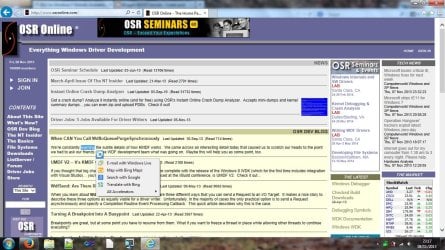
I updated two systems to IE 11 today and so far the only issue that I have found in both is that the text highlight contex menu, for search, translate etc. no longer works.

Has anyone else seen that?

Edit: If I right click on the highlighted text I can get the Menu but the blue arrow box no longer does anything.
 

My Computer My Computer

At a glance

Windows 10 Pro x64, Windows 8.1 Pro x64, Wind...INTEL i9-7920X LGA 206664 GB (4 X 16 GB) G-Skill V Series DDR4 3200 ...EVGA GTX 1060 SC 3 GB
Computer type
PC/Desktop
Computer Manufacturer/Model Number
Custom Built
OS
Windows 10 Pro x64, Windows 8.1 Pro x64, Windows 7 Ultimate x64 SP1,
CPU
INTEL i9-7920X LGA 2066
Motherboard
Gigabyte X299-WU8 F3
Memory
64 GB (4 X 16 GB) G-Skill V Series DDR4 3200 Quad Channel
Graphics Card(s)
EVGA GTX 1060 SC 3 GB
Sound Card
Realtek Onboard ALC1220
Monitor(s) Displays
2 x Samsung S27E310
Screen Resolution
1920x1080
Hard Drives
Samsung 2 x 970 EVO Plus 500 GB NVMe
1 x 6TB WD 6003FZBX SATA
1 x 6TB WD 60EFRX SATA
12 x 3TB WD 30EFRX SATA
PSU
Seasonic X-1050
Case
Thermaltake Armor+
Cooling
Corsair H80i V2 Liquid AOI Cooler
Keyboard
Logitech G510s
Mouse
Logitech MX Master 2S
Internet Speed
200 Mb/s
Antivirus
ESET NOD32 13.1
Browser
EDGE (Dev, Canary, Beta), Chrome
Other Info
ASUS RT-AC68U router
Malwarebytes 4.0.4
Thanks x BlueRobot, I don't know what my issue is. It occurs on two different Windows 7 x64 Ultimate systems since I upgraded to IE 11.

Was that blue Arrow removed from Windows 8.1/IE 11?


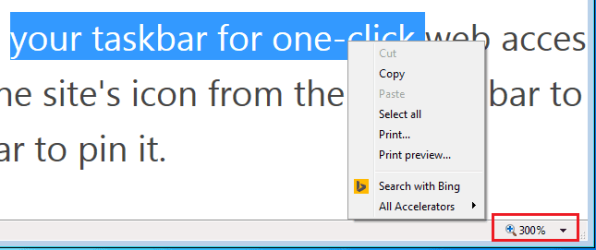
Edit: I normally have my zoom setting at 125% (getting up there), I discovered if I return the Zoom setting to 100%, all is well but the problem occurs at any other zoom setting.
 
Last edited:

My Computer My Computer

At a glance

Windows 10 Pro x64, Windows 8.1 Pro x64, Wind...INTEL i9-7920X LGA 206664 GB (4 X 16 GB) G-Skill V Series DDR4 3200 ...EVGA GTX 1060 SC 3 GB
Computer type
PC/Desktop
Computer Manufacturer/Model Number
Custom Built
OS
Windows 10 Pro x64, Windows 8.1 Pro x64, Windows 7 Ultimate x64 SP1,
CPU
INTEL i9-7920X LGA 2066
Motherboard
Gigabyte X299-WU8 F3
Memory
64 GB (4 X 16 GB) G-Skill V Series DDR4 3200 Quad Channel
Graphics Card(s)
EVGA GTX 1060 SC 3 GB
Sound Card
Realtek Onboard ALC1220
Monitor(s) Displays
2 x Samsung S27E310
Screen Resolution
1920x1080
Hard Drives
Samsung 2 x 970 EVO Plus 500 GB NVMe
1 x 6TB WD 6003FZBX SATA
1 x 6TB WD 60EFRX SATA
12 x 3TB WD 30EFRX SATA
PSU
Seasonic X-1050
Case
Thermaltake Armor+
Cooling
Corsair H80i V2 Liquid AOI Cooler
Keyboard
Logitech G510s
Mouse
Logitech MX Master 2S
Internet Speed
200 Mb/s
Antivirus
ESET NOD32 13.1
Browser
EDGE (Dev, Canary, Beta), Chrome
Other Info
ASUS RT-AC68U router
Malwarebytes 4.0.4
There may be a setting that turns off the other context menu option if the zoom level is > or < 100%.
 

My Computer My Computer

Computer type
Laptop
For anyone wanting to hold off on seeing 11 go on at this time however they would want to grab the blocker tool before they end up seeing the automatic update to 11...

I have my updates set to notify me before downloading and updating so I can choose the time to do so (I generally wait until the following Saturday to do so in case problematic updates are reported; usually, any problems are fixed or pulled by Saturday anyway) so it will be easy for me to hide it when it shows up and unhide it when I'm ready to download and update. That's what I did with IE10.

...Here I just downloaded the final 4 times for folders on 4 HDs two storage and one separate partition on my system image drive in case I plan a host drive wipe. I back up the back ups including whichever browsers I want to continue using if I perform a clean install. Once I get the finished 11 on a new image once again! :D

I always make a system image before installing updates and new programs. Since I do a weekly image Friday evening after running my AV and anti-malware scans (I run my data backups overnight after that), Saturday morning is the ideal time to run windows updates since I already have the image made.

Here I simply make a "Pre-" as well as seeing the "immediately after" images created. The advantage of having two options one built in and the other 3rd party is I will know them apart if one or the other ever had to be restored. For the most part the images have only been restored to test integrity with only one or two exceptions since 2009.

Thanks x BlueRobot, I don't know what my issue is. It occurs on two different Windows 7 x64 Ultimate systems since I upgraded to IE 11.

Was that blue Arrow removed from Windows 8.1/IE 11?


Edit: I normally have my zoom setting at 125% (getting up there), I discovered if I return the Zoom setting to 100%, all is well but the problem occurs at any other zoom setting.

I found the zoom option for FF and WaterFox was simply pressing the Ctrl and + keys to zoom in and the Ctrl and - minus keys to zoom out whenever the retained 125% I left it at was off either zoomed out or in. When closing up any browser windows you have to reset the last to the 125% or be sure it is at that or the next time you open a new browser window even for the open source browsers the zoom will be off.

With each version of IE since IE 6 that has always been the case as well unless something like an addon makes a change or you forget to reset before closing up all of your browser windows and then open to a different view. When closing up several windows here fast with one off of the 125% mark and ends being the last in a rush to close I've seen that happen a few times easily corrected by making to close at the preferred the next time around and open to double check if it remembers.

As for the forward or back button which would the blue button you are talking about often a separate window open lacks that since you have not moved anywhere from the home page to then enable the back button which remains greyed out and unavailable.
 

My Computers My Computers

  • At a glance

    W7 Ultimate x64/W10 Pro x64/W11 Pro Triple Bo...AMD Phenom II X4 975 Deneb 3.6ghz - 965 2nd r...Kingston Hyper X DDR3 1600 1.5v 16gb - Hyper ...MSI HD Radeon 5750 1gb - MSI HD Radeon 6450 o...
    Computer type
    PC/Desktop
    Computer Manufacturer/Model Number
    Custom builds = 2
    OS
    W7 Ultimate x64/W10 Pro x64/W11 Pro Triple Boot - Main PC W7 Remote PC Micro ATX W7 Pro x64/W11 Pro
    CPU
    AMD Phenom II X4 975 Deneb 3.6ghz - 965 2nd remote pc
    Motherboard
    Gigabyte GA-790XTA-UD4-Gigabyte GA-880GM-D2H remote pc
    Memory
    Kingston Hyper X DDR3 1600 1.5v 16gb - Hyper X Fury 8gb 2nd
    Graphics Card(s)
    MSI HD Radeon 5750 1gb - MSI HD Radeon 6450 on mini tower
    Sound Card
    Creative Labs X-Fi Xtreme Audio P - Realtek onooard 2nd case
    Monitor(s) Displays
    ASUS VW199T-P 19" HP 2082a Main-HP 2082a 20" remote pc
    Screen Resolution
    Asus 1440x900 - HP 1600x900
    Hard Drives
    WD Black 1TB HD per OS W7, W10, and pending W11 presently on 500gb OS Drive - Pending Triple 1TB HDs for Spanned Storage/backup volume
    Single 2TB external USB enclosure, single 1TB System 7 Host/Boot drive, Pending 8TB external HD for system image b
    PSU
    Corsair 750TX - primary / Corsair CX600 - second
    Case
    Antec 900-2 - SSD compatible / NZXT Vulcan mini tower
    Cooling
    Zalman CNPS9900A
    Keyboard
    AZIO L70 Backlit Letters Gaming - ONN Cordless/USB
    Mouse
    MSI DS200 Programmable, Logitech Cordless
    Internet Speed
    30mbps upgrade - primary hard wired - mini tower usb WiFi
    Antivirus
    GFI VIPRE Internet Security 2014 on W7 2016 beta on W10,
    Browser
    Cyberfox, WaterFox 64bit FF variants, FireFox x64, Pale Moon
    Other Info
    Accomdata fan cooled usb 2.0 PIDE/Sata II, III external enclosure.
    Sambient usb/eSata PATA/Sata II, III external enclosure.
  • At a glance

    W7 Pro x64/W11 ProAMD Deneb 3.6ghz - 965Kingston Hyper X Fury 8gbMSI HD Radeon 6450 DVI Output
    Computer type
    PC/Desktop
    System Manufacturer/Model Number
    CUSTOM ASSEMBLY
    OS
    W7 Pro x64/W11 Pro
    CPU
    AMD Deneb 3.6ghz - 965
    Motherboard
    Gigabyte GA-880GM-D2H remote pc
    Memory
    Kingston Hyper X Fury 8gb
    Graphics Card(s)
    MSI HD Radeon 6450 DVI Output
    Sound Card
    Realtek onooard Creative or Other separate PENDING
    Monitor(s) Displays
    VIZIO 32" LCD TV Separate LCD Pending
    Screen Resolution
    1600x1080
    Hard Drives
    WD 500GB OS Host/Boot WD Green 1TB Storage/Backup
    PSU
    Corsair 600W - THERMALTAKE 600W spare case
    Case
    NZXT Vulcan mini tower
    Cooling
    Twin 120mm Top Fans - 240mm Side Cover
    Keyboard
    ONN Cordless/USB Logitech Cordless
    Mouse
    ONN USB/Cordless - Logitech Cordless
    Internet Speed
    DSL 5G
    Browser
    MS Edge, FireFox, WaterFox x64, FireFox Nightly
    Other Info
    OS Testing-Remote Access to Main TeamViewer
Hi Night Hawk

What I am talking about is the highlighted text, blue arrow box and context menu that is shown in Post # 12

This does not work in IE 11 with zoom set to anything but 100%.
 

My Computer My Computer

At a glance

Windows 10 Pro x64, Windows 8.1 Pro x64, Wind...INTEL i9-7920X LGA 206664 GB (4 X 16 GB) G-Skill V Series DDR4 3200 ...EVGA GTX 1060 SC 3 GB
Computer type
PC/Desktop
Computer Manufacturer/Model Number
Custom Built
OS
Windows 10 Pro x64, Windows 8.1 Pro x64, Windows 7 Ultimate x64 SP1,
CPU
INTEL i9-7920X LGA 2066
Motherboard
Gigabyte X299-WU8 F3
Memory
64 GB (4 X 16 GB) G-Skill V Series DDR4 3200 Quad Channel
Graphics Card(s)
EVGA GTX 1060 SC 3 GB
Sound Card
Realtek Onboard ALC1220
Monitor(s) Displays
2 x Samsung S27E310
Screen Resolution
1920x1080
Hard Drives
Samsung 2 x 970 EVO Plus 500 GB NVMe
1 x 6TB WD 6003FZBX SATA
1 x 6TB WD 60EFRX SATA
12 x 3TB WD 30EFRX SATA
PSU
Seasonic X-1050
Case
Thermaltake Armor+
Cooling
Corsair H80i V2 Liquid AOI Cooler
Keyboard
Logitech G510s
Mouse
Logitech MX Master 2S
Internet Speed
200 Mb/s
Antivirus
ESET NOD32 13.1
Browser
EDGE (Dev, Canary, Beta), Chrome
Other Info
ASUS RT-AC68U router
Malwarebytes 4.0.4
Hi Night Hawk

What I am talking about is the highlighted text, blue arrow box and context menu that is shown in Post # 12

This does not work in IE 11 with zoom set to anything but 100%.

Apparently you have a glitch of some type going or a setting change needed. When first getting 11 here without uninstalling the preview first I assume the installation simply saw everything updated automatically retaining the favorites as well as not requiring a log in and remember password task as with the installs for the previous versions.

Once greeted with the MS introduction page that opened immediately as a second tab I grabbed the snipping here of an immediate hightlight and right click.

e5ikjt.jpg
 

My Computers My Computers

  • At a glance

    W7 Ultimate x64/W10 Pro x64/W11 Pro Triple Bo...AMD Phenom II X4 975 Deneb 3.6ghz - 965 2nd r...Kingston Hyper X DDR3 1600 1.5v 16gb - Hyper ...MSI HD Radeon 5750 1gb - MSI HD Radeon 6450 o...
    Computer type
    PC/Desktop
    Computer Manufacturer/Model Number
    Custom builds = 2
    OS
    W7 Ultimate x64/W10 Pro x64/W11 Pro Triple Boot - Main PC W7 Remote PC Micro ATX W7 Pro x64/W11 Pro
    CPU
    AMD Phenom II X4 975 Deneb 3.6ghz - 965 2nd remote pc
    Motherboard
    Gigabyte GA-790XTA-UD4-Gigabyte GA-880GM-D2H remote pc
    Memory
    Kingston Hyper X DDR3 1600 1.5v 16gb - Hyper X Fury 8gb 2nd
    Graphics Card(s)
    MSI HD Radeon 5750 1gb - MSI HD Radeon 6450 on mini tower
    Sound Card
    Creative Labs X-Fi Xtreme Audio P - Realtek onooard 2nd case
    Monitor(s) Displays
    ASUS VW199T-P 19" HP 2082a Main-HP 2082a 20" remote pc
    Screen Resolution
    Asus 1440x900 - HP 1600x900
    Hard Drives
    WD Black 1TB HD per OS W7, W10, and pending W11 presently on 500gb OS Drive - Pending Triple 1TB HDs for Spanned Storage/backup volume
    Single 2TB external USB enclosure, single 1TB System 7 Host/Boot drive, Pending 8TB external HD for system image b
    PSU
    Corsair 750TX - primary / Corsair CX600 - second
    Case
    Antec 900-2 - SSD compatible / NZXT Vulcan mini tower
    Cooling
    Zalman CNPS9900A
    Keyboard
    AZIO L70 Backlit Letters Gaming - ONN Cordless/USB
    Mouse
    MSI DS200 Programmable, Logitech Cordless
    Internet Speed
    30mbps upgrade - primary hard wired - mini tower usb WiFi
    Antivirus
    GFI VIPRE Internet Security 2014 on W7 2016 beta on W10,
    Browser
    Cyberfox, WaterFox 64bit FF variants, FireFox x64, Pale Moon
    Other Info
    Accomdata fan cooled usb 2.0 PIDE/Sata II, III external enclosure.
    Sambient usb/eSata PATA/Sata II, III external enclosure.
  • At a glance

    W7 Pro x64/W11 ProAMD Deneb 3.6ghz - 965Kingston Hyper X Fury 8gbMSI HD Radeon 6450 DVI Output
    Computer type
    PC/Desktop
    System Manufacturer/Model Number
    CUSTOM ASSEMBLY
    OS
    W7 Pro x64/W11 Pro
    CPU
    AMD Deneb 3.6ghz - 965
    Motherboard
    Gigabyte GA-880GM-D2H remote pc
    Memory
    Kingston Hyper X Fury 8gb
    Graphics Card(s)
    MSI HD Radeon 6450 DVI Output
    Sound Card
    Realtek onooard Creative or Other separate PENDING
    Monitor(s) Displays
    VIZIO 32" LCD TV Separate LCD Pending
    Screen Resolution
    1600x1080
    Hard Drives
    WD 500GB OS Host/Boot WD Green 1TB Storage/Backup
    PSU
    Corsair 600W - THERMALTAKE 600W spare case
    Case
    NZXT Vulcan mini tower
    Cooling
    Twin 120mm Top Fans - 240mm Side Cover
    Keyboard
    ONN Cordless/USB Logitech Cordless
    Mouse
    ONN USB/Cordless - Logitech Cordless
    Internet Speed
    DSL 5G
    Browser
    MS Edge, FireFox, WaterFox x64, FireFox Nightly
    Other Info
    OS Testing-Remote Access to Main TeamViewer
Hi Night Hawk

What I am talking about is the highlighted text, blue arrow box and context menu that is shown in Post # 12

This does not work in IE 11 with zoom set to anything but 100%.
I agree with Night Hawk. Maybe you have a video driver issue:

IE11.png
 

My Computer My Computer

At a glance

W7 Pro SP1 64biti78GBIntel HD Graphics
Computer type
Laptop
Computer Manufacturer/Model Number
Employer provided Dell Latitude
OS
W7 Pro SP1 64bit
CPU
i7
Memory
8GB
Graphics Card(s)
Intel HD Graphics
Hard Drives
crappy SSD
Antivirus
Employer mandated Symantec Endpoint Protection
Browser
Pale Moon 64bit, IE11 64bit & Chrome 64bit
When will the 64 bit functions be available in IE 11 for win 7

2 questions, 1. when will the 64 bit capability be activated in IE 11 for windows 7.

2. Will I lose any functionality by using it (like not having the Flash player in the older versions)?

Thanks in advance.

Donald
 

My Computer My Computer

At a glance

Windows 7 Ultimate x64 and windows pro x64Core I5 U430 1.2 Ghz8 gigIntel HD 4000 and AMD Radeon 5450
Computer type
Laptop
Computer Manufacturer/Model Number
HP Touchsmart TM2T 1100 3 other desktops and 1 more Laptop
OS
Windows 7 Ultimate x64 and windows pro x64
CPU
Core I5 U430 1.2 Ghz
Motherboard
HP
Memory
8 gig
Graphics Card(s)
Intel HD 4000 and AMD Radeon 5450
Sound Card
internal
Monitor(s) Displays
various
Screen Resolution
minium 1280 x 800
Hard Drives
500 gig 7200 rpm
Antivirus
Avast
Browser
IE 11 64 bit
Other Info
I have 5 systems total all running Windows 7 X64

My Computer My Computer

At a glance

W7 Pro SP1 64biti78GBIntel HD Graphics
Computer type
Laptop
Computer Manufacturer/Model Number
Employer provided Dell Latitude
OS
W7 Pro SP1 64bit
CPU
i7
Memory
8GB
Graphics Card(s)
Intel HD Graphics
Hard Drives
crappy SSD
Antivirus
Employer mandated Symantec Endpoint Protection
Browser
Pale Moon 64bit, IE11 64bit & Chrome 64bit
Back
Top