- Local time
- 10:33 AM
- Messages
- 240
Hi all. New install of W7 Ult, and fully updated. I use webmail for my Comcast email, and also my personal website email (different address, obviously)
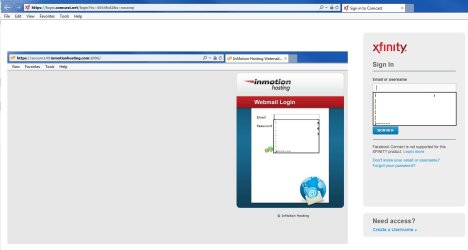
With auto complete on, I open IE11 to my Comcast email, and enter my email address & pwrd. Both are remembered.
I then open the link to my site email, click in the email field, and the email address previously entered at the Comcast site is there.
How do I get rid of that? Clearing the form data and pwrds from Int Options will get rid of the email address & pwrd from the Comcast site, which I do not want to do.
Any ideas? Thanks in advance.
With auto complete on, I open IE11 to my Comcast email, and enter my email address & pwrd. Both are remembered.
I then open the link to my site email, click in the email field, and the email address previously entered at the Comcast site is there.
How do I get rid of that? Clearing the form data and pwrds from Int Options will get rid of the email address & pwrd from the Comcast site, which I do not want to do.
Any ideas? Thanks in advance.
My Computer
- Computer type
- PC/Desktop
- Computer Manufacturer/Model Number
- Custom
- OS
- W7 64 Ult
- CPU
- Intel Core i9-7940x
- Motherboard
- ASUS x299 TUF
- Memory
- GSkill 128GB
- Graphics Card(s)
- AMD Radeon RX 560
- Sound Card
- RME
- Screen Resolution
- 1920x1080
- Hard Drives
- 5
- PSU
- BeQuiet!
- Case
- BeQuiet!
- Keyboard
- HyperX
- Mouse
- Logitech
- Browser
- IE - what else is there?