IE11 loads blank (white) pages - but page reload works OK

cwr64

New member
Local time
1:39 AM
Messages
21
Frequently in IE11 when I click on something that would load a new web page, IE11 loads the menu bars,etc, but the actual page image/content does not load - IE just displays a blank (white) page. If I hit PFK 5 to refresh the page, the page reloads as it should have loaded the first time. Firefox and Chrome do not have this problem. Also, I've noticed that in IE11 I often have to click on an item a 2nd time in order for the browser to react. I have done no diagnostics up to now. I'm running an HP desktop PC, quad AMD cpu, 6GB memory, Windows 7 Home Premium SP1 64bit with all Windows Updates applied. Anyone know how to fix IE11?
 

My Computer My Computer

At a glance

Windows 7
OS
Windows 7
Internet Speed
Cable Modem
Hi and welcome to sevenforums,
Please post which security you use,
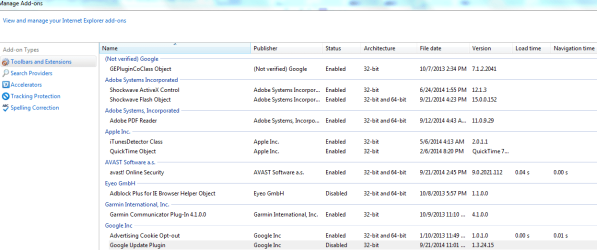
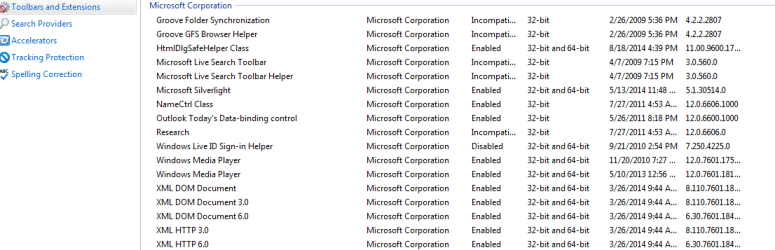
Also post your browser show all add-ons pages,
Gear symbol on the top right and Manage add-ons, Toolbar and extensions,
all%20add-ons.jpg

Review the links above my signature for how to take and upload screen shots here if you need to,
See what this does,
Use No Add-ons mode/ Click the Start button and type in the search box,
Internet explorer
Start-no%20add-ons-7.jpg

Click on the suggestion (No Add-ons) or it’s located at,
Start/ All programs/ Accessories folder/ System tools folder/ No add-ons.

Same applies to ie11,
http://windows.microsoft.com/en-us/internet-explorer/manage-add-ons#ie=ie-10-win-7

Also this can be used for No add-ons mode,
Add the Run box to the Start menu list,
http://www.sevenforums.com/tutorials/559-start-menu-add-run-button.html
Open the Run command and Paste this into it and Okay,
"C:\Program Files\Internet Explorer\iexplore.exe" -extoff
 

My Computer My Computer

At a glance

Win-7-Pro64bit 7-H-Prem-64biti7-5930K 2nd i9-9940x both water blocked VRM'...Trident-z 3200C14 2nd Trident-z 3600C16EVGA 1080ti ftw3 2nd Titan Xp both water blocked
Computer type
PC/Desktop
Computer Manufacturer/Model Number
Custom assembled by me :}
OS
Win-7-Pro64bit 7-H-Prem-64bit
CPU
i7-5930K 2nd i9-9940x both water blocked VRM's too
Motherboard
ASUS SABERTOOTH X99 2nd ASUS x299 Apex
Memory
Trident-z 3200C14 2nd Trident-z 3600C16
Graphics Card(s)
EVGA 1080ti ftw3 2nd Titan Xp both water blocked
Sound Card
Built-in Realtek
Monitor(s) Displays
1-AOC G2460PG 24"G-Sync 144Hz/ 2nd 1-ASUS VG248QE 24" 144Hz
Screen Resolution
1920 x 1080 144Hz
Hard Drives
2-Samsung M.2 Evo & Evo Plus
2-Samsung 850 EVO 500GB SSD's/ 3-2.5 W.D. Black 1tb-&3-1tb/3-3.5 WD Black 1tb hdd's
PSU
EVGA SuperNOVA 1000-P2 2nd 1200-P2
Case
2-Corsair Obsidian Series 450D Black ATX Mid Tower
Cooling
Custom water loops
Keyboard
Logitech G710+/ 2nd Logitech G910
Mouse
2-RedDragon M901 Perdition 16400 dpi Gaming mouse = wired
Internet Speed
Comcast Ping 19ms 89.31mbps download speed 6.12mbps upload
Antivirus
Malwarebytes Pro/ Superantispyware Pro
Browser
FireFox & Pale moon
Other Info
2nd ASUS X299 Apex/Intel i9-9940x with Custom water loop/7H-Prem-x64/Corsair 450D case/Ram Trident-z 3600C16 4x8gb / Samsung970Evo plus 500gb SSD/Dual ssd EZ swap evo/PSU EVGA SuperNova 1200w-P2 80+Platinum/GPU Titan Xp /8-ML-140 on push-pull on 2-280GTX rads
Secuuruty sw & Snips of add-ons

I run the current version of AVAST free AV and run the regular MS Windows firewall.
I've attached 4 MS Snippet files (Snip1.png-Snip4.png) of the IE11 add-ons window.
Hope that shows you what you need to see.
 

Attachments

  • Snip1.png
    Snip1.png
    31 KB · Views: 2
  • Snip2.png
    Snip2.png
    9.6 KB · Views: 2
  • Snip3.png
    Snip3.png
    14.2 KB · Views: 2
  • Snip4.png
    Snip4.png
    8.8 KB · Views: 3

My Computer My Computer

At a glance

Windows 7
OS
Windows 7
Internet Speed
Cable Modem
Hi thanks that is a list :)
Open ie,
Use Gear symbol on the top right and Safety/ Delete browser history,
Uncheck All of the boxes and delete.
Close ie and boot your machine,
Then test,
If still no joy,
Try In-private browsing use alt + TO or Gear symbol/ Internet options/ Privacy section/ Make sure near the bottom the box is checked to disable third party stuff when In-Private browsing starts ;)
Right click your Internet explorer shortcut on the taskbar and click on Start In-Private browsing,
You can also activate EPM and test,
http://www.sevenforums.com/tutorials/280434-internet-explorer-10-enable-32-bit-64-bit-ie10-windows-7-a.html
 

My Computer My Computer

At a glance

Win-7-Pro64bit 7-H-Prem-64biti7-5930K 2nd i9-9940x both water blocked VRM'...Trident-z 3200C14 2nd Trident-z 3600C16EVGA 1080ti ftw3 2nd Titan Xp both water blocked
Computer type
PC/Desktop
Computer Manufacturer/Model Number
Custom assembled by me :}
OS
Win-7-Pro64bit 7-H-Prem-64bit
CPU
i7-5930K 2nd i9-9940x both water blocked VRM's too
Motherboard
ASUS SABERTOOTH X99 2nd ASUS x299 Apex
Memory
Trident-z 3200C14 2nd Trident-z 3600C16
Graphics Card(s)
EVGA 1080ti ftw3 2nd Titan Xp both water blocked
Sound Card
Built-in Realtek
Monitor(s) Displays
1-AOC G2460PG 24"G-Sync 144Hz/ 2nd 1-ASUS VG248QE 24" 144Hz
Screen Resolution
1920 x 1080 144Hz
Hard Drives
2-Samsung M.2 Evo & Evo Plus
2-Samsung 850 EVO 500GB SSD's/ 3-2.5 W.D. Black 1tb-&3-1tb/3-3.5 WD Black 1tb hdd's
PSU
EVGA SuperNOVA 1000-P2 2nd 1200-P2
Case
2-Corsair Obsidian Series 450D Black ATX Mid Tower
Cooling
Custom water loops
Keyboard
Logitech G710+/ 2nd Logitech G910
Mouse
2-RedDragon M901 Perdition 16400 dpi Gaming mouse = wired
Internet Speed
Comcast Ping 19ms 89.31mbps download speed 6.12mbps upload
Antivirus
Malwarebytes Pro/ Superantispyware Pro
Browser
FireFox & Pale moon
Other Info
2nd ASUS X299 Apex/Intel i9-9940x with Custom water loop/7H-Prem-x64/Corsair 450D case/Ram Trident-z 3600C16 4x8gb / Samsung970Evo plus 500gb SSD/Dual ssd EZ swap evo/PSU EVGA SuperNova 1200w-P2 80+Platinum/GPU Titan Xp /8-ML-140 on push-pull on 2-280GTX rads
Back
Top