- Local time
- 9:45 AM
- Messages
- 161
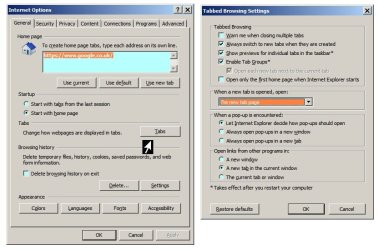
In my IE11 Internet Options I have under Tabs:
Open links from other programs in - a new tab in the current window.
Yet when I click a link it just opens a blank page. This, to my knowledge started only this morning. Does anyone have any idea what this is all about? I have tried it on different web sites and different links and still get a blank page.
For example. From above: For how to upload a screenshot or file, read here
When I click read here I get a blank page.
Thanks in advance.
Open links from other programs in - a new tab in the current window.
Yet when I click a link it just opens a blank page. This, to my knowledge started only this morning. Does anyone have any idea what this is all about? I have tried it on different web sites and different links and still get a blank page.
For example. From above: For how to upload a screenshot or file, read here
When I click read here I get a blank page.
Thanks in advance.
My Computer
- OS
- windows 7 Home Premium