IE11 Won't Save Favorites

iang5184

New member
Local time
5:43 AM
Messages
21
Hi Everyone,

I have just finished a clean reinstall of Win7 Home Premium following a BSOD incident --- cause unknown.

As no update was being offered following the install, I chose to install IE11 manually.
This appeared OK, and I then moved the Favorites folder to my D:\drive.
Checked registry and it appears in the appropriate "Shell" entry as D:\Favorites.

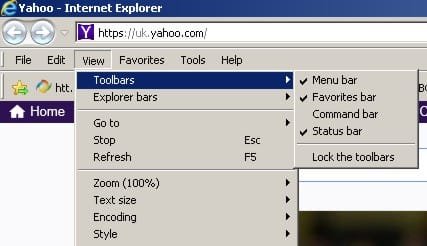
In the "View" Tab, I have Menu Bar and Status bar ticked, but the Favorites and Command Bar are greyed out completely.

I have imported some Favourites into the folder (from prior to BSOD) and they are all visible, and usable, when I click on the Favorites Tab. I can even see them in the Organise Favorites bit too.

Can anyone please shed any light on what is wrong here please, and hopefully, let me know how it can be remedied?

Thank you,

Ian
 

My Computer My Computer

At a glance

Windows 7 Ultimate x32Intel dual 1.64Gb
Computer type
Laptop
Computer Manufacturer/Model Number
Toshiba Satellite P-100
OS
Windows 7 Ultimate x32
CPU
Intel dual 1.6
Memory
4Gb
Hard Drives
1 x ssd Kingston (Partitioned C:\ & D:\) 60Gb
1 x Toshib ATA ---- 100 Gb
1 x USB attached ------ 1TB
Browser
IE8
Hi and welcome to SevenForums,
Click Start and click on your user name listed near the top,
Open the favorites folder,
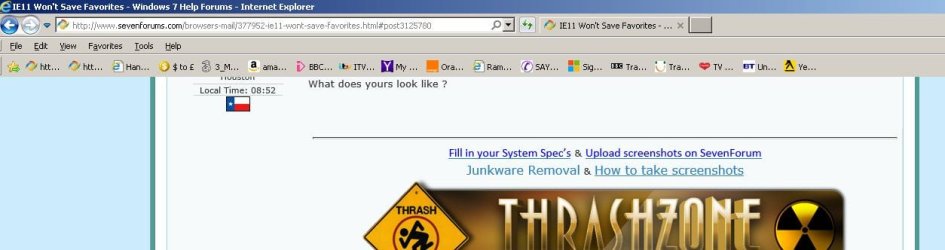
This is what mine looks like
View attachment 368437
What does yours look like ?
 
Last edited:

My Computer My Computer

At a glance

Win-7-Pro64bit 7-H-Prem-64biti7-5930K 2nd i9-9940x both water blocked VRM'...Trident-z 3200C14 2nd Trident-z 3600C16EVGA 1080ti ftw3 2nd Titan Xp both water blocked
Computer type
PC/Desktop
Computer Manufacturer/Model Number
Custom assembled by me :}
OS
Win-7-Pro64bit 7-H-Prem-64bit
CPU
i7-5930K 2nd i9-9940x both water blocked VRM's too
Motherboard
ASUS SABERTOOTH X99 2nd ASUS x299 Apex
Memory
Trident-z 3200C14 2nd Trident-z 3600C16
Graphics Card(s)
EVGA 1080ti ftw3 2nd Titan Xp both water blocked
Sound Card
Built-in Realtek
Monitor(s) Displays
1-AOC G2460PG 24"G-Sync 144Hz/ 2nd 1-ASUS VG248QE 24" 144Hz
Screen Resolution
1920 x 1080 144Hz
Hard Drives
2-Samsung M.2 Evo & Evo Plus
2-Samsung 850 EVO 500GB SSD's/ 3-2.5 W.D. Black 1tb-&3-1tb/3-3.5 WD Black 1tb hdd's
PSU
EVGA SuperNOVA 1000-P2 2nd 1200-P2
Case
2-Corsair Obsidian Series 450D Black ATX Mid Tower
Cooling
Custom water loops
Keyboard
Logitech G710+/ 2nd Logitech G910
Mouse
2-RedDragon M901 Perdition 16400 dpi Gaming mouse = wired
Internet Speed
Comcast Ping 19ms 89.31mbps download speed 6.12mbps upload
Antivirus
Malwarebytes Pro/ Superantispyware Pro
Browser
FireFox & Pale moon
Other Info
2nd ASUS X299 Apex/Intel i9-9940x with Custom water loop/7H-Prem-x64/Corsair 450D case/Ram Trident-z 3600C16 4x8gb / Samsung970Evo plus 500gb SSD/Dual ssd EZ swap evo/PSU EVGA SuperNova 1200w-P2 80+Platinum/GPU Titan Xp /8-ML-140 on push-pull on 2-280GTX rads
Hi ThrashZone
Sorry but I can't give a screen-shot as I am now about 50 miles away from the computer, but I can assure you it looks nothing like yours.
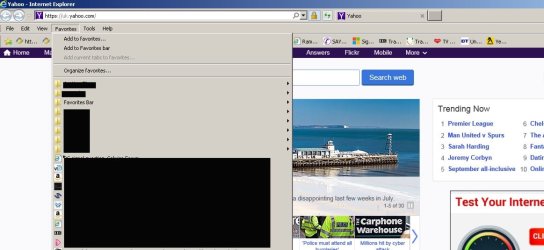
Although not the machine in question, the layout is more akin to the attachment herewith, although this machine does save Favourites.
Ian
 

Attachments

  • capture_004_08082015_165600.jpg
    capture_004_08082015_165600.jpg
    49.2 KB · Views: 1

My Computer My Computer

At a glance

Windows 7 Ultimate x32Intel dual 1.64Gb
Computer type
Laptop
Computer Manufacturer/Model Number
Toshiba Satellite P-100
OS
Windows 7 Ultimate x32
CPU
Intel dual 1.6
Memory
4Gb
Hard Drives
1 x ssd Kingston (Partitioned C:\ & D:\) 60Gb
1 x Toshib ATA ---- 100 Gb
1 x USB attached ------ 1TB
Browser
IE8
Hi,
Okay please verify when you get back around,
That image is accessing favorites from the Menu bar which will work but the list is not scrollable so I don't use it at all,
I would use the yellow star on the right end of the browser windows instead

I do take it a bit farther and don't use the default folders that you will see in the location I show
I would make a new folder there and call it bookmarks or what ever you want to anything besides what is already being used by ie
Then open the folders the websites and stuff is located and move then into the bookmarks folder instead
You can make as many folders as you want inside the bookmarks folder and use your own organization preferences ;)

You can also use the Organize favorites listing too

An advantage to using your own folder structure is if you ever have to reset internet explorer your folder structure is unaffected by the reset process.

Everything still shows up on the menu bar list too.
View attachment 368443
View attachment 368444
 
Last edited:

My Computer My Computer

At a glance

Win-7-Pro64bit 7-H-Prem-64biti7-5930K 2nd i9-9940x both water blocked VRM'...Trident-z 3200C14 2nd Trident-z 3600C16EVGA 1080ti ftw3 2nd Titan Xp both water blocked
Computer type
PC/Desktop
Computer Manufacturer/Model Number
Custom assembled by me :}
OS
Win-7-Pro64bit 7-H-Prem-64bit
CPU
i7-5930K 2nd i9-9940x both water blocked VRM's too
Motherboard
ASUS SABERTOOTH X99 2nd ASUS x299 Apex
Memory
Trident-z 3200C14 2nd Trident-z 3600C16
Graphics Card(s)
EVGA 1080ti ftw3 2nd Titan Xp both water blocked
Sound Card
Built-in Realtek
Monitor(s) Displays
1-AOC G2460PG 24"G-Sync 144Hz/ 2nd 1-ASUS VG248QE 24" 144Hz
Screen Resolution
1920 x 1080 144Hz
Hard Drives
2-Samsung M.2 Evo & Evo Plus
2-Samsung 850 EVO 500GB SSD's/ 3-2.5 W.D. Black 1tb-&3-1tb/3-3.5 WD Black 1tb hdd's
PSU
EVGA SuperNOVA 1000-P2 2nd 1200-P2
Case
2-Corsair Obsidian Series 450D Black ATX Mid Tower
Cooling
Custom water loops
Keyboard
Logitech G710+/ 2nd Logitech G910
Mouse
2-RedDragon M901 Perdition 16400 dpi Gaming mouse = wired
Internet Speed
Comcast Ping 19ms 89.31mbps download speed 6.12mbps upload
Antivirus
Malwarebytes Pro/ Superantispyware Pro
Browser
FireFox & Pale moon
Other Info
2nd ASUS X299 Apex/Intel i9-9940x with Custom water loop/7H-Prem-x64/Corsair 450D case/Ram Trident-z 3600C16 4x8gb / Samsung970Evo plus 500gb SSD/Dual ssd EZ swap evo/PSU EVGA SuperNova 1200w-P2 80+Platinum/GPU Titan Xp /8-ML-140 on push-pull on 2-280GTX rads
Hi Thrashzone,

It is not the layout about which I am seeking help, for as you can see from my attached image, I already know how to configure Favourites.
My problem is that IE11 just will not save Favourites, no matter what I do.

Although there are three ticks shown in the second image, the Favorites and Command are NOT ticked on the machine with the problem.

Ian
 

Attachments

  • IE_11_Favourites.jpg
    IE_11_Favourites.jpg
    71.8 KB · Views: 0
  • IE_11_View.jpg
    IE_11_View.jpg
    23.3 KB · Views: 4

My Computer My Computer

At a glance

Windows 7 Ultimate x32Intel dual 1.64Gb
Computer type
Laptop
Computer Manufacturer/Model Number
Toshiba Satellite P-100
OS
Windows 7 Ultimate x32
CPU
Intel dual 1.6
Memory
4Gb
Hard Drives
1 x ssd Kingston (Partitioned C:\ & D:\) 60Gb
1 x Toshib ATA ---- 100 Gb
1 x USB attached ------ 1TB
Browser
IE8
Back
Top