IE8 add-ons reappear when new window is opened

matt44

New member
Local time
6:18 AM
Messages
11
Location
London
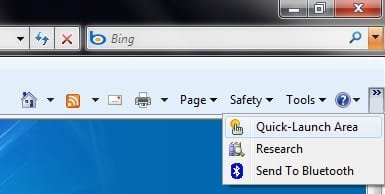
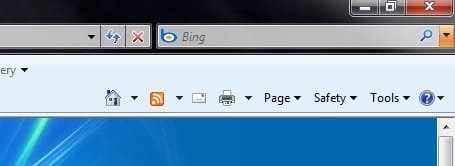
When I open a new window in IE8 (when another window is already open), I've noticed that the » symbol reappears on the far right hand side which reveals a list of 3 add-ons I have set as disabled.

If I check in Manage Add-ons, they remain set to disabled.

This doesn't happen when I open a new tab in the same window.

Pics:
 

Attachments
  • no addons.jpg
    no addons.jpg
    8.9 KB · Views: 1
  • addons in new window.jpg
    addons in new window.jpg
    10.8 KB · Views: 5

My Computer My Computer

At a glance

Windows 7 Home Premium SP1 64bitIntel Core 2 Duo P8400 2.26GHz4GB DDR3Nvidia GeForce 9600M GT 512MB GDDR3
Computer Manufacturer/Model Number
Acer Aspire 6935G
OS
Windows 7 Home Premium SP1 64bit
CPU
Intel Core 2 Duo P8400 2.26GHz
Memory
4GB DDR3
Graphics Card(s)
Nvidia GeForce 9600M GT 512MB GDDR3
Monitor(s) Displays
16" Acer HD CineCrystal LCD
Screen Resolution
1366 x 768
Hard Drives
320GB 7200rpm
Internet Speed
20Mbps
Welcome

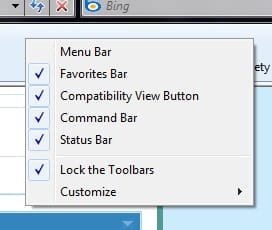
If you are trying to get rid of the add-on appearing Right click on the bar>customize>add or remove commands. Then select what you want.
 

My Computer My Computer

At a glance

Windows 10, Home Clean InstallIntel Core2 processsor Q8200(2.33Ghz 1333FSB)...6 gbATI Radeon 256MB HD3650
Computer type
PC/Desktop
Computer Manufacturer/Model Number
Dell XPS 420
OS
Windows 10, Home Clean Install
CPU
Intel Core2 processsor Q8200(2.33Ghz 1333FSB) Quad Core Tech
Motherboard
Dell
Memory
6 gb
Graphics Card(s)
ATI Radeon 256MB HD3650
Sound Card
Intergrated 7.1 Channel Audio
Monitor(s) Displays
Dell SP2009W 20"
Hard Drives
640 GB Serial ATA Hard drive
Cooling
Fan
Keyboard
Dell USB Keyboard
Mouse
Dell Premium Optical USB
Internet Speed
DSL 2.85
Thanks very much, that stopped them reappearing

I've noticed too that links to 2 of the add-ons reappear in the Tools menu when I open a new window, but not when I open a new tab.

Also, only the 32 bit version of IE8 has these issues.
 

My Computer My Computer

At a glance

Windows 7 Home Premium SP1 64bitIntel Core 2 Duo P8400 2.26GHz4GB DDR3Nvidia GeForce 9600M GT 512MB GDDR3
Computer Manufacturer/Model Number
Acer Aspire 6935G
OS
Windows 7 Home Premium SP1 64bit
CPU
Intel Core 2 Duo P8400 2.26GHz
Memory
4GB DDR3
Graphics Card(s)
Nvidia GeForce 9600M GT 512MB GDDR3
Monitor(s) Displays
16" Acer HD CineCrystal LCD
Screen Resolution
1366 x 768
Hard Drives
320GB 7200rpm
Internet Speed
20Mbps
Hope that I can be two for two

Go to tool bar

Right click

Toolbars

Then untick links.

Hope you come back with this:D

and not this:(
 

My Computer My Computer

At a glance

Windows 10, Home Clean InstallIntel Core2 processsor Q8200(2.33Ghz 1333FSB)...6 gbATI Radeon 256MB HD3650
Computer type
PC/Desktop
Computer Manufacturer/Model Number
Dell XPS 420
OS
Windows 10, Home Clean Install
CPU
Intel Core2 processsor Q8200(2.33Ghz 1333FSB) Quad Core Tech
Motherboard
Dell
Memory
6 gb
Graphics Card(s)
ATI Radeon 256MB HD3650
Sound Card
Intergrated 7.1 Channel Audio
Monitor(s) Displays
Dell SP2009W 20"
Hard Drives
640 GB Serial ATA Hard drive
Cooling
Fan
Keyboard
Dell USB Keyboard
Mouse
Dell Premium Optical USB
Internet Speed
DSL 2.85
When I right click a blank part of the toolbar there are no references to the add-ons to untick.
 

Attachments

  • ie8.jpg
    ie8.jpg
    9.2 KB · Views: 68

My Computer My Computer

At a glance

Windows 7 Home Premium SP1 64bitIntel Core 2 Duo P8400 2.26GHz4GB DDR3Nvidia GeForce 9600M GT 512MB GDDR3
Computer Manufacturer/Model Number
Acer Aspire 6935G
OS
Windows 7 Home Premium SP1 64bit
CPU
Intel Core 2 Duo P8400 2.26GHz
Memory
4GB DDR3
Graphics Card(s)
Nvidia GeForce 9600M GT 512MB GDDR3
Monitor(s) Displays
16" Acer HD CineCrystal LCD
Screen Resolution
1366 x 768
Hard Drives
320GB 7200rpm
Internet Speed
20Mbps
Back
Top