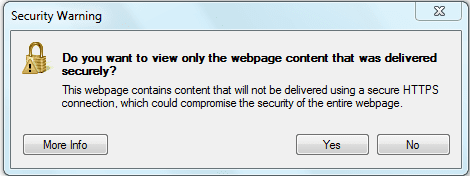
IE8 Error: Do you want to view only the webpage...

juanantoniod

Antonio
Power User
Local time
2:28 AM
Messages
300
Location
Los Angeles, CA
Hello y'all!

I have been getting this error message since I installed IE8, but now it has become annoying to the point that I must now find out how to turn it off.

It is kind of a reverse question which itself is annoying, but just having to answer this question all the time and not being able to say "Don't ask me again." is frustrating!

Error message in IE8: "Do you want to view only the webpage content that was delivered securely?"

My usual answer is "NO", because I am on Websites I trust, like twitter (newly so), etc.

Thanks again for all your help and advice. I appreciate you input on this one.

~Antonio :geek:
 

Attachments

  • Capture.PNG
    Capture.PNG
    7.1 KB · Views: 7

My Computer My Computer

At a glance

Microsoft Windows 7 Home Premium 32-bit 7601 ...Intel(R) Pentium(R) D CPU 2.80GHz2.00 GBNVIDIA GeForce 6200SE TurboCache(TM)
Computer Manufacturer/Model Number
HP Pavilion Media Center PC m7350n
OS
Microsoft Windows 7 Home Premium 32-bit 7601 Multiprocessor Free Service Pack 1
CPU
Intel(R) Pentium(R) D CPU 2.80GHz
Motherboard
ASUSTek Computer INC. EMERY
Memory
2.00 GB
Graphics Card(s)
NVIDIA GeForce 6200SE TurboCache(TM)
Sound Card
Realtek High Definition Audio
Monitor(s) Displays
HP L1710 LCD Display
Screen Resolution
1280 x 1024 x 32 bits (4294967296 colors) @ 60 Hz
Hard Drives
(1) SAMSUNG SP2504C (2) EPSON Stylus Storage USB Device (3) Generic USB CF Reader USB Device (4) Generic USB MS Reader USB Device (5) Generic USB SD Reader USB Device (6) Generic USB SM Reader USB Device (7) Seagate FA GoFlex Desk USB Dev
Internet Speed
20+mbps
Ok, try this method out and reply back if it works.


  1. Going to Tools->Internet Options->Security
  2. Select the ‘Security’ tab
  3. Click the ‘Custom Level’ button
  4. In the ‘Miscellaneous’ section change “Display mixed content” to Enable
 

My Computer My Computer

At a glance

Windows 7 Ultimate NIntel(R) Pentium 4(R) 2.6GHz Processor2.5GB DDR KINGSTON RAMSapphire ATI Radeon 3450
Computer Manufacturer/Model Number
N/A Custom Made
OS
Windows 7 Ultimate N
CPU
Intel(R) Pentium 4(R) 2.6GHz Processor
Motherboard
MSI
Memory
2.5GB DDR KINGSTON RAM
Graphics Card(s)
Sapphire ATI Radeon 3450
Sound Card
RealTek AC97
Monitor(s) Displays
Samsung Syncmaster 710M
Screen Resolution
1024x1280
Hard Drives
ST380011A ATA H/D 100GB (Internal) TOSHIBA 250GB (External) Generic USB Media Kingston (8GB)
Case
N/A CUSTOM MADE VINYL CASE
Cooling
Dual Fans Back
Keyboard
Genius Keyboard HID Device
Mouse
Dell HID Generic Mouse
Internet Speed
Broadband
You are my new hero!

Ok, try this method out and reply back if it works.


  1. Going to Tools->Internet Options->Security
  2. Select the ‘Security’ tab
  3. Click the ‘Custom Level’ button
  4. In the ‘Miscellaneous’ section change “Display mixed content” to Enable

Razo,

Thank you, thank you, thank you! How easy that was, but so helpful. I appreciate it, and as I said, You are my new hero!

~Antonio :geek:
 

My Computer My Computer

At a glance

Microsoft Windows 7 Home Premium 32-bit 7601 ...Intel(R) Pentium(R) D CPU 2.80GHz2.00 GBNVIDIA GeForce 6200SE TurboCache(TM)
Computer Manufacturer/Model Number
HP Pavilion Media Center PC m7350n
OS
Microsoft Windows 7 Home Premium 32-bit 7601 Multiprocessor Free Service Pack 1
CPU
Intel(R) Pentium(R) D CPU 2.80GHz
Motherboard
ASUSTek Computer INC. EMERY
Memory
2.00 GB
Graphics Card(s)
NVIDIA GeForce 6200SE TurboCache(TM)
Sound Card
Realtek High Definition Audio
Monitor(s) Displays
HP L1710 LCD Display
Screen Resolution
1280 x 1024 x 32 bits (4294967296 colors) @ 60 Hz
Hard Drives
(1) SAMSUNG SP2504C (2) EPSON Stylus Storage USB Device (3) Generic USB CF Reader USB Device (4) Generic USB MS Reader USB Device (5) Generic USB SD Reader USB Device (6) Generic USB SM Reader USB Device (7) Seagate FA GoFlex Desk USB Dev
Internet Speed
20+mbps
Ok, try this method out and reply back if it works.


  1. Going to Tools->Internet Options->Security
  2. Select the ‘Security’ tab
  3. Click the ‘Custom Level’ button
  4. In the ‘Miscellaneous’ section change “Display mixed content” to Enable

Razo,

Thank you, thank you, thank you! How easy that was, but so helpful. I appreciate it, and as I said, You are my new hero!

~Antonio :geek:
Haha no problem mate, I had this problem too and got me really frustrated.

This problem primarily occured to me when I visited gmail but I fixed it up.
 

My Computer My Computer

At a glance

Windows 7 Ultimate NIntel(R) Pentium 4(R) 2.6GHz Processor2.5GB DDR KINGSTON RAMSapphire ATI Radeon 3450
Computer Manufacturer/Model Number
N/A Custom Made
OS
Windows 7 Ultimate N
CPU
Intel(R) Pentium 4(R) 2.6GHz Processor
Motherboard
MSI
Memory
2.5GB DDR KINGSTON RAM
Graphics Card(s)
Sapphire ATI Radeon 3450
Sound Card
RealTek AC97
Monitor(s) Displays
Samsung Syncmaster 710M
Screen Resolution
1024x1280
Hard Drives
ST380011A ATA H/D 100GB (Internal) TOSHIBA 250GB (External) Generic USB Media Kingston (8GB)
Case
N/A CUSTOM MADE VINYL CASE
Cooling
Dual Fans Back
Keyboard
Genius Keyboard HID Device
Mouse
Dell HID Generic Mouse
Internet Speed
Broadband
Understand, that is NOT an error message! It is a warning message! And a good one at that.

My usual answer is "NO", because I am on Websites I trust, like twitter
:what:

I would never, as in NEVER EVER trust any social networking site. They have an abysmal security record and are primary targets for badguys simply because so many less experienced (dare I say "naive"?) users (1) fail to understand the threat and (2) fail to adequately protect themselves or their computers from those threats.

Understand too that Microsoft intentionally reworded that warning in recent versions of IE for our safety. Previous versions asked if you wanted to view the nonsecure content. Users, sadly, are into the habit of automatically (haphazardly?) clicking "Yes" for most prompts. Clicking yes with older IE versions caused both secure and nonsecure content to be downloaded. With IE8, clicking "Yes" means you only want the secure content, taking auto-clickers down the safer road.

The truth is, the site should be reconfigured to support https content properly - users should not down-grade their security settings. They, not you, need to ensure HTTPS pages only access embedded resources using the HTTPS protocol.

Therefore, I disagree with the advice given to disable these warnings - especially in light of your statement about Twitter being a trusted site. Also, I advise against changing that setting because it affects all sites accessed by any user of that computer. And I would also advise against such actions if you are not the only user of that computer.

The better solution, IMO, is to add the sites you trust to your Trusted Zone. This can be a pain, but it is a one-time pain. But it can be risky too because you may also need to add the sites from where this nonsecure content is being pulled from. It may not be a site you can trust.

Security trumps convenience.
 

My Computer My Computer

At a glance

Windows 7 Profession 64-bitIntel Core i7-860 QuadMushkin 4x2Gb PC12800Gigabyte GTX260 896Mb
Computer Manufacturer/Model Number
BrightWorks Systems B4
OS
Windows 7 Profession 64-bit
CPU
Intel Core i7-860 Quad
Motherboard
Gigabyte P55-UD4P
Memory
Mushkin 4x2Gb PC12800
Graphics Card(s)
Gigabyte GTX260 896Mb
Sound Card
Integrated 7.1 HD Dolby
Monitor(s) Displays
2 Samsung 2220wm-HAS 22"
Screen Resolution
1680 x 1050 | 1680 x 1050
Hard Drives
WD HE 1Tb
PSU
Corsair TX-750W
Case
Ultra M998
Cooling
OEM
Keyboard
MS Wireless Comfort 5000
Mouse
MS Wireless 5000
Internet Speed
Cable and pretty darn fast
Good advice! ^^^^^ ;)
 

My Computer My Computer

At a glance

Windows 7 Ultimate 32bit SP1Intel(R) Core(TM)2 Quad CPU @ 2.40GHz, 2400 MHz4 GBATI Radeon HD 2600 Pro
Computer type
PC/Desktop
Computer Manufacturer/Model Number
Bruce ... somewhere in his 40's
OS
Windows 7 Ultimate 32bit SP1
CPU
Intel(R) Core(TM)2 Quad CPU @ 2.40GHz, 2400 MHz
Motherboard
INTEL/D975XBX2
Memory
4 GB
Graphics Card(s)
ATI Radeon HD 2600 Pro
Monitor(s) Displays
Samsung SyncMaster 914v
Screen Resolution
1280 x 1024
Hard Drives
2/500GB each ... ST3500630AS ATA Device.
One is not connected
PSU
Rocketfish 700 W
Case
G.Skill Gigabyte Chassis
Keyboard
Standard PS/2 Keyboard
Mouse
Microsoft PS/2 Mouse
Internet Speed
DSL
Antivirus
Avira Internet Security
Browser
IE 11
Other Info
ATI HDMI Audio
Digerati >> Thanks for the advice!!!

Hi Digerati,

Thanks for the advice; what I was trying to say is that I am not a naive user; twitter is one of the sites I just happened to be on at that moment that was giving me the error. I also get it on Microsoft sites. I also meant to imply that I do not go to "warez" type sites, and I also have McAfee Security Advisor toolbar installed which makes recommendations about the sites' security. I usually do not go to sites they don't have a green for go indicator.

Also, Microsoft, if it knew what it were doing, would have put it an "always remember for this site" option so that one did not constantly have to check "no" for sites you visit often. I also felt like MS was treating me like an idiot by trying to trick me into choosing the wrong thing by the misleading wording, and I resented that every time I saw that message.

I have a comprehensive Internet security package installed; whatever your opinions of McAfee, they are about the same as any other out there. And, as I said, I do not go to "warez" or "porn" or "contest win" sites and the like. In fact, I just got a confirmation email from an order I placed, and I did not recognize the sending domain, and the email content seemed misleading. So, rather than clicking on the tracking number link in the email, I manually copied the number into the USPS tracking system. (FWIW, it was a legit email, but the point is that I know how to protect myself.)

Furthermore, I am the only user of my lil' notebook (my 'baby'). Nonetheless, I appreciate your input and concern. I will definitely keep it in mind as I "cruise" the wild, wild, world, of the world wide web.

Thanks a lot!

~Antonio :geek:
 

My Computer My Computer

At a glance

Microsoft Windows 7 Home Premium 32-bit 7601 ...Intel(R) Pentium(R) D CPU 2.80GHz2.00 GBNVIDIA GeForce 6200SE TurboCache(TM)
Computer Manufacturer/Model Number
HP Pavilion Media Center PC m7350n
OS
Microsoft Windows 7 Home Premium 32-bit 7601 Multiprocessor Free Service Pack 1
CPU
Intel(R) Pentium(R) D CPU 2.80GHz
Motherboard
ASUSTek Computer INC. EMERY
Memory
2.00 GB
Graphics Card(s)
NVIDIA GeForce 6200SE TurboCache(TM)
Sound Card
Realtek High Definition Audio
Monitor(s) Displays
HP L1710 LCD Display
Screen Resolution
1280 x 1024 x 32 bits (4294967296 colors) @ 60 Hz
Hard Drives
(1) SAMSUNG SP2504C (2) EPSON Stylus Storage USB Device (3) Generic USB CF Reader USB Device (4) Generic USB MS Reader USB Device (5) Generic USB SD Reader USB Device (6) Generic USB SM Reader USB Device (7) Seagate FA GoFlex Desk USB Dev
Internet Speed
20+mbps
I also felt like MS was treating me like an idiot by trying to trick me into choosing the wrong thing by the misleading wording, and I resented that every time I saw that message.
Misleading wording?
"Do you want to view only the webpage content that was delivered securely?"
I see nothing misleading about that.

Microsoft, if it knew what it were doing, would have put it an "always remember for this site" option so that one did not constantly have to check "no" for sites you visit often.
I agree that it could be easier, but again, security trumps convenience. Note, adding a site to your Trusted Zone is easy, though it does take a few [too many] mouse clicks. Click on Tools > Internet Options > Security > Trusted Sites > Sites > Add.
 

My Computer My Computer

At a glance

Windows 7 Profession 64-bitIntel Core i7-860 QuadMushkin 4x2Gb PC12800Gigabyte GTX260 896Mb
Computer Manufacturer/Model Number
BrightWorks Systems B4
OS
Windows 7 Profession 64-bit
CPU
Intel Core i7-860 Quad
Motherboard
Gigabyte P55-UD4P
Memory
Mushkin 4x2Gb PC12800
Graphics Card(s)
Gigabyte GTX260 896Mb
Sound Card
Integrated 7.1 HD Dolby
Monitor(s) Displays
2 Samsung 2220wm-HAS 22"
Screen Resolution
1680 x 1050 | 1680 x 1050
Hard Drives
WD HE 1Tb
PSU
Corsair TX-750W
Case
Ultra M998
Cooling
OEM
Keyboard
MS Wireless Comfort 5000
Mouse
MS Wireless 5000
Internet Speed
Cable and pretty darn fast
DIGERATI,

I guess "misleading" was the wrong term. I was just in a way agreeing that it was phrased so that you couldn't just click "yes" to view the webpage, you actually had to read and understand the message, which in and of itself is a good thing, but every time? I'm just going to leave the question turned off, as was decided previously, because I do not know, nor do I care to know, how to take my list of "trusted sites" from one machine to another, or from one install/image restore to another. If there even is a way, which I seriously doubt, knowing Microsoft.
 

My Computer My Computer

At a glance

Microsoft Windows 7 Home Premium 32-bit 7601 ...Intel(R) Pentium(R) D CPU 2.80GHz2.00 GBNVIDIA GeForce 6200SE TurboCache(TM)
Computer Manufacturer/Model Number
HP Pavilion Media Center PC m7350n
OS
Microsoft Windows 7 Home Premium 32-bit 7601 Multiprocessor Free Service Pack 1
CPU
Intel(R) Pentium(R) D CPU 2.80GHz
Motherboard
ASUSTek Computer INC. EMERY
Memory
2.00 GB
Graphics Card(s)
NVIDIA GeForce 6200SE TurboCache(TM)
Sound Card
Realtek High Definition Audio
Monitor(s) Displays
HP L1710 LCD Display
Screen Resolution
1280 x 1024 x 32 bits (4294967296 colors) @ 60 Hz
Hard Drives
(1) SAMSUNG SP2504C (2) EPSON Stylus Storage USB Device (3) Generic USB CF Reader USB Device (4) Generic USB MS Reader USB Device (5) Generic USB SD Reader USB Device (6) Generic USB SM Reader USB Device (7) Seagate FA GoFlex Desk USB Dev
Internet Speed
20+mbps
I agree that "every time" is a hassle, but as noted earlier, that can be changed by adding the site to your Trusted Zone. As far as knowing MS would not make it easy to export these settings - I don't see any justification to bash MS for this or for MS to provide such security export capabilities. That is way too risky - except perhaps in a corporate network environment. There is a way to do it by the way - see Internet Explorer Newsgroup FAQs

MS has certainly made some decisions I am not happy about, but placing blame on them here for not making it easy in unfounded, IMO for surely, if they decided to compromise security, they would get bashed for that too - as history has repeatedly shown us when they provided legacy hardware and software support over security in XP (buckling to demands of the user base not wanting to buy new HW or SW when XP came out). There really is no position they can take in which someone won't them for something and so, and rightfully so, they have decided to put security first in Windows 7 - and I applaud them for that.

I think you are making a mistake by exposing your system to possible threats and compromising your security - especially in light of how easy it is to add individual sites to the Trusted Zone. You seem like a conscientious person so that is good but I wish you would reconsider. Users should not be compensating for poor decisions by those doing the website maintenance - which is what this boils down to. IMO, if the website cares that little, they may not be so careful ensuring the links they embed are legitimate - and that scares me. The risk of compromise may be small, but the potential damage (and the grief afterwards) is huge.

I urge you to keep all systems on your network fully patched, updated, scanned and blocked and to be extra cautious clicking on links and paying attention to what is happening.

And BTW - concerning McAfee - See McAfee admits "inadequate" quality control caused PC meltdown | Ed Bott’s Microsoft Report | ZDNet.com
 

My Computer My Computer

At a glance

Windows 7 Profession 64-bitIntel Core i7-860 QuadMushkin 4x2Gb PC12800Gigabyte GTX260 896Mb
Computer Manufacturer/Model Number
BrightWorks Systems B4
OS
Windows 7 Profession 64-bit
CPU
Intel Core i7-860 Quad
Motherboard
Gigabyte P55-UD4P
Memory
Mushkin 4x2Gb PC12800
Graphics Card(s)
Gigabyte GTX260 896Mb
Sound Card
Integrated 7.1 HD Dolby
Monitor(s) Displays
2 Samsung 2220wm-HAS 22"
Screen Resolution
1680 x 1050 | 1680 x 1050
Hard Drives
WD HE 1Tb
PSU
Corsair TX-750W
Case
Ultra M998
Cooling
OEM
Keyboard
MS Wireless Comfort 5000
Mouse
MS Wireless 5000
Internet Speed
Cable and pretty darn fast
Back
Top