

Hi everybody
We've found ONE snag that is causing a major headache.
SAP JAVA J2EE server works fine but we need to use the ECLIPSE based IDE (SAP Netweaver Developer Studio) to create and deploy applications to the J2EE server.
Testing this with IE8 on a Virtual W2K3 server causes the whole machine to HANG as soon as you've logged in with 100% CPU. (Host machine is Windows 7 X-64 which also now goes up to 70% CPU on a QUAD system- this app normally runs at around 7% on the HOST CPU).
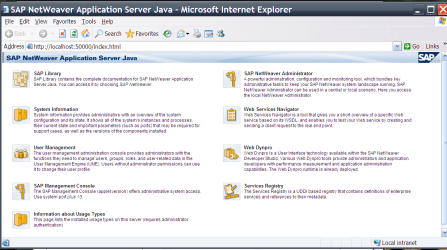
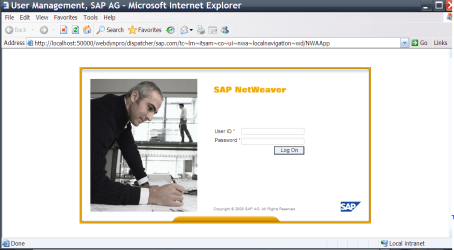
You get the home page and the logon screen -- after that you get the ist screen to chose the application and then -- Bang --whole system freezes with 100% CPU.
The system worked fine with IE6 and IE7.
Since the SAP netweaver developer studio is used on a LOT of desktops where I'm on contract to this is a MAJOR headache
Anybody else using this --- the J2EE server is the SAP netweaver Composition environment release 7.1 (CE 7.1 with EHP at SP1).
Server is currently running on the same workstation so its all being tested locally.
Unfortunately you have to use IE with this server so trying FF is not an option.
Any other SAP JAVA users out there on 7.1 EHP
3 screenshots shown - Home page, Logon screen, then application. After that HANG.
Works perfectly with IE6 / IE7.
Cheers
jimbo
We've found ONE snag that is causing a major headache.
SAP JAVA J2EE server works fine but we need to use the ECLIPSE based IDE (SAP Netweaver Developer Studio) to create and deploy applications to the J2EE server.
Testing this with IE8 on a Virtual W2K3 server causes the whole machine to HANG as soon as you've logged in with 100% CPU. (Host machine is Windows 7 X-64 which also now goes up to 70% CPU on a QUAD system- this app normally runs at around 7% on the HOST CPU).
You get the home page and the logon screen -- after that you get the ist screen to chose the application and then -- Bang --whole system freezes with 100% CPU.
The system worked fine with IE6 and IE7.
Since the SAP netweaver developer studio is used on a LOT of desktops where I'm on contract to this is a MAJOR headache
Anybody else using this --- the J2EE server is the SAP netweaver Composition environment release 7.1 (CE 7.1 with EHP at SP1).
Server is currently running on the same workstation so its all being tested locally.
Unfortunately you have to use IE with this server so trying FF is not an option.
Any other SAP JAVA users out there on 7.1 EHP
3 screenshots shown - Home page, Logon screen, then application. After that HANG.
Works perfectly with IE6 / IE7.
Cheers
jimbo
Attachments

My Computer
- Computer type
- PC/Desktop
- Computer Manufacturer/Model Number
- Custom built, several laptops HP/ASUS
- OS
- Linux CENTOS 7 / various Windows OS'es and servers
- CPU
- Intel i7 Intel i5
- Memory
- 8GB, 16GB
- Graphics Card(s)
- On Motherboard
- Sound Card
- Realtek HD audio
- Monitor(s) Displays
- Apple Cinema display, Samsung LCD
- Screen Resolution
- 1920 X 1080
- Hard Drives
- 4 X 1TB SATA
- Mouse
- Toshiba wireless laser
- Internet Speed
- > 20MB up