IE8 suddenly opening on MSN page

BruceUK

New member
Local time
12:22 PM
Messages
48
Hi everyone,

I'm running Windows 7 Home Premium and IE8. My home page on IE8 is set to "blank". However, on launching IE8 today, it's automatically opening an MSN page, and the toolbar at the top of the screen is blurred.

I haven't made any changes to the IE8 settings, so can anyone throw any light on what is going on here?
 

My Computer My Computer

At a glance

Windows 74GB
Computer Manufacturer/Model Number
HP Pavilion DV7-2215SA
OS
Windows 7
Memory
4GB
Hard Drives
Internal 500GB
External LaCie 160GB
Did you recently install a service pack or hotfix for your operating system that might have invoked a reset of some of IE's settings?

the toolbar at the top of the screen is blurred
Eh? Screenshot?
 

My Computer My Computer

At a glance

Windows 8 Pro x64i7 3820 @ 4.68GHzF3-12800CL9D-8GBXL (32GB)GTX 480 SLI
Computer type
PC/Desktop
OS
Windows 8 Pro x64
CPU
i7 3820 @ 4.68GHz
Motherboard
ASUS Rampage IV Extreme RoG BF3
Memory
F3-12800CL9D-8GBXL (32GB)
Graphics Card(s)
GTX 480 SLI
Sound Card
Auzentech X-Fi HomeTheater HD
Monitor(s) Displays
Sony 32V5500
Screen Resolution
1920 x 1080
Hard Drives
LSI MR9260-4i (RAID10):
Toshiba DT01ACA300 x 4
iaStorA:
OCZ Vertex Enterprise 120GB
ST3500320AS 500GB
Intel 520 Series 120GB
PSU
OCZ ZX 1250W
Case
HAF X
Cooling
H80
Keyboard
Cyborg V.7
Mouse
Razer Lachesis 3.5G 5600dpi
Internet Speed
23296kbps ds / 812kbps us ADSL2+
Browser
Mozilla/5.0 (Windows NT 6.3; Win64; x64; rv:32.0) Gecko/2010
Other Info
AverMedia C127 Game Broadcaster HD
No I haven't done any changes to Windows or to the browser.

I suppose I could download and install IE9. Would that solve the problem? Are there any problems/issues with IE9 that I should be aware of? I've been in hospital for the past 6 months until a few days ago, so I'm a bit out of touch with such things.
 

My Computer My Computer

At a glance

Windows 74GB
Computer Manufacturer/Model Number
HP Pavilion DV7-2215SA
OS
Windows 7
Memory
4GB
Hard Drives
Internal 500GB
External LaCie 160GB
Sometimes software installation packages can change homepages, add toolbars etc.
If the toolbar (which you speaketh of :)) is blurred or greyed out, and you want to change it, I think you can do so in another way.

Go to Control Panel > Network and Internet > Change your Homepage. You should see that MSN page there, change it to whatever. If you leave it blank maybe that will work.
 

My Computer My Computer

At a glance

Microsoft Windows 7 Ultimate 64-bitIntel Core i3-3110M @ 2.40 Ghz Ivy Bridge 22n...4.00 GB Dual-Channel DDR3 @ 665MHz (9-9-9-24)Intel HD Graphics 4000
Computer Manufacturer/Model Number
HP ProBook 4540s
OS
Microsoft Windows 7 Ultimate 64-bit
CPU
Intel Core i3-3110M @ 2.40 Ghz Ivy Bridge 22nm Technology
Motherboard
Hewlett-Packard 17F6 (U3E1)
Memory
4.00 GB Dual-Channel DDR3 @ 665MHz (9-9-9-24)
Graphics Card(s)
Intel HD Graphics 4000
Sound Card
IDT High Definition Audio CODEC
Monitor(s) Displays
Generic PnP Monitor
Screen Resolution
1366x768@60Hz
Hard Drives
466GB Hitachi HTS727550A9E364 (SATA)
Keyboard
Standard PS/2 Keyboard Fixed
Mouse
Dell HID-compliant mouse
Internet Speed
3 Mbs/s Down, 1Mbs/s Up.
Other Info
Bought by Laptop on 24 December 2012, after making sure the world wasn't going to end.
This is getting stranger. When I launched the browser today, it asked me if I wanted to upgrade to IE9. As I'd been thinking about going this anyway, I told it to go ahead, but nothing happened. When I did a help|about, it indicated that I was already running IE9!

On checking the list of installed programs in Control Panel, there is no version of IE listed at all! Is that as it should be?

As far as the browser window is concerned, I've set up the toolbars I want and reset the home page, but I'm still seeing a blurred version of the icons toolbar behind the current URL bar and the open tabs bar. I installed Firefox but this strange blurred icons bar is also visible on the Firefox window as well.

So I'm thoroughly confused. Any further thoughts would be welcomed!
 

My Computer My Computer

At a glance

Windows 74GB
Computer Manufacturer/Model Number
HP Pavilion DV7-2215SA
OS
Windows 7
Memory
4GB
Hard Drives
Internal 500GB
External LaCie 160GB
On checking the list of installed programs in Control Panel, there is no version of IE listed at all! Is that as it should be?

Yes, that is how it should be.

As far as the browser window is concerned, I've set up the toolbars I want and reset the home page, but I'm still seeing a blurred version of the icons toolbar behind the current URL bar and the open tabs bar. I installed Firefox but this strange blurred icons bar is also visible on the Firefox window as well.

Please provide an image of that toolbar. To take a screenshot, press the print screen key on your keyboard, this will save the image in your clipboard.
 

My Computer My Computer

At a glance

Microsoft Windows 7 Ultimate 64-bitIntel Core i3-3110M @ 2.40 Ghz Ivy Bridge 22n...4.00 GB Dual-Channel DDR3 @ 665MHz (9-9-9-24)Intel HD Graphics 4000
Computer Manufacturer/Model Number
HP ProBook 4540s
OS
Microsoft Windows 7 Ultimate 64-bit
CPU
Intel Core i3-3110M @ 2.40 Ghz Ivy Bridge 22nm Technology
Motherboard
Hewlett-Packard 17F6 (U3E1)
Memory
4.00 GB Dual-Channel DDR3 @ 665MHz (9-9-9-24)
Graphics Card(s)
Intel HD Graphics 4000
Sound Card
IDT High Definition Audio CODEC
Monitor(s) Displays
Generic PnP Monitor
Screen Resolution
1366x768@60Hz
Hard Drives
466GB Hitachi HTS727550A9E364 (SATA)
Keyboard
Standard PS/2 Keyboard Fixed
Mouse
Dell HID-compliant mouse
Internet Speed
3 Mbs/s Down, 1Mbs/s Up.
Other Info
Bought by Laptop on 24 December 2012, after making sure the world wasn't going to end.
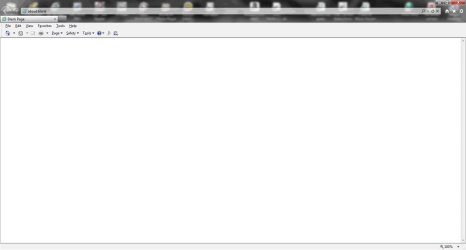
OK, here's an image of the browser window:

BrowserWindow.jpg

I hope someone can make sense of this! Thanks for your help so far.
 

My Computer My Computer

At a glance

Windows 74GB
Computer Manufacturer/Model Number
HP Pavilion DV7-2215SA
OS
Windows 7
Memory
4GB
Hard Drives
Internal 500GB
External LaCie 160GB
Those might be icons...

Those might be Desktop Icons, because I don't have such a problem as you mentioned, but when I align my icons to the top and open IE8 ... the Icons appear almost exactly like yours. Try to alighn your Desktop Icons to the Left Of your Desktop.
 

Attachments

  • Untitled.png
    Untitled.png
    15.5 KB · Views: 2

My Computer My Computer

At a glance

Microsoft Windows 7 Ultimate 64-bitIntel Core i3-3110M @ 2.40 Ghz Ivy Bridge 22n...4.00 GB Dual-Channel DDR3 @ 665MHz (9-9-9-24)Intel HD Graphics 4000
Computer Manufacturer/Model Number
HP ProBook 4540s
OS
Microsoft Windows 7 Ultimate 64-bit
CPU
Intel Core i3-3110M @ 2.40 Ghz Ivy Bridge 22nm Technology
Motherboard
Hewlett-Packard 17F6 (U3E1)
Memory
4.00 GB Dual-Channel DDR3 @ 665MHz (9-9-9-24)
Graphics Card(s)
Intel HD Graphics 4000
Sound Card
IDT High Definition Audio CODEC
Monitor(s) Displays
Generic PnP Monitor
Screen Resolution
1366x768@60Hz
Hard Drives
466GB Hitachi HTS727550A9E364 (SATA)
Keyboard
Standard PS/2 Keyboard Fixed
Mouse
Dell HID-compliant mouse
Internet Speed
3 Mbs/s Down, 1Mbs/s Up.
Other Info
Bought by Laptop on 24 December 2012, after making sure the world wasn't going to end.
I suspect that the icons will not be appearing behind Firefox's Tabs and Address Bar. If so then they are indeed Desktop Icons.
 

My Computer My Computer

At a glance

Microsoft Windows 7 Ultimate 64-bitIntel Core i3-3110M @ 2.40 Ghz Ivy Bridge 22n...4.00 GB Dual-Channel DDR3 @ 665MHz (9-9-9-24)Intel HD Graphics 4000
Computer Manufacturer/Model Number
HP ProBook 4540s
OS
Microsoft Windows 7 Ultimate 64-bit
CPU
Intel Core i3-3110M @ 2.40 Ghz Ivy Bridge 22nm Technology
Motherboard
Hewlett-Packard 17F6 (U3E1)
Memory
4.00 GB Dual-Channel DDR3 @ 665MHz (9-9-9-24)
Graphics Card(s)
Intel HD Graphics 4000
Sound Card
IDT High Definition Audio CODEC
Monitor(s) Displays
Generic PnP Monitor
Screen Resolution
1366x768@60Hz
Hard Drives
466GB Hitachi HTS727550A9E364 (SATA)
Keyboard
Standard PS/2 Keyboard Fixed
Mouse
Dell HID-compliant mouse
Internet Speed
3 Mbs/s Down, 1Mbs/s Up.
Other Info
Bought by Laptop on 24 December 2012, after making sure the world wasn't going to end.
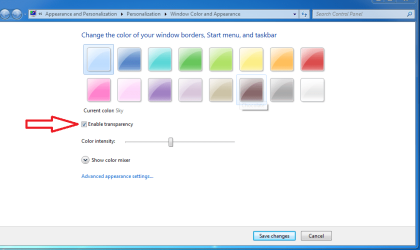
Those icons are showing through because you have transparency enabled. Have you changed you homepage yet?

transparency.PNG
 

My Computer My Computer

At a glance

Windows 7 Ultimate 64 bitAMD Phenom II X4 965 Black EditionGSkill 4 X 2 GB PC 8500XFX Radeon HD 6790 D
Computer Manufacturer/Model Number
Custom built
OS
Windows 7 Ultimate 64 bit
CPU
AMD Phenom II X4 965 Black Edition
Motherboard
Gigabyte GA-MA790X-DS4
Memory
GSkill 4 X 2 GB PC 8500
Graphics Card(s)
XFX Radeon HD 6790 D
Sound Card
On board RealTek HD
Monitor(s) Displays
Dual monitors:Samsung SyncMaster S20B300
Screen Resolution
1600 X 900
Hard Drives
Seagate Barracuda 1TB (primary)
Seagate Barracuda 2 X 320 GB
PSU
Ultra X4 750 watt fully modular
Case
Thermaltake Overseer RX 1 full tower
Cooling
Core-Contact 92 mm CPU Cooler
Keyboard
Logitech G510
Mouse
Razor DeathAdder
Internet Speed
50/5 Mbps UL/DL
Other Info
Optical: Super Muliti DVD burner w/lightscribe, Hauppauge WinTV HVR-1800
Yes you're right - they are desktop icons. I've moved the icons down on the desktop so they no longer appear in the browser window.

What I find a bit strange is the fact that the IE9 (and Firefox) browser window has these "empty" areas at the top where the desktop "shows through". Maybe I'm not remembering correctly, but I don't recall this happening on previous IE versions.

Anyway, many thanks for youir help.
 

My Computer My Computer

At a glance

Windows 74GB
Computer Manufacturer/Model Number
HP Pavilion DV7-2215SA
OS
Windows 7
Memory
4GB
Hard Drives
Internal 500GB
External LaCie 160GB
That would be Aero, and maybe IE7 didn't have Aero. If it bugs you or gets in the way, you could turn it off by Right Clicking the Desktop, Personalize, Windows Color (at the bottom ) and Unchecking "Enable Transparency" ( see bassfisher6522's pic ).
 

My Computer My Computer

At a glance

Microsoft Windows 7 Ultimate 64-bitIntel Core i3-3110M @ 2.40 Ghz Ivy Bridge 22n...4.00 GB Dual-Channel DDR3 @ 665MHz (9-9-9-24)Intel HD Graphics 4000
Computer Manufacturer/Model Number
HP ProBook 4540s
OS
Microsoft Windows 7 Ultimate 64-bit
CPU
Intel Core i3-3110M @ 2.40 Ghz Ivy Bridge 22nm Technology
Motherboard
Hewlett-Packard 17F6 (U3E1)
Memory
4.00 GB Dual-Channel DDR3 @ 665MHz (9-9-9-24)
Graphics Card(s)
Intel HD Graphics 4000
Sound Card
IDT High Definition Audio CODEC
Monitor(s) Displays
Generic PnP Monitor
Screen Resolution
1366x768@60Hz
Hard Drives
466GB Hitachi HTS727550A9E364 (SATA)
Keyboard
Standard PS/2 Keyboard Fixed
Mouse
Dell HID-compliant mouse
Internet Speed
3 Mbs/s Down, 1Mbs/s Up.
Other Info
Bought by Laptop on 24 December 2012, after making sure the world wasn't going to end.
Back
Top