IE9 new tab sites question.

AlexP

Knowledge is power.
Local time
2:23 AM
Messages
53
Location
Romania,Timis
Ok,so,I've recently upgraded to IE9,and the new tab sites are very helpful.
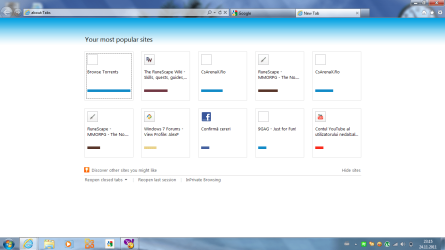
Only one problem,I've deleted google by accident,and now I can't find any way to get it back.
Any suggestions?
Thanks in advance.
P.S.:these are the tabs that I'm talking about.\/\/
 

Attachments
  • Capture.PNG
    Capture.PNG
    52.6 KB · Views: 16
Last edited:

My Computer My Computer

OS
Win 7 Home Premium 64 bit
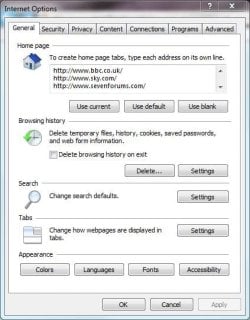
In IE9, click Tools (Alt+X) at the top-right of the screen, then click Internet Options.

Under the Home Page section type in your Google home address on its own line then click OK and restart IE9.

You should now have a Google tab.
 

My Computer My Computer

Computer Manufacturer/Model Number
HP Pavilion Elite 495UK
OS
Windows 7 Ultimate SP1 64-Bit
CPU
Intel Core i7 870 @ 2.93GHz
Motherboard
MSI 2A9C (CPU1)
Memory
8Gb Dual-Channel DDR3 @ 664MHz
Graphics Card(s)
nVidia GeForce GTX 460 1024MB dedicated RAM
Sound Card
Realtek HD Audio
Monitor(s) Displays
HP2310i
Screen Resolution
1920 x 1080
Hard Drives
1x1954GB Hitachi HDS22020ALA 330 (RAID), 1x1954GB Hitachi External for backup and storage
PSU
460W
Case
HP Elite
Cooling
Air cooled
Keyboard
Logitech K750 solar-powered keyboard
Mouse
Logitech Wireless M180 mouse
Internet Speed
2Mb
Other Info
Pure Avanti Flow Internet Radio with iPod Dock, 64Gb iPod, HP USB Speakers, Sony MDR-V500 Headphones, Sony Vaio F-Series Laptop
I don't get it...
Alt+X>>no home page...
 

My Computer My Computer

OS
Win 7 Home Premium 64 bit
Launch Internet Explorer then look at the top-right of the page and highlight the icon that looks like a gearwheel icon and you'll see it says Tools (Alt+X).

Click this icon then click Internet Options at the bottom of the list.

IE.JPG

Click the General tab then type the Google home address on it's own line in the Home Page section then click OK to save the change.

Close IE9 then launch it again and Google should now have it's own tab.
 

My Computer My Computer

Computer Manufacturer/Model Number
HP Pavilion Elite 495UK
OS
Windows 7 Ultimate SP1 64-Bit
CPU
Intel Core i7 870 @ 2.93GHz
Motherboard
MSI 2A9C (CPU1)
Memory
8Gb Dual-Channel DDR3 @ 664MHz
Graphics Card(s)
nVidia GeForce GTX 460 1024MB dedicated RAM
Sound Card
Realtek HD Audio
Monitor(s) Displays
HP2310i
Screen Resolution
1920 x 1080
Hard Drives
1x1954GB Hitachi HDS22020ALA 330 (RAID), 1x1954GB Hitachi External for backup and storage
PSU
460W
Case
HP Elite
Cooling
Air cooled
Keyboard
Logitech K750 solar-powered keyboard
Mouse
Logitech Wireless M180 mouse
Internet Speed
2Mb
Other Info
Pure Avanti Flow Internet Radio with iPod Dock, 64Gb iPod, HP USB Speakers, Sony MDR-V500 Headphones, Sony Vaio F-Series Laptop
I'm talking bout this kind of tabs....
 

Attachments

  • Capture.PNG
    Capture.PNG
    52.6 KB · Views: 10

My Computer My Computer

OS
Win 7 Home Premium 64 bit

My Computer My Computer

Computer type
PC/Desktop
Computer Manufacturer/Model Number
Self Built
OS
Win 10 Pro x64
CPU
Intel I5-2500K @3.3GHz
Motherboard
Asrock P67 Extreme4
Memory
16GB G.Skill Ripjaws X (4x4GB)
Graphics Card(s)
EVGA GeForce 750 Ti SC 2GB
Sound Card
ASUS Xonar DG 5.1 Channels 24-bit 96KHz PCI Interface Sound
Monitor(s) Displays
auria eq2367
Screen Resolution
1920 x 1080
Hard Drives
250GB Samsung 850 EVO SSD
1TB WD Blue
1TB Hitachi
PSU
SeaSonic X 650W 80 Plus Gold
Case
Corsair Obsidian 750D
Cooling
Corsair H60, Three 140mm case fans
Keyboard
Logitech Wireless Keyboard K520
Mouse
Logitech Wireless Mouse M310
Internet Speed
Wave Broadband ~ 100 dn 5 up
Antivirus
Windows Defender, Malwarebytes Premium
Browser
Edge, IE11, Chrome
Other Info
Laptop specs: HP g7-1365dx /
CPU: AMD A6-3420M APU with Radeon(tm) HD Graphics /
RAM: Crucial 8Gb (2x4Gb) /
SSD: Crucial M4-CT128M4SSD2 ATA Device/ FW 000F /
GFX: AMD Radeon HD 6520G /
OS: Windows 10 Pro x64
It still hasn't appeared after 2 weeks....
 

My Computer My Computer

OS
Win 7 Home Premium 64 bit
It still hasn't appeared after 2 weeks....

Strange, if I clean my "tabs", after 2 or 3 visists to any site they appear there again.
 

My Computer My Computer

Computer type
PC/Desktop
Computer Manufacturer/Model Number
My Build
OS
Windows 10 Build 9926
CPU
Core i7 4770k
Motherboard
Asus Z87 - Plus
Memory
32 GB DDR3 @ 1822 MHz
Graphics Card(s)
ATi 280X 3GB 384-Bit @ 1180/6840 MHz
Sound Card
Onboard 8 CH
Monitor(s) Displays
LCD 22" + CRT 17"
Screen Resolution
1920 x 1080 / 1600 x 1200
Hard Drives
SSD: 240 GB
HDD: 750GB (Media) + 2TB (Mass Storage)
PSU
1000W
Case
Self Modded
Cooling
Corsair H60 Triple Fan (Push-Push-Pull)
Keyboard
MS wireless
Mouse
MS wireless
Internet Speed
25M (down) 2M (up)
Antivirus
AVG Internet Security 2015
Browser
IE11 / FF / Chrome
.....
Well,it's not the same for me...
Strage things happen...
Isn't there a way for me to manually set a tab to go to google?
 

My Computer My Computer

OS
Win 7 Home Premium 64 bit

My Computer My Computer

Computer type
PC/Desktop
Computer Manufacturer/Model Number
Self Built
OS
Win 10 Pro x64
CPU
Intel I5-2500K @3.3GHz
Motherboard
Asrock P67 Extreme4
Memory
16GB G.Skill Ripjaws X (4x4GB)
Graphics Card(s)
EVGA GeForce 750 Ti SC 2GB
Sound Card
ASUS Xonar DG 5.1 Channels 24-bit 96KHz PCI Interface Sound
Monitor(s) Displays
auria eq2367
Screen Resolution
1920 x 1080
Hard Drives
250GB Samsung 850 EVO SSD
1TB WD Blue
1TB Hitachi
PSU
SeaSonic X 650W 80 Plus Gold
Case
Corsair Obsidian 750D
Cooling
Corsair H60, Three 140mm case fans
Keyboard
Logitech Wireless Keyboard K520
Mouse
Logitech Wireless Mouse M310
Internet Speed
Wave Broadband ~ 100 dn 5 up
Antivirus
Windows Defender, Malwarebytes Premium
Browser
Edge, IE11, Chrome
Other Info
Laptop specs: HP g7-1365dx /
CPU: AMD A6-3420M APU with Radeon(tm) HD Graphics /
RAM: Crucial 8Gb (2x4Gb) /
SSD: Crucial M4-CT128M4SSD2 ATA Device/ FW 000F /
GFX: AMD Radeon HD 6520G /
OS: Windows 10 Pro x64
Have you tried clicking on "Reopen closed tabs" and following the directions to reopen the closed Google tab?

Have you tried adding Google to "Discover other sites you might like"?

Seeing as this screen is entitled "Your most popular sites" -- have you tried opening and closing the Google home page multiple times, enough that it would qualify to beome one of your "most popular sites"?
 

My Computer My Computer

Computer Manufacturer/Model Number
HP Pavillion dv5t (generation 1)
OS
Vista 64 bit and 32 bit (SP2)
CPU
Intel(R) Core(TM)2 Duo Processor T9400 (2.53 GHz
Memory
4GB DDR2 System Memory (2 Dimm)
Graphics Card(s)
512 MB NVIDIA GeForce 9600M GT
Monitor(s) Displays
15.4" diagonal WSXGA+ High-Definition HP BrightView Widescre
Screen Resolution
1680 x 1050
Hard Drives
320GB 5400RPM SATA Hard Drive with HP ProtectSmart Hard Drive Protection
Keyboard
Built-in HP
Mouse
Built in - Synaptics TouchPad V6.5 on PS/2 Port
Internet Speed
Max
Other Info
~ Intel Next-Gen Wireless-N Mini-card w/Bluetooth ~ Blu-Ray ROM DVD+/-R/RW ~ Integ. HDTV Hybrid Tuner ~ 12 Cell Battery ~ MS Office (Home Premium) 2007 ~
^
yes
no
yes
^^
google is my start tab...I just don't wanna have 10 ie's working...
 

My Computer My Computer

OS
Win 7 Home Premium 64 bit
It still hasn't appeared after 2 weeks....

Sounds like you have http://www.sevenforums.com/tutorials/162675-internet-explorer-delete-browsing-history-exit.html checked.

You can set the new tab to open directly to your home page,

http://www.sevenforums.com/tutorials/162253-internet-explorer-9-new-tab-change-what-page-opens.html

To get it to go directly to Google you would need to set that as your first home page.

^
yes
no
yes
^^
google is my start tab...I just don't wanna have 10 ie's working...

Not sure what you mean by 10 IE's working.

Did you try the tutorials above?
 

My Computer My Computer

Computer type
PC/Desktop
Computer Manufacturer/Model Number
Self Built
OS
Win 10 Pro x64
CPU
Intel I5-2500K @3.3GHz
Motherboard
Asrock P67 Extreme4
Memory
16GB G.Skill Ripjaws X (4x4GB)
Graphics Card(s)
EVGA GeForce 750 Ti SC 2GB
Sound Card
ASUS Xonar DG 5.1 Channels 24-bit 96KHz PCI Interface Sound
Monitor(s) Displays
auria eq2367
Screen Resolution
1920 x 1080
Hard Drives
250GB Samsung 850 EVO SSD
1TB WD Blue
1TB Hitachi
PSU
SeaSonic X 650W 80 Plus Gold
Case
Corsair Obsidian 750D
Cooling
Corsair H60, Three 140mm case fans
Keyboard
Logitech Wireless Keyboard K520
Mouse
Logitech Wireless Mouse M310
Internet Speed
Wave Broadband ~ 100 dn 5 up
Antivirus
Windows Defender, Malwarebytes Premium
Browser
Edge, IE11, Chrome
Other Info
Laptop specs: HP g7-1365dx /
CPU: AMD A6-3420M APU with Radeon(tm) HD Graphics /
RAM: Crucial 8Gb (2x4Gb) /
SSD: Crucial M4-CT128M4SSD2 ATA Device/ FW 000F /
GFX: AMD Radeon HD 6520G /
OS: Windows 10 Pro x64
I tried them all,as I said.
And,I alredy have google as a home page...By 10 IE's working,I mean that if I make google my homepage,I still need to open an explorer each time i wanna visit it,which is just too troublesome,I just wanna make it appear in the new tab section...
 

My Computer My Computer

OS
Win 7 Home Premium 64 bit
.....

Isn't there a way for me to manually set a tab to go to google?

http://www.sevenforums.com/tutorials/162253-internet-explorer-9-new-tab-change-what-page-opens.html


I tried them all,as I said.

If you had said that, I wouldn't need to ask. "yes, no, yes" isn't much help.

What happened after you tried the tutorial above?

And,I alredy have google as a home page...By 10 IE's working,I mean that if I make google my homepage..

So, it is your homepage? Or "if" you make it your homepage?

I still need to open an explorer each time i wanna visit it,which is just too troublesome

Isn't that the purpose of Tabbed browsing?
 

My Computer My Computer

Computer type
PC/Desktop
Computer Manufacturer/Model Number
Self Built
OS
Win 10 Pro x64
CPU
Intel I5-2500K @3.3GHz
Motherboard
Asrock P67 Extreme4
Memory
16GB G.Skill Ripjaws X (4x4GB)
Graphics Card(s)
EVGA GeForce 750 Ti SC 2GB
Sound Card
ASUS Xonar DG 5.1 Channels 24-bit 96KHz PCI Interface Sound
Monitor(s) Displays
auria eq2367
Screen Resolution
1920 x 1080
Hard Drives
250GB Samsung 850 EVO SSD
1TB WD Blue
1TB Hitachi
PSU
SeaSonic X 650W 80 Plus Gold
Case
Corsair Obsidian 750D
Cooling
Corsair H60, Three 140mm case fans
Keyboard
Logitech Wireless Keyboard K520
Mouse
Logitech Wireless Mouse M310
Internet Speed
Wave Broadband ~ 100 dn 5 up
Antivirus
Windows Defender, Malwarebytes Premium
Browser
Edge, IE11, Chrome
Other Info
Laptop specs: HP g7-1365dx /
CPU: AMD A6-3420M APU with Radeon(tm) HD Graphics /
RAM: Crucial 8Gb (2x4Gb) /
SSD: Crucial M4-CT128M4SSD2 ATA Device/ FW 000F /
GFX: AMD Radeon HD 6520G /
OS: Windows 10 Pro x64
q.gif
Quote: Originally Posted by AlexP
.....

Isn't there a way for me to manually set a tab to go to google?


Internet Explorer 9 New Tab - Change What Page it Opens To
The tab it opens to is google.
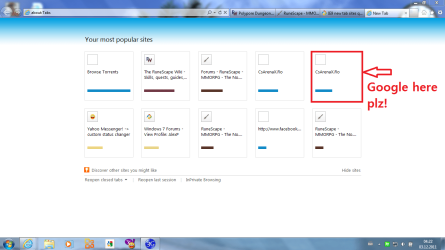
I want google to appear in the new tab area,in one of the 10 squares.
q.gif
Quote: Originally Posted by AlexP
I tried them all,as I said.


If you had said that, I wouldn't need to ask. "yes, no, yes" isn't much help.

What happened after you tried the tutorial above?
It opens a blank page,which is an even bigger annoyance.
Quote:
And,I alredy have google as a home page...By 10 IE's working,I mean that if I make google my homepage..

So, it is your homepage? Or "if" you make it your homepage?
Google is my homepage....But idk how the homepage thing will help me get it in the new tab sites...
Quote:
I still need to open an explorer each time i wanna visit it,which is just too troublesome

Isn't that the purpose of Tabbed browsing?
That's what I wanted to say,but you guys keep giving me the "set homepage to google"...
 

My Computer My Computer

OS
Win 7 Home Premium 64 bit
Just so that we get on the same thing,ima post a pic in which I explain what I want:)
 

Attachments

  • Capturedd.PNG
    Capturedd.PNG
    55.4 KB · Views: 8

My Computer My Computer

OS
Win 7 Home Premium 64 bit

My Computer My Computer

Computer type
PC/Desktop
Computer Manufacturer/Model Number
Self Built
OS
Win 10 Pro x64
CPU
Intel I5-2500K @3.3GHz
Motherboard
Asrock P67 Extreme4
Memory
16GB G.Skill Ripjaws X (4x4GB)
Graphics Card(s)
EVGA GeForce 750 Ti SC 2GB
Sound Card
ASUS Xonar DG 5.1 Channels 24-bit 96KHz PCI Interface Sound
Monitor(s) Displays
auria eq2367
Screen Resolution
1920 x 1080
Hard Drives
250GB Samsung 850 EVO SSD
1TB WD Blue
1TB Hitachi
PSU
SeaSonic X 650W 80 Plus Gold
Case
Corsair Obsidian 750D
Cooling
Corsair H60, Three 140mm case fans
Keyboard
Logitech Wireless Keyboard K520
Mouse
Logitech Wireless Mouse M310
Internet Speed
Wave Broadband ~ 100 dn 5 up
Antivirus
Windows Defender, Malwarebytes Premium
Browser
Edge, IE11, Chrome
Other Info
Laptop specs: HP g7-1365dx /
CPU: AMD A6-3420M APU with Radeon(tm) HD Graphics /
RAM: Crucial 8Gb (2x4Gb) /
SSD: Crucial M4-CT128M4SSD2 ATA Device/ FW 000F /
GFX: AMD Radeon HD 6520G /
OS: Windows 10 Pro x64
  • Like
Reactions: JMH
Back
Top