Hello
I have lenovo B560 laptop windows 7 ultimate 32bit.
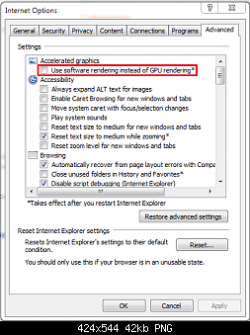
intalled IE9 today and there is a problem
I can not see any web sites
it seems web site is there because moving mouse over it.. mouse cursor changes for links etc. but i can see only blank white.. same problem with about window.
IE8 worked fine.
tried removing and reintalling IE9 still same problem.
intalled IE9 on other pc no problem.
EDIT:
It seems to be problem with intel HD + Nvidia geforce 310M graphics (nvidia optimus)
is it okay to update driver from nvidia web site? because some sources say optimus will stop working if you don't use manufacturer drivers
I have lenovo B560 laptop windows 7 ultimate 32bit.
intalled IE9 today and there is a problem
I can not see any web sites
it seems web site is there because moving mouse over it.. mouse cursor changes for links etc. but i can see only blank white.. same problem with about window.
IE8 worked fine.
tried removing and reintalling IE9 still same problem.
intalled IE9 on other pc no problem.
EDIT:
It seems to be problem with intel HD + Nvidia geforce 310M graphics (nvidia optimus)
is it okay to update driver from nvidia web site? because some sources say optimus will stop working if you don't use manufacturer drivers
My Computer
- Computer type
- PC/Desktop
- Computer Manufacturer/Model Number
- Self Built PC
- OS
- Windows 7 pro 64bit. (SP1)
- CPU
- Intel core I5 2400
- Motherboard
- Gigabyte H61
- Memory
- 8GB DDR3 Kingston
- Graphics Card(s)
- Gigabyte GF GTX650OC
- Sound Card
- Realtek HD audio
- Monitor(s) Displays
- LCD 20"
- Screen Resolution
- 1600x900
- Hard Drives
- INTEL SSD 320 80GB +Seagate 7200.12 1TBx3
- PSU
- Coolermaster RX450W
- Case
- Coolermaster atx case
- Cooling
- stock cooler
- Keyboard
- logitech
- Mouse
- logitech
- Internet Speed
- FTTD 100mbps