IE9 Problems happening over simple actions

BinkerNate

New member
Power User
VIP
Local time
7:31 AM
Messages
316
I'm getting furious over my IE9; recently, it's been shutting itself down and reopening up tabs (and after 2-3 times on the same site, it doesn't do it anymore) when I do things that are simple. I can't save any sites on my favorites without it happening, or I can't minimize my sites to use other folders or my desktop without fearing that it happen again when I go back to them; and just now, it happens when I was about to delete e-mails on Yahoo (not when I delete them from Google). Looked at troubleshooting, and I tried deleting history, and temp. internet files, and it still does this; and there isn't any updates. I'm running out of ideas; any suggestions or answers to what's going on?

P.S. I'm using Firefox to post this; should I just forget about IE and just stay on Firefox instead?
 

My Computer My Computer

Computer Manufacturer/Model Number
Gateway SX2802-07
OS
Windows 7
CPU
Intel Pentium E5300
Motherboard
WG43M
Graphics Card(s)
Intel(R) G45/G43 Express Chipset
Sound Card
Realtek High Definition Audio
Monitor(s) Displays
Acer S232HL
Keyboard
Standard PS/2
Mouse
HID-Compliant
I noticed that when I drag/drop a URL from IE9 to the desktop, it closes the IE9 window that I had opened and re-opens it (most annoying). The reason why I mentions that is: adding things to favorites (or the favorites bar) is adding a file to the hard drive (just like dragging it to the desktop). It should not do what you describe when you add stuff to the favorites areas, but I'm wondering if your antivirus tool has changed something on you. What AV tool do you use?

Or maybe this is happening because of some malware. try an offline scan with WDO:
What is Windows Defender Offline?

And while I'm at it - uninstall all versions of Java that you might have - see if you can live without it.

I tested deleting e-mails on yahoo and I did not see the issue that you mentioned... so you might also want to work thru any plugins that might be loaded. Disable them and see if the issue persists.

As for forgetting about IE - you can do that, but I would sure want to know why this is happening just to know that my system was not infected. Malware and barfed plugins can cause all sorts of unexpected behavior.
 

My Computer My Computer

Computer type
Laptop
Computer Manufacturer/Model Number
Employer provided Dell Latitude
OS
W7 Pro SP1 64bit
CPU
i7
Memory
8GB
Graphics Card(s)
Intel HD Graphics
Hard Drives
crappy SSD
Antivirus
Employer mandated Symantec Endpoint Protection
Browser
Pale Moon 64bit, IE11 64bit & Chrome 64bit
I have MSE, Malwarebytes, and SUPERAntispyware; all of which say I'm clean (with SUPERAnti removing a number of adware). And I got rid of java a while back, and no problems.
 

My Computer My Computer

Computer Manufacturer/Model Number
Gateway SX2802-07
OS
Windows 7
CPU
Intel Pentium E5300
Motherboard
WG43M
Graphics Card(s)
Intel(R) G45/G43 Express Chipset
Sound Card
Realtek High Definition Audio
Monitor(s) Displays
Acer S232HL
Keyboard
Standard PS/2
Mouse
HID-Compliant
What IE addins do you have installed?.

Have you tried reseting internet explorer?.

In IE: Go to: Tools, Internet Options, Advanced tab, at the bottom Select Reset.
Dont worry, you wont loose your favorites.
You will loose stored passwords, and the home page will be back on msn.
 

My Computer My Computer

Computer Manufacturer/Model Number
Cooler Master
OS
Windows 7 Home Premium 64 Bit
CPU
Core I7 1155 3.4GHZ
Memory
8GB DDR 1600
Hard Drives
64 GB SSD - OS
1TB - DATA
PSU
340 Watt Corsair
Case
Cooler Master
Cooling
Cooler Master
My addons are Adobe Flash, Adobe PDF, and Norton Safe Web Lite. Windows Live and Writer are disabled.

I'm going to reset it after work tonight. So expect an update...in the midde of night EST (lol).

UPDATE: Okay, I reset IE. And...the problem still exists. And now, I just noticed that the message also pops up when I want to watch on yt in full screen (???).
 
Last edited:

My Computer My Computer

Computer Manufacturer/Model Number
Gateway SX2802-07
OS
Windows 7
CPU
Intel Pentium E5300
Motherboard
WG43M
Graphics Card(s)
Intel(R) G45/G43 Express Chipset
Sound Card
Realtek High Definition Audio
Monitor(s) Displays
Acer S232HL
Keyboard
Standard PS/2
Mouse
HID-Compliant
I have MSE, Malwarebytes, and SUPERAntispyware; all of which say I'm clean (with SUPERAnti removing a number of adware). And I got rid of java a while back, and no problems.
I'm not saying that you are infected - but some infections load before the OS and thus hide from those types of scans. That is why there are so many offline scanners these days.
 

My Computer My Computer

Computer type
Laptop
Computer Manufacturer/Model Number
Employer provided Dell Latitude
OS
W7 Pro SP1 64bit
CPU
i7
Memory
8GB
Graphics Card(s)
Intel HD Graphics
Hard Drives
crappy SSD
Antivirus
Employer mandated Symantec Endpoint Protection
Browser
Pale Moon 64bit, IE11 64bit & Chrome 64bit
My addons are Adobe Flash, Adobe PDF, and Norton Safe Web Lite. Windows Live and Writer are disabled.

I'm going to reset it after work tonight. So expect an update...in the midde of night EST (lol).

UPDATE: Okay, I reset IE. And...the problem still exists. And now, I just noticed that the message also pops up when I want to watch on yt in full screen (???).
Disable all plug ins (especially Norton Safe Web Lite) then test for a while. Select the option to show all plug-ins (not just the ones that are loaded) then please disable everything as a test.
 

My Computer My Computer

Computer type
Laptop
Computer Manufacturer/Model Number
Employer provided Dell Latitude
OS
W7 Pro SP1 64bit
CPU
i7
Memory
8GB
Graphics Card(s)
Intel HD Graphics
Hard Drives
crappy SSD
Antivirus
Employer mandated Symantec Endpoint Protection
Browser
Pale Moon 64bit, IE11 64bit & Chrome 64bit
Just did, and without any of them on, the problems are still the same. I wonder if its IE9 itself. If so, how did that happen? :|
 

My Computer My Computer

Computer Manufacturer/Model Number
Gateway SX2802-07
OS
Windows 7
CPU
Intel Pentium E5300
Motherboard
WG43M
Graphics Card(s)
Intel(R) G45/G43 Express Chipset
Sound Card
Realtek High Definition Audio
Monitor(s) Displays
Acer S232HL
Keyboard
Standard PS/2
Mouse
HID-Compliant

My Computer My Computer

Computer type
Laptop
Computer Manufacturer/Model Number
Employer provided Dell Latitude
OS
W7 Pro SP1 64bit
CPU
i7
Memory
8GB
Graphics Card(s)
Intel HD Graphics
Hard Drives
crappy SSD
Antivirus
Employer mandated Symantec Endpoint Protection
Browser
Pale Moon 64bit, IE11 64bit & Chrome 64bit
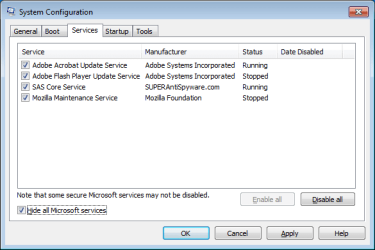
This is weird. The first step I was about to do, where I'am to disable all after hiding Microsoft services: they already are disabled (?). This is the list from there:
SAS Core Service | SUPERAntiSpyware | Running
Adobe Acrobat Update | Adobe Systems | Running
Adobe Flash Update | Adobe Systems | Stopped
Cyberlink Product | Cyberlink | Stopped
Mozilla Maintenance Service | Mozilla | Stopped
Norton Safe Web Lite | Symantec | Running
Cyberlink RichVideo Service | Unknown | Running

Should I click enable all and see what happens, before going to step 1? (or 2, since it seems my computer has been doing that for don't know how long).

EDIT: I don't know if I pointed this out or not, but again if I did, this is affecting IE only; Firefox is all fine.

EDIT2: All videos playing from a site all use flash, right? Because I'm having that full screen problem from yt, but another site I checked I'm fine with. So reviewing: minimizing IE (with two+ tabs mostly) and doing something in a folder from my computer, then going back to IE causes it to shut down and perform a website restore 1-2 times before failing; adding a site to my favorites does the same thing, as does watching a video from yt in full screen, and deleting e-mails from yahoo.
 
Last edited:

My Computer My Computer

Computer Manufacturer/Model Number
Gateway SX2802-07
OS
Windows 7
CPU
Intel Pentium E5300
Motherboard
WG43M
Graphics Card(s)
Intel(R) G45/G43 Express Chipset
Sound Card
Realtek High Definition Audio
Monitor(s) Displays
Acer S232HL
Keyboard
Standard PS/2
Mouse
HID-Compliant
This is weird. The first step I was about to do, where I'am to disable all after hiding Microsoft services: they already are disabled (?). This is the list from there:
SAS Core Service | SUPERAntiSpyware | Running
Adobe Acrobat Update | Adobe Systems | Running
Adobe Flash Update | Adobe Systems | Stopped
Cyberlink Product | Cyberlink | Stopped
Mozilla Maintenance Service | Mozilla | Stopped
Norton Safe Web Lite | Symantec | Running
Cyberlink RichVideo Service | Unknown | Running
~~~~~~~
Can you please post a screenshot of what you are seeing?

msconfig.png

I'm not sure how...
SAS Core Service
Adobe Acrobat Update
Norton Safe Web Lite and
Cyberlink RichVideo Service
...could be running and yet disabled.
 

My Computer My Computer

Computer type
Laptop
Computer Manufacturer/Model Number
Employer provided Dell Latitude
OS
W7 Pro SP1 64bit
CPU
i7
Memory
8GB
Graphics Card(s)
Intel HD Graphics
Hard Drives
crappy SSD
Antivirus
Employer mandated Symantec Endpoint Protection
Browser
Pale Moon 64bit, IE11 64bit & Chrome 64bit
Okay, I think I know what might be causing this: ieframe.dll The filename popped up when I accidently mininiazed my IE and obviously it was with two tabs and the website restore encountered an error, like it has been. But for the first time, one tab said ieframe.dll, so I googled it. It can cause problems if its corrupted or missing, and one problem it can do is errors. Now, I don't want to go off and say that I found the problem, but it feels like it did, but I need confirmation before I do anything (which seems that the only option is reinstalling IE, as restarting my computer didn't do it nor is there an update for IE (unless there's another option(s) people here could tell me)). So, what do you think?

EDIT: I just found out that if I right click and hit "restore" when I want to max the IE from my startbar, the error doesn't happen. Same goes for favorites.
 
Last edited:

My Computer My Computer

Computer Manufacturer/Model Number
Gateway SX2802-07
OS
Windows 7
CPU
Intel Pentium E5300
Motherboard
WG43M
Graphics Card(s)
Intel(R) G45/G43 Express Chipset
Sound Card
Realtek High Definition Audio
Monitor(s) Displays
Acer S232HL
Keyboard
Standard PS/2
Mouse
HID-Compliant

My Computer My Computer

Computer type
Laptop
Computer Manufacturer/Model Number
Employer provided Dell Latitude
OS
W7 Pro SP1 64bit
CPU
i7
Memory
8GB
Graphics Card(s)
Intel HD Graphics
Hard Drives
crappy SSD
Antivirus
Employer mandated Symantec Endpoint Protection
Browser
Pale Moon 64bit, IE11 64bit & Chrome 64bit
Okay, well I did file checker for the scan and the corrupt files (the two scans), and it found nothing. Plus, I just realized that my favorites are back to normal (?) and I see that it's only if I click the tab that's yt from my startbar, it leads to that IE shut down/website restore errors, but if I click the tab that isn't yt, it's normal (??). Huh? Again, what?
 

My Computer My Computer

Computer Manufacturer/Model Number
Gateway SX2802-07
OS
Windows 7
CPU
Intel Pentium E5300
Motherboard
WG43M
Graphics Card(s)
Intel(R) G45/G43 Express Chipset
Sound Card
Realtek High Definition Audio
Monitor(s) Displays
Acer S232HL
Keyboard
Standard PS/2
Mouse
HID-Compliant
...it's only if I click the tab that's yt from my startbar,....
I'm not sure that I follow you. Are you talking about the list of items that you can select from when you hover over (or click on) the pinned shortcut for IE on the task bar? Are you using Aero and selecting from preview panes?
 
Last edited:

My Computer My Computer

Computer type
Laptop
Computer Manufacturer/Model Number
Employer provided Dell Latitude
OS
W7 Pro SP1 64bit
CPU
i7
Memory
8GB
Graphics Card(s)
Intel HD Graphics
Hard Drives
crappy SSD
Antivirus
Employer mandated Symantec Endpoint Protection
Browser
Pale Moon 64bit, IE11 64bit & Chrome 64bit
Well, here's how I can explain it: when I have two tabs with websites in it, and one of them is yt, I can't judt click the IE logo from my startbar. I have to roll my mouse over, see the mini windows that fade in that "preview" the sites, right click the one I want to go and click restore. Now, just one tab that even has yt on it, I'm fine by clicking the logo like normal.
 

My Computer My Computer

Computer Manufacturer/Model Number
Gateway SX2802-07
OS
Windows 7
CPU
Intel Pentium E5300
Motherboard
WG43M
Graphics Card(s)
Intel(R) G45/G43 Express Chipset
Sound Card
Realtek High Definition Audio
Monitor(s) Displays
Acer S232HL
Keyboard
Standard PS/2
Mouse
HID-Compliant
Well, here's how I can explain it: when I have two tabs with websites in it, and one of them is yt, I can't judt click the IE logo from my startbar. I have to roll my mouse over, see the mini windows that fade in that "preview" the sites, right click the one I want to go and click restore. Now, just one tab that even has yt on it, I'm fine by clicking the logo like normal.


Thats how its ment to be.

I don't understand whats wrong?.
 

My Computer My Computer

Computer Manufacturer/Model Number
Cooler Master
OS
Windows 7 Home Premium 64 Bit
CPU
Core I7 1155 3.4GHZ
Memory
8GB DDR 1600
Hard Drives
64 GB SSD - OS
1TB - DATA
PSU
340 Watt Corsair
Case
Cooler Master
Cooling
Cooler Master
Are you saying that, on the task bar you want to see each Internet explorer tab? So you can switch between web pages?. Easily?.
 

My Computer My Computer

Computer Manufacturer/Model Number
Cooler Master
OS
Windows 7 Home Premium 64 Bit
CPU
Core I7 1155 3.4GHZ
Memory
8GB DDR 1600
Hard Drives
64 GB SSD - OS
1TB - DATA
PSU
340 Watt Corsair
Case
Cooler Master
Cooling
Cooler Master
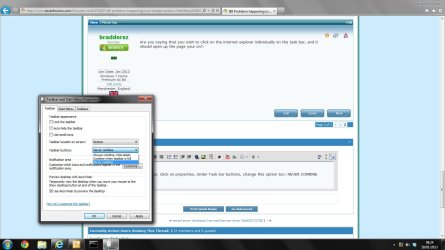
Try this:

Right click on the task bar, Click on properties, Under Task bar buttons, change this option too: NEVER COMBINE

Untitled.jpg

Then Open more then 1 web page. Check the task bar?

If you open another TAB in IE, it will always "group" it on the task bar. You will need to open a new Explorer window each time for it to display sepertely in the Task Bar, Unless you change IE settings to always open new TAB in a new window.
 

My Computer My Computer

Computer Manufacturer/Model Number
Cooler Master
OS
Windows 7 Home Premium 64 Bit
CPU
Core I7 1155 3.4GHZ
Memory
8GB DDR 1600
Hard Drives
64 GB SSD - OS
1TB - DATA
PSU
340 Watt Corsair
Case
Cooler Master
Cooling
Cooler Master
Well, here's how I can explain it: when I have two tabs with websites in it, and one of them is yt, I can't judt click the IE logo from my startbar. I have to roll my mouse over, see the mini windows that fade in that "preview" the sites, right click the one I want to go and click restore. Now, just one tab that even has yt on it, I'm fine by clicking the logo like normal.


Thats how its ment to be.

I don't understand whats wrong?.
The OP is not saying that anything is wrong with those steps --- If I understand correctly, IE crashes/recovers if the preview being restored happens to be a YouTube page.
 

My Computer My Computer

Computer type
Laptop
Computer Manufacturer/Model Number
Employer provided Dell Latitude
OS
W7 Pro SP1 64bit
CPU
i7
Memory
8GB
Graphics Card(s)
Intel HD Graphics
Hard Drives
crappy SSD
Antivirus
Employer mandated Symantec Endpoint Protection
Browser
Pale Moon 64bit, IE11 64bit & Chrome 64bit
Back
Top