Ok, its my first attempt at hosting a website myself. So please don't laugh.
I've purchased a domain through GoDaddy, easy enough. I pointed it to my router's IP address, which is static. That all seemed scarily easy, I can't believe I made it through that process without a fault.
Next I fired up my Windows 7 Ultimate box and installed all the IIS stuff I could.
I then went to my Windows Firewall and created the port 80 inbound exception.
After opening IIS Manager, I deleted the default website and created "My First Website". I wrote a simple HTML file in the C:\inetpub\wwwroot. I went to the ASP settings and set True the Enable Parent Paths flag. Ok so everything seems fine to me so far. I had to change the order of precedence of the defaulting page also to account for the HTML file I wanted to see.
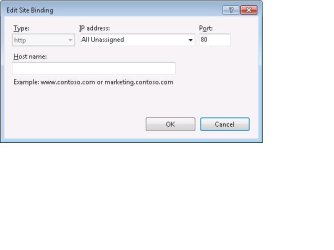
When I created My First Website, I had originally binded the IP address of the computer that I was on to it. This gave me 404's when I typed localhost into my browser, so I binded all available IP's (asterisk) and that worked. Anyways...
So now I can type localhost on the hosting computer and that gives me my test HTML page. OK, well I can't seem to access that test HTML page from another computer my my LAN? How would I go about doing that? I thought I would just type the IP into the web browser?
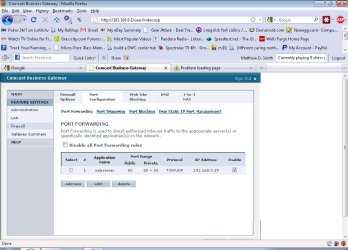
I have one more problem, I think. I have port 80 forwarded on my router to the IP address of the hosting computer. But I'm not sure if it's working...every time I type in the public (static) IP address of the router, the page doesn't respond. If I disable the port forwarding rule, I get the the administrator login page. So I'm not sure if it's having a problem forwarding port 80 to my hosting computer or if my hosting computer is having problems hosting on port 80. Any advice is help is appreciated.
I've purchased a domain through GoDaddy, easy enough. I pointed it to my router's IP address, which is static. That all seemed scarily easy, I can't believe I made it through that process without a fault.
Next I fired up my Windows 7 Ultimate box and installed all the IIS stuff I could.
I then went to my Windows Firewall and created the port 80 inbound exception.
After opening IIS Manager, I deleted the default website and created "My First Website". I wrote a simple HTML file in the C:\inetpub\wwwroot. I went to the ASP settings and set True the Enable Parent Paths flag. Ok so everything seems fine to me so far. I had to change the order of precedence of the defaulting page also to account for the HTML file I wanted to see.
When I created My First Website, I had originally binded the IP address of the computer that I was on to it. This gave me 404's when I typed localhost into my browser, so I binded all available IP's (asterisk) and that worked. Anyways...
So now I can type localhost on the hosting computer and that gives me my test HTML page. OK, well I can't seem to access that test HTML page from another computer my my LAN? How would I go about doing that? I thought I would just type the IP into the web browser?
I have one more problem, I think. I have port 80 forwarded on my router to the IP address of the hosting computer. But I'm not sure if it's working...every time I type in the public (static) IP address of the router, the page doesn't respond. If I disable the port forwarding rule, I get the the administrator login page. So I'm not sure if it's having a problem forwarding port 80 to my hosting computer or if my hosting computer is having problems hosting on port 80. Any advice is help is appreciated.
My Computer
At a glance
Windows 7 Ultimate x32
- OS
- Windows 7 Ultimate x32