IIS 7: receiving 404 on http://localhost (Screen shots too) plz help

smithmds

New member
Local time
9:24 PM
Messages
11
I've obviously installed all of the IIS features, and not that it matters to this post but I've also already put the port 80 exception on the Windows Firewall.

I've created a simple index.html page in C:\inetpub\wwwroot, and I have also shown a screen shot of my advanced settings:
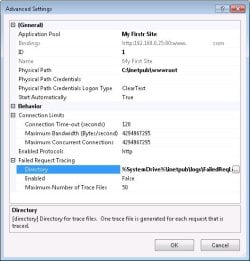
IIS Advance Settings.jpg

In Firefox I can't browse to my localhost and I receive a 404, I can't even use the IP of the computer I'm using.

I don't understand what's up here...this shouldn't be that difficult. I feel like I'm missing something obvious...I'm not a webmaster obviously, just trying to learn a new skill. Any help is appreciated!
 

My Computer My Computer

OS
Windows 7 Ultimate x32
UPDATE:

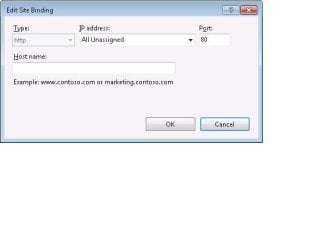
I had to bind the site to all available IP addresses. I don't know why though, can anybody answer that? I tried using the IP address of the local computer and that's what was returning the 404.
 

My Computer My Computer

OS
Windows 7 Ultimate x32
Another question, I want to visit the test site I setup from another computer on the LAN. I setup the inbound port 80 exception on the website hosting computer's firewall. I still can't seem to access the site.... I just type the IP address of the website hosting computer into a web browser of another computer on my LAN and it should work, right, or what am I missing?
 

My Computer My Computer

OS
Windows 7 Ultimate x32
smithmds can you post a screen shot of the configuration on the hosting pc?
 

My Computer My Computer

Computer Manufacturer/Model Number
SMN-Productions
OS
Windows 7 x86/x64, Server 2008r2, Web Server 2008
CPU
i7 v2 3930K Steping stone 2
Motherboard
ASUS Rampage IV Extreme
Memory
G.SKILL Ripjaws Z Series 32GB
Graphics Card(s)
AMD HD 5770
Monitor(s) Displays
Acer 21" and Samsung 20"
Hard Drives
Patriot Pyro 80GB
PSU
1000 Watt
Case
HAF-X
Cooling
4 Fans
Keyboard
Black Widow Ultimate
smithmds can you post a screen shot of the configuration on the hosting pc?


You want more than the advanced settings picture in my original post, sure no problem but can you be more specific please?
 

My Computer My Computer

OS
Windows 7 Ultimate x32
Here's the Edit Site Bindings settings screen shot...
 

Attachments

  • Edit Site Bindings.jpg
    Edit Site Bindings.jpg
    14.2 KB · Views: 145

My Computer My Computer

OS
Windows 7 Ultimate x32
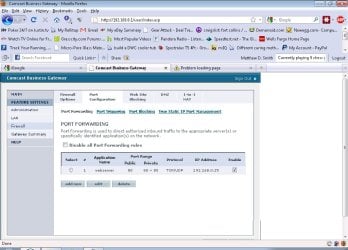
port forwarding screen shot
 

Attachments

  • Port Forwarding.jpg
    Port Forwarding.jpg
    86.8 KB · Views: 341

My Computer My Computer

OS
Windows 7 Ultimate x32
I guess i'll close the case on this one...I can now use a web browser and IP address to visit the test website from another computer on the LAN. I'm not sure yet how or why it works...hmmm
 

My Computer My Computer

OS
Windows 7 Ultimate x32
I have personally found IIS to be buggy.
 

My Computer My Computer

Computer Manufacturer/Model Number
SMN-Productions
OS
Windows 7 x86/x64, Server 2008r2, Web Server 2008
CPU
i7 v2 3930K Steping stone 2
Motherboard
ASUS Rampage IV Extreme
Memory
G.SKILL Ripjaws Z Series 32GB
Graphics Card(s)
AMD HD 5770
Monitor(s) Displays
Acer 21" and Samsung 20"
Hard Drives
Patriot Pyro 80GB
PSU
1000 Watt
Case
HAF-X
Cooling
4 Fans
Keyboard
Black Widow Ultimate
Well thanks for being the first to respond +rep, I think I got it all figured out now. Cheers =)
 

My Computer My Computer

OS
Windows 7 Ultimate x32
Back
Top