Ik new here , but I need help

walshy11

New member
Local time
4:42 PM
Messages
20
I need help to make this thing go back to normal

screen shot

nvv19i.jpg


before I could move windows(opend apps/explorer etc.) around and still see them now, when I move windows around it goes see thru kinda and shows a outline of where the window is.

Please help me put it back to normal
 
Last edited by a moderator:

My Computer My Computer

Computer Manufacturer/Model Number
Home Build
OS
WIN7 X32 ULTAMATE RTM V7600
CPU
AMD ATHLON X3 445
Motherboard
ECS GF8100VM-M5
Memory
4GB SAMSUNG DDR2 800 MHZ
Graphics Card(s)
GEFORCE GT240 + ATI HD5770
Sound Card
AUDIGY 2 ZS
Monitor(s) Displays
NOT SURE
Hard Drives
320GB SATA2
PSU
580 WATT CORSAIR
Case
CUSTOM
Cooling
Air
Internet Speed
1 MBIT ahahah (really)
Far from expert here.
But you need to turn some things off, stop running so much in background, and get more ram, try using Readyboost.

Try using performance techniques. Turn off Aero peek, use old styles windows. Reduce some running processes.
Did I say you need more ram?
Look at the forum tutorials, good stuff there.

You do not really say what your issue is, the pic shows a seriously maxed out system IMO.
 

My Computer My Computer

Computer Manufacturer/Model Number
DIY #3, #2
OS
W7 Ulti/64, XP Pro/32
CPU
INTEL i7 920 DO, Core2 Duo 6400
Motherboard
GIGABYTE EX58 UD3R-SLI, EP45-UD3R
Memory
KINGSTON DDR3 1333MHz, CORSAIR DDR2 800MHz
Graphics Card(s)
EVGA GTX 260 x2, 8800 GTX
Sound Card
REALTEK HD onboard, ditto
Monitor(s) Displays
SONY 40" BRAVIA LCD
Screen Resolution
1360 X 768
Hard Drives
OCZ VERTEX/RAID0 -3, Vertex 30GB
PSU
COOLERMASTER 900W, ENERMAX 850W
Case
COOLERMASTER HAF 932 x2
Cooling
stock
Keyboard
MS
Mouse
MS
Internet Speed
ADSL 3MB/768KBs
Other Info
amateur enthusiast
Try to disabe processes from background, upgrading to more RAM could help...
 

My Computer My Computer

Computer type
PC/Desktop
Computer Manufacturer/Model Number
Assembled Desktop PC
OS
Microsoft Windows 7 Home Premium SP1 64-bit Build 7600
CPU
AMD Athlon 64 X2 5200+ Dual Core CPU @ 2.7 Ghz (Brisbane)
Motherboard
PCChips A13G+ v3.0
Memory
2x2 GB DDR2 PC-5300 (667 Mhz) Kingston ValueRAM
Graphics Card(s)
XFX ATI Radeon HD 4350 GPU (512 MB + 512 MB HM)
Sound Card
Realtek High Definition Audio Driver ALC660 @ MCP61S
Monitor(s) Displays
HP S2031 20" LED HD Widescreen Display Monitor
Screen Resolution
1600 x 900 px
Hard Drives
Maxtor Diamond Max 10 (160 GB, 7200 RPM, SATA-II Hard Disk)
Western Digital Scorpion Blue (250 GB, 5400 RPM, SATA-II External Hard Disk - Personal Data)
Toshiba MQ01ABD050 (500 GB, 5400 RPM, SATA-II External Hard Disk - Software & ISOs)
PSU
Pixxo Transformer 850W 80+ Certification PSU
Case
Compaq 5BW353 Case
Cooling
Many solutions, see other info...
Keyboard
Green Leaf (Mitzu) Standard Keyboard
Mouse
Microsoft USB Lasser Pointing Device
Internet Speed
10 MB
Antivirus
Avast Antivirus Free
Browser
Firefox, Chrome, Internet Explorer
Other Info
Windows Experience Index Result: 3.8 of 7.9.

Cooling solutions:
- AVC @ 2000/5000 RPM Copper Heatpipes (For Athlon 64 X2 6000+ CPU used in an Athlon 64 X2 5200+)
- Rear Fan 80 mm @ 2700 RPM for heat extraction
- Manhatan Chipset Cooler @ 4700/7200 RPM (For nVidia Chipset in MoBo)
- Foxconn @ 2500 RPM (Old Pentium III heatsink fan) in XFX ATI Radeon HD 4350
Umm no, I think you are getting it wrong , a few days ago I could move windows around and while moving them I could see them, now if I drag them it shows a black outline of where it is.

Please help

Its nothing to do with the RAM and stuff, just I think I have chnage something, and dont know what.
 

My Computer My Computer

Computer Manufacturer/Model Number
Home Build
OS
WIN7 X32 ULTAMATE RTM V7600
CPU
AMD ATHLON X3 445
Motherboard
ECS GF8100VM-M5
Memory
4GB SAMSUNG DDR2 800 MHZ
Graphics Card(s)
GEFORCE GT240 + ATI HD5770
Sound Card
AUDIGY 2 ZS
Monitor(s) Displays
NOT SURE
Hard Drives
320GB SATA2
PSU
580 WATT CORSAIR
Case
CUSTOM
Cooling
Air
Internet Speed
1 MBIT ahahah (really)
Ok.. based on the hardware listed in your specs, you shouldn't be having this problem. Window 7 works well even on systems with half the memory and much slower hardware than you have if installed correctly and kept streamlined. So what you should do is hit Ctrl+shift+esc to open task mgr, click on the processes tab, click show processes from all users, and take a screenshot of your running processes. then hit the windows key, type msconfig, click the startup tab and take another screenshot, do the same with device manager and post them all.. It won't take too long to figure out what the problem is.

Also there's an easier way to take screenshots. Just hit shift+prnt scrn then windows key, type mspaint, hit control+v, then save as jpeg
 
no worries, I done it, it was gamebooster, gamebooster set the display so It would used minimal resources.

ty all anyway :D
 

My Computer My Computer

Computer Manufacturer/Model Number
Home Build
OS
WIN7 X32 ULTAMATE RTM V7600
CPU
AMD ATHLON X3 445
Motherboard
ECS GF8100VM-M5
Memory
4GB SAMSUNG DDR2 800 MHZ
Graphics Card(s)
GEFORCE GT240 + ATI HD5770
Sound Card
AUDIGY 2 ZS
Monitor(s) Displays
NOT SURE
Hard Drives
320GB SATA2
PSU
580 WATT CORSAIR
Case
CUSTOM
Cooling
Air
Internet Speed
1 MBIT ahahah (really)
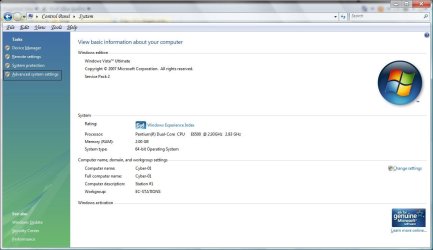
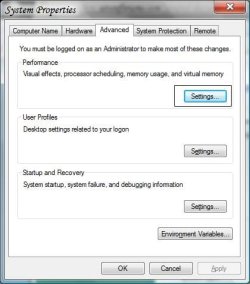
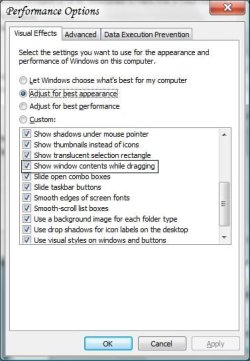
Oh, I know exactly what you're talking about. The way to fix that is to go to the Control Panel, set it to Large Icons view, then click on "System". After that, click on "Advanced System Settings". Then click on the "Advanced" tab and click on "Settings" under "Performance". After that, you can click on "Adjust for best appearance" or at the very least, click on "Show window contents while dragging" to ensure it is checked off and click "OK". If it is already checked, uncheck it, click "Apply", then check it again and click "Apply" again. Close all the windows and that should resolve this issue.

Let us know what happens. Also, I have attached some screenshots of the steps; they are from Vista but the steps are exactly the same.
 

Attachments

  • Step 1.jpg
    Step 1.jpg
    64.6 KB · Views: 5
  • Step 2.jpg
    Step 2.jpg
    27.2 KB · Views: 0
  • Step 3.jpg
    Step 3.jpg
    32.9 KB · Views: 0

My Computer My Computer

OS
Windows 7 Ultimate x64 SP1
CPU
Intel Core i3 530 2.93 Ghz Clarkdale
Motherboard
ASRock P55 PRO/USB3 LGA 1156
Memory
4 GB OCZ DDR3 1600 (PC12800) Low Voltage Desktop Memory
Graphics Card(s)
Nvidia GeForce GTX 550 Ti with 1 GB of RAM
Sound Card
Realtek HD ALC892
Monitor(s) Displays
20'' eMachines E202HDbmd Glare Panel Widescreen
Screen Resolution
1600 x 900
Hard Drives
Western Digital 1 TB Caviar Black Edition (7200 RPM) SATA
Hitachi Deskstar 500 GB (7200 RPM) SATA
Samsung SpinPoint 400 GB (7200 RPM) SATA
PSU
Rosewill Xtreme Series RX750-D-B ATX12V v2.2 & EPS12V (750W)
Case
Cooler Master Centurion 534 RC-534-KKN2-GP Mid-Tower
Cooling
Standard Case Fans and Stock CPU Heatsink
Keyboard
Microsoft Wireless Optical Desktop Elite
Mouse
Microsoft Wireless Optical Desktop Elite
Internet Speed
7.1 Mbps Verizon DSL
also I found out about WIN7 "GodMode"

Its cool.
 

My Computer My Computer

Computer Manufacturer/Model Number
Home Build
OS
WIN7 X32 ULTAMATE RTM V7600
CPU
AMD ATHLON X3 445
Motherboard
ECS GF8100VM-M5
Memory
4GB SAMSUNG DDR2 800 MHZ
Graphics Card(s)
GEFORCE GT240 + ATI HD5770
Sound Card
AUDIGY 2 ZS
Monitor(s) Displays
NOT SURE
Hard Drives
320GB SATA2
PSU
580 WATT CORSAIR
Case
CUSTOM
Cooling
Air
Internet Speed
1 MBIT ahahah (really)
Back
Top