I'm back, with an internet question...

philippo

New member
I had a spot of trouble getting my virtual machine to connect to the internet, though It's finally up and running now with Network Adapter #1 set to "Shared Network (NAT)"

Thing is, I don't want that, I would like to run things as the SECOND bulleted paragraph in the Networking Help files states, shown below:

<Network adapter name> (on host operating system). This option is sometimes referred to as “bridged mode”. It uses a physical network adapter to connect the virtual machine to a physical TCP/IP-based network as a separate computer. The virtual machine appears and operates like a separate physical computer on the network. You use this option by selecting the name of the physical network adapter that is connected to the network you want to use. You can choose from both wired and wireless network adapters.

So how would I do this and what would I need? A new piece of hardware? software?

Thanks for any help, and your safest assumption would be that I know nothing about this...(because that's true)
 

My Computer

Computer Manufacturer/Model Number
Dell Inspiron 530
OS
Windows 7 Ultimate 64 bit
CPU
Intel Quad Core Q6600 @ 2.40 GHz
Memory
3.00 GB RAM
Graphics Card(s)
NVIDIA GeForce 8300 GS DirectX 10
Screen Resolution
1920x1080
Hard Drives
Total size of hard disk(s) 932 GB
Disk partition (C:) 353 GB Free (466 GB Total)
Disk partition (D:) 243 GB Free (466 GB Total)
Internet Speed
f***in' dialup!!
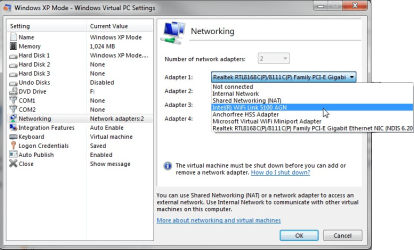
I don't fully understand your question. Why don't you simply change the adapter 1 to that of your host's, LAN or WiFi?

Kari

XPM_NIC1.png
 

My Computer

Computer type
Laptop
Computer Manufacturer/Model Number
HP ENVY 17-1150eg
OS
Windows 10 Pro x64 EN-GB
CPU
1.6 GHz Intel Core i7-720QM Processor
Memory
6 GB
Graphics Card(s)
ATI Mobility Radeon HD 5850 Graphics
Sound Card
Beats sound system with integrated subwoofer
Monitor(s) Displays
17" laptop display, 22" LED and 32" Full HD TV through HDMI
Screen Resolution
1600*900 (1), 1920*1080 (2&3)
Hard Drives
Internal: 2 x 500 GB SATA Hard Disk Drive 7200 rpm
External: 2TB for backups, 3TB USB3 network drive for media
Cooling
As Envy runs a bit warm, I have it on a Cooler Master pad
Keyboard
Logitech diNovo Media Desktop Laser (bluetooth)
Mouse
Logitech Performance Mouse MX
Internet Speed
50/10 Mbps VDSL
Antivirus
Windows Defender 4.3.9431.0
Browser
Maxthon 3.5.2., IE11
Maybe it would be easier if I told you what I was trying to achieve: I would like to access the internet with my virtual machine using a different IP address than the one my host computer is using...

Possible?
 

My Computer

Computer Manufacturer/Model Number
Dell Inspiron 530
OS
Windows 7 Ultimate 64 bit
CPU
Intel Quad Core Q6600 @ 2.40 GHz
Memory
3.00 GB RAM
Graphics Card(s)
NVIDIA GeForce 8300 GS DirectX 10
Screen Resolution
1920x1080
Hard Drives
Total size of hard disk(s) 932 GB
Disk partition (C:) 353 GB Free (466 GB Total)
Disk partition (D:) 243 GB Free (466 GB Total)
Internet Speed
f***in' dialup!!
Simply, it is not possible.


Exceptions:
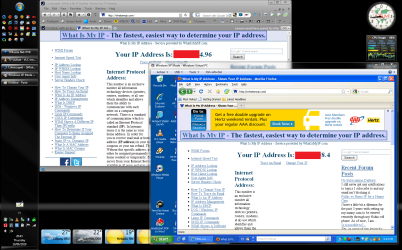
  1. If you use a proxy or VPN on virtual machine, it gets an external IP other than that of your router / modem. Here's an example, where my XP Mode is going to internet over another VPN than my host:

    XPM_Different_IP.png
    .
    I blanked out most of the IP addresses, but you can still see that virtual machine (XP Mode) has its own external IP address, no longer sharing the one my router have. Notice that normally a connection from virtual machine using public proxy's or VPN's is very slow
    .
  2. If your host has two NIC's, connected to different routers / modems having a separate DSL, Cable or other line, and you set host to use one NIC - router combination and virtual machine another. Faster but more expensive method (two separate lines)
Kari
 
Last edited:

My Computer

Computer type
Laptop
Computer Manufacturer/Model Number
HP ENVY 17-1150eg
OS
Windows 10 Pro x64 EN-GB
CPU
1.6 GHz Intel Core i7-720QM Processor
Memory
6 GB
Graphics Card(s)
ATI Mobility Radeon HD 5850 Graphics
Sound Card
Beats sound system with integrated subwoofer
Monitor(s) Displays
17" laptop display, 22" LED and 32" Full HD TV through HDMI
Screen Resolution
1600*900 (1), 1920*1080 (2&3)
Hard Drives
Internal: 2 x 500 GB SATA Hard Disk Drive 7200 rpm
External: 2TB for backups, 3TB USB3 network drive for media
Cooling
As Envy runs a bit warm, I have it on a Cooler Master pad
Keyboard
Logitech diNovo Media Desktop Laser (bluetooth)
Mouse
Logitech Performance Mouse MX
Internet Speed
50/10 Mbps VDSL
Antivirus
Windows Defender 4.3.9431.0
Browser
Maxthon 3.5.2., IE11
Back
Top