
You are using an out of date browser. It may not display this or other websites correctly.
You should upgrade or use an alternative browser.
You should upgrade or use an alternative browser.
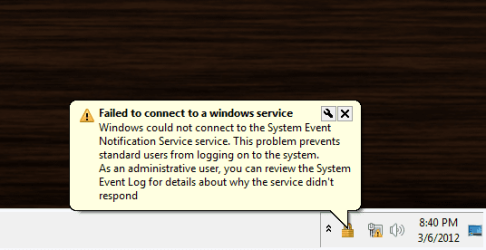
Im getting a desktop glitch
- Thread starter Nekusora
- Start date

- Local time
- 1:36 AM
- Messages
- 14,164
have you made changes to your computer recently? since when is this happening? try a http://www.sevenforums.com/tutorials/700-system-restore.html to a date before it started.
My Computer
- Computer type
- PC/Desktop
- Computer Manufacturer/Model Number
- Self assembled
- OS
- Windows 10 Home 64Bit
- CPU
- Intel Core i5 10400 @ 2.90GHz
- Motherboard
- Intel Corporation DG41WV (PROCESSOR)
- Memory
- 8.00GB Single-Channel Unknown @ 1329MHz (16-20-20-38)
- Sound Card
- Realtek High Definition Audio
- Monitor(s) Displays
- DELL E170S
- Screen Resolution
- 1280x1024 pixels
- Hard Drives
- 931GB TOSHIBA DT01ACA100 (SATA)
238GB TEAM TM8PS7256G (SATA SSD)
- Case
- Nothing Fancy
- Cooling
- Fans
- Keyboard
- A4 Tech Co LTD
- Mouse
- A4 Tech Co Ltd/Logitech
- Internet Speed
- 25 Mbps

Dear Nekusora,
A warm welcome to SevenForums! I have seen the snap you have posted. Kindly do the following:
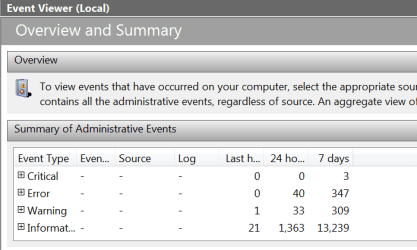
In the "search box" (which you get on clicking on the "START") ,type Event Viewer.
Click on the "Event Viewer" result and in the window that opens,click on " the + against "Critical" and post what you view. We will proceed from that point.
View my Event Viewer snap below.
Regards,
sreedhav
A warm welcome to SevenForums! I have seen the snap you have posted. Kindly do the following:
In the "search box" (which you get on clicking on the "START") ,type Event Viewer.
Click on the "Event Viewer" result and in the window that opens,click on " the + against "Critical" and post what you view. We will proceed from that point.
View my Event Viewer snap below.
Regards,
sreedhav
Attachments
My Computer
- Computer Manufacturer/Model Number
- Sony Vaio C series VPCCB35FN laptop
- OS
- MS Windows 7 Home Premium 64-bit SP1
- CPU
- IntelCore [email protected]; Sandy Bridge 32nm Tech.
- Motherboard
- Sony Vaio Version:C609NJYJ
- Memory
- 4096Mb RAM; Single ChannelDDR3@665MHz; DRAM Freq:662MHz
- Graphics Card(s)
- AMD Radeon HD 6630M; GPU:Whistler;BIOS Core&mem Clock:123.36
- Sound Card
- REALTEK High Definition Audio Device; INTEL Display Card
- Monitor(s) Displays
- Generic PnP Intel HD;Resolution:1920*1040 Pixels; BPP:32bits
- Screen Resolution
- Current Resolution:1920*1080 Pixels; Monitor Frequency:60Hz
- Hard Drives
- Internal HD:TOSHIBA MK5061GSY; Real Size:488 GB;NTFS; 3 Partitions; SATA; HEADS:16
External HDD: WD Elements 1023 PORTABLE; Estimated Size: 1TB; NTFS; 3 Partitions
- Cooling
- Lateral Exhaust with a Cooling Pad Placed Beneath.
- Keyboard
- Logitech Bluetooth+ Generic Integrated K-B
- Mouse
- Logitech Bluetooth
- Internet Speed
- 2MBPS
- Other Info
- 1)Trend Micro Titanium Maximum Security Suite Version:3
2)SAS-PRO
3)MBAM--PRO
4)WATERFOX+IE9 +WOT+LINKEXTEND+ DRWEBCUREIT LINK CHECKER
5)SPYWAREBLASTER
6) WINPATROL PLUS
7) SANDBOXIE and
8) A BIT OF COMMON SENSE.
Dear Nekusora,
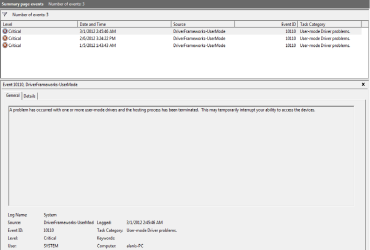
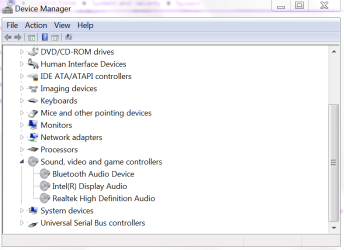
Event ID 10110 is usually associated with BSOD (computer crash). Please open "Device Manager" and click open "Sound,Video and Game Controllers" and take a snap and post as before.View mine for comparison
Regards,
sreedhav
Event ID 10110 is usually associated with BSOD (computer crash). Please open "Device Manager" and click open "Sound,Video and Game Controllers" and take a snap and post as before.View mine for comparison
Regards,
sreedhav
Attachments
My Computer
- Computer Manufacturer/Model Number
- Sony Vaio C series VPCCB35FN laptop
- OS
- MS Windows 7 Home Premium 64-bit SP1
- CPU
- IntelCore [email protected]; Sandy Bridge 32nm Tech.
- Motherboard
- Sony Vaio Version:C609NJYJ
- Memory
- 4096Mb RAM; Single ChannelDDR3@665MHz; DRAM Freq:662MHz
- Graphics Card(s)
- AMD Radeon HD 6630M; GPU:Whistler;BIOS Core&mem Clock:123.36
- Sound Card
- REALTEK High Definition Audio Device; INTEL Display Card
- Monitor(s) Displays
- Generic PnP Intel HD;Resolution:1920*1040 Pixels; BPP:32bits
- Screen Resolution
- Current Resolution:1920*1080 Pixels; Monitor Frequency:60Hz
- Hard Drives
- Internal HD:TOSHIBA MK5061GSY; Real Size:488 GB;NTFS; 3 Partitions; SATA; HEADS:16
External HDD: WD Elements 1023 PORTABLE; Estimated Size: 1TB; NTFS; 3 Partitions
- Cooling
- Lateral Exhaust with a Cooling Pad Placed Beneath.
- Keyboard
- Logitech Bluetooth+ Generic Integrated K-B
- Mouse
- Logitech Bluetooth
- Internet Speed
- 2MBPS
- Other Info
- 1)Trend Micro Titanium Maximum Security Suite Version:3
2)SAS-PRO
3)MBAM--PRO
4)WATERFOX+IE9 +WOT+LINKEXTEND+ DRWEBCUREIT LINK CHECKER
5)SPYWAREBLASTER
6) WINPATROL PLUS
7) SANDBOXIE and
8) A BIT OF COMMON SENSE.
To open Device Manager,right click on Computer>click on "properties">click on Device Manager.
sreedhav
sreedhav
My Computer
- Computer Manufacturer/Model Number
- Sony Vaio C series VPCCB35FN laptop
- OS
- MS Windows 7 Home Premium 64-bit SP1
- CPU
- IntelCore [email protected]; Sandy Bridge 32nm Tech.
- Motherboard
- Sony Vaio Version:C609NJYJ
- Memory
- 4096Mb RAM; Single ChannelDDR3@665MHz; DRAM Freq:662MHz
- Graphics Card(s)
- AMD Radeon HD 6630M; GPU:Whistler;BIOS Core&mem Clock:123.36
- Sound Card
- REALTEK High Definition Audio Device; INTEL Display Card
- Monitor(s) Displays
- Generic PnP Intel HD;Resolution:1920*1040 Pixels; BPP:32bits
- Screen Resolution
- Current Resolution:1920*1080 Pixels; Monitor Frequency:60Hz
- Hard Drives
- Internal HD:TOSHIBA MK5061GSY; Real Size:488 GB;NTFS; 3 Partitions; SATA; HEADS:16
External HDD: WD Elements 1023 PORTABLE; Estimated Size: 1TB; NTFS; 3 Partitions
- Cooling
- Lateral Exhaust with a Cooling Pad Placed Beneath.
- Keyboard
- Logitech Bluetooth+ Generic Integrated K-B
- Mouse
- Logitech Bluetooth
- Internet Speed
- 2MBPS
- Other Info
- 1)Trend Micro Titanium Maximum Security Suite Version:3
2)SAS-PRO
3)MBAM--PRO
4)WATERFOX+IE9 +WOT+LINKEXTEND+ DRWEBCUREIT LINK CHECKER
5)SPYWAREBLASTER
6) WINPATROL PLUS
7) SANDBOXIE and
8) A BIT OF COMMON SENSE.
Dear Nekusora,
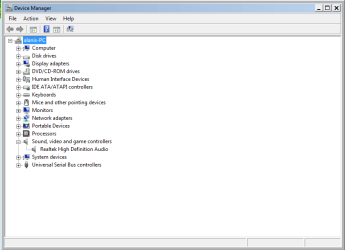
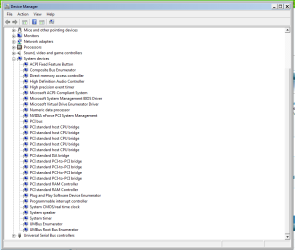
As you have observed in the Event Viewer, the problem is related to driver corruption(IMO). In the snap you provided in the previous post and just under audio..., open "system devices" and look for any Yellow Exclamation marks. Did you install any drivers or programs recently or prior to this glitch?
sree
As you have observed in the Event Viewer, the problem is related to driver corruption(IMO). In the snap you provided in the previous post and just under audio..., open "system devices" and look for any Yellow Exclamation marks. Did you install any drivers or programs recently or prior to this glitch?
sree
My Computer
- Computer Manufacturer/Model Number
- Sony Vaio C series VPCCB35FN laptop
- OS
- MS Windows 7 Home Premium 64-bit SP1
- CPU
- IntelCore [email protected]; Sandy Bridge 32nm Tech.
- Motherboard
- Sony Vaio Version:C609NJYJ
- Memory
- 4096Mb RAM; Single ChannelDDR3@665MHz; DRAM Freq:662MHz
- Graphics Card(s)
- AMD Radeon HD 6630M; GPU:Whistler;BIOS Core&mem Clock:123.36
- Sound Card
- REALTEK High Definition Audio Device; INTEL Display Card
- Monitor(s) Displays
- Generic PnP Intel HD;Resolution:1920*1040 Pixels; BPP:32bits
- Screen Resolution
- Current Resolution:1920*1080 Pixels; Monitor Frequency:60Hz
- Hard Drives
- Internal HD:TOSHIBA MK5061GSY; Real Size:488 GB;NTFS; 3 Partitions; SATA; HEADS:16
External HDD: WD Elements 1023 PORTABLE; Estimated Size: 1TB; NTFS; 3 Partitions
- Cooling
- Lateral Exhaust with a Cooling Pad Placed Beneath.
- Keyboard
- Logitech Bluetooth+ Generic Integrated K-B
- Mouse
- Logitech Bluetooth
- Internet Speed
- 2MBPS
- Other Info
- 1)Trend Micro Titanium Maximum Security Suite Version:3
2)SAS-PRO
3)MBAM--PRO
4)WATERFOX+IE9 +WOT+LINKEXTEND+ DRWEBCUREIT LINK CHECKER
5)SPYWAREBLASTER
6) WINPATROL PLUS
7) SANDBOXIE and
8) A BIT OF COMMON SENSE.

Do you have administrative account or the standard one?
Try to create an administrative account and have a check if this error surfaces there also.
Try to create an administrative account and have a check if this error surfaces there also.
My Computer
- Computer Manufacturer/Model Number
- DELL
- OS
- Windows 8 Pro
- CPU
- intel i3 2.40 Ghz
- Motherboard
- DELL inc
- Memory
- 6 GB RAM
- Graphics Card(s)
- Integrated Intel HD
- Sound Card
- Realtek high definition SRS surround sound
- Screen Resolution
- 1366*768
- Hard Drives
- 320 GB
- Internet Speed
- 1Mbps
Welcome dreamer! We'll need as many inputs as we can to get this sorted out!
Regards,
sree
Regards,
sree
My Computer
- Computer Manufacturer/Model Number
- Sony Vaio C series VPCCB35FN laptop
- OS
- MS Windows 7 Home Premium 64-bit SP1
- CPU
- IntelCore [email protected]; Sandy Bridge 32nm Tech.
- Motherboard
- Sony Vaio Version:C609NJYJ
- Memory
- 4096Mb RAM; Single ChannelDDR3@665MHz; DRAM Freq:662MHz
- Graphics Card(s)
- AMD Radeon HD 6630M; GPU:Whistler;BIOS Core&mem Clock:123.36
- Sound Card
- REALTEK High Definition Audio Device; INTEL Display Card
- Monitor(s) Displays
- Generic PnP Intel HD;Resolution:1920*1040 Pixels; BPP:32bits
- Screen Resolution
- Current Resolution:1920*1080 Pixels; Monitor Frequency:60Hz
- Hard Drives
- Internal HD:TOSHIBA MK5061GSY; Real Size:488 GB;NTFS; 3 Partitions; SATA; HEADS:16
External HDD: WD Elements 1023 PORTABLE; Estimated Size: 1TB; NTFS; 3 Partitions
- Cooling
- Lateral Exhaust with a Cooling Pad Placed Beneath.
- Keyboard
- Logitech Bluetooth+ Generic Integrated K-B
- Mouse
- Logitech Bluetooth
- Internet Speed
- 2MBPS
- Other Info
- 1)Trend Micro Titanium Maximum Security Suite Version:3
2)SAS-PRO
3)MBAM--PRO
4)WATERFOX+IE9 +WOT+LINKEXTEND+ DRWEBCUREIT LINK CHECKER
5)SPYWAREBLASTER
6) WINPATROL PLUS
7) SANDBOXIE and
8) A BIT OF COMMON SENSE.

- Local time
- 12:36 PM
- Messages
- 50,634
Please fill in your System Specs in bottom left hand corner of post. What is your computer or mobo make/model?
If you relied on the drivers given only by the Windows 7 installer, there may be newer ones cued in optional Windows Updates. Check now, note their name and install.
If not, you may need to install the latest manufacturer's chipset for your computer or mobo model. We can look it over with you and help decide once we have the specs.
If you relied on the drivers given only by the Windows 7 installer, there may be newer ones cued in optional Windows Updates. Check now, note their name and install.
If not, you may need to install the latest manufacturer's chipset for your computer or mobo model. We can look it over with you and help decide once we have the specs.
Dear Nekusora,
To comply with Greg's post, you can get the full system specifications by downloading this extremely useful tool called SPECCY. Download from:http://www.piriform.com/defragglerhttp://www.piriform.com/speccy
Speccy not only gives you system specs., but various other functions. Now go to USER CP at the top of your post> EDIT SYSTEM SPECS and please fill in the details by referring to SPECCY!
best wishes,
sreedhav
To comply with Greg's post, you can get the full system specifications by downloading this extremely useful tool called SPECCY. Download from:http://www.piriform.com/defragglerhttp://www.piriform.com/speccy
Speccy not only gives you system specs., but various other functions. Now go to USER CP at the top of your post> EDIT SYSTEM SPECS and please fill in the details by referring to SPECCY!
best wishes,
sreedhav
My Computer
- Computer Manufacturer/Model Number
- Sony Vaio C series VPCCB35FN laptop
- OS
- MS Windows 7 Home Premium 64-bit SP1
- CPU
- IntelCore [email protected]; Sandy Bridge 32nm Tech.
- Motherboard
- Sony Vaio Version:C609NJYJ
- Memory
- 4096Mb RAM; Single ChannelDDR3@665MHz; DRAM Freq:662MHz
- Graphics Card(s)
- AMD Radeon HD 6630M; GPU:Whistler;BIOS Core&mem Clock:123.36
- Sound Card
- REALTEK High Definition Audio Device; INTEL Display Card
- Monitor(s) Displays
- Generic PnP Intel HD;Resolution:1920*1040 Pixels; BPP:32bits
- Screen Resolution
- Current Resolution:1920*1080 Pixels; Monitor Frequency:60Hz
- Hard Drives
- Internal HD:TOSHIBA MK5061GSY; Real Size:488 GB;NTFS; 3 Partitions; SATA; HEADS:16
External HDD: WD Elements 1023 PORTABLE; Estimated Size: 1TB; NTFS; 3 Partitions
- Cooling
- Lateral Exhaust with a Cooling Pad Placed Beneath.
- Keyboard
- Logitech Bluetooth+ Generic Integrated K-B
- Mouse
- Logitech Bluetooth
- Internet Speed
- 2MBPS
- Other Info
- 1)Trend Micro Titanium Maximum Security Suite Version:3
2)SAS-PRO
3)MBAM--PRO
4)WATERFOX+IE9 +WOT+LINKEXTEND+ DRWEBCUREIT LINK CHECKER
5)SPYWAREBLASTER
6) WINPATROL PLUS
7) SANDBOXIE and
8) A BIT OF COMMON SENSE.

My Computer
- Computer type
- PC/Desktop
- OS
- Windows 10 Home x64
- CPU
- INTEL Core i5-750 Quad-Core 3.37GHz
- Motherboard
- ASUS P7P55D
- Memory
- HyperX Fury Black Series 8GB (2 x 4GB) 1866Mhz
- Graphics Card(s)
- EVGA GeForce GTX 750 Superclocked 1GB 128-Bit GDDR5
- Monitor(s) Displays
- LG 32MA68HY 32" IPS
- Screen Resolution
- 1920 x 1080
- Hard Drives
- Samsung 840 Evo 120GB, SEAGATE 500GB Barracuda® 7200.12, SATA 3 Gb/s, 7200 RPM, 16MB cache
- PSU
- ANTEC TruePower New TP-550, 80 PLUS, 550W
- Case
- ANTEC Three Hundred Illusion
- Cooling
- COOLER MASTER Hyper 212 Plus, 4 x 120mm 1 x 140mm Noctua's
- Internet Speed
- 85 + Mbps
- Antivirus
- Avast
- Browser
- Vivaldi
Dear A Guy,
Thanks for the better direction!
regards,
sreedhav
Thanks for the better direction!
regards,
sreedhav
My Computer
- Computer Manufacturer/Model Number
- Sony Vaio C series VPCCB35FN laptop
- OS
- MS Windows 7 Home Premium 64-bit SP1
- CPU
- IntelCore [email protected]; Sandy Bridge 32nm Tech.
- Motherboard
- Sony Vaio Version:C609NJYJ
- Memory
- 4096Mb RAM; Single ChannelDDR3@665MHz; DRAM Freq:662MHz
- Graphics Card(s)
- AMD Radeon HD 6630M; GPU:Whistler;BIOS Core&mem Clock:123.36
- Sound Card
- REALTEK High Definition Audio Device; INTEL Display Card
- Monitor(s) Displays
- Generic PnP Intel HD;Resolution:1920*1040 Pixels; BPP:32bits
- Screen Resolution
- Current Resolution:1920*1080 Pixels; Monitor Frequency:60Hz
- Hard Drives
- Internal HD:TOSHIBA MK5061GSY; Real Size:488 GB;NTFS; 3 Partitions; SATA; HEADS:16
External HDD: WD Elements 1023 PORTABLE; Estimated Size: 1TB; NTFS; 3 Partitions
- Cooling
- Lateral Exhaust with a Cooling Pad Placed Beneath.
- Keyboard
- Logitech Bluetooth+ Generic Integrated K-B
- Mouse
- Logitech Bluetooth
- Internet Speed
- 2MBPS
- Other Info
- 1)Trend Micro Titanium Maximum Security Suite Version:3
2)SAS-PRO
3)MBAM--PRO
4)WATERFOX+IE9 +WOT+LINKEXTEND+ DRWEBCUREIT LINK CHECKER
5)SPYWAREBLASTER
6) WINPATROL PLUS
7) SANDBOXIE and
8) A BIT OF COMMON SENSE.