Ucrtbase and api-ms-win-crt-runtime-|1-1-0.dll both point to trying to run a windows10 developed program on a machine that does not run with windows 10 as its operating system.
The usual fix to remove these messages is to install:
Microsoft Download - Visual C++ Redistributable for Visual Studio 2015 If you do not have it installed already.
And if you do have it installed, it may need this update:
KB2999226: Update for Universal C Runtime in Windows
A prerequisite for VS2015 and KB2999226 on Windows7 is to have
SP1 installed.
If you are trying to run a valid win10 program you need at least VS2015 and 2999226, but this feels more like a windows10 compatibility problem, KB2999226 is one of the windows updates that is needed to upgrade a win7 machine to win10. VS2015 and KB2999226 are involved with sending telemetry back to Microsoft by using
UCRT and the api
crt runtimes.
If you are trying to stay away from the win10 upgrade you might have some [kb2999226?], or several of the bothersome win10 updates on your machine and that is what is throwing those messages your seeing; Are you keeping updated with the threads that discuss the ongoing vigilance to keeping the win10 upgrade updates off of one's computer?
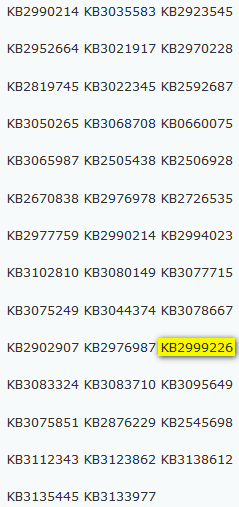
If you are trying to keep win7 on your machine and win 10 off go over the list of KBs in the attached snip at the bottom and uninstall any that you find in order to stop the messages:
http://www.sevenforums.com/tutorials/24373-windows-update-uninstall-update.html
One of the more recent thread's with an updated list of unwanted updates is here:
It's time for Microsoft to fix the Windows 7 update slowdowns | Post #145. There is a working hypothesis among win7 users that the win10 upgrade updates are what's causing the slowdowns as you can see, 2999226 makes the list, [
Snip attachment courtesy of Lady Fitzgerald's post #145].