I'm looking for a good and advanced firewall for win7?

Marie SWE

New member
Power User
VIP
Local time
6:47 PM
Messages
286
Location
In Sweden
Hello :D
Sorry if my english is a little bit bad:o, but i hope you will understand me.:)
In my older computers, i use Sygate Personal Firewall Pro 5.5 but it does not work on win7 .. So i wonder if there are any other firewalls that are as advanced or more?
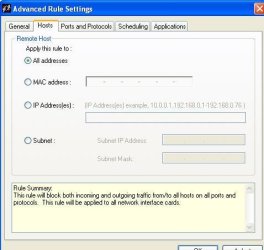
I still want to be able to allow or block MAC addresses, IP addresses and the entire range of IP addresses, for all applications or only individual applications.
And i like that Sygate have detailed logs and connection details....... but I'm not going to complain if it is even better and more detailed logs.:p
Do you have any suggestions?

:oand yes, i cheat a little bit with a translator to get a correct spelling.. it's better for all of us that way i think. :party:
//Marie
 

Attachments

  • SygateFirewallPro55.JPG
    SygateFirewallPro55.JPG
    27.6 KB · Views: 46
Last edited:

My Computer My Computer

At a glance

Linux:Debian, Kali.. 2xWin8.1,2x,1x7Pro, Retr...cpu's intel 8088 up to intel i7 gen9.. dual x...oldest 1024KB newest 64GBmostly internals i don't game
Computer type
PC/Desktop
Computer Manufacturer/Model Number
AsusX53, Aspire E1-572. AsusUX32A, HP Pro3130mt+3010mt, HP Proliant ML150G3, 3xCustom, i3, i5, i7
OS
Linux:Debian, Kali.. 2xWin8.1,2x,1x7Pro, Retro:1x2003server.1xXPpro, 1xW2k,1x98SE,1x95,1x3.11
CPU
cpu's intel 8088 up to intel i7 gen9.. dual xenon on server
Motherboard
a lot of them :-)
Memory
oldest 1024KB newest 64GB
Graphics Card(s)
mostly internals i don't game
Sound Card
old retro=soundblaster.. newer ones internal
Monitor(s) Displays
smalest 12" largest 26"
Internet Speed
100/100
Antivirus
NortonInternetSecurity, MS, Avast, (not on the same computer
Browser
IE8, IE9. IE11, Firefox
Other Info
I can't fit all info on all my computers in these fields :-D
I've been happy with ZoneAlarm's free firewall and have been using it for several years.
 

My Computer My Computer

At a glance

Win 7 Ultimate 64 bitIntel i7-3930KKingston HyperX Genesis 32GB Kit (8x4GB Modul...MSI R7850 Twin Frozr 2GD5/OC Radeon HD 7850 2...
Computer type
PC/Desktop
Computer Manufacturer/Model Number
Custom Build
OS
Win 7 Ultimate 64 bit
CPU
Intel i7-3930K
Motherboard
ASUS P9X79 WS
Memory
Kingston HyperX Genesis 32GB Kit (8x4GB Modules) 1600MHz DDR
Graphics Card(s)
MSI R7850 Twin Frozr 2GD5/OC Radeon HD 7850 2GB 256-bit GDDR
Sound Card
Asus Xonar Essence STX
Monitor(s) Displays
3x Asus VG248QE 24", Vizio 32" TV
Screen Resolution
1920 x 1080, ?
Hard Drives
Samsung 128GB 840 Pro SSD (1),
Samsung 4TB 850 EVO SSDs (4)
Samsung 4TB 850 EVO SSDs (16) external backup drives used in 2.5" hot swap bays in the computer.
PSU
Corsair HX750w
Case
Antec Two Hundred v2 (modified)
Cooling
Cooler Master GeminII S524 120mm (fan replaced with a 140mm)
Keyboard
Logitech G510s
Mouse
Logitech M525 (two in use)
Internet Speed
=< 32Mbps down, 8Mbps up
Antivirus
AVAST!, MBAM, SAS, Spybot S&D (all but MBAM free) Glary Util
Browser
IE11
Other Info
LSI 9211-8i HBA card (8 SATA III ports), 2.5" & 3.5" Hot Swap Bays, HooToo HT-CR001 PCI-E to USB 3.0 Internal Hub + 6 Slot Card Reader, and LG Model CH12LS28 BD-ROM Optical Drive. Also, ScanSnap S1500 ADF duplexing scanner, Canon 9000F flat bed scanner, Corsair SP2500 2.1 speakers, Samsung CLP 415nw laser color printer, Cyberpower PP2200SW UPS
I use and highly recommend Windows 10 Firewall Control

Don't let the name fool you...it works with windows versions Vista, 7, 8 AND 10.

It's highly customizable. The free version works great for most. I run the free version on 4 machines here, but I have the paid Plus Edition on my main system, as it allows me to block windows system connections, specific IP addresses and much more.
 

My Computer My Computer

At a glance

windows 7 Pro 64 Biti5 4670K16GB DDR3@933mhzRadeon R9 390 8192mb
Computer type
PC/Desktop
Computer Manufacturer/Model Number
custom
OS
windows 7 Pro 64 Bit
CPU
i5 4670K
Motherboard
Asus Max Hero 1150 socket
Memory
16GB DDR3@933mhz
Graphics Card(s)
Radeon R9 390 8192mb
Monitor(s) Displays
Dell U2415 x3
Screen Resolution
1920 (5760) x 1200 x3
Hard Drives
System: Kingston 128GB SSD

Installing to Samsung 860 EVO 500GB
WD Black 2 TB & 1 TB
PSU
Corsair CX750M
Cooling
Hyper 312
Internet Speed
50mbps
I've been happy with ZoneAlarm's free firewall and have been using it for several years.
Hey! Thanks for the tip.:)
I have tested free ZoneAlarm, but it missing many functions for my needs, unfortunately. But ZoneAlarm is a very good freeware and does it's job well.
 
Last edited:

My Computer My Computer

At a glance

Linux:Debian, Kali.. 2xWin8.1,2x,1x7Pro, Retr...cpu's intel 8088 up to intel i7 gen9.. dual x...oldest 1024KB newest 64GBmostly internals i don't game
Computer type
PC/Desktop
Computer Manufacturer/Model Number
AsusX53, Aspire E1-572. AsusUX32A, HP Pro3130mt+3010mt, HP Proliant ML150G3, 3xCustom, i3, i5, i7
OS
Linux:Debian, Kali.. 2xWin8.1,2x,1x7Pro, Retro:1x2003server.1xXPpro, 1xW2k,1x98SE,1x95,1x3.11
CPU
cpu's intel 8088 up to intel i7 gen9.. dual xenon on server
Motherboard
a lot of them :-)
Memory
oldest 1024KB newest 64GB
Graphics Card(s)
mostly internals i don't game
Sound Card
old retro=soundblaster.. newer ones internal
Monitor(s) Displays
smalest 12" largest 26"
Internet Speed
100/100
Antivirus
NortonInternetSecurity, MS, Avast, (not on the same computer
Browser
IE8, IE9. IE11, Firefox
Other Info
I can't fit all info on all my computers in these fields :-D
I use and highly recommend Windows 10 Firewall Control

Don't let the name fool you...it works with windows versions Vista, 7, 8 AND 10.

It's highly customizable. The free version works great for most. I run the free version on 4 machines here, but I have the paid Plus Edition on my main system, as it allows me to block windows system connections, specific IP addresses and much more.

Helluu :)
Oh no.. program name is nothing that i relay react to.;) ....as long as it is not from Microsoft .. then you should beware of anything that has a W and a 10 or X in the same sentence.:roflmao:
I've tested the free version Windows 10 Firewall Control, and it was not for me. But I will test the Plus version and evaluate it.
Thanks for the tip.:)
 
Last edited:

My Computer My Computer

At a glance

Linux:Debian, Kali.. 2xWin8.1,2x,1x7Pro, Retr...cpu's intel 8088 up to intel i7 gen9.. dual x...oldest 1024KB newest 64GBmostly internals i don't game
Computer type
PC/Desktop
Computer Manufacturer/Model Number
AsusX53, Aspire E1-572. AsusUX32A, HP Pro3130mt+3010mt, HP Proliant ML150G3, 3xCustom, i3, i5, i7
OS
Linux:Debian, Kali.. 2xWin8.1,2x,1x7Pro, Retro:1x2003server.1xXPpro, 1xW2k,1x98SE,1x95,1x3.11
CPU
cpu's intel 8088 up to intel i7 gen9.. dual xenon on server
Motherboard
a lot of them :-)
Memory
oldest 1024KB newest 64GB
Graphics Card(s)
mostly internals i don't game
Sound Card
old retro=soundblaster.. newer ones internal
Monitor(s) Displays
smalest 12" largest 26"
Internet Speed
100/100
Antivirus
NortonInternetSecurity, MS, Avast, (not on the same computer
Browser
IE8, IE9. IE11, Firefox
Other Info
I can't fit all info on all my computers in these fields :-D
Hello again :)

Now it has almost been a year since I started this thread
And I haven't found any firewall as advanced as Sygate Firewall Pro.5.5
Have any new firewalls come up on the market that I have missed out? :rolleyes:

So I ask you all again. Please Is there any of you who know about an advanced firewall software?

Features i relay need is.
If a program wants internet access, I want it to ask me "every time".. and an option to remember my answer. (but not an requirement to remember).
Why? if I'm on my mobile internet connection, (and it's slow) then i want the firewall to ask me if every program is going to have internet access or not.. a fast no or yes click and my bandwidth isn't blocked by antivirus, winupdate and so on.

Block or allow IP numbers ex.10.0.0.1 or a IP-range 10.0.0.0-10.255.255.255
That rule is going to apply on all internet connections or on an specific program.
Block or allow mac-addresses in my network.

+ is if it's possible to block domains.. ex google.analytics.com

Is this possible?
Or is it so bad that a 15year old program is superior to any software firewalls today? :what:
 

My Computer My Computer

At a glance

Linux:Debian, Kali.. 2xWin8.1,2x,1x7Pro, Retr...cpu's intel 8088 up to intel i7 gen9.. dual x...oldest 1024KB newest 64GBmostly internals i don't game
Computer type
PC/Desktop
Computer Manufacturer/Model Number
AsusX53, Aspire E1-572. AsusUX32A, HP Pro3130mt+3010mt, HP Proliant ML150G3, 3xCustom, i3, i5, i7
OS
Linux:Debian, Kali.. 2xWin8.1,2x,1x7Pro, Retro:1x2003server.1xXPpro, 1xW2k,1x98SE,1x95,1x3.11
CPU
cpu's intel 8088 up to intel i7 gen9.. dual xenon on server
Motherboard
a lot of them :-)
Memory
oldest 1024KB newest 64GB
Graphics Card(s)
mostly internals i don't game
Sound Card
old retro=soundblaster.. newer ones internal
Monitor(s) Displays
smalest 12" largest 26"
Internet Speed
100/100
Antivirus
NortonInternetSecurity, MS, Avast, (not on the same computer
Browser
IE8, IE9. IE11, Firefox
Other Info
I can't fit all info on all my computers in these fields :-D

My Computer My Computer

At a glance

W7 home premium 32bit/W7HP 64bit/w10 tp insid...E5300 dual core3gbNvidia Geforce 7100 Nforce 630i
Computer type
PC/Desktop
Computer Manufacturer/Model Number
medionl/Aspire 6930G/acer x55a
OS
W7 home premium 32bit/W7HP 64bit/w10 tp insider ring
CPU
E5300 dual core
Motherboard
medion MS7366
Memory
3gb
Graphics Card(s)
Nvidia Geforce 7100 Nforce 630i
Monitor(s) Displays
avixc
Internet Speed
n (isp resticted to 72)
Antivirus
mse/pands
Browser
palemoon
Other Info
Belkin Fd7050 n USB using Railink RT2870 drivers, more upto date
Hi Maria,

not sure if this will be of any use, but

Cloud Delivered Enterprise Security by OpenDNS

hit the personal tab


Roy
Hello Roy :)
OpenDNS is a good solution, I use it at home with a Cisco firewall router. But it does not give me total control over my local computer's program if I want it to access the internet this time but not next time.
I must be able to block or allow access before it passes the network card. With OpenDNS, I need to configure the settings each time instead of just clicking yes or no depending on what I am going to do online. My mobile-internet speed is only 2-6 Mbps, that is why I need to be able to block access with just one yes or no. And I need to be able to block IP numbers and IP-ranges. There are way too many companies that track everything we do online. ;) But some time i easily need to be able to unblock them temporary, if i need to use google.com :lol: :o :rolleyes:
 

My Computer My Computer

At a glance

Linux:Debian, Kali.. 2xWin8.1,2x,1x7Pro, Retr...cpu's intel 8088 up to intel i7 gen9.. dual x...oldest 1024KB newest 64GBmostly internals i don't game
Computer type
PC/Desktop
Computer Manufacturer/Model Number
AsusX53, Aspire E1-572. AsusUX32A, HP Pro3130mt+3010mt, HP Proliant ML150G3, 3xCustom, i3, i5, i7
OS
Linux:Debian, Kali.. 2xWin8.1,2x,1x7Pro, Retro:1x2003server.1xXPpro, 1xW2k,1x98SE,1x95,1x3.11
CPU
cpu's intel 8088 up to intel i7 gen9.. dual xenon on server
Motherboard
a lot of them :-)
Memory
oldest 1024KB newest 64GB
Graphics Card(s)
mostly internals i don't game
Sound Card
old retro=soundblaster.. newer ones internal
Monitor(s) Displays
smalest 12" largest 26"
Internet Speed
100/100
Antivirus
NortonInternetSecurity, MS, Avast, (not on the same computer
Browser
IE8, IE9. IE11, Firefox
Other Info
I can't fit all info on all my computers in these fields :-D
Hello again :)

Now it has almost been a year since I started this thread
And I haven't found any firewall as advanced as Sygate Firewall Pro.5.5
Have any new firewalls come up on the market that I have missed out? :rolleyes:

So I ask you all again. Please Is there any of you who know about an advanced firewall software?

Features i relay need is.
If a program wants internet access, I want it to ask me "every time".. and an option to remember my answer. (but not an requirement to remember).
Why? if I'm on my mobile internet connection, (and it's slow) then i want the firewall to ask me if every program is going to have internet access or not.. a fast no or yes click and my bandwidth isn't blocked by antivirus, winupdate and so on.

Block or allow IP numbers ex.10.0.0.1 or a IP-range 10.0.0.0-10.255.255.255
That rule is going to apply on all internet connections or on an specific program.
Block or allow mac-addresses in my network.

+ is if it's possible to block domains.. ex google.analytics.com

Is this possible?
Or is it so bad that a 15year old program is superior to any software firewalls today? :what:

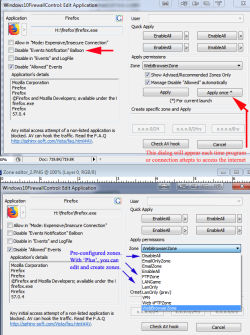
Windows Firewall Control Plus will do all of this. Even the free version will seek your permission to connect every time. Just click 'Apply Once' instead of 'Apply' when the Zone Window appears (asking for your permission). Clicking 'Apply' will allow trusted programs to access at will. A Log Balloon will appear when a permissioned program, app, system file accesses the internet, unless you tell it not to (for all or for specific ones).

The Plus version will allow you to create 'Zones' to block specific IPs, IP address ranges and domains. Online manual is here.

And, from your previous post, I assume you know that W10FC is not a Microsoft program.

Online manual is here.

But honestly, what you are asking for can be done with the (Microsoft) Advanced Firewall bundled with Windows (with the exception of asking permission to connect). In fact, W10FC is a front-end for the bundled firewall.

You access the advanced settings via Control Panel\Windows Firewall. The left pane has a link for 'Advanced Settings'. There, you can edit or create inbound and outbound rules that you can apply to private, public or even corporate networks. The (Microsoft) firewall is actually pretty extensive and will allow you to do everything you're asking, but you have to create the rules, which can add up to a lot of time. You could easily find guides using Google (or DuckDuckGo, the search engine I prefer).

It would be easier to give W10FC a try. The plus version is only $30. Read the manual and you should be able to do all you want.

And, since you're security conscious, I suggest using Firefox (or perhaps you already are). There are many add-ons that will increase your security further. One add-on that's a must is NoScript, which allows you to block scripts from whatever website or domain you wish. Or you can allow (Trust) it, or you can choose to 'allow' it or not on demand.

There are learning curves to these (FW & NoScript), but since you seem to know what you want and are determined, it shouldn't be a problem.

You can search for NoScript in FireFox add-ons. Here's a basic guide on what it does and its use.
 

My Computer My Computer

At a glance

windows 7 Pro 64 Biti5 4670K16GB DDR3@933mhzRadeon R9 390 8192mb
Computer type
PC/Desktop
Computer Manufacturer/Model Number
custom
OS
windows 7 Pro 64 Bit
CPU
i5 4670K
Motherboard
Asus Max Hero 1150 socket
Memory
16GB DDR3@933mhz
Graphics Card(s)
Radeon R9 390 8192mb
Monitor(s) Displays
Dell U2415 x3
Screen Resolution
1920 (5760) x 1200 x3
Hard Drives
System: Kingston 128GB SSD

Installing to Samsung 860 EVO 500GB
WD Black 2 TB & 1 TB
PSU
Corsair CX750M
Cooling
Hyper 312
Internet Speed
50mbps
Windows Firewall Control Plus will do all of this. Even the free version will seek your permission to connect every time. Just click 'Apply Once' instead of 'Apply' when the Zone Window appears (asking for your permission). Clicking 'Apply' will allow trusted programs to access at will. A Log Balloon will appear when a permissioned program, app, system file accesses the internet, unless you tell it not to (for all or for specific ones).

The Plus version will allow you to create 'Zones' to block specific IPs, IP address ranges and domains. Online manual is here.

And, from your previous post, I assume you know that W10FC is not a Microsoft program.

Online manual is here.

But honestly, what you are asking for can be done with the (Microsoft) Advanced Firewall bundled with Windows (with the exception of asking permission to connect). In fact, W10FC is a front-end for the bundled firewall.

You access the advanced settings via Control Panel\Windows Firewall. The left pane has a link for 'Advanced Settings'. There, you can edit or create inbound and outbound rules that you can apply to private, public or even corporate networks. The (Microsoft) firewall is actually pretty extensive and will allow you to do everything you're asking, but you have to create the rules, which can add up to a lot of time. You could easily find guides using Google (or DuckDuckGo, the search engine I prefer).

It would be easier to give W10FC a try. The plus version is only $30. Read the manual and you should be able to do all you want.

And, since you're security conscious, I suggest using Firefox (or perhaps you already are). There are many add-ons that will increase your security further. One add-on that's a must is NoScript, which allows you to block scripts from whatever website or domain you wish. Or you can allow (Trust) it, or you can choose to 'allow' it or not on demand.

There are learning curves to these (FW & NoScript), but since you seem to know what you want and are determined, it shouldn't be a problem.

You can search for NoScript in FireFox add-ons. Here's a basic guide on what it does and its use.

Hello :)
Okay.. I did try Windows Firewall Control, but it only asked for permission ones.. next time it didn't ask..
Maybe I missed any setting, I only evaluated the program for 10 minutes.:o
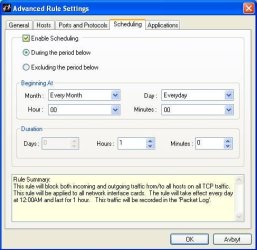
I thought it was unnecessary complicated to add rules and later quickly lift the rules temporarily... In the program, Sygate firewall pro, I just needed to tick the box to temporarily cancel the rule and then tick the box again to re-enable the rule. Neat, simple and user-friendly.
I didn't try Windows Firewall Control Plus.I didn't find any trail version.
Am trying Windows Firewall Control Plus right now, and i don't find were I can apply all my rules to the different programs.. i want to block ex: IP10.0.0.0-10.255.255.255 but i want one program to have access to 10.0.10.10.
And the installation crashed my access from my winxp computer to my win7 :huh:
So i did uninstall it again.. Damn, I need a lab-computer to learn it.. I hope the uninstallation restored the original Win firewall settings.. Because I can't reinstall win7 on that computer before next year :confused: I hope the security isn't compromised..

Yes, I use Firefox and advanced custom settings ... And DuckDuckGo as a search engine. Sometimes I'm forced to use google .. that's then I quickly have to lift the rule for 20 seconds to a minute and then apply it again.

I relay hate win7 some times... I think win xp was the last windows that doesn't have i mind of it own and have a good backward compatible..:rolleyes:
I am in the process to learn Linux.. when win7 doesn't get any security updates then i am screwed.. win8, 10 not in my life.

so maybe I should give up trying to get a good protection to Windows 7.. and use win xp until i have "learned" Linus... :(:o:shock: one or two years more..

Yes I give up.. throwing in the towel... TKO :picnic:
used Microsoft 1989-2018(2019)


Now I'll sleep on it...... The time is now 06:59 here in Sweden. It's time to sleep a long time ago. Good night :sleep:
 
Last edited:

My Computer My Computer

At a glance

Linux:Debian, Kali.. 2xWin8.1,2x,1x7Pro, Retr...cpu's intel 8088 up to intel i7 gen9.. dual x...oldest 1024KB newest 64GBmostly internals i don't game
Computer type
PC/Desktop
Computer Manufacturer/Model Number
AsusX53, Aspire E1-572. AsusUX32A, HP Pro3130mt+3010mt, HP Proliant ML150G3, 3xCustom, i3, i5, i7
OS
Linux:Debian, Kali.. 2xWin8.1,2x,1x7Pro, Retro:1x2003server.1xXPpro, 1xW2k,1x98SE,1x95,1x3.11
CPU
cpu's intel 8088 up to intel i7 gen9.. dual xenon on server
Motherboard
a lot of them :-)
Memory
oldest 1024KB newest 64GB
Graphics Card(s)
mostly internals i don't game
Sound Card
old retro=soundblaster.. newer ones internal
Monitor(s) Displays
smalest 12" largest 26"
Internet Speed
100/100
Antivirus
NortonInternetSecurity, MS, Avast, (not on the same computer
Browser
IE8, IE9. IE11, Firefox
Other Info
I can't fit all info on all my computers in these fields :-D

My Computer My Computer

At a glance

Windows 7 Ultimate x64AMD A10-7850 Quad Core 3.7 GHz16 GBMSI Radeon R7 250 OC Crossfired with A10 AMD ...
Computer type
PC/Desktop
Computer Manufacturer/Model Number
Custom
OS
Windows 7 Ultimate x64
CPU
AMD A10-7850 Quad Core 3.7 GHz
Motherboard
MSI MS-7900
Memory
16 GB
Graphics Card(s)
MSI Radeon R7 250 OC Crossfired with A10 AMD Radeon R7
Monitor(s) Displays
Samsung SyncMaster XL2370HD, ViewSonic VA1912wb
Screen Resolution
1920*1080, 1440*900
Hard Drives
128 GB SSD
512 GB SSD
500 GB HDD
PSU
Corsair CX500
Case
Rosewill THOR V2 BLACK
Keyboard
Logitech G15
Mouse
CMSTORM MS2K
Internet Speed
ATT U-Verse
Antivirus
Microsoft Security Essentials, MalwareBytes
Browser
Firefox (lastest stable) with NoScript
Other Info
Just a humdrum little system.
Domains:

Domains : Windows 10 Firewall Control: Sphinx Software

From the link (under 'Name Requirements' heading near top of page):

"Windows 10 Firewall Control can create filtering rules using domain (web site) strict names and name patterns. "*", "?" and "[a-x]" (character intervals) are allowed for the patterns creation. Example the "*telemetry*" pattern matches all the domains that include the "telemetry" word inside, e.g. "telemetry.microsoft.com", "telemetry.mozilla.org".

IP Address filters (including ranges of IPs):

Events : Windows 10 Firewall Control: Sphinx Software

From link (near bottom of page):

The rule can be created from the listed event precisely or the rule may be expanded by using a wider IP address/service range.


Apply once (asks for permission at each attempt to access internet for any specified program):

Zone editor_.PNG

You can turn the notification balloon off or on, as you please. It's default is 'On', which will provide a tooltip-like notification for each and every program/event/connection that tries to access the internet. You'll want to disable it for the permissioned events/etc., as it can become annoying.

W10FC secures outbound traffic only.

The only thing that W10FC won't do (AFAIK) is filter MAC addresses (that would be inbound filtering, at any rate). I think Sygate Personal FW will. If you're on a routered network, you can filter MACs through the router (the standard way of doing so).

But MAC address filtering does not provide much security, since it's fairly easy to snag one's MAC and spoof it.

As mentioned previously, you can create inbound rules using the MS Advanced settings of windows firewall. But in that case, you may want to use a software firewall that filters both inbound and outbound traffic.
 

My Computer My Computer

At a glance

windows 7 Pro 64 Biti5 4670K16GB DDR3@933mhzRadeon R9 390 8192mb
Computer type
PC/Desktop
Computer Manufacturer/Model Number
custom
OS
windows 7 Pro 64 Bit
CPU
i5 4670K
Motherboard
Asus Max Hero 1150 socket
Memory
16GB DDR3@933mhz
Graphics Card(s)
Radeon R9 390 8192mb
Monitor(s) Displays
Dell U2415 x3
Screen Resolution
1920 (5760) x 1200 x3
Hard Drives
System: Kingston 128GB SSD

Installing to Samsung 860 EVO 500GB
WD Black 2 TB & 1 TB
PSU
Corsair CX750M
Cooling
Hyper 312
Internet Speed
50mbps
Domains:

Domains : Windows 10 Firewall Control: Sphinx Software

From the link (under 'Name Requirements' heading near top of page):

"Windows 10 Firewall Control can create filtering rules using domain (web site) strict names and name patterns. "*", "?" and "[a-x]" (character intervals) are allowed for the patterns creation. Example the "*telemetry*" pattern matches all the domains that include the "telemetry" word inside, e.g. "telemetry.microsoft.com", "telemetry.mozilla.org".

IP Address filters (including ranges of IPs):

Events : Windows 10 Firewall Control: Sphinx Software

From link (near bottom of page):

The rule can be created from the listed event precisely or the rule may be expanded by using a wider IP address/service range.


Apply once (asks for permission at each attempt to access internet for any specified program):

View attachment 402567

You can turn the notification balloon off or on, as you please. It's default is 'On', which will provide a tooltip-like notification for each and every program/event/connection that tries to access the internet. You'll want to disable it for the permissioned events/etc., as it can become annoying.

W10FC secures outbound traffic only.

The only thing that W10FC won't do (AFAIK) is filter MAC addresses (that would be inbound filtering, at any rate). I think Sygate Personal FW will. If you're on a routered network, you can filter MACs through the router (the standard way of doing so).

But MAC address filtering does not provide much security, since it's fairly easy to snag one's MAC and spoof it.

As mentioned previously, you can create inbound rules using the MS Advanced settings of windows firewall. But in that case, you may want to use a software firewall that filters both inbound and outbound traffic.

Hello again :D
I thank you for all the tips and help.
Yes i want to control both inbound and outbound traffic.. as near as total control possible.

(But MAC address filtering does not provide much security)) Yes i know.. but it's inside my firewall/router i use this function.. so all my computers can connect to each other, but if a new computer connects to the network it is denied access. I don't have wifi. so i don't have to worry about my neighbors.. And my friends can only use a computer.. so i don't worry about in internal hacker.
So the firewalls more or less only control my computers outgoing traffic.. and is a second barrier if an attacker succeeds in hacking my first firewall.

About win10FC... I still don't get it without experimenting my self... :o I just cant see where all the options possibilities are.
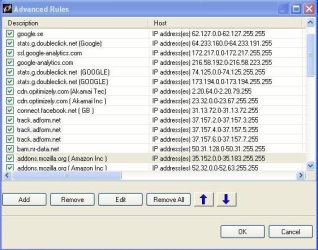
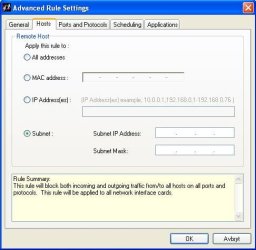
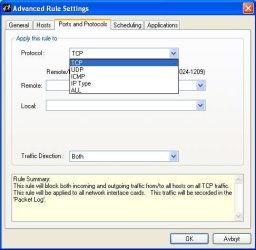
I attach some pictures from my firewall, so maybe you understand what I mean.

rule list... simple to disable and activate the rules temporarily.
Adding a new rule and all the options.
And last some of the options in the firewall.

Can win10FC do all this and more?
 

Attachments

  • rules-list.JPG
    rules-list.JPG
    55.7 KB · Views: 13
  • new-rule.JPG
    new-rule.JPG
    36.1 KB · Views: 13
  • new-rule-H.JPG
    new-rule-H.JPG
    30.6 KB · Views: 13
  • new-rule-P.JPG
    new-rule-P.JPG
    30.3 KB · Views: 13
  • new-rule-S.JPG
    new-rule-S.JPG
    35.8 KB · Views: 13
  • new-rule-A.JPG
    new-rule-A.JPG
    56.1 KB · Views: 13
  • Options.JPG
    Options.JPG
    40.7 KB · Views: 13
Last edited:

My Computer My Computer

At a glance

Linux:Debian, Kali.. 2xWin8.1,2x,1x7Pro, Retr...cpu's intel 8088 up to intel i7 gen9.. dual x...oldest 1024KB newest 64GBmostly internals i don't game
Computer type
PC/Desktop
Computer Manufacturer/Model Number
AsusX53, Aspire E1-572. AsusUX32A, HP Pro3130mt+3010mt, HP Proliant ML150G3, 3xCustom, i3, i5, i7
OS
Linux:Debian, Kali.. 2xWin8.1,2x,1x7Pro, Retro:1x2003server.1xXPpro, 1xW2k,1x98SE,1x95,1x3.11
CPU
cpu's intel 8088 up to intel i7 gen9.. dual xenon on server
Motherboard
a lot of them :-)
Memory
oldest 1024KB newest 64GB
Graphics Card(s)
mostly internals i don't game
Sound Card
old retro=soundblaster.. newer ones internal
Monitor(s) Displays
smalest 12" largest 26"
Internet Speed
100/100
Antivirus
NortonInternetSecurity, MS, Avast, (not on the same computer
Browser
IE8, IE9. IE11, Firefox
Other Info
I can't fit all info on all my computers in these fields :-D
Sygate was unique in its configuration and set up. I doubt you'll find a modern day software firewall that works the same. Here is a "top best alternatives site" that list several alternatives to Sygate PFW. It will at least give you some suggestions (of which there are 14).

I don't vouch for the credibility of the site itself. I suggest that, rather than clicking on the links they provide to the firewall sites that you search for the product and use one of the links that are returned.

I understand you want a firewall that will provide a front end allowing you to easily control both inbound and outbound, but of the two, outbound is the most important, since it will help prevent any rogue program, app, etc from sending data/personal information out. IOW, keeping a tight rein on network accessing events means that you prevent any attempts to 'phone home'.

If there's one bit of advice that will serve best, it is that the first and most important security measure is User common sense and caution. You may already know this.
 

My Computer My Computer

At a glance

windows 7 Pro 64 Biti5 4670K16GB DDR3@933mhzRadeon R9 390 8192mb
Computer type
PC/Desktop
Computer Manufacturer/Model Number
custom
OS
windows 7 Pro 64 Bit
CPU
i5 4670K
Motherboard
Asus Max Hero 1150 socket
Memory
16GB DDR3@933mhz
Graphics Card(s)
Radeon R9 390 8192mb
Monitor(s) Displays
Dell U2415 x3
Screen Resolution
1920 (5760) x 1200 x3
Hard Drives
System: Kingston 128GB SSD

Installing to Samsung 860 EVO 500GB
WD Black 2 TB & 1 TB
PSU
Corsair CX750M
Cooling
Hyper 312
Internet Speed
50mbps
Here is the forgotten link:

14 Sygate Personal Firewall Alternatives and Competitors 2018 Top Best Alternatives

Additionally, if you access public wifis (usually a bad idea), I recommend a reputable VPN. All VPNs are not equal. The highly advertised ones are generally not the one you want.

Here is a site with a lot of good info on vpns, what characteristics to look for and there is also a downloadable Excel chart (that is very wide) with numerous vpns and all of their "features" (good and bad).

I use two vpns that I chose based on the charts (really, on their characteristics and policies). One is Mullvad (the best due to the fact that they don't log traffic, bandwidth...nothing, but is a bit slower). The other is AirVPN, but they do log traffic. They are faster. Only a problem if you do illegal things or if Big Brother starts dominating the masses (an inevitability these days).

Both of these VPNs provide a windows app (and other OS's) and router configurations. The router usage is much slower, unless you have a powerful router.
 

My Computer My Computer

At a glance

windows 7 Pro 64 Biti5 4670K16GB DDR3@933mhzRadeon R9 390 8192mb
Computer type
PC/Desktop
Computer Manufacturer/Model Number
custom
OS
windows 7 Pro 64 Bit
CPU
i5 4670K
Motherboard
Asus Max Hero 1150 socket
Memory
16GB DDR3@933mhz
Graphics Card(s)
Radeon R9 390 8192mb
Monitor(s) Displays
Dell U2415 x3
Screen Resolution
1920 (5760) x 1200 x3
Hard Drives
System: Kingston 128GB SSD

Installing to Samsung 860 EVO 500GB
WD Black 2 TB & 1 TB
PSU
Corsair CX750M
Cooling
Hyper 312
Internet Speed
50mbps
Sygate was unique in its configuration and set up. I doubt you'll find a modern day software firewall that works the same. Here is a "top best alternatives site" that list several alternatives to Sygate PFW. It will at least give you some suggestions (of which there are 14).

I don't vouch for the credibility of the site itself. I suggest that, rather than clicking on the links they provide to the firewall sites that you search for the product and use one of the links that are returned.

I understand you want a firewall that will provide a front end allowing you to easily control both inbound and outbound, but of the two, outbound is the most important, since it will help prevent any rogue program, app, etc from sending data/personal information out. IOW, keeping a tight rein on network accessing events means that you prevent any attempts to 'phone home'.

If there's one bit of advice that will serve best, it is that the first and most important security measure is User common sense and caution. You may already know this.

Yes.. Sygate was a good product.. to bad that symantec bought them up and scraped a good software :( I only wonder why the didn't developed the firewall instead.. symantec doesn't have any firewall without a lot of other stuff..

( Here is a "top best alternatives site" ) i think you forgot the link :D

( If there's one bit of advice that will serve best, it is that the first and most important security measure is User common sense and caution )
oh yes .. spot on :D:D but even the best can make mistakes, so antivirus and a goooood firewall is priceless those times.:thumbsup:

.
Edit: Now i can see the links :D
 

My Computer My Computer

At a glance

Linux:Debian, Kali.. 2xWin8.1,2x,1x7Pro, Retr...cpu's intel 8088 up to intel i7 gen9.. dual x...oldest 1024KB newest 64GBmostly internals i don't game
Computer type
PC/Desktop
Computer Manufacturer/Model Number
AsusX53, Aspire E1-572. AsusUX32A, HP Pro3130mt+3010mt, HP Proliant ML150G3, 3xCustom, i3, i5, i7
OS
Linux:Debian, Kali.. 2xWin8.1,2x,1x7Pro, Retro:1x2003server.1xXPpro, 1xW2k,1x98SE,1x95,1x3.11
CPU
cpu's intel 8088 up to intel i7 gen9.. dual xenon on server
Motherboard
a lot of them :-)
Memory
oldest 1024KB newest 64GB
Graphics Card(s)
mostly internals i don't game
Sound Card
old retro=soundblaster.. newer ones internal
Monitor(s) Displays
smalest 12" largest 26"
Internet Speed
100/100
Antivirus
NortonInternetSecurity, MS, Avast, (not on the same computer
Browser
IE8, IE9. IE11, Firefox
Other Info
I can't fit all info on all my computers in these fields :-D
While it too is no longer supported, a very powerful app is Private Firewall. It provides a lot of control and creation of powerful rules - inbound and out. I still use it on one of my machines.
 

My Computer My Computer

At a glance

Windows 7 Pro 64
Computer type
PC/Desktop
OS
Windows 7 Pro 64
Here is the forgotten link:

14 Sygate Personal Firewall Alternatives and Competitors 2018 Top Best Alternatives

Additionally, if you access public wifis (usually a bad idea), I recommend a reputable VPN. All VPNs are not equal. The highly advertised ones are generally not the one you want.

Here is a site with a lot of good info on vpns, what characteristics to look for and there is also a downloadable Excel chart (that is very wide) with numerous vpns and all of their "features" (good and bad).

I use two vpns that I chose based on the charts (really, on their characteristics and policies). One is Mullvad (the best due to the fact that they don't log traffic, bandwidth...nothing, but is a bit slower). The other is AirVPN, but they do log traffic. They are faster. Only a problem if you do illegal things or if Big Brother starts dominating the masses (an inevitability these days).

Both of these VPNs provide a windows app (and other OS's) and router configurations. The router usage is much slower, unless you have a powerful router.

I don't have wifi.. my wifi-cards is removed in my laptops.. so if I am forced to use wifi I have a USB-wifi solution.. but I prefer to use mobile broadband in those cases.. Why have the cards if they have no use, they only steal resources.

I also use encrypted VPN.. top speed i have reached is 60Mbps, and they don't log traffic ether.. Not a free service and it's only based here in Sweden. so I'm not going to tip about them.
But i will read about your VPN tip. I will get a new firewall next week, and it's quite powerful :p So i guess it's going to be a lot of ???? and !!!!! and what a ****, before I get it to work fully :roflmao:
hmm .. Some of my friends call me security paranoid .. maybe they are right :rolleyes:

Now it's time to sleep.. 04:30..
Thanks for all the tips :D
 

My Computer My Computer

At a glance

Linux:Debian, Kali.. 2xWin8.1,2x,1x7Pro, Retr...cpu's intel 8088 up to intel i7 gen9.. dual x...oldest 1024KB newest 64GBmostly internals i don't game
Computer type
PC/Desktop
Computer Manufacturer/Model Number
AsusX53, Aspire E1-572. AsusUX32A, HP Pro3130mt+3010mt, HP Proliant ML150G3, 3xCustom, i3, i5, i7
OS
Linux:Debian, Kali.. 2xWin8.1,2x,1x7Pro, Retro:1x2003server.1xXPpro, 1xW2k,1x98SE,1x95,1x3.11
CPU
cpu's intel 8088 up to intel i7 gen9.. dual xenon on server
Motherboard
a lot of them :-)
Memory
oldest 1024KB newest 64GB
Graphics Card(s)
mostly internals i don't game
Sound Card
old retro=soundblaster.. newer ones internal
Monitor(s) Displays
smalest 12" largest 26"
Internet Speed
100/100
Antivirus
NortonInternetSecurity, MS, Avast, (not on the same computer
Browser
IE8, IE9. IE11, Firefox
Other Info
I can't fit all info on all my computers in these fields :-D
While it too is no longer supported, a very powerful app is Private Firewall. It provides a lot of control and creation of powerful rules - inbound and out. I still use it on one of my machines.

Okay, do you have a link? There are many search results on "Private Firewall".
 

My Computer My Computer

At a glance

Linux:Debian, Kali.. 2xWin8.1,2x,1x7Pro, Retr...cpu's intel 8088 up to intel i7 gen9.. dual x...oldest 1024KB newest 64GBmostly internals i don't game
Computer type
PC/Desktop
Computer Manufacturer/Model Number
AsusX53, Aspire E1-572. AsusUX32A, HP Pro3130mt+3010mt, HP Proliant ML150G3, 3xCustom, i3, i5, i7
OS
Linux:Debian, Kali.. 2xWin8.1,2x,1x7Pro, Retro:1x2003server.1xXPpro, 1xW2k,1x98SE,1x95,1x3.11
CPU
cpu's intel 8088 up to intel i7 gen9.. dual xenon on server
Motherboard
a lot of them :-)
Memory
oldest 1024KB newest 64GB
Graphics Card(s)
mostly internals i don't game
Sound Card
old retro=soundblaster.. newer ones internal
Monitor(s) Displays
smalest 12" largest 26"
Internet Speed
100/100
Antivirus
NortonInternetSecurity, MS, Avast, (not on the same computer
Browser
IE8, IE9. IE11, Firefox
Other Info
I can't fit all info on all my computers in these fields :-D
Okay, do you have a link? There are many search results on "Private Firewall".

Private Firewall was discontinued. Therefore, any download you find will be an old version.

I also use encrypted VPN.. top speed i have reached is 60Mbps, and they don't log traffic ether.. Not a free service and it's only based here in Sweden. so I'm not going to tip about them.

Mullvad is in Sweden.

To give you an example of the usefulness of the chart earlier mentioned, the VPNs in Sweden that don't log any traffic (traffic, DNS requests, timestamps, bandwidth or IP addresses):

Azire
Froot
Mullvad
oVPN.se

There are a few others, but they log one or more of the logging categories mentioned above.
This list may be missing a few of those that do.


hmm .. Some of my friends call me security paranoid .. maybe they are right :rolleyes:
It's not paranoia if they really are out to get you. The state of the world demonstrates that they are. It's not over-caution that kills the mouse.
 

My Computer My Computer

At a glance

windows 7 Pro 64 Biti5 4670K16GB DDR3@933mhzRadeon R9 390 8192mb
Computer type
PC/Desktop
Computer Manufacturer/Model Number
custom
OS
windows 7 Pro 64 Bit
CPU
i5 4670K
Motherboard
Asus Max Hero 1150 socket
Memory
16GB DDR3@933mhz
Graphics Card(s)
Radeon R9 390 8192mb
Monitor(s) Displays
Dell U2415 x3
Screen Resolution
1920 (5760) x 1200 x3
Hard Drives
System: Kingston 128GB SSD

Installing to Samsung 860 EVO 500GB
WD Black 2 TB & 1 TB
PSU
Corsair CX750M
Cooling
Hyper 312
Internet Speed
50mbps
Back
Top