Im Scared My PC Might Die

Pedroc1999

Banned
Local time
9:46 PM
Messages
1,155
Location
Merthyr Tydfil, Wales
Well my computer has been active for just under 7years and im afraid one day it might die. I have only upgraded the hdd and added a graphics card. Is this putting the pc under stress. I dont really know the signs of a dieing PC. Could someone tell me what the signs are?
 

My Computer My Computer

At a glance

Windows 7 Ultimate x86Intel Pentium D 925 @ 3.00GHz1GB DDR2 667MHzOverclocked Asus ATI Radeon X1600 Pro 512MB
Computer Manufacturer/Model Number
Packard Bell iMedia 2218 -- Has Been Running For Almost 7 Years!
OS
Windows 7 Ultimate x86
CPU
Intel Pentium D 925 @ 3.00GHz
Motherboard
Socket 775 MCP73VT-PM
Memory
1GB DDR2 667MHz
Graphics Card(s)
Overclocked Asus ATI Radeon X1600 Pro 512MB
Sound Card
Sound Blaster Audigy 570
Monitor(s) Displays
19" LCD Monitor; MW19E-AAA
Screen Resolution
1440 x 900
Hard Drives
500gb 7200rpm (Windows 7) ---
160gb 7200rpm (Backup) ---
1TB Iomega External Drive (7200rpm)
PSU
250w Packard Bell Standard
Case
Packard Bell standard
Cooling
Intel Socket 775 Air Cooler
Keyboard
Wired PS/2 Keyboard
Mouse
Dell Wireless USB Mouse
Internet Speed
Wireles --- Download - 6.63 Mbps Upload - 0.38 Mbps
Other Info
Currently Planning To Build New Computer --- Also Got A Samsung Galaxy Ace II (Plays All Games You Throw At It)
Any PC could die at any time, but usually it's only one component that dies unless you are real unlucky and the psu goes taking several components with it.

You have replaced the HDD, that's a good thing.

Don't worry about it too much, if it stops working then you just need to figure out which bit died.
 

My Computer My Computer

At a glance

Windows 7 Professional 64 bit
OS
Windows 7 Professional 64 bit
Any PC could die at any time, but usually it's only one component that dies unless you are real unlucky and the psu goes taking several components with it.

You have replaced the HDD, that's a good thing.

Don't worry about it too much, if it stops working then you just need to figure out which bit died.
lol Paul I fear this on a daily lol lol lol

The fear is always there if it has run 7 years with no issues consider yourself lucky some people can't get past the first 6 months let alone 7 years don't worry about it

But if you are thinking ahead why don't you put a few bucks aside untill you get a reasonable amout let's say 6 month period im sure you could drum up a couple hundred easy for some upgrades
 

My Computer My Computer

At a glance

Windows 10 Home Premium 64bit sp1Intel I7-6700K @ 4.6 Ghz 1.344 volts everyday OC32GB G-Skill TridentZ 3200mhz 16-18-18-38 DDR4Sli Gigabyte Windforce GTX 980 G1
Computer type
PC/Desktop
Computer Manufacturer/Model Number
CoreI7-6700K MrFingerIII Special Builds
OS
Windows 10 Home Premium 64bit sp1
CPU
Intel I7-6700K @ 4.6 Ghz 1.344 volts everyday OC
Motherboard
Asrock Fatality K6 Z170 Socket 1151
Memory
32GB G-Skill TridentZ 3200mhz 16-18-18-38 DDR4
Graphics Card(s)
Sli Gigabyte Windforce GTX 980 G1
Sound Card
AC97 Creative Rage Tactic 3D Headphones Bluetooth
Monitor(s) Displays
27" Asus ROG Swift PG278Q G-Sync 48" Vizio Smart HD TV
Screen Resolution
2560x1440p 27"- 48" Currently Gaming at 2560x1440p Res 2K
Hard Drives
250GB Samsung Evo840SSD Seagate baracuda 500 GB WD Mybook 500Gb 1TB Seagate Barracuda
PSU
HX1050w Corsair Silver 80plus certified crosfire/sli
Case
Enthod Pro Full Tower
Cooling
Corsair H110i GT 280 mm High Performance WaterBlock
Keyboard
Logitech wireless keyboard
Mouse
Logitech wireless mouse
Internet Speed
Cox Cable 100+ mb
Antivirus
WebRoot Spysweeper with Antivirus
Browser
IE-10, Chrome, Opera
Other Info
My Other Rig is a AMD FX8320E @4.6Ghz 16GB Ballistic Sport Ram
Mobo Asrock Fatality 990FX 120GB OCZ SSD 1TB Seagate Barracuda Corsair H75 Cooling PSU Corsair CX750
GPU GTX Gigabyte 970G1
I fear it too Solar :D It's all part of the fun eh!

But more seriously, I can understand it being a more serious concern especially if you only have 1 PC and no funds to sort it out. All you can do is cross that bridge when you come to it make sure to regularly back up data if you can, keep the PC clean inside and just enjoy the PC while its working fine.
 

My Computer My Computer

At a glance

Windows 7 Professional 64 bit
OS
Windows 7 Professional 64 bit
Different components show different signs when they start to fail.

For Power supplies, the amount of power put out will degrade over time. Hence its a good idea to get a PSU with more overhead than you expect to use and not to run the PSU at full capacity full time. When PSU's start to go bad, you will get random restarts or lockups or error messages on startup or during heavy or light loads. This is usually the first thing that will die in a computer over time.

You can test the output of the PSU with a multimeter and by looking at the specifications of the PSU to make sure that the 12v rail and 5v rail are supplying the correct voltage. Here is a good guide for that: How To Manually Test a Power Supply With a Multimeter
There are also devices you can buy to test the PSU that have all the connectors setup so you just plug it in: How To Test a Power Supply Using a Power Supply Tester

For motherboards, components on the mobo can fail. Since the motherboard is a group of components, this can be seen by many different problems. Usually, on the motherboard, this will be a complete failure or a partial failure. In a complete failure, the motherboard will not go to POST. with this, a component essential to functionality has failed and will usualy do so without warning. With a partial failure, the individual components will start to not work. The USB drives might start failing or not recognizing external drives or mice if the USB interface starts to fail. Problems with Hard-drive SATA connections can also occur causing error messages that would look like hard-drive failures. the northbridge or southbdrige could also fail. Northbridge causeing video and memory errors, the southbridge causing problems with USB, audio and IDE drives.Here is a good synopsis on the two bridges: http://en.wikipedia.org/wiki/Northbridge_(computing) (click link for southbridge on same page)

A partial failure is usually a warning sign of complete failure. The motherboard can still function with a partial failure, but a complete failure of the motherboard is usually expected. could be months, days or years though depending on the component that failed.

For the CPU (FYI: CPU's usually now include the Northbridge like Sandy-bridge and AMD Fusion) CPU's fail in one way. they burn out... The CPU is pushed to highest capacity before shipping to make sure the chip won't fail. if a chip fails at this time or shortly after being used new, it is called a Burn In Failure. if it passes this torture test, the component will usually last for quite a long time. The only thing to kill it would be heat. The symptoms of the CPU failing due to heat would be: system errors and system crashes, failure to POST, and the system starting but then shutting off. Sometimes, by the system starting up but with high fan usuage and won't load.


When Hard Drives start to fail, they can make noise like clicking or whirling sounds. This is not good. Also sometime before failure, a drive will start to be very sluggish. When it fails, the HDD could be not recognized in the BIOS or reported incorrectly in the BIOS. Usually the HDD maker will have a tool to check your hard-drives like Seatools: SeaTools | Seagate

When RAM starts to die, you can have single chips on the RAM Stick or the whole stick fail. this can be seen in the system not seeing the RAM at all or if you have an error message or crash that references the same location or error code repeatedly. You can use Memtest+ to test the RAM to see if it has any issues. Info on this: RAM Failure: Symptoms and Diagnosis

Edit: if I have made any errors in here, please correct me. I still have much to learn

 
Last edited:

My Computer My Computer

At a glance

Win7 Home Premium 64xIntel Core 2 Duo P7450 / 2.13 GHz (2.29 with ...4 GB PC-6400 Hyundai (2X2) at 800MhzNVIDIA GeForce GTX 260M 1GB DDR3 VRAM
Computer type
Laptop
Computer Manufacturer/Model Number
ASUS G60-RBBX05
OS
Win7 Home Premium 64x
CPU
Intel Core 2 Duo P7450 / 2.13 GHz (2.29 with Extreme Turbo)
Memory
4 GB PC-6400 Hyundai (2X2) at 800Mhz
Graphics Card(s)
NVIDIA GeForce GTX 260M 1GB DDR3 VRAM
Monitor(s) Displays
16" LED Backlit
Screen Resolution
1366 x 768 on laptop 1600x1050 max res on 22" external mon
Hard Drives
OCZ Agility 3 60GB SSD / 320 GB - Serial ATA-150 - 7200 rpm
PSU
6-cell Lithium ion { lasts 1.5 hours }
Case
ASUS G60 Laptop
Keyboard
Chicklet type back-lit (white light) keyboard
Mouse
Logitech G9 Laser Mouse 3200dpi and 1000 reports per minute
Internet Speed
Comcast 8.60mb/s up - 3.11mb/s down
Antivirus
MSE
Browser
Firefox
Other Info
General mid-budget gaming Comp. Low batterylife - High FrameRates - currently overheating problems :(

2nd Rig: Case: Rosewill BLACKHAWK Gaming ATX Mid Tower Computer Case

Mobo: GIGABYTE GA-990FXA-UD3
CPU: AMD FX-6200 Zambezi 3.8GHz (4.1GHz Turbo)
Heatsink: COOLER MASTER V8 CPU Cooler
RAM: Patriot Viper 3 8GB (2 x 4GB) 240-Pin DDR3 SDRAM 1866 (PC3 15000)
GPU: SAPPHIRE Radeon HD 6850 1GB 2
With you system specs and age anything can happen at any time. If I had to choose one piece of hardware to replace it would be your 250W power supply. That is a long time for a OEM power supply.
 

My Computer My Computer

At a glance

Windows 10 Pro. 64/ version 1709 Windows 7 Pr...Intel i7-6800K @ 4.3Corsair Platinum 16 gig @2400EVGA GTX 1070 OC
Computer type
PC/Desktop
Computer Manufacturer/Model Number
Home made Desktop
OS
Windows 10 Pro. 64/ version 1709 Windows 7 Pro/64
CPU
Intel i7-6800K @ 4.3
Motherboard
ASUS X-99 Deluxe II
Memory
Corsair Platinum 16 gig @2400
Graphics Card(s)
EVGA GTX 1070 OC
Monitor(s) Displays
Asus 27" LED LCD/VE278Q
Screen Resolution
1920-1080 or 1280-720 HDMI
Hard Drives
INTEL SSD 730-240 Gb Sata 3.0/
PSU
EVGA Platium 1200W
Case
Phanteks Luxe Tempered Glass 8 fans/ one radiator
Cooling
XSPC/ Water Cooled CPU
Keyboard
Das 4 Professional
Mouse
Logitech M705/MX Anywhere 2-S
Internet Speed
100 mbits
Antivirus
Microsoft Security Essentials/ Malwarebytes Premium 3.0/ SAS
Browser
I.E. 11 default/Firefox/ ISP Time Warner Cable/Spectrum
Other Info
LG BluRay Burner/
Sound system-KLipsch-THX/
Icy Dock ssd Hot Swap bays.
Yes, I have a old celeron wiv graphics just in case, also i still got old hdd, old ram and an old pc, thing is i love this one and have has lots of fun wiv it.


No regarding updates i am rly short of

i cant upgrade ram cos ddr2 is to expensive, will wait till another mobo,
i cant upgrade psu cos it is oem case
cant upgrade mobo cos it is oem case
if i cant upgrade psu i cant upgrade nothing else tbh
cant upgrade case cos oem board

so you see what im at, it is either stay with this or get new pc. i am thinking abpout it and have got £150, i need roughly annother £100 for decent pc
 

My Computer My Computer

At a glance

Windows 7 Ultimate x86Intel Pentium D 925 @ 3.00GHz1GB DDR2 667MHzOverclocked Asus ATI Radeon X1600 Pro 512MB
Computer Manufacturer/Model Number
Packard Bell iMedia 2218 -- Has Been Running For Almost 7 Years!
OS
Windows 7 Ultimate x86
CPU
Intel Pentium D 925 @ 3.00GHz
Motherboard
Socket 775 MCP73VT-PM
Memory
1GB DDR2 667MHz
Graphics Card(s)
Overclocked Asus ATI Radeon X1600 Pro 512MB
Sound Card
Sound Blaster Audigy 570
Monitor(s) Displays
19" LCD Monitor; MW19E-AAA
Screen Resolution
1440 x 900
Hard Drives
500gb 7200rpm (Windows 7) ---
160gb 7200rpm (Backup) ---
1TB Iomega External Drive (7200rpm)
PSU
250w Packard Bell Standard
Case
Packard Bell standard
Cooling
Intel Socket 775 Air Cooler
Keyboard
Wired PS/2 Keyboard
Mouse
Dell Wireless USB Mouse
Internet Speed
Wireles --- Download - 6.63 Mbps Upload - 0.38 Mbps
Other Info
Currently Planning To Build New Computer --- Also Got A Samsung Galaxy Ace II (Plays All Games You Throw At It)
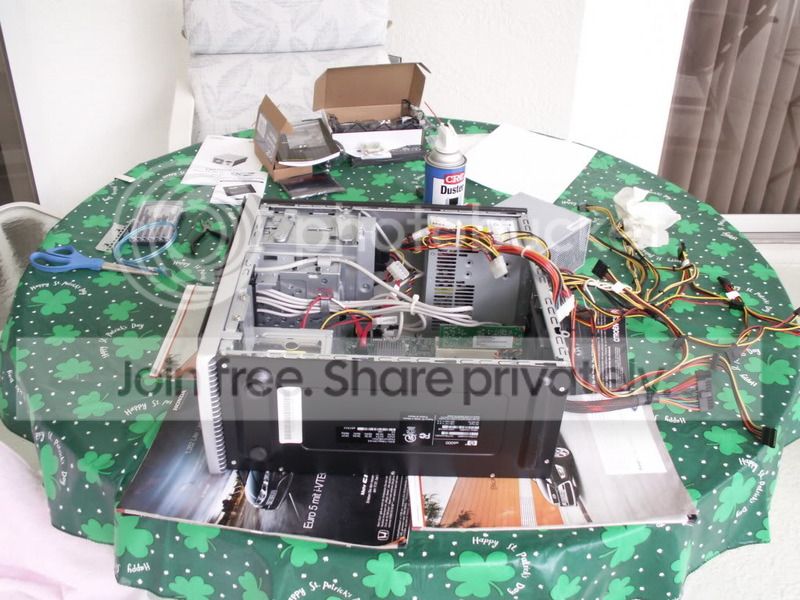
If it is s standard midsize case, upgrading should not be a problem. I put a new PSU and GPU into my stock HP case. This is a 2007 model.

PICT0091.jpg
 

My Computer My Computer

At a glance

Vista, Windows7, Mint Mate, Zorin, Windows 8from 1.6GHz Duo to i7
Computer Manufacturer/Model Number
HP, Dell, Gateway, Toshiba - 4 laptops and 2 desktops
OS
Vista, Windows7, Mint Mate, Zorin, Windows 8
CPU
from 1.6GHz Duo to i7
Monitor(s) Displays
2x HP w2207
Hard Drives
5x HDD, 7x SSD, 12x Externals
Keyboard
with trackball - no mices
Mouse
Trackball mice
Internet Speed
DSL 6000
I understand where you are coming from. It's old and usable. Saving for a new system makes sense to me.
 

My Computer My Computer

At a glance

Windows 10 Pro. 64/ version 1709 Windows 7 Pr...Intel i7-6800K @ 4.3Corsair Platinum 16 gig @2400EVGA GTX 1070 OC
Computer type
PC/Desktop
Computer Manufacturer/Model Number
Home made Desktop
OS
Windows 10 Pro. 64/ version 1709 Windows 7 Pro/64
CPU
Intel i7-6800K @ 4.3
Motherboard
ASUS X-99 Deluxe II
Memory
Corsair Platinum 16 gig @2400
Graphics Card(s)
EVGA GTX 1070 OC
Monitor(s) Displays
Asus 27" LED LCD/VE278Q
Screen Resolution
1920-1080 or 1280-720 HDMI
Hard Drives
INTEL SSD 730-240 Gb Sata 3.0/
PSU
EVGA Platium 1200W
Case
Phanteks Luxe Tempered Glass 8 fans/ one radiator
Cooling
XSPC/ Water Cooled CPU
Keyboard
Das 4 Professional
Mouse
Logitech M705/MX Anywhere 2-S
Internet Speed
100 mbits
Antivirus
Microsoft Security Essentials/ Malwarebytes Premium 3.0/ SAS
Browser
I.E. 11 default/Firefox/ ISP Time Warner Cable/Spectrum
Other Info
LG BluRay Burner/
Sound system-KLipsch-THX/
Icy Dock ssd Hot Swap bays.
Got to get me one of those table cloths.
 

My Computer My Computer

At a glance

Windows 10 Pro. 64/ version 1709 Windows 7 Pr...Intel i7-6800K @ 4.3Corsair Platinum 16 gig @2400EVGA GTX 1070 OC
Computer type
PC/Desktop
Computer Manufacturer/Model Number
Home made Desktop
OS
Windows 10 Pro. 64/ version 1709 Windows 7 Pro/64
CPU
Intel i7-6800K @ 4.3
Motherboard
ASUS X-99 Deluxe II
Memory
Corsair Platinum 16 gig @2400
Graphics Card(s)
EVGA GTX 1070 OC
Monitor(s) Displays
Asus 27" LED LCD/VE278Q
Screen Resolution
1920-1080 or 1280-720 HDMI
Hard Drives
INTEL SSD 730-240 Gb Sata 3.0/
PSU
EVGA Platium 1200W
Case
Phanteks Luxe Tempered Glass 8 fans/ one radiator
Cooling
XSPC/ Water Cooled CPU
Keyboard
Das 4 Professional
Mouse
Logitech M705/MX Anywhere 2-S
Internet Speed
100 mbits
Antivirus
Microsoft Security Essentials/ Malwarebytes Premium 3.0/ SAS
Browser
I.E. 11 default/Firefox/ ISP Time Warner Cable/Spectrum
Other Info
LG BluRay Burner/
Sound system-KLipsch-THX/
Icy Dock ssd Hot Swap bays.
It is the iMedia 2218b case
 

Attachments

  • Packard-Bell-IMedia-B2218-0.jpg
    Packard-Bell-IMedia-B2218-0.jpg
    3.9 KB · Views: 52

My Computer My Computer

At a glance

Windows 7 Ultimate x86Intel Pentium D 925 @ 3.00GHz1GB DDR2 667MHzOverclocked Asus ATI Radeon X1600 Pro 512MB
Computer Manufacturer/Model Number
Packard Bell iMedia 2218 -- Has Been Running For Almost 7 Years!
OS
Windows 7 Ultimate x86
CPU
Intel Pentium D 925 @ 3.00GHz
Motherboard
Socket 775 MCP73VT-PM
Memory
1GB DDR2 667MHz
Graphics Card(s)
Overclocked Asus ATI Radeon X1600 Pro 512MB
Sound Card
Sound Blaster Audigy 570
Monitor(s) Displays
19" LCD Monitor; MW19E-AAA
Screen Resolution
1440 x 900
Hard Drives
500gb 7200rpm (Windows 7) ---
160gb 7200rpm (Backup) ---
1TB Iomega External Drive (7200rpm)
PSU
250w Packard Bell Standard
Case
Packard Bell standard
Cooling
Intel Socket 775 Air Cooler
Keyboard
Wired PS/2 Keyboard
Mouse
Dell Wireless USB Mouse
Internet Speed
Wireles --- Download - 6.63 Mbps Upload - 0.38 Mbps
Other Info
Currently Planning To Build New Computer --- Also Got A Samsung Galaxy Ace II (Plays All Games You Throw At It)

My Computer My Computer

At a glance

Vista, Windows7, Mint Mate, Zorin, Windows 8from 1.6GHz Duo to i7
Computer Manufacturer/Model Number
HP, Dell, Gateway, Toshiba - 4 laptops and 2 desktops
OS
Vista, Windows7, Mint Mate, Zorin, Windows 8
CPU
from 1.6GHz Duo to i7
Monitor(s) Displays
2x HP w2207
Hard Drives
5x HDD, 7x SSD, 12x Externals
Keyboard
with trackball - no mices
Mouse
Trackball mice
Internet Speed
DSL 6000
Actually, that's my table cloth. I just let Wolfgang borrow it. :what:
 

My Computers My Computers

  • At a glance

    Windows 11 ProRyzen 9 5900X32GB G Skill DDR4-3600EVGA RTX 3080 FTW 3 Ultra
    Computer type
    PC/Desktop
    Computer Manufacturer/Model Number
    ALWAYS UNDER CONSTRUCTION
    OS
    Windows 11 Pro
    CPU
    Ryzen 9 5900X
    Motherboard
    Asus X570 Crosshair Viii Hero
    Memory
    32GB G Skill DDR4-3600
    Graphics Card(s)
    EVGA RTX 3080 FTW 3 Ultra
    Sound Card
    On Board/Sennheiser PC37X Headset
    Monitor(s) Displays
    3 X Asus 27"
    Screen Resolution
    2560x1440
    Hard Drives
    2 X 1 TB NVME drives
    PSU
    EVGA 850
    Case
    Phanteks Eclipse P400A
    Cooling
    EVGA 280 AIO
    Keyboard
    Logitech G510s/ Logitech G13
    Mouse
    Logitech G502
    Internet Speed
    24/1
    Antivirus
    ESET/MBAM Pro/SAS Pro
    Browser
    Chrome/ Firefox/ Edge
  • At a glance

    Windows 11 ProIntel Ultra 9 288V32 GB LPDDR5X 8533
    Computer type
    Laptop
    System Manufacturer/Model Number
    Dell 16 Plus
    OS
    Windows 11 Pro
    CPU
    Intel Ultra 9 288V
    Memory
    32 GB LPDDR5X 8533
    Monitor(s) Displays
    16" Mini-LED HDR600 Touch 90 Hz
    Screen Resolution
    2560X1600
    Hard Drives
    1 TB NVME

My Computer My Computer

At a glance

Vista, Windows7, Mint Mate, Zorin, Windows 8from 1.6GHz Duo to i7
Computer Manufacturer/Model Number
HP, Dell, Gateway, Toshiba - 4 laptops and 2 desktops
OS
Vista, Windows7, Mint Mate, Zorin, Windows 8
CPU
from 1.6GHz Duo to i7
Monitor(s) Displays
2x HP w2207
Hard Drives
5x HDD, 7x SSD, 12x Externals
Keyboard
with trackball - no mices
Mouse
Trackball mice
Internet Speed
DSL 6000
I have had PCs that have run for years with no problem, but the first laptop I bought managed to have the HDD and the LAN port die within 6 months. Fortunately HP repaired it and also paid for shipping both ways.
 

My Computer My Computer

At a glance

Windows 7 Home Premium 64bit SP 1Intel i5 2500k8 gigabytes Corsair PC3-12800 DDR3EVGA GeForce GTX 460 superclocked
Computer Manufacturer/Model Number
Customized build from CyberPower
OS
Windows 7 Home Premium 64bit SP 1
CPU
Intel i5 2500k
Motherboard
Asus P8P67 Deluxe
Memory
8 gigabytes Corsair PC3-12800 DDR3
Graphics Card(s)
EVGA GeForce GTX 460 superclocked
Sound Card
Integrated
Monitor(s) Displays
ViewSonic 23" LCD
Screen Resolution
1980 x 1080
Hard Drives
120 Gb Samsung 840 Pro SSD
120 Gb Kingston Hyper X SSD
1 Tb WD Caviar Black HDD
PSU
Coolermaster 1000 watt modular
Case
Coolermaster HAF X full tower
Cooling
Coolermaster Hyper 212 plus
Keyboard
Logitech USB
Mouse
Microsoft 3 button
Internet Speed
download 1.5 Mb/sec upload 300Kb/sec
I have a circa 1998 laptop and a circa 1999 desktop both still running very well with no signs of imminent failure, computers will last a long time if you take proper care of them!

Of the parts you need to be concerned with, you basically need to be concerned with anything that has moving parts. This includes:
* Hard disk drives
* Fans
* CPU heatsink+fan assembly
* Power supplies (they usually have fans in them!)
* Video cards (higher-end video cards use a heatsink+fan asembly for additional cooling)
* Motherboards (some motherboards use a heatsink+fan asembly for cooling)

You also need to look out for capacitors that might fail and leak, though you can't easily fix this unless you're skilled with soldering electronics.

Of the parts I listed, the parts most likely to fail first are the fans. If you notice a fan acting funny, look to repair or replace them, their cooling is essential to proper functioning of a computer and to ensure a computer lives for a long time.

HDDs then follow second. HDD failures are somewhat random, but are more likely to occur if the computer is subject to physical shock (laptops are notoriously vulnerable to HDD failures). HDDs usually fail gradually, showing signs such as giving off clicking sounds and reduced performance. If you find that your HDD is acting strangely, look to backup and replace it ASAP! If you're somewhat knowledgable with computers, you can use software that can read SMART information off your HDDs; SMART is a set of information that users and technicians can use to diagnose the health status of a HDD with some degree of accuracy.

Capacitor failures and leaks are an evil bunch and depend on the computer and failure itself, but are more likely to occur on older computers due simply to being old. I've also heard that computer components of a certain era also had a bad string of factory-defective capacitors used (it's gotten better now!), which can manifest as leaking and failing capacitors over time. As I said, if you have soldering experience you might be able to fix them, but it's all a guess at best since capacitors aren't usually meant to be replaced.

Overall, keep an eye on your fans, HDD, and PSU for signs of failure and replace them as necessary. Most other parts besides capacitors shouldn't fail unless they happened to be factory-defective or you did something really bad to your computer.

And last but not least, you will have to accept the sad fact that computers will die at some point. Whether it be through your own mishandling or something completely out of your control like a power surge or a flood, there's only so much we can do to prolong a computer's life until the world decides to troll you.
 

My Computer My Computer

At a glance

Windows 7 Ultimate x64 SP1Intel Core i7 2700K @ 3.5GHz (TurboBoost disa...16GB (4x4GB) Kingston HyperX DDR3 1600MHz @ 1...Nvidia EVGA GeForce GTX 1060 6GB
Computer type
PC/Desktop
Computer Manufacturer/Model Number
N/A (custom-built)
OS
Windows 7 Ultimate x64 SP1
CPU
Intel Core i7 2700K @ 3.5GHz (TurboBoost disabled)
Motherboard
ASUS P8Z68-V/GEN3
Memory
16GB (4x4GB) Kingston HyperX DDR3 1600MHz @ 1333MHz
Graphics Card(s)
Nvidia EVGA GeForce GTX 1060 6GB
Sound Card
Realtek High Definition Audio (motherboard integrated)
Monitor(s) Displays
NEC Multisync EX231W
Screen Resolution
1920x1080 @ 60Hz via DVI-D
Hard Drives
2x Western Digital 1TB SATA3 Caviar Black Internal HDD // 1x WD 500GB USB 3.0 "My Passport Essential" External HDD // 1x WD 1TB USB 3.0 "My Passport Essential" External HDD // 2x WD 2TB USB 3.0 "My Passport Essential" External HDD
PSU
Corsair Professional Series Gold AX850
Case
Antec 300
Cooling
Air-cooling
Keyboard
Steelseries 6Gv2
Mouse
Steelseries Sensei RAW Glossy, Logitech M500
Internet Speed
DSL (AT&T)
Antivirus
Microsoft Security Essentials
Browser
Pale Moon, Mozilla Firefox 12, Opera 12, Chromium, IE9
Other Info
Virtual Machines (VirtualBox):
* Japanese Windows XP Professional SP3
* Japanese Windows 7 Professional SP1
afaik, the only parts that have a lifespan you can worry about are PSU, fans (any fan), HDDs. Theoretically the capacitors on the mobos (the non-solid-state ones) do have a limited life, but i've seen only a few mobos that died of old age (capacitors showed signs of death) in hundreds if not thousands of mobos that travelled through the shop since I started working here.

Top killer is cheapo crappy PSU going chernobyl at a random time and murdering everything with overvoltage or whatever. With added smoke, of course.
 

My Computer My Computer

At a glance

Win 7 Pro 64-bit 7601AMD Phenom 9650 QuadCore, revision DR-B35 GB yes I run 2x 2GB and 1x 1GB, different b...NVIDIA GeForce 9800 GT 512 Mb, unknown manufa...
Computer type
PC/Desktop
Computer Manufacturer/Model Number
custom built
OS
Win 7 Pro 64-bit 7601
CPU
AMD Phenom 9650 QuadCore, revision DR-B3
Motherboard
ASUS M4A78
Memory
5 GB yes I run 2x 2GB and 1x 1GB, different brand, spank me.
Graphics Card(s)
NVIDIA GeForce 9800 GT 512 Mb, unknown manufacturer.
Sound Card
Crappy Realtek Integrated Audio
Monitor(s) Displays
Fujitsu Siemens P19-3P
Screen Resolution
1280 x 1024 x 32 bits @ 60 Hz Oh yeah, 4:3 rocks!
Hard Drives
(1) MAXTOR S TM3320613AS SATA Disk Device (2) STM35004 18AS SATA Disk Device (3) TOSHIBA USB 2.5"-HDD
PSU
whatever, around 450w
Case
Scavenged from old company PC, 10+ years old
Cooling
CPU fan, GPU fan, case fan, nothing fancy
Keyboard
Microsoft, PS/2, white.
Mouse
Optical, logitec.
Internet Speed
effective max speeds: 70-ish kB/s down 30-ish kB/s up
Antivirus
Avira, free edition.
Browser
Firefox with FXChrome to make it look like Google Chrome :P
Other Info
Was discarded by previous owner due to "horrible performance".
Was running Win Xp from a IDE drive. Yeah. Was a pain.
SATA II drive and Win7 and it zips away! Yay!
Bob is right. Low-spec'd power supplies are main killers. Best to get one 50% more capacity than what you need, with an 80plus rating. It will never be stressed.

On the other, good, side of the coin, you can have pc's run a long time without a problem.

I've got a pc museum in my shop; down to 8 running units now.
One is a 27 year old, $1500 cost, Leading Edge XT - still good. I turn it on every day. Remember MS-Dos 2.0?
Another has a Gigabyte PII board, 14 years old, that is running W7 with the help of a Power Leap cpu adapter housing a 1.4 Celeron o'clkd to 1.56.
One 12 yr old Compaq, an old Gateway, 26" high, 486 tower, etc, and on and on.

I've serviced thousands in my 20 some odd years. PSU's & h/d's go more than anything else.

Only seen 3 mobo's go on their own.

You're running seven years - means you have a good one. Stay with it!
 

My Computer My Computer

At a glance

W7 Home Premium 32bit
Computer Manufacturer/Model Number
8 home-builds from the 80's into 2004
OS
W7 Home Premium 32bit
Back
Top