
Solved Image and sound freezes, need to force-restart 10x a day

Technoir

New member
Member
Local time
1:57 PM
Messages
56
Hi all,

This has been happening for a while.

My PC (DELL XPS desktop) often freezes (impossible to move anything, and the sound gets stuck on one note if playing a sound)... and the only way to stop it to litterally hold down the power button and restart.

Ten times a day.

I changed the graphics card, but no improvement still.
Is this a software problem, or hardware issue?

Thank you
 

My Computer My Computer

At a glance

Microsoft Windows 7 Home Premium 64-bit 7601 ...Intel(R) Core(TM) i7 CPU 920 @ 2.67GHz8.00 GBNVIDIA GeForce GTX 1050
Computer type
PC/Desktop
OS
Microsoft Windows 7 Home Premium 64-bit 7601 Multiprocessor Free Service Pack 1
CPU
Intel(R) Core(TM) i7 CPU 920 @ 2.67GHz
Motherboard
DELL Inc. 0X501H
Memory
8.00 GB
Graphics Card(s)
NVIDIA GeForce GTX 1050
Sound Card
(1) Monitor Webcam (2) High Definition Audio Device (3)
Screen Resolution
2048 x 1152 x 32 bits (4294967296 colors) @ 59 Hz
Hard Drives
(1) SAMSUNG HD103SJ (2) Samsung D3 Station USB Device
could be a lot of things, but yes it sounds like hardware. That same thing happened to me recently and it was because the motherboard had gone bad. Here are a few things to try

1) post your detailed specs so we know what we're dealing with
System Info - See Your System Specs - Windows 7 Help Forums

2) do start > run > msinfo32 > components > problem devices then copy and paste here anything that is in the right hand pane. If your device drivers are all okay that right hand pane will be blank. This will tell us if you have any driver conflicts

3) Disable all your audio devices as described here (they will be listed under sound/video/game controllers). In the case that this problem is due to your audio device, the freezes will stop. If they do stop, your audio device has gone bad and you will need to buy a $10 new pci-e sound card.
How to remove a device in Windows Device Manager

4) If none of the above leads to a solution and the problems continue, reboot into safe mode and run that way for a few hours. If you freeze in safe mode you certainly have a hardware problem, probably the motherboard but not for sure yet, so

5) the next step is to run a bootable memtest86 and let it do a full 8-pass memory test.
Memtest86+ - Advanced Memory Diagnostic Tool
 

My Computer My Computer

At a glance

Win7 pro x64stock i7 7700kCorsair Vengeance LPX 16GB (2x8GB) DDR4 @ 320...integrated Intel HD 630
Computer type
PC/Desktop
Computer Manufacturer/Model Number
diy
OS
Win7 pro x64
CPU
stock i7 7700k
Motherboard
Gigabyte Z270N-WIFI mini-ITX
Memory
Corsair Vengeance LPX 16GB (2x8GB) DDR4 @ 3200MHz
Graphics Card(s)
integrated Intel HD 630
Sound Card
onboard Realtek ALC1220
Monitor(s) Displays
two vertically mounted samsung 55" 4k un55mu8000
Screen Resolution
1920x1280
Hard Drives
256GB Samsung EVO 960 M.2 pci-e NVMe SSD
PSU
SilverStone Nightjar ST45NF 450Watt Fanless
Case
No case. Motherboard is mounted directly onto power supply
Cooling
Evercool low profile 815EP with Panaflow 12L fan at 7v
Keyboard
Ortek MCK-86 mini
Mouse
Belkin 5-button USB
Internet Speed
spectrum 400mbps
Thanks a lot for your reply!

1)
BIOS Version/Date DELL INC. A16, 2/4/2010
SMBIOS Version 2.5
Windows Directory C:\Windows
System Directory C:\Windows\system32
Boot Device \Device\HarddiskVolume2
Locale United States
Hardware Abstraction Layer Version = "6.1.7601.17514"
User Name NL-PC\NL
Time Zone China Standard Time
Installed Physical Memory (RAM) 8.00 GB
Total Physical Memory 7.99 GB
Available Physical Memory 5.63 GB
Total Virtual Memory 16.1 GB
Available Virtual Memory 13.6 GB
Page File Space 8.11 GB
Page File C:\pagefile.sys

2) [two items]
SBRE ROOT\LEGACY_SBRE\0000 This device is not present, is not working properly, or does not have all its drivers installed.

SonicWALL Virtual NIC ROOT\SWVNIC\0000 This device is disabled.


3) Disabled all audio. Problem persists.

4) Not performed yet.
 

My Computer My Computer

At a glance

Microsoft Windows 7 Home Premium 64-bit 7601 ...Intel(R) Core(TM) i7 CPU 920 @ 2.67GHz8.00 GBNVIDIA GeForce GTX 1050
Computer type
PC/Desktop
OS
Microsoft Windows 7 Home Premium 64-bit 7601 Multiprocessor Free Service Pack 1
CPU
Intel(R) Core(TM) i7 CPU 920 @ 2.67GHz
Motherboard
DELL Inc. 0X501H
Memory
8.00 GB
Graphics Card(s)
NVIDIA GeForce GTX 1050
Sound Card
(1) Monitor Webcam (2) High Definition Audio Device (3)
Screen Resolution
2048 x 1152 x 32 bits (4294967296 colors) @ 59 Hz
Hard Drives
(1) SAMSUNG HD103SJ (2) Samsung D3 Station USB Device
We still need your system specs. Please follow the steps in this link, especially item #5 here

System Info - See Your System Specs - Windows 7 Help Forums

The problem devices you posted are possibly the issue here. Suggest you run an online scan for viruses and malware and remove them if they are found. Free Online Virus Scan - Bitdefender Online Virus Scanner

Go ahead and re-enable your audio.

The SBRE ROOT\LEGACY_SBRE\0000 error needs to be cleared. Two steps to do so is to update all your drivers first. You can do that by running SDI Lite. The full version is way too big so run the lite version and once the app is open make sure you "download indexes" as your first step. Here is the link: Download

After that is done, reboot. If the problem persists then suggest you take the following steps to fix that SBRE error. Do start > programs > accessories > right click on Command Prompt and select Run As Administrator, this takes you to a black window known as an elevated command prompt, then type in SC DELETE SBRE and press enter, then reboot
 

My Computer My Computer

At a glance

Win7 pro x64stock i7 7700kCorsair Vengeance LPX 16GB (2x8GB) DDR4 @ 320...integrated Intel HD 630
Computer type
PC/Desktop
Computer Manufacturer/Model Number
diy
OS
Win7 pro x64
CPU
stock i7 7700k
Motherboard
Gigabyte Z270N-WIFI mini-ITX
Memory
Corsair Vengeance LPX 16GB (2x8GB) DDR4 @ 3200MHz
Graphics Card(s)
integrated Intel HD 630
Sound Card
onboard Realtek ALC1220
Monitor(s) Displays
two vertically mounted samsung 55" 4k un55mu8000
Screen Resolution
1920x1280
Hard Drives
256GB Samsung EVO 960 M.2 pci-e NVMe SSD
PSU
SilverStone Nightjar ST45NF 450Watt Fanless
Case
No case. Motherboard is mounted directly onto power supply
Cooling
Evercool low profile 815EP with Panaflow 12L fan at 7v
Keyboard
Ortek MCK-86 mini
Mouse
Belkin 5-button USB
Internet Speed
spectrum 400mbps
Hello,

Audio enabled
Antivirus ran
System specs: I entered it directly into Windows 7 Forum using the app.
SDI Lite: I downloaded it, but the folder contains several EXE files (screenshot attached). Confused as to which one to run..?
 

Attachments

  • A.JPG
    A.JPG
    53 KB · Views: 41
  • zipped.JPG
    zipped.JPG
    24.6 KB · Views: 1

My Computer My Computer

At a glance

Microsoft Windows 7 Home Premium 64-bit 7601 ...Intel(R) Core(TM) i7 CPU 920 @ 2.67GHz8.00 GBNVIDIA GeForce GTX 1050
Computer type
PC/Desktop
OS
Microsoft Windows 7 Home Premium 64-bit 7601 Multiprocessor Free Service Pack 1
CPU
Intel(R) Core(TM) i7 CPU 920 @ 2.67GHz
Motherboard
DELL Inc. 0X501H
Memory
8.00 GB
Graphics Card(s)
NVIDIA GeForce GTX 1050
Sound Card
(1) Monitor Webcam (2) High Definition Audio Device (3)
Screen Resolution
2048 x 1152 x 32 bits (4294967296 colors) @ 59 Hz
Hard Drives
(1) SAMSUNG HD103SJ (2) Samsung D3 Station USB Device
just click SDI_auto.bat and it should go from there. Did the bitdefender scan come up with anything?
 

My Computer My Computer

At a glance

Win7 pro x64stock i7 7700kCorsair Vengeance LPX 16GB (2x8GB) DDR4 @ 320...integrated Intel HD 630
Computer type
PC/Desktop
Computer Manufacturer/Model Number
diy
OS
Win7 pro x64
CPU
stock i7 7700k
Motherboard
Gigabyte Z270N-WIFI mini-ITX
Memory
Corsair Vengeance LPX 16GB (2x8GB) DDR4 @ 3200MHz
Graphics Card(s)
integrated Intel HD 630
Sound Card
onboard Realtek ALC1220
Monitor(s) Displays
two vertically mounted samsung 55" 4k un55mu8000
Screen Resolution
1920x1280
Hard Drives
256GB Samsung EVO 960 M.2 pci-e NVMe SSD
PSU
SilverStone Nightjar ST45NF 450Watt Fanless
Case
No case. Motherboard is mounted directly onto power supply
Cooling
Evercool low profile 815EP with Panaflow 12L fan at 7v
Keyboard
Ortek MCK-86 mini
Mouse
Belkin 5-button USB
Internet Speed
spectrum 400mbps
just click SDI_auto.bat and it should go from there. Did the bitdefender scan come up with anything?

The SDI_auto.bat file was small and didn't do anything, so I tried with SDI_x64_R1751.exe and it showed a long list of drivers I supposedly needed to update. I checked all and it took over 3h to load them. Next step (I suppose this is where the drivers get actually installed), the monitor went black almost immediately. I didn't touch it for 3h thinking it may actually be installing drivers, even with the black monitor.
I force restarted it by pushing the power button.

Bitdefender didn't find anything serious.

Searched Problem File, and 2 items still there:
SBRE ROOT\LEGACY_SBRE\0000 This device is not present, is not working properly, or does not have all its drivers installed.
SonicWALL Virtual NIC ROOT\SWVNIC\0000 This device is disabled.
 

My Computer My Computer

At a glance

Microsoft Windows 7 Home Premium 64-bit 7601 ...Intel(R) Core(TM) i7 CPU 920 @ 2.67GHz8.00 GBNVIDIA GeForce GTX 1050
Computer type
PC/Desktop
OS
Microsoft Windows 7 Home Premium 64-bit 7601 Multiprocessor Free Service Pack 1
CPU
Intel(R) Core(TM) i7 CPU 920 @ 2.67GHz
Motherboard
DELL Inc. 0X501H
Memory
8.00 GB
Graphics Card(s)
NVIDIA GeForce GTX 1050
Sound Card
(1) Monitor Webcam (2) High Definition Audio Device (3)
Screen Resolution
2048 x 1152 x 32 bits (4294967296 colors) @ 59 Hz
Hard Drives
(1) SAMSUNG HD103SJ (2) Samsung D3 Station USB Device
Do start > programs > accessories > right click on Command Prompt and select Run As Administrator, this takes you to a black window known as an elevated command prompt, then type in SC DELETE SBRE and press enter, then reboot
 

My Computer My Computer

At a glance

Win7 pro x64stock i7 7700kCorsair Vengeance LPX 16GB (2x8GB) DDR4 @ 320...integrated Intel HD 630
Computer type
PC/Desktop
Computer Manufacturer/Model Number
diy
OS
Win7 pro x64
CPU
stock i7 7700k
Motherboard
Gigabyte Z270N-WIFI mini-ITX
Memory
Corsair Vengeance LPX 16GB (2x8GB) DDR4 @ 3200MHz
Graphics Card(s)
integrated Intel HD 630
Sound Card
onboard Realtek ALC1220
Monitor(s) Displays
two vertically mounted samsung 55" 4k un55mu8000
Screen Resolution
1920x1280
Hard Drives
256GB Samsung EVO 960 M.2 pci-e NVMe SSD
PSU
SilverStone Nightjar ST45NF 450Watt Fanless
Case
No case. Motherboard is mounted directly onto power supply
Cooling
Evercool low profile 815EP with Panaflow 12L fan at 7v
Keyboard
Ortek MCK-86 mini
Mouse
Belkin 5-button USB
Internet Speed
spectrum 400mbps
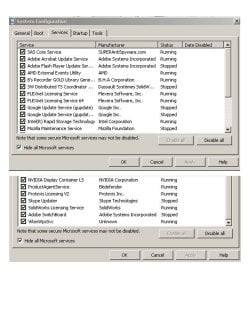
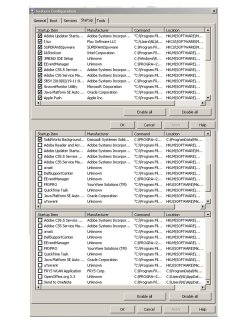
it would be good to see a screenshot of your device manager, startup programs, and startup services, which will be at least three screenshots depending on how big they are. To shows device manager do start > run > devmgmt.msc To show startup programs and services check out this link. MSCONFIG: speeding up Windows 7 startup
 

My Computer My Computer

At a glance

Win7 pro x64stock i7 7700kCorsair Vengeance LPX 16GB (2x8GB) DDR4 @ 320...integrated Intel HD 630
Computer type
PC/Desktop
Computer Manufacturer/Model Number
diy
OS
Win7 pro x64
CPU
stock i7 7700k
Motherboard
Gigabyte Z270N-WIFI mini-ITX
Memory
Corsair Vengeance LPX 16GB (2x8GB) DDR4 @ 3200MHz
Graphics Card(s)
integrated Intel HD 630
Sound Card
onboard Realtek ALC1220
Monitor(s) Displays
two vertically mounted samsung 55" 4k un55mu8000
Screen Resolution
1920x1280
Hard Drives
256GB Samsung EVO 960 M.2 pci-e NVMe SSD
PSU
SilverStone Nightjar ST45NF 450Watt Fanless
Case
No case. Motherboard is mounted directly onto power supply
Cooling
Evercool low profile 815EP with Panaflow 12L fan at 7v
Keyboard
Ortek MCK-86 mini
Mouse
Belkin 5-button USB
Internet Speed
spectrum 400mbps
sorry man but that's too many services to filter through. Need you to just do screenshots of msconfig > startup and msconfig > services as discussed in my link in post #9. And for msconfig > services makes sure you check "hide all microsoft services"

As for sonicwall, the question is whether or not you use the sonicwall VPN service or not. If you do, suggest you reinstall their package here:
How to install or uninstall Global VPN Client (GVC) (SW3990)

And if you do not need a VPN, you need to uninstall that sonicwall device permanently. Instructions to remove it are here:
Unable to uninstall Global VPN Client (GVC) adapter (SW4045)
 

My Computer My Computer

At a glance

Win7 pro x64stock i7 7700kCorsair Vengeance LPX 16GB (2x8GB) DDR4 @ 320...integrated Intel HD 630
Computer type
PC/Desktop
Computer Manufacturer/Model Number
diy
OS
Win7 pro x64
CPU
stock i7 7700k
Motherboard
Gigabyte Z270N-WIFI mini-ITX
Memory
Corsair Vengeance LPX 16GB (2x8GB) DDR4 @ 3200MHz
Graphics Card(s)
integrated Intel HD 630
Sound Card
onboard Realtek ALC1220
Monitor(s) Displays
two vertically mounted samsung 55" 4k un55mu8000
Screen Resolution
1920x1280
Hard Drives
256GB Samsung EVO 960 M.2 pci-e NVMe SSD
PSU
SilverStone Nightjar ST45NF 450Watt Fanless
Case
No case. Motherboard is mounted directly onto power supply
Cooling
Evercool low profile 815EP with Panaflow 12L fan at 7v
Keyboard
Ortek MCK-86 mini
Mouse
Belkin 5-button USB
Internet Speed
spectrum 400mbps
Hi,
One thing I do notice is you have avast and avira installed
Those are 2 antivirus programs and one too many :)
 

My Computer My Computer

At a glance

Win-7-Pro64bit 7-H-Prem-64biti7-5930K 2nd i9-9940x both water blocked VRM'...Trident-z 3200C14 2nd Trident-z 3600C16EVGA 1080ti ftw3 2nd Titan Xp both water blocked
Computer type
PC/Desktop
Computer Manufacturer/Model Number
Custom assembled by me :}
OS
Win-7-Pro64bit 7-H-Prem-64bit
CPU
i7-5930K 2nd i9-9940x both water blocked VRM's too
Motherboard
ASUS SABERTOOTH X99 2nd ASUS x299 Apex
Memory
Trident-z 3200C14 2nd Trident-z 3600C16
Graphics Card(s)
EVGA 1080ti ftw3 2nd Titan Xp both water blocked
Sound Card
Built-in Realtek
Monitor(s) Displays
1-AOC G2460PG 24"G-Sync 144Hz/ 2nd 1-ASUS VG248QE 24" 144Hz
Screen Resolution
1920 x 1080 144Hz
Hard Drives
2-Samsung M.2 Evo & Evo Plus
2-Samsung 850 EVO 500GB SSD's/ 3-2.5 W.D. Black 1tb-&3-1tb/3-3.5 WD Black 1tb hdd's
PSU
EVGA SuperNOVA 1000-P2 2nd 1200-P2
Case
2-Corsair Obsidian Series 450D Black ATX Mid Tower
Cooling
Custom water loops
Keyboard
Logitech G710+/ 2nd Logitech G910
Mouse
2-RedDragon M901 Perdition 16400 dpi Gaming mouse = wired
Internet Speed
Comcast Ping 19ms 89.31mbps download speed 6.12mbps upload
Antivirus
Malwarebytes Pro/ Superantispyware Pro
Browser
FireFox & Pale moon
Other Info
2nd ASUS X299 Apex/Intel i9-9940x with Custom water loop/7H-Prem-x64/Corsair 450D case/Ram Trident-z 3600C16 4x8gb / Samsung970Evo plus 500gb SSD/Dual ssd EZ swap evo/PSU EVGA SuperNova 1200w-P2 80+Platinum/GPU Titan Xp /8-ML-140 on push-pull on 2-280GTX rads
Its up to you whether or not you need a VPN. If not, then uninstall sonicwall (or just uncheck the sonicwall services box). But if you need a VPN, then re-install sonicwall. Same feedback and links as post #13.
 

My Computer My Computer

At a glance

Win7 pro x64stock i7 7700kCorsair Vengeance LPX 16GB (2x8GB) DDR4 @ 320...integrated Intel HD 630
Computer type
PC/Desktop
Computer Manufacturer/Model Number
diy
OS
Win7 pro x64
CPU
stock i7 7700k
Motherboard
Gigabyte Z270N-WIFI mini-ITX
Memory
Corsair Vengeance LPX 16GB (2x8GB) DDR4 @ 3200MHz
Graphics Card(s)
integrated Intel HD 630
Sound Card
onboard Realtek ALC1220
Monitor(s) Displays
two vertically mounted samsung 55" 4k un55mu8000
Screen Resolution
1920x1280
Hard Drives
256GB Samsung EVO 960 M.2 pci-e NVMe SSD
PSU
SilverStone Nightjar ST45NF 450Watt Fanless
Case
No case. Motherboard is mounted directly onto power supply
Cooling
Evercool low profile 815EP with Panaflow 12L fan at 7v
Keyboard
Ortek MCK-86 mini
Mouse
Belkin 5-button USB
Internet Speed
spectrum 400mbps
Hi, sorry I got it wrong, now attached the correct screenshots from msconfig.

I completely removed SonicWall/VPN, as I don't think I need it. Checked in "Problem Devices" and it is no longer visible either. Now I just need to test whether my pc will continue to randomly freeze (mostly while surfing the internet)

Update: The problem persists. I suppose next I would need to run the machine in Safe Mode.
 

Attachments

  • Services.jpg
    Services.jpg
    259 KB · Views: 1
  • Startup.jpg
    Startup.jpg
    378.8 KB · Views: 1
Last edited:

My Computer My Computer

At a glance

Microsoft Windows 7 Home Premium 64-bit 7601 ...Intel(R) Core(TM) i7 CPU 920 @ 2.67GHz8.00 GBNVIDIA GeForce GTX 1050
Computer type
PC/Desktop
OS
Microsoft Windows 7 Home Premium 64-bit 7601 Multiprocessor Free Service Pack 1
CPU
Intel(R) Core(TM) i7 CPU 920 @ 2.67GHz
Motherboard
DELL Inc. 0X501H
Memory
8.00 GB
Graphics Card(s)
NVIDIA GeForce GTX 1050
Sound Card
(1) Monitor Webcam (2) High Definition Audio Device (3)
Screen Resolution
2048 x 1152 x 32 bits (4294967296 colors) @ 59 Hz
Hard Drives
(1) SAMSUNG HD103SJ (2) Samsung D3 Station USB Device
The issue did not occur while running Safe Mode.
I understand this means it is not a hardware issue, but a software issue.
 

My Computer My Computer

At a glance

Microsoft Windows 7 Home Premium 64-bit 7601 ...Intel(R) Core(TM) i7 CPU 920 @ 2.67GHz8.00 GBNVIDIA GeForce GTX 1050
Computer type
PC/Desktop
OS
Microsoft Windows 7 Home Premium 64-bit 7601 Multiprocessor Free Service Pack 1
CPU
Intel(R) Core(TM) i7 CPU 920 @ 2.67GHz
Motherboard
DELL Inc. 0X501H
Memory
8.00 GB
Graphics Card(s)
NVIDIA GeForce GTX 1050
Sound Card
(1) Monitor Webcam (2) High Definition Audio Device (3)
Screen Resolution
2048 x 1152 x 32 bits (4294967296 colors) @ 59 Hz
Hard Drives
(1) SAMSUNG HD103SJ (2) Samsung D3 Station USB Device
If it had frozen in safe mode I'd say it was a hardware issue for sure, but even though it was stable in safe mode that does not rule out hardware. For instance the video card runs with just a vga driver in safe mode and is hardly taxed at all, creating very little heat, so a bad video card may be fine in safe mode but fail in normal mode. just saying.

there are a few steps you might take next, its up to you what order you do them, but start with a clean boot

- do a clean boot and see if you are stable

Troubleshoot Application Conflicts by Performing a Clean Startup - Windows 7 Help Forums

- post in the bsod section after capturing log file, which sometimes points directly to the issue. We did not start there because you had problem devices and those needed to be cleared up first.

Blue Screen of Death (BSOD) Posting Instructions - Windows 7 Help Forums

- since the issue happens surfing the net, try using a different browser. Also try disabling hardware acceleration within the browser.

- if you have a spare video card, try swapping video cards.

- run an 8-pass bootable test of memory using free memtest86+

MemTest86 - Download now!
 

My Computer My Computer

At a glance

Win7 pro x64stock i7 7700kCorsair Vengeance LPX 16GB (2x8GB) DDR4 @ 320...integrated Intel HD 630
Computer type
PC/Desktop
Computer Manufacturer/Model Number
diy
OS
Win7 pro x64
CPU
stock i7 7700k
Motherboard
Gigabyte Z270N-WIFI mini-ITX
Memory
Corsair Vengeance LPX 16GB (2x8GB) DDR4 @ 3200MHz
Graphics Card(s)
integrated Intel HD 630
Sound Card
onboard Realtek ALC1220
Monitor(s) Displays
two vertically mounted samsung 55" 4k un55mu8000
Screen Resolution
1920x1280
Hard Drives
256GB Samsung EVO 960 M.2 pci-e NVMe SSD
PSU
SilverStone Nightjar ST45NF 450Watt Fanless
Case
No case. Motherboard is mounted directly onto power supply
Cooling
Evercool low profile 815EP with Panaflow 12L fan at 7v
Keyboard
Ortek MCK-86 mini
Mouse
Belkin 5-button USB
Internet Speed
spectrum 400mbps
Still working on it, please keep this thread active. Thank you.

Update #1: No problem so far while running in clean mode.
 
Last edited:

My Computer My Computer

At a glance

Microsoft Windows 7 Home Premium 64-bit 7601 ...Intel(R) Core(TM) i7 CPU 920 @ 2.67GHz8.00 GBNVIDIA GeForce GTX 1050
Computer type
PC/Desktop
OS
Microsoft Windows 7 Home Premium 64-bit 7601 Multiprocessor Free Service Pack 1
CPU
Intel(R) Core(TM) i7 CPU 920 @ 2.67GHz
Motherboard
DELL Inc. 0X501H
Memory
8.00 GB
Graphics Card(s)
NVIDIA GeForce GTX 1050
Sound Card
(1) Monitor Webcam (2) High Definition Audio Device (3)
Screen Resolution
2048 x 1152 x 32 bits (4294967296 colors) @ 59 Hz
Hard Drives
(1) SAMSUNG HD103SJ (2) Samsung D3 Station USB Device
RE issue: Image/sound freezes randomly while using the internet, I need to hold power button to turn off.

Video Card is new, but did not resolve issue
Safe Mode: Problem does not take place.. yet
Clean Boot: Problem persists even if all non-MS Services are OFF, although less often
Memtest passed
BSOD file attached.


Thank you!
 

Attachments

My Computer My Computer

At a glance

Microsoft Windows 7 Home Premium 64-bit 7601 ...Intel(R) Core(TM) i7 CPU 920 @ 2.67GHz8.00 GBNVIDIA GeForce GTX 1050
Computer type
PC/Desktop
OS
Microsoft Windows 7 Home Premium 64-bit 7601 Multiprocessor Free Service Pack 1
CPU
Intel(R) Core(TM) i7 CPU 920 @ 2.67GHz
Motherboard
DELL Inc. 0X501H
Memory
8.00 GB
Graphics Card(s)
NVIDIA GeForce GTX 1050
Sound Card
(1) Monitor Webcam (2) High Definition Audio Device (3)
Screen Resolution
2048 x 1152 x 32 bits (4294967296 colors) @ 59 Hz
Hard Drives
(1) SAMSUNG HD103SJ (2) Samsung D3 Station USB Device
Hi all,

Can I assume that the motherboard is toast?

Thank you
 

My Computer My Computer

At a glance

Microsoft Windows 7 Home Premium 64-bit 7601 ...Intel(R) Core(TM) i7 CPU 920 @ 2.67GHz8.00 GBNVIDIA GeForce GTX 1050
Computer type
PC/Desktop
OS
Microsoft Windows 7 Home Premium 64-bit 7601 Multiprocessor Free Service Pack 1
CPU
Intel(R) Core(TM) i7 CPU 920 @ 2.67GHz
Motherboard
DELL Inc. 0X501H
Memory
8.00 GB
Graphics Card(s)
NVIDIA GeForce GTX 1050
Sound Card
(1) Monitor Webcam (2) High Definition Audio Device (3)
Screen Resolution
2048 x 1152 x 32 bits (4294967296 colors) @ 59 Hz
Hard Drives
(1) SAMSUNG HD103SJ (2) Samsung D3 Station USB Device
Still hoping for a solution. Can I assume that I need to change the motherboard?
 

My Computer My Computer

At a glance

Microsoft Windows 7 Home Premium 64-bit 7601 ...Intel(R) Core(TM) i7 CPU 920 @ 2.67GHz8.00 GBNVIDIA GeForce GTX 1050
Computer type
PC/Desktop
OS
Microsoft Windows 7 Home Premium 64-bit 7601 Multiprocessor Free Service Pack 1
CPU
Intel(R) Core(TM) i7 CPU 920 @ 2.67GHz
Motherboard
DELL Inc. 0X501H
Memory
8.00 GB
Graphics Card(s)
NVIDIA GeForce GTX 1050
Sound Card
(1) Monitor Webcam (2) High Definition Audio Device (3)
Screen Resolution
2048 x 1152 x 32 bits (4294967296 colors) @ 59 Hz
Hard Drives
(1) SAMSUNG HD103SJ (2) Samsung D3 Station USB Device
if you have been on just the one hard drive all this time then before buying a motherboard I would disconnect the hard drive and boot from a bootable linux usb flash drive, then surf the net and watch videos using linux firefox for a few hours. If everything is perfect doing this then its also possible the issue is your hard drive.

UNetbootin - Homepage and Downloads
 

My Computer My Computer

At a glance

Win7 pro x64stock i7 7700kCorsair Vengeance LPX 16GB (2x8GB) DDR4 @ 320...integrated Intel HD 630
Computer type
PC/Desktop
Computer Manufacturer/Model Number
diy
OS
Win7 pro x64
CPU
stock i7 7700k
Motherboard
Gigabyte Z270N-WIFI mini-ITX
Memory
Corsair Vengeance LPX 16GB (2x8GB) DDR4 @ 3200MHz
Graphics Card(s)
integrated Intel HD 630
Sound Card
onboard Realtek ALC1220
Monitor(s) Displays
two vertically mounted samsung 55" 4k un55mu8000
Screen Resolution
1920x1280
Hard Drives
256GB Samsung EVO 960 M.2 pci-e NVMe SSD
PSU
SilverStone Nightjar ST45NF 450Watt Fanless
Case
No case. Motherboard is mounted directly onto power supply
Cooling
Evercool low profile 815EP with Panaflow 12L fan at 7v
Keyboard
Ortek MCK-86 mini
Mouse
Belkin 5-button USB
Internet Speed
spectrum 400mbps
Back
Top