
Image file 3X larger than used space. Used Macrium Reflect free ver.

KDT

New member
Local time
11:12 AM
Messages
8
After talking to some 'friends' about which to use, I chose macrium to help me backup windows 7. For the compression and I heard it's able to backup even if windows is totally screwed up.

So I want EXACTLY what's on my drive and it came out weird.

The system reserve is 100 MB, I've used 35MB.
The actual drive has 99GB used and is a total of 465 free (Solid State Drive Samsung Evo)

And I got a 314 GB image file (thankfully I used my pretty empty external drive, thought it would've been smaller and was close to thinking a 150 GB drive would be more than sufficient space...)

So when I mount it in macrium, I'm getting 25MB used out of the 100MB reserve for system. And the other one I'm getting around 89 GB out of the total 465.

So the numbers are different as well.....


My procedure:

Clicked on the C drive which has system reserve and all my programs. Clicked on IMAGE THIS DISK.

Chose destination which is my F external drive.

In the next one "EDIT PLAN FOR BACKUP" I didn't add anything because I just wanted a one time thing and I unchecked everything, including the retention rules

The compression is on medium recommended.


Am I missing something? It's suppose to be at LEAST same size if not smaller :/
 

My Computer My Computer

At a glance

Windows 7 Home 64bitIntel Core i5 Quad 750 2.66 GBZ 8MB LGA11564GBASUS GTX 560
Computer type
PC/Desktop
Computer Manufacturer/Model Number
Custom
OS
Windows 7 Home 64bit
CPU
Intel Core i5 Quad 750 2.66 GBZ 8MB LGA1156
Motherboard
Asus p7h55-M Pro h55 DDR3 LGA1156
Memory
4GB
Graphics Card(s)
ASUS GTX 560
Hard Drives
OS HD: 500GB WD5003abyx (160 GB left, many times to 80)

Commonly connected HD for file saving: WD10EACS

They're both SATA 3.0 and based on the oldest file that I can quickly find, they're about 5 years old since the file is 2009.

I have othe
Antivirus
Kaspersky
Browser
Firefox and Google Chrome (firefox atm)
My procedure:

Clicked on the C drive which has system reserve and all my programs. Clicked on IMAGE THIS DISK.
How can the C partition have the system reserved. Did you copy the bootmgr to C ??

Try to image the partitions rather than the whole disk.
 

My Computer My Computer

At a glance

Vista, Windows7, Mint Mate, Zorin, Windows 8from 1.6GHz Duo to i7
Computer Manufacturer/Model Number
HP, Dell, Gateway, Toshiba - 4 laptops and 2 desktops
OS
Vista, Windows7, Mint Mate, Zorin, Windows 8
CPU
from 1.6GHz Duo to i7
Monitor(s) Displays
2x HP w2207
Hard Drives
5x HDD, 7x SSD, 12x Externals
Keyboard
with trackball - no mices
Mouse
Trackball mice
Internet Speed
DSL 6000
For the Macrium Compression setting did you use Intelligent sector copy or Make an exact copy... ?

Macrium_Compression_01.png
 

My Computer My Computer

At a glance

Multi-Boot W7_Pro_x64 W8.1_Pro_x64 W10_Pro_x6...AMD Athlon II x4 6206GB GSkill DDR2 800AMD 4670 GPU + AMD 4200 IGP
Computer type
PC/Desktop
Computer Manufacturer/Model Number
home built
OS
Multi-Boot W7_Pro_x64 W8.1_Pro_x64 W10_Pro_x64 +Linux_VMs +Chromium_VM
CPU
AMD Athlon II x4 620
Motherboard
Gigabyte GA-MA785G-UD3H
Memory
6GB GSkill DDR2 800
Graphics Card(s)
AMD 4670 GPU + AMD 4200 IGP
Sound Card
on board Realtek ALC889A
Monitor(s) Displays
RCA 40" LCD TV, Insignia 32" LCD TV, HP 15" LCD monitor
Screen Resolution
1680 x 1050
Hard Drives
OCZ Vertex 3 120GB,
Samsung F3 1TB (3),
Several others - WD, Seagate, Hitachi, ...
PSU
Corsair 500 W
Case
Rosewill mid tower
Cooling
CM 90mm rifle
Keyboard
Gyration wireless, Logitech wireless, Dell USB wired
Mouse
Gyration wireless, Logitech wireless, V7 USB wired
Internet Speed
Spectrum - 100Mbps D / 10Mbps U
Antivirus
Avast, MBAM3, EMET, WinPatrol
Browser
Pale Moon, Firefox, IE
Other Info
2 multi-boot PC's
Mainly HTPC/Office/Gen purpose (no gaming).
Trendnet USB KVM.
LG DVD burner/Blue Ray Player.
Tray system for removable SATA backup drives.

Not currently OCd, under-volted.
I use Hybrid sleep, rarely re-boot or shutdown.

Hauppauge HD-PVR, Avermedia PCIe TV Tuner, Hauppauge PCI TV Tuner.
Since I wanted the exact copy of my system, I chose the "Make an exact copy of partition", but I'm guessing that's not it even though it says it is. So I did it again and I got 60GB. However, I still have some size difference:

On macrium (not in the image), it says that I'm using around 35 MB out of 100. In the image mount, it says it is 24 MB.

The other one says 99 GB out of 465 GB
But on the image it says 88.5 out of 465


Is that normal?
 

My Computer My Computer

At a glance

Windows 7 Home 64bitIntel Core i5 Quad 750 2.66 GBZ 8MB LGA11564GBASUS GTX 560
Computer type
PC/Desktop
Computer Manufacturer/Model Number
Custom
OS
Windows 7 Home 64bit
CPU
Intel Core i5 Quad 750 2.66 GBZ 8MB LGA1156
Motherboard
Asus p7h55-M Pro h55 DDR3 LGA1156
Memory
4GB
Graphics Card(s)
ASUS GTX 560
Hard Drives
OS HD: 500GB WD5003abyx (160 GB left, many times to 80)

Commonly connected HD for file saving: WD10EACS

They're both SATA 3.0 and based on the oldest file that I can quickly find, they're about 5 years old since the file is 2009.

I have othe
Antivirus
Kaspersky
Browser
Firefox and Google Chrome (firefox atm)
Are you saying when you did it again you selected Intelligent sector copy rather than Make an exact copy... that you used before?

If that's true i can understand some size differences because Intelligent sector copy doesn't include the pagefile or hibernate file.
That info is in my post #3 screen print.

I can't comment on the System Reserved size question, i don't use System Reserved for the bootloader, my bootloader is in the partition. The only thing that matters to me is Macrium can reliably backup and restore my PC OS partition, and it does. You might want to test Macrium Backup/Restore with a small unimportant partition so you can test it and verify it works for you.
 

My Computer My Computer

At a glance

Multi-Boot W7_Pro_x64 W8.1_Pro_x64 W10_Pro_x6...AMD Athlon II x4 6206GB GSkill DDR2 800AMD 4670 GPU + AMD 4200 IGP
Computer type
PC/Desktop
Computer Manufacturer/Model Number
home built
OS
Multi-Boot W7_Pro_x64 W8.1_Pro_x64 W10_Pro_x64 +Linux_VMs +Chromium_VM
CPU
AMD Athlon II x4 620
Motherboard
Gigabyte GA-MA785G-UD3H
Memory
6GB GSkill DDR2 800
Graphics Card(s)
AMD 4670 GPU + AMD 4200 IGP
Sound Card
on board Realtek ALC889A
Monitor(s) Displays
RCA 40" LCD TV, Insignia 32" LCD TV, HP 15" LCD monitor
Screen Resolution
1680 x 1050
Hard Drives
OCZ Vertex 3 120GB,
Samsung F3 1TB (3),
Several others - WD, Seagate, Hitachi, ...
PSU
Corsair 500 W
Case
Rosewill mid tower
Cooling
CM 90mm rifle
Keyboard
Gyration wireless, Logitech wireless, Dell USB wired
Mouse
Gyration wireless, Logitech wireless, V7 USB wired
Internet Speed
Spectrum - 100Mbps D / 10Mbps U
Antivirus
Avast, MBAM3, EMET, WinPatrol
Browser
Pale Moon, Firefox, IE
Other Info
2 multi-boot PC's
Mainly HTPC/Office/Gen purpose (no gaming).
Trendnet USB KVM.
LG DVD burner/Blue Ray Player.
Tray system for removable SATA backup drives.

Not currently OCd, under-volted.
I use Hybrid sleep, rarely re-boot or shutdown.

Hauppauge HD-PVR, Avermedia PCIe TV Tuner, Hauppauge PCI TV Tuner.
Yeah, that's right. I thought make an exact copy (right in the name too) was what I should've chose because that's exactly what I want, everything exactly like that should I ever need to reinstall and have everything like it is now.

And yeah, I might dig out an old hard drive and see if I can install it on there for testing it, thanks for bringing that up as well.


Oh yeah, I gotta make one of those disks, emergency or recovery disk (what it asked me to do). Hm...gotta ask around for a dvd. Not sure if I have a usb
 

My Computer My Computer

At a glance

Windows 7 Home 64bitIntel Core i5 Quad 750 2.66 GBZ 8MB LGA11564GBASUS GTX 560
Computer type
PC/Desktop
Computer Manufacturer/Model Number
Custom
OS
Windows 7 Home 64bit
CPU
Intel Core i5 Quad 750 2.66 GBZ 8MB LGA1156
Motherboard
Asus p7h55-M Pro h55 DDR3 LGA1156
Memory
4GB
Graphics Card(s)
ASUS GTX 560
Hard Drives
OS HD: 500GB WD5003abyx (160 GB left, many times to 80)

Commonly connected HD for file saving: WD10EACS

They're both SATA 3.0 and based on the oldest file that I can quickly find, they're about 5 years old since the file is 2009.

I have othe
Antivirus
Kaspersky
Browser
Firefox and Google Chrome (firefox atm)
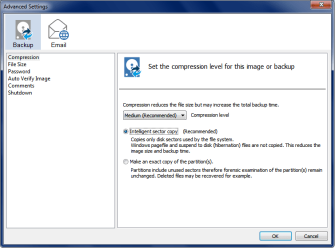
I never used Intelligent sector copy Exact copy because i want smaller images, but i understand why you did.
It's just part of the learning process we all go through :p

You do want a recovery disc (or usb flash stick) so you can run Macrium if your HD fails and restore a backup image from a different HD.
You don't need a DVD, Macrium Recovery fits on a CD.
 
Last edited:

My Computer My Computer

At a glance

Multi-Boot W7_Pro_x64 W8.1_Pro_x64 W10_Pro_x6...AMD Athlon II x4 6206GB GSkill DDR2 800AMD 4670 GPU + AMD 4200 IGP
Computer type
PC/Desktop
Computer Manufacturer/Model Number
home built
OS
Multi-Boot W7_Pro_x64 W8.1_Pro_x64 W10_Pro_x64 +Linux_VMs +Chromium_VM
CPU
AMD Athlon II x4 620
Motherboard
Gigabyte GA-MA785G-UD3H
Memory
6GB GSkill DDR2 800
Graphics Card(s)
AMD 4670 GPU + AMD 4200 IGP
Sound Card
on board Realtek ALC889A
Monitor(s) Displays
RCA 40" LCD TV, Insignia 32" LCD TV, HP 15" LCD monitor
Screen Resolution
1680 x 1050
Hard Drives
OCZ Vertex 3 120GB,
Samsung F3 1TB (3),
Several others - WD, Seagate, Hitachi, ...
PSU
Corsair 500 W
Case
Rosewill mid tower
Cooling
CM 90mm rifle
Keyboard
Gyration wireless, Logitech wireless, Dell USB wired
Mouse
Gyration wireless, Logitech wireless, V7 USB wired
Internet Speed
Spectrum - 100Mbps D / 10Mbps U
Antivirus
Avast, MBAM3, EMET, WinPatrol
Browser
Pale Moon, Firefox, IE
Other Info
2 multi-boot PC's
Mainly HTPC/Office/Gen purpose (no gaming).
Trendnet USB KVM.
LG DVD burner/Blue Ray Player.
Tray system for removable SATA backup drives.

Not currently OCd, under-volted.
I use Hybrid sleep, rarely re-boot or shutdown.

Hauppauge HD-PVR, Avermedia PCIe TV Tuner, Hauppauge PCI TV Tuner.
I never used Intelligent sector copy because i want smaller images, but i understand why you did.
It's just part of the learning process we all go through :p

You do want a recovery disc (or usb flash stick) so you can run Macrium if your HD fails and restore a backup image from a different HD.
You don't need a DVD, Macrium Recovery fits on a CD.

I think you meant exact copy? The intelligent sector copy is the one that creates smaller images.

That's good to know, I tried to see how large the recovery disk needs to be and it started on it's own so I freaked out and stopped it.
 

My Computer My Computer

At a glance

Windows 7 Home 64bitIntel Core i5 Quad 750 2.66 GBZ 8MB LGA11564GBASUS GTX 560
Computer type
PC/Desktop
Computer Manufacturer/Model Number
Custom
OS
Windows 7 Home 64bit
CPU
Intel Core i5 Quad 750 2.66 GBZ 8MB LGA1156
Motherboard
Asus p7h55-M Pro h55 DDR3 LGA1156
Memory
4GB
Graphics Card(s)
ASUS GTX 560
Hard Drives
OS HD: 500GB WD5003abyx (160 GB left, many times to 80)

Commonly connected HD for file saving: WD10EACS

They're both SATA 3.0 and based on the oldest file that I can quickly find, they're about 5 years old since the file is 2009.

I have othe
Antivirus
Kaspersky
Browser
Firefox and Google Chrome (firefox atm)
You're right, i meant exact copy, i always use intelligent sector copy. :o
Thanks for correcting me and pointing out my mistake. :)

EDIT: Post #7 edited, thanks again !
 
Last edited:

My Computer My Computer

At a glance

Multi-Boot W7_Pro_x64 W8.1_Pro_x64 W10_Pro_x6...AMD Athlon II x4 6206GB GSkill DDR2 800AMD 4670 GPU + AMD 4200 IGP
Computer type
PC/Desktop
Computer Manufacturer/Model Number
home built
OS
Multi-Boot W7_Pro_x64 W8.1_Pro_x64 W10_Pro_x64 +Linux_VMs +Chromium_VM
CPU
AMD Athlon II x4 620
Motherboard
Gigabyte GA-MA785G-UD3H
Memory
6GB GSkill DDR2 800
Graphics Card(s)
AMD 4670 GPU + AMD 4200 IGP
Sound Card
on board Realtek ALC889A
Monitor(s) Displays
RCA 40" LCD TV, Insignia 32" LCD TV, HP 15" LCD monitor
Screen Resolution
1680 x 1050
Hard Drives
OCZ Vertex 3 120GB,
Samsung F3 1TB (3),
Several others - WD, Seagate, Hitachi, ...
PSU
Corsair 500 W
Case
Rosewill mid tower
Cooling
CM 90mm rifle
Keyboard
Gyration wireless, Logitech wireless, Dell USB wired
Mouse
Gyration wireless, Logitech wireless, V7 USB wired
Internet Speed
Spectrum - 100Mbps D / 10Mbps U
Antivirus
Avast, MBAM3, EMET, WinPatrol
Browser
Pale Moon, Firefox, IE
Other Info
2 multi-boot PC's
Mainly HTPC/Office/Gen purpose (no gaming).
Trendnet USB KVM.
LG DVD burner/Blue Ray Player.
Tray system for removable SATA backup drives.

Not currently OCd, under-volted.
I use Hybrid sleep, rarely re-boot or shutdown.

Hauppauge HD-PVR, Avermedia PCIe TV Tuner, Hauppauge PCI TV Tuner.
You're right, i meant exact copy, i always use intelligent sector copy. :o
Thanks for correcting me and pointing out my mistake. :)

EDIT: Post #7 edited, thanks again !

Na, I simply thought you did a typo, it's all good man ;)

I should be thanking you.

Actually, thanks a bunch guys! I'll try to check up on the image file and see how it goes. I'll back it up on a normal HDD maybe, in case my ssd craps out *knocks on wood*
 

My Computer My Computer

At a glance

Windows 7 Home 64bitIntel Core i5 Quad 750 2.66 GBZ 8MB LGA11564GBASUS GTX 560
Computer type
PC/Desktop
Computer Manufacturer/Model Number
Custom
OS
Windows 7 Home 64bit
CPU
Intel Core i5 Quad 750 2.66 GBZ 8MB LGA1156
Motherboard
Asus p7h55-M Pro h55 DDR3 LGA1156
Memory
4GB
Graphics Card(s)
ASUS GTX 560
Hard Drives
OS HD: 500GB WD5003abyx (160 GB left, many times to 80)

Commonly connected HD for file saving: WD10EACS

They're both SATA 3.0 and based on the oldest file that I can quickly find, they're about 5 years old since the file is 2009.

I have othe
Antivirus
Kaspersky
Browser
Firefox and Google Chrome (firefox atm)
The system reserve is 100 MB, I've used 35MB.
The actual drive has 99GB used and is a total of 465 free (Solid State Drive Samsung Evo)
Assuming you are using the free version default settings which should have "Intelligent Sector copy" selected in the Advanced options then if you select:
"Create an image of the partition(s) required to back and restore Windows"
from the opening selection options I would expect a system image of ~60GB. This assumes the default "Medium Compression".
 

My Computer My Computer

At a glance

Windows 7x64 Home Premium SP1Intel i7 2600kG.Skill Ripjaws (DDR3-1600) 2x4GBNvidia GeForce GTS 450; Intel HD Graphics 300...
Computer type
PC/Desktop
Computer Manufacturer/Model Number
Own build
OS
Windows 7x64 Home Premium SP1
CPU
Intel i7 2600k
Motherboard
ASUS P8Z68 Deluxe
Memory
G.Skill Ripjaws (DDR3-1600) 2x4GB
Graphics Card(s)
Nvidia GeForce GTS 450; Intel HD Graphics 3000(GT2+)
Monitor(s) Displays
Dell Ultrasharp IPS panel U2311H, Samsung SyncMaster P2350
Screen Resolution
1920x1080
Hard Drives
Samsung 850 Pro SSD 256GB, Samsung SSD 840 120GB, Seagates 1TB Barracuda ST31000528AS x2
PSU
Seasonic M12II 520W
Case
Lian Li Lancool PC-K60
Cooling
Case: 1x120mm, 3x140mm CPU: Hyper 212+
Keyboard
Logitech MK520 (wireless)
Mouse
Logitech MK520
Internet Speed
6-7 Mbps
Antivirus
Norton Security Premium, Malwarebytes on 2 (MSE on 3rd PC)
Browser
FireFox
Other Info
Audio: Logitech Z523 2.1
Back
Top