Image host issues

Sam Spade

New member
Local time
12:45 AM
Messages
7
Location
Southampton ~ GB
2nd attempt. :o

I am a mod at a forum (i won't add a link as it contains adult content) and all of a sudden i am having problems seeing some or all of the images in certain posts.
When i attempt to edit the post i can see the code, but the images do not show up, a member can make two posts using the same host, such as ImageBam or ImageVenue and i might be able to see all of the images in one of them, but none in the other, it also affects older posts as well as new ones, Pimp&Host seems to work OK.


If i try to download the images in an affected post with ImageGrabber it saves the images i can see, but not the images i can't, even though the code is present in the post.


My usual browser is FireFox, but IE8, Safari and Opera are all affected as well, though if i use AOL i see all of the images. :confused:
Also when i try to d/l images from a certain site that i have used for quite a while image grabber does not work, even with older entries…

Any ideas?


I tried a system restore, but that did not work.


I hope i have posted this in the correct forum, if not could a mod move it for me?


To be honest i am just a random button jabber, so please phrase your replies as if you are talking to a 5 year old, with a short attention span. :o
 

Attachments

  • Capture1.JPG
    Capture1.JPG
    157.3 KB · Views: 19

My Computer

OS
Windows 7 Home Premium 64 bit
CPU
Intel(R) Core(TM)2 Duo CPU T6600 @ 2.20GHz
Motherboard
Acer JV50
Memory
3.00 GB
Graphics Card(s)
(1) Mobile Intel(R) 4 Series Express Chipset Family
Sound Card
Intel(R) Corporation Intel(R) High Definition Audio HDMI
The code might be present but it sure looks like those pics are deleted off the server. The few you still see is probably just "residue" out of your cache

Capture.JPG

-DG
 

My Computer

Computer Manufacturer/Model Number
HP m8000n
OS
Windows 7 Ultimate x86
CPU
DualCore AMD Athlon 64 X2, 2600 MHz 5200+
Motherboard
Asus M2N68-LA (Narra)
Memory
Samsung 2GB DDR2
Graphics Card(s)
Onboard NVIDIA GeForce 6150SE nForce 430
Sound Card
Onboard nVIDIA nForce 6100-430 (MCP61P)
Monitor(s) Displays
Westinghouse 19" LED
Screen Resolution
1280x1024
Hard Drives
SATA II Seagate Barracuda 500GB
USB II WD Elements 500GB
USB II WD My Book 1TB
USB II WD My Book 2TB
PSU
Stock (HP)
Case
Stock (HP)
Cooling
Stock
Keyboard
Logitech Classic KB 200
Mouse
Standard HP opticle USB mouse
The code might be present but it sure looks like those pics are deleted off the server. The few you still see is probably just "residue" out of your cache

View attachment 196960

-DG

They are there, other members can see them, so can i when i view the page using AOL, but not with any browsers, i even tried Google Chrome, but with the same result.

I have just checked out a couple of other forums and it's the same story, the poster says there are x amount of images in a post, but i cannot see them all, and neither does ImageGrabber, it seems to see the same images i do.:(

Thanks for the reply, though. :)

Edit ~ That screen shot was not from the forum i mod at, it was from one of the sites i gather images from.

I checked out a reported post that said image number 5 "Does not exist on this server", when i checked out what i saw as image 5 it was ok, when i looked at the code of the post i saw 18 images, and thats what i see with AOL, but no matter what browser i use i see only 12 images, always the same 12, some other posts are all ok, some are totally empty for me, i tried a test post using imagevenue and bam, neither showed up, yet with other posts i make they do.

It's very annoying.
doh.gif


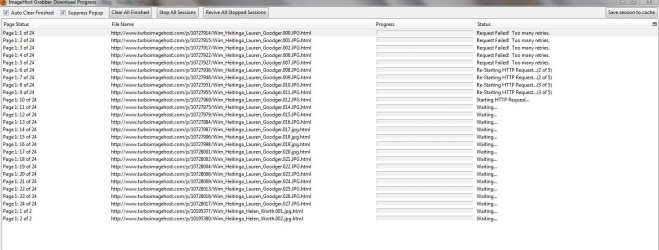
Edit 2 ~ I have added a sceen shot from when i tried to download the 18 images, these 6 failed to d/l
 

Attachments

  • Capture3.JPG
    Capture3.JPG
    57.2 KB · Views: 12
Last edited:

My Computer

OS
Windows 7 Home Premium 64 bit
CPU
Intel(R) Core(TM)2 Duo CPU T6600 @ 2.20GHz
Motherboard
Acer JV50
Memory
3.00 GB
Graphics Card(s)
(1) Mobile Intel(R) 4 Series Express Chipset Family
Sound Card
Intel(R) Corporation Intel(R) High Definition Audio HDMI
No takers? :(

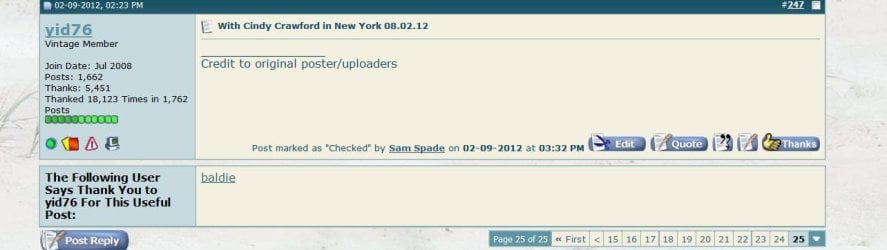
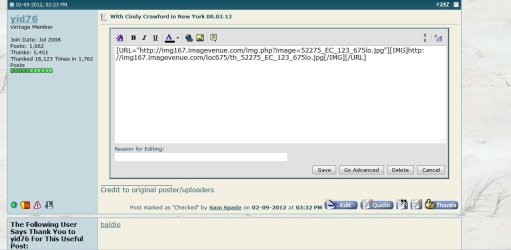
A couple of snips to show how a typical post appears to me and proof that the code is present.

If i try to copy and paste the code into my browser it will just time out.

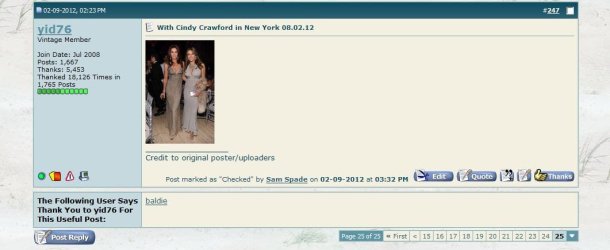
Edit ~ Added a cap of post when viewed via AOL.
 

Attachments

  • Capture4.JPG
    Capture4.JPG
    52.8 KB · Views: 10
  • Capture4a.JPG
    Capture4a.JPG
    73.5 KB · Views: 12
  • Capture4b.JPG
    Capture4b.JPG
    52.9 KB · Views: 17

My Computer

OS
Windows 7 Home Premium 64 bit
CPU
Intel(R) Core(TM)2 Duo CPU T6600 @ 2.20GHz
Motherboard
Acer JV50
Memory
3.00 GB
Graphics Card(s)
(1) Mobile Intel(R) 4 Series Express Chipset Family
Sound Card
Intel(R) Corporation Intel(R) High Definition Audio HDMI
Still no takers?

An interesting development, that may help solve my problem.

A few days ago my hard drive died, i used my mobile phone to access the forum where i first had the problem, and i found that i could not see the images even via the phone, i have installed a new h/d and am still having the same problem, i have added imagevenue to my bookmarks but image bam will not load, so if the computer is not the problem that can only leave the wireless router, can't it?

I am using a D-LINK DSL2640R, if that helps at all?.

Edit ~ I also cannot access any of the image bam pictures i have uploaded to the site.
 
Last edited:

My Computer

OS
Windows 7 Home Premium 64 bit
CPU
Intel(R) Core(TM)2 Duo CPU T6600 @ 2.20GHz
Motherboard
Acer JV50
Memory
3.00 GB
Graphics Card(s)
(1) Mobile Intel(R) 4 Series Express Chipset Family
Sound Card
Intel(R) Corporation Intel(R) High Definition Audio HDMI
Welcome to Seven Forums Sam Spade. Try to access the same post through a web proxy such as Anonymouse , or Hide my a$$. See if you can see the images then. A Guy
 

My Computer

Computer type
PC/Desktop
OS
Windows 10 Home x64
CPU
INTEL Core i5-750 Quad-Core 3.37GHz
Motherboard
ASUS P7P55D
Memory
HyperX Fury Black Series 8GB (2 x 4GB) 1866Mhz
Graphics Card(s)
EVGA GeForce GTX 750 Superclocked 1GB 128-Bit GDDR5
Monitor(s) Displays
LG 32MA68HY 32" IPS
Screen Resolution
1920 x 1080
Hard Drives
Samsung 840 Evo 120GB, SEAGATE 500GB Barracuda® 7200.12, SATA 3 Gb/s, 7200 RPM, 16MB cache
PSU
ANTEC TruePower New TP-550, 80 PLUS, 550W
Case
ANTEC Three Hundred Illusion
Cooling
COOLER MASTER Hyper 212 Plus, 4 x 120mm 1 x 140mm Noctua's
Internet Speed
85 + Mbps
Antivirus
Avast
Browser
Vivaldi
Hi, A Guy,

I tried Anonymous and it worked. :), i was even able to open the images as well, it's a bit of a fiddly thing to do (and the pop up's are annoying), but it's certainly better than the alternative.

Thank you very much for the idea and links, do you have any idea why i cannot access the images without using a proxy, and is there any way of fixing it?

Sam. :geek:
 

My Computer

OS
Windows 7 Home Premium 64 bit
CPU
Intel(R) Core(TM)2 Duo CPU T6600 @ 2.20GHz
Motherboard
Acer JV50
Memory
3.00 GB
Graphics Card(s)
(1) Mobile Intel(R) 4 Series Express Chipset Family
Sound Card
Intel(R) Corporation Intel(R) High Definition Audio HDMI
It may be a hosts file entry, a security program, a browser protection setting. Likely it would also work in safe mode with networking as well, but then there is no security programs running then.

You might try clearing your DNS cache

Start> In search box type cmd> In results above right click cmd.exe and choose Run as administrator> In command prompt type

ipconfig /flushdns

Enter

See if that helped

If no help, you could try a clean start and see if you can identify what is blocking it.

http://www.sevenforums.com/tutorial...ation-conflicts-performing-clean-startup.html

A Guy
 

My Computer

Computer type
PC/Desktop
OS
Windows 10 Home x64
CPU
INTEL Core i5-750 Quad-Core 3.37GHz
Motherboard
ASUS P7P55D
Memory
HyperX Fury Black Series 8GB (2 x 4GB) 1866Mhz
Graphics Card(s)
EVGA GeForce GTX 750 Superclocked 1GB 128-Bit GDDR5
Monitor(s) Displays
LG 32MA68HY 32" IPS
Screen Resolution
1920 x 1080
Hard Drives
Samsung 840 Evo 120GB, SEAGATE 500GB Barracuda® 7200.12, SATA 3 Gb/s, 7200 RPM, 16MB cache
PSU
ANTEC TruePower New TP-550, 80 PLUS, 550W
Case
ANTEC Three Hundred Illusion
Cooling
COOLER MASTER Hyper 212 Plus, 4 x 120mm 1 x 140mm Noctua's
Internet Speed
85 + Mbps
Antivirus
Avast
Browser
Vivaldi
First of all, thanks for the help, it's, appreciated.

Secondly, the fault seems to have fixed itself, i can now see the image-bam pictures that before i could not, i can click on them and they enlarge and i can access the image-bam main upload page.:party:

Fingers crossed it's a permanent fix, and i won't be bothering you with this again.:)

Thanks again, guys.
 

My Computer

OS
Windows 7 Home Premium 64 bit
CPU
Intel(R) Core(TM)2 Duo CPU T6600 @ 2.20GHz
Motherboard
Acer JV50
Memory
3.00 GB
Graphics Card(s)
(1) Mobile Intel(R) 4 Series Express Chipset Family
Sound Card
Intel(R) Corporation Intel(R) High Definition Audio HDMI
Good to hear. Sometimes windows isn't so much a science, as voodoo :D A Guy
 

My Computer

Computer type
PC/Desktop
OS
Windows 10 Home x64
CPU
INTEL Core i5-750 Quad-Core 3.37GHz
Motherboard
ASUS P7P55D
Memory
HyperX Fury Black Series 8GB (2 x 4GB) 1866Mhz
Graphics Card(s)
EVGA GeForce GTX 750 Superclocked 1GB 128-Bit GDDR5
Monitor(s) Displays
LG 32MA68HY 32" IPS
Screen Resolution
1920 x 1080
Hard Drives
Samsung 840 Evo 120GB, SEAGATE 500GB Barracuda® 7200.12, SATA 3 Gb/s, 7200 RPM, 16MB cache
PSU
ANTEC TruePower New TP-550, 80 PLUS, 550W
Case
ANTEC Three Hundred Illusion
Cooling
COOLER MASTER Hyper 212 Plus, 4 x 120mm 1 x 140mm Noctua's
Internet Speed
85 + Mbps
Antivirus
Avast
Browser
Vivaldi
Back
Top