
Image is smaller than it should be

MadSupra354

Supra
Pro User
Local time
8:14 AM
Messages
792
Location
On my chair, in my room
If HD DVDs appear fine and sharp on TV why does it look stretched on PC? Here is an example of the same frame in Family Guy in different sizes. Here's what it looks like at 50% (Note all the images where deliberately resized to 720p from 1680x1050)
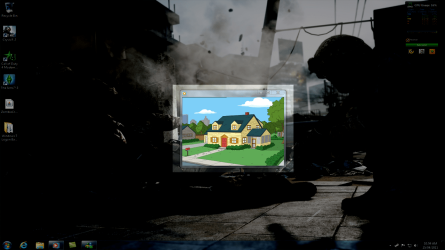
Capture.PNG
As you can see, it looks sharp and clear. Now look at it at 100%
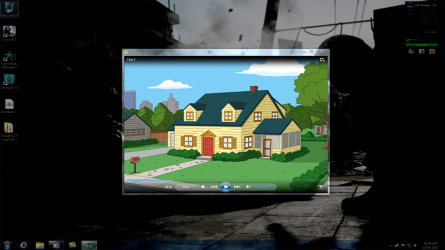
Capture2.PNG
You can't really see it, but it starts to look stretched. Now in fullscreen (1680x1050)
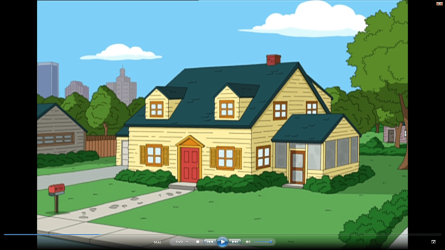
Capture3.png
Now it looks stretched. How can this look fine at 720p on TV and terrible at about 800x600? Is there a way to fix this?
 

My Computer

Computer type
PC/Desktop
OS
10 Home x64
CPU
Intel Core i5 4670K
Motherboard
Gigabyte GA-Z87-D3HP
Memory
Corsair XMS3 8GB DDr3 1600MHz
Graphics Card(s)
Sapphire NITRO Radeon R9 Fury
Sound Card
Asus Xonar DX
Monitor(s) Displays
Acer H236HLbmjd
Screen Resolution
1920x1080
Hard Drives
Force GS 128GB - Seagate 320GB - WD Caviar Black 1TB - WD Caviar Blue 500GB
PSU
EVGA SuperNOVA 650 P2
Case
Silverstone Raven 3 RV03B-W
Keyboard
Topre Realforce 104UG-HiPro
Mouse
Mionix Naos 7000
Internet Speed
76/4 On a good day
Antivirus
SmartScreen
Browser
Internet Explorer 11
What player are you using for playing the dvd? Have you checked the ratio settings in the player?
 

My Computer

Computer Manufacturer/Model Number
Black and Blue Beast
OS
Microsoft Windows 7 Home Premium 64bit SP1
CPU
AMD Athlon II X3 440 3.0Ghz OC to 3.51(22hr stable prime95)
Motherboard
MSI 785GM-E51
Memory
PNY XLR8 4GB DDR3 PC3-12800 1600MHz 2x2GB Crucial 2048MB DDR
Graphics Card(s)
MSI R5770 Hawk 1GB GDDR5 OCed to 935MHz 1335MHz Mem
Sound Card
Realtek® High-End Audio
Monitor(s) Displays
46" Sharp 1080p LED, Vizio 42" 1080p LED
Screen Resolution
1080p via HDMI cable
Hard Drives
Seagate 1.5TB 32mb cache SATA
WD Caviar Green 1TB 64MB/SATA-3G
WD Caviar Green 2TB 64MB/SATA-3G
PSU
Thermaltake TR2 RX 650-Watt Modular PSU
Case
Apevia X-Master Black Desktop/HTPC Case
Cooling
Corsair H50 liquid cooled
Keyboard
Cideko Wireless 3D keyboard
Mouse
Cideko Wireless 3D Mouse
Internet Speed
6 MB/s Download 2 MB/s Upload
Other Info
Sabrent USB 2.0 Internal Multi Card Reader
LG 10X Blu Ray Burner
3x 80mm fans
2x 120mm fans

22 deg C Idle; 36 deg C full load; mobo 26 deg C under load 18 deg C idle
What player are you using for playing the dvd? Have you checked the ratio settings in the player?
I'm just using Windows Media Player. How would one check the ratio setting?
 

My Computer

Computer type
PC/Desktop
OS
10 Home x64
CPU
Intel Core i5 4670K
Motherboard
Gigabyte GA-Z87-D3HP
Memory
Corsair XMS3 8GB DDr3 1600MHz
Graphics Card(s)
Sapphire NITRO Radeon R9 Fury
Sound Card
Asus Xonar DX
Monitor(s) Displays
Acer H236HLbmjd
Screen Resolution
1920x1080
Hard Drives
Force GS 128GB - Seagate 320GB - WD Caviar Black 1TB - WD Caviar Blue 500GB
PSU
EVGA SuperNOVA 650 P2
Case
Silverstone Raven 3 RV03B-W
Keyboard
Topre Realforce 104UG-HiPro
Mouse
Mionix Naos 7000
Internet Speed
76/4 On a good day
Antivirus
SmartScreen
Browser
Internet Explorer 11
I would try using a more funtional player such as VLC. It is freeware and plays just about everything. Then when using it right click and in the menu go to video i believe then ratio. Media player has given me trouble in the past. When I switched to vlc that cleared up a bunch of my problem right away. Give that a try and post back.
 

My Computer

Computer Manufacturer/Model Number
Black and Blue Beast
OS
Microsoft Windows 7 Home Premium 64bit SP1
CPU
AMD Athlon II X3 440 3.0Ghz OC to 3.51(22hr stable prime95)
Motherboard
MSI 785GM-E51
Memory
PNY XLR8 4GB DDR3 PC3-12800 1600MHz 2x2GB Crucial 2048MB DDR
Graphics Card(s)
MSI R5770 Hawk 1GB GDDR5 OCed to 935MHz 1335MHz Mem
Sound Card
Realtek® High-End Audio
Monitor(s) Displays
46" Sharp 1080p LED, Vizio 42" 1080p LED
Screen Resolution
1080p via HDMI cable
Hard Drives
Seagate 1.5TB 32mb cache SATA
WD Caviar Green 1TB 64MB/SATA-3G
WD Caviar Green 2TB 64MB/SATA-3G
PSU
Thermaltake TR2 RX 650-Watt Modular PSU
Case
Apevia X-Master Black Desktop/HTPC Case
Cooling
Corsair H50 liquid cooled
Keyboard
Cideko Wireless 3D keyboard
Mouse
Cideko Wireless 3D Mouse
Internet Speed
6 MB/s Download 2 MB/s Upload
Other Info
Sabrent USB 2.0 Internal Multi Card Reader
LG 10X Blu Ray Burner
3x 80mm fans
2x 120mm fans

22 deg C Idle; 36 deg C full load; mobo 26 deg C under load 18 deg C idle
Do you have the monitor set to it's highest resolution?
HD looks best when the resolution is set to the highest your monitor will allow.
 

My Computer

Computer type
PC/Desktop
Computer Manufacturer/Model Number
Custom Build
OS
Windows 7 Home Premium 64 bit
CPU
Intel Core i7-4790
Motherboard
GA-Z87X-D3H
Memory
G.SKILL 8GB (2 x 4GB) DDR3 F3-10666CL9D-8GBNT
Graphics Card(s)
AMD Radeon R7 250
Sound Card
Realtek ALC892
Monitor(s) Displays
Samsung UN32EH5000, Dell 1703FPT
Screen Resolution
1920 x 1080, 1280 x 1024
Hard Drives
WD5003AZEX
WD10EZEX
Samsung HD103SJ
Samsung 128 GB 840 PRO
PSU
SeaSonic M12II SS-500GM
Case
Fractal Design Define R4
Cooling
Zalman CNPS9900ALED
Keyboard
Logitech K800
Mouse
Logitech M705
Internet Speed
16 Mbps
Antivirus
Avast
Browser
Firefox
Other Info
Bose Companion 2 Multimedia Speakers
Do you have the monitor set to it's highest resolution?
HD looks best when the resolution is set to the highest your monitor will allow.
Of course :)
 

My Computer

Computer type
PC/Desktop
OS
10 Home x64
CPU
Intel Core i5 4670K
Motherboard
Gigabyte GA-Z87-D3HP
Memory
Corsair XMS3 8GB DDr3 1600MHz
Graphics Card(s)
Sapphire NITRO Radeon R9 Fury
Sound Card
Asus Xonar DX
Monitor(s) Displays
Acer H236HLbmjd
Screen Resolution
1920x1080
Hard Drives
Force GS 128GB - Seagate 320GB - WD Caviar Black 1TB - WD Caviar Blue 500GB
PSU
EVGA SuperNOVA 650 P2
Case
Silverstone Raven 3 RV03B-W
Keyboard
Topre Realforce 104UG-HiPro
Mouse
Mionix Naos 7000
Internet Speed
76/4 On a good day
Antivirus
SmartScreen
Browser
Internet Explorer 11

My Computer

Computer type
PC/Desktop
Computer Manufacturer/Model Number
Custom Build
OS
Windows 7 Home Premium 64 bit
CPU
Intel Core i7-4790
Motherboard
GA-Z87X-D3H
Memory
G.SKILL 8GB (2 x 4GB) DDR3 F3-10666CL9D-8GBNT
Graphics Card(s)
AMD Radeon R7 250
Sound Card
Realtek ALC892
Monitor(s) Displays
Samsung UN32EH5000, Dell 1703FPT
Screen Resolution
1920 x 1080, 1280 x 1024
Hard Drives
WD5003AZEX
WD10EZEX
Samsung HD103SJ
Samsung 128 GB 840 PRO
PSU
SeaSonic M12II SS-500GM
Case
Fractal Design Define R4
Cooling
Zalman CNPS9900ALED
Keyboard
Logitech K800
Mouse
Logitech M705
Internet Speed
16 Mbps
Antivirus
Avast
Browser
Firefox
Other Info
Bose Companion 2 Multimedia Speakers
I run the player window at different sizes.
 

My Computer

Computer type
PC/Desktop
OS
10 Home x64
CPU
Intel Core i5 4670K
Motherboard
Gigabyte GA-Z87-D3HP
Memory
Corsair XMS3 8GB DDr3 1600MHz
Graphics Card(s)
Sapphire NITRO Radeon R9 Fury
Sound Card
Asus Xonar DX
Monitor(s) Displays
Acer H236HLbmjd
Screen Resolution
1920x1080
Hard Drives
Force GS 128GB - Seagate 320GB - WD Caviar Black 1TB - WD Caviar Blue 500GB
PSU
EVGA SuperNOVA 650 P2
Case
Silverstone Raven 3 RV03B-W
Keyboard
Topre Realforce 104UG-HiPro
Mouse
Mionix Naos 7000
Internet Speed
76/4 On a good day
Antivirus
SmartScreen
Browser
Internet Explorer 11
They only look "stretched" if something is not set up correctly.

If you take a "snapshot" of HD video, then it is about half the size. The video itself however looks perfect.

Regards....Mike Connor
 

My Computer

OS
Several, including Windows 7 x64 Ultimate
They only look "stretched" if something is not set up correctly.

If you take a "snapshot" of HD video, then it is about half the size. The video itself however looks perfect.

Regards....Mike Connor
The video looks stretched either way. I don't have a full-HD monitor, and I'm not sure if the newer series of Family Guy is 1080p, but it looks stretched when I changed the sizes of the player [Small-Medium-Large] as you can see in the last image, it looks very stretched.
 

My Computer

Computer type
PC/Desktop
OS
10 Home x64
CPU
Intel Core i5 4670K
Motherboard
Gigabyte GA-Z87-D3HP
Memory
Corsair XMS3 8GB DDr3 1600MHz
Graphics Card(s)
Sapphire NITRO Radeon R9 Fury
Sound Card
Asus Xonar DX
Monitor(s) Displays
Acer H236HLbmjd
Screen Resolution
1920x1080
Hard Drives
Force GS 128GB - Seagate 320GB - WD Caviar Black 1TB - WD Caviar Blue 500GB
PSU
EVGA SuperNOVA 650 P2
Case
Silverstone Raven 3 RV03B-W
Keyboard
Topre Realforce 104UG-HiPro
Mouse
Mionix Naos 7000
Internet Speed
76/4 On a good day
Antivirus
SmartScreen
Browser
Internet Explorer 11
They look the same to me. I took the 2 larger images into Photoshop and they are the exact same aspect ratio.
 

My Computer

Computer Manufacturer/Model Number
HAL-9000
OS
Windows 7 Ultimate 64bit
CPU
Intel i7 3770K
Motherboard
Asus Sabertooth Z77
Memory
16GB DDR3 1333 Corsair XMS3
Graphics Card(s)
XFX HD6950 2GB EyeFinity
Sound Card
Logitech G35 & Sennheiser PC135 & VIA HD
Monitor(s) Displays
23" HP 2310e, 23" Samsung B2230, 21.5" Viewsonic
Screen Resolution
5760x1080
Hard Drives
16TB of Storage
128GB & 256GB Crucial M4 SSD's, 2X 1TB WD Black, 3x 2TB WD, 3x 2TB Samsung F4, 1.5TB Seagate, WD 500GB,
PSU
Antec True Power New 650watt
Case
Cooler Master HAF-932
Cooling
Corsair H60 Hydro Cooler, 3x 230mm Fans, 2x120mm Fan
Keyboard
Logitech G15 and G13
Mouse
Logitech G700 Gaming Mouse
Internet Speed
50/10 Mbit
Other Info
Speakers : Alesis M1 Active Mk2 Studio Monitors , APC RS 1200 UPS, HP 4500DN Color Laser, HP P1006 mono Laser, Kodak 8500 Dye-Sub, Epson 1280 inkjet, Epson Worforce 610 MFC
Yea, I agree. In the images, they look fine but the last one gives you an idea.
 

My Computer

Computer type
PC/Desktop
OS
10 Home x64
CPU
Intel Core i5 4670K
Motherboard
Gigabyte GA-Z87-D3HP
Memory
Corsair XMS3 8GB DDr3 1600MHz
Graphics Card(s)
Sapphire NITRO Radeon R9 Fury
Sound Card
Asus Xonar DX
Monitor(s) Displays
Acer H236HLbmjd
Screen Resolution
1920x1080
Hard Drives
Force GS 128GB - Seagate 320GB - WD Caviar Black 1TB - WD Caviar Blue 500GB
PSU
EVGA SuperNOVA 650 P2
Case
Silverstone Raven 3 RV03B-W
Keyboard
Topre Realforce 104UG-HiPro
Mouse
Mionix Naos 7000
Internet Speed
76/4 On a good day
Antivirus
SmartScreen
Browser
Internet Explorer 11
Are you talking about looking scaled? As in it looks blurrier as if it's been scaled up? (Streatched ususaly refers to a change in aspect ratio and the ratios look the same to me in all three)

Is this a DVD or a blueray?

DVDs are only 720x480 pixels (Widescreen or standard) There is no such thing as an "HD" DVD. (Well there was that HDDVD format that died...)

If you scale them up larger than 480 pixels high, they will get blurry... Computer montiors are WAY sharper than TVs and so you can see the sharpness change a lot better than on the TV.
 

My Computer

Computer Manufacturer/Model Number
Scratch built
OS
Windows 7 x64 Ultimate
CPU
i7 960
Motherboard
Asus P6X58D
Memory
12 Gig Corsair Dominator
Graphics Card(s)
Nvidia 480
Sound Card
Maudio Delta 44 + breakout box
Monitor(s) Displays
Dell UltraSharp U2410 24in and Samsung 21 dual monitors
Screen Resolution
1920x1200 and 1280x1024
Hard Drives
Primary: Intel X-25M G2 160G SSD
Secondary: Segate baracuda 1.0 TB
HDs in AHCI mode.
PSU
Corasair TX850
Case
Cooler Master HAF
Cooling
Corsair H50
Keyboard
Logitech G15 + N52 game pad
Mouse
Logitech MX518
Internet Speed
15kbs down 4.5kbps up
Other Info
WEI 7.6
CPU & RAM 7.6
Graphics 7.9
Hard disk 7.7
Are you talking about looking scaled? As in it looks blurrier as if it's been scaled up? (Streatched ususaly refers to a change in aspect ratio and the ratios look the same to me in all three)

Is this a DVD or a blueray?

DVDs are only 720x480 pixels (Widescreen or standard) There is no such thing as an "HD" DVD. (Well there was that HDDVD format that died...)

If you scale them up larger than 480 pixels high, they will get blurry... Computer montiors are WAY sharper than TVs and so you can see the sharpness change a lot better than on the TV.

Actually, you will notice it more on a larger HDTV since the pixels are already spaced further apart.
 

My Computer

Computer Manufacturer/Model Number
HAL-9000
OS
Windows 7 Ultimate 64bit
CPU
Intel i7 3770K
Motherboard
Asus Sabertooth Z77
Memory
16GB DDR3 1333 Corsair XMS3
Graphics Card(s)
XFX HD6950 2GB EyeFinity
Sound Card
Logitech G35 & Sennheiser PC135 & VIA HD
Monitor(s) Displays
23" HP 2310e, 23" Samsung B2230, 21.5" Viewsonic
Screen Resolution
5760x1080
Hard Drives
16TB of Storage
128GB & 256GB Crucial M4 SSD's, 2X 1TB WD Black, 3x 2TB WD, 3x 2TB Samsung F4, 1.5TB Seagate, WD 500GB,
PSU
Antec True Power New 650watt
Case
Cooler Master HAF-932
Cooling
Corsair H60 Hydro Cooler, 3x 230mm Fans, 2x120mm Fan
Keyboard
Logitech G15 and G13
Mouse
Logitech G700 Gaming Mouse
Internet Speed
50/10 Mbit
Other Info
Speakers : Alesis M1 Active Mk2 Studio Monitors , APC RS 1200 UPS, HP 4500DN Color Laser, HP P1006 mono Laser, Kodak 8500 Dye-Sub, Epson 1280 inkjet, Epson Worforce 610 MFC
I was unaware you were not using the old HD DVD format. Also unaware that your monitor was not HD. Watching a regular DVD on a 800x600(or worse) monitor is not going to hold up to crisp, clear, pure HD video. It does look blurry if one is use to blu-rays and such. Judging from you uploaded screenshots it looks like normal dvd quality 480..

If your tv is 720. That is 1280x720. It is a better screen than 800x600. which is essentially 600i. But playing a 480 dvd should not matter. Unless your tv has a better Dynamic Contrast Ratio than your pc monitor. Reason why manufacturers are giving you the ratio now. The main picture difference between a top end lcd and a low end lcd.

I also used photoshop to measure the screenshots. They are in the same aspect ratio for sure.

I guess I am confused now on what the problem is??
 

My Computer

Computer Manufacturer/Model Number
Black and Blue Beast
OS
Microsoft Windows 7 Home Premium 64bit SP1
CPU
AMD Athlon II X3 440 3.0Ghz OC to 3.51(22hr stable prime95)
Motherboard
MSI 785GM-E51
Memory
PNY XLR8 4GB DDR3 PC3-12800 1600MHz 2x2GB Crucial 2048MB DDR
Graphics Card(s)
MSI R5770 Hawk 1GB GDDR5 OCed to 935MHz 1335MHz Mem
Sound Card
Realtek® High-End Audio
Monitor(s) Displays
46" Sharp 1080p LED, Vizio 42" 1080p LED
Screen Resolution
1080p via HDMI cable
Hard Drives
Seagate 1.5TB 32mb cache SATA
WD Caviar Green 1TB 64MB/SATA-3G
WD Caviar Green 2TB 64MB/SATA-3G
PSU
Thermaltake TR2 RX 650-Watt Modular PSU
Case
Apevia X-Master Black Desktop/HTPC Case
Cooling
Corsair H50 liquid cooled
Keyboard
Cideko Wireless 3D keyboard
Mouse
Cideko Wireless 3D Mouse
Internet Speed
6 MB/s Download 2 MB/s Upload
Other Info
Sabrent USB 2.0 Internal Multi Card Reader
LG 10X Blu Ray Burner
3x 80mm fans
2x 120mm fans

22 deg C Idle; 36 deg C full load; mobo 26 deg C under load 18 deg C idle
I'm running a normal DVD, and thanks everyone for the information.
 

My Computer

Computer type
PC/Desktop
OS
10 Home x64
CPU
Intel Core i5 4670K
Motherboard
Gigabyte GA-Z87-D3HP
Memory
Corsair XMS3 8GB DDr3 1600MHz
Graphics Card(s)
Sapphire NITRO Radeon R9 Fury
Sound Card
Asus Xonar DX
Monitor(s) Displays
Acer H236HLbmjd
Screen Resolution
1920x1080
Hard Drives
Force GS 128GB - Seagate 320GB - WD Caviar Black 1TB - WD Caviar Blue 500GB
PSU
EVGA SuperNOVA 650 P2
Case
Silverstone Raven 3 RV03B-W
Keyboard
Topre Realforce 104UG-HiPro
Mouse
Mionix Naos 7000
Internet Speed
76/4 On a good day
Antivirus
SmartScreen
Browser
Internet Explorer 11
Back
Top