Solved Image your system with free Macrium

Is this what is known as "Volume Shadow Copy Service" in Windows?

Volume Shadow Copy "freezes" the contents at a point in time. Any changes to files after that are done so that they don't affect the "snapshot". This allows Macrium (and any other backup program) to make a backup from the "snapshot" while other work is continuing.
 

My Computer My Computer

Computer type
Laptop
Computer Manufacturer/Model Number
Hewlett-Packard/G62-107SA Notebook
OS
Microsoft Windows 7 Home Premium 64-bit Service Pack 1
CPU
Intel(R) Core(TM) i3 CPU M 330 @ 2.13GHz
Motherboard
Hewlett-Packard 1425
Memory
8 GB DDR3
Graphics Card(s)
Intel(R) HD Graphics
Sound Card
Realtek High Definition Audio
Monitor(s) Displays
Builtin
Screen Resolution
1366 x 768 x 32 bits (4294967296 colors) @ 60 Hz
Hard Drives
250 GB SATA Hard Disk Drive 7200 rpm
2TB Seagate GoFlex USB 2 Drive
1TB Iomega Prestige USB 2 Drive
1.5TB Iomega Prestige USB 2 Drive (Samsung)
2TB WD MyBook Live NAS.
Mouse
Logitech Anywhere MX
Internet Speed
152 Mbs download 10 Mbs upload
Antivirus
Norton 360
Browser
Chrome
Laptop: I ran into one of those
2ykxly0.jpg
things where I forgot about Drivers so I had to burn another ISO using my Laptop PC instead of the Desktop PC. I'm using the WinPE 3.1 version burn.

I perform all of my images from the boot CD, outside of Windows.
With the non-Free versions you have the choice of either WinPE 3.1 or 4.?
I am sure that you will have that choice with the Free version, either now or in the future.

The two different versions are based on two different downloads from Microsoft,
and USB3 drivers are NOT part of the original Microsoft download but ARE part of the latest.

I only had USB2 capability until I added a PCI Express card with USB3 Ports and installed drivers from a mini CD.
Macrium had to add the USB3 driver from my installation when building the next WinPE 3.1,
but when I selected the WinPE 4.? download the USB3 drivers were already part of that download.

You may find that whatever drivers you need to add to WinPE 3.1 will already be present in 4.?


Amongst the advantages of NOT using the Boot CD to create an image is the fact that the backup is smaller so takes less time to create,
and also less time to duplicate on another external drive.
The reduction is due to VSS NOT including the content of my 8 GB Pagefile.
 

My Computer My Computer

Computer Manufacturer/Model Number
ASUSTeK Computer INC. M3A32-MVP DELUXE (CPU 1)
OS
Windows 7 Ultimate 64 bit SP1 x64
CPU
AMD Phenom X4 9500
Motherboard
ASUSTeK M3A32-MVP Deluxe (CPU 1)
Memory
8 GB
Graphics Card(s)
ATI Radeon HD 4600 Series
Sound Card
AMD High Definition Audio Device
Monitor(s) Displays
SyncMaster (1680x1050@60Hz)
Hard Drives
59GB OCZ-VERTEX2 ATA Device
+
977GB SAMSUNG HD103SJ ATA Device
+
625GB WDC WD6401AALS-00L3B2 ATA Device
Volume Shadow Copy "freezes" the contents at a point in time. Any changes to files after that are done so that they don't affect the "snapshot". This allows Macrium (and any other backup program) to make a backup from the "snapshot" while other work is continuing.

Thanks for the explanation of this :). I had thought this was how it worked but wasn't sure if I was understanding the terminology.

With the non-Free versions you have the choice of either WinPE 3.1 or 4.?
I am sure that you will have that choice with the Free version, either now or in the future.

The two different versions are based on two different downloads from Microsoft,
and USB3 drivers are NOT part of the original Microsoft download but ARE part of the latest.

I only had USB2 capability until I added a PCI Express card with USB3 Ports and installed drivers from a mini CD.
Macrium had to add the USB3 driver from my installation when building the next WinPE 3.1,
but when I selected the WinPE 4.? download the USB3 drivers were already part of that download.

You may find that whatever drivers you need to add to WinPE 3.1 will already be present in 4.?

Amongst the advantages of NOT using the Boot CD to create an image is the fact that the backup is smaller so takes less time to create,
and also less time to duplicate on another external drive.
The reduction is due to VSS NOT including the content of my 8 GB Pagefile.

Thanks. The Free version does include that choice during the ISO build dialog, ver 3 or 4 PE.

I'll try ver 4 when I burn another Rescue CD. That sounds like what happened earlier when I boot the 3.0 CD. The "missing driver" dialog box said that it was a USB driver.

I'll run the next dull-disk backup from the installed program instead of the CD.

Thanks again all from a novice "imager" for your info here.
2z9ifc1.jpg
 

My Computer My Computer

Computer type
PC/Desktop
Computer Manufacturer/Model Number
Built at Micro Center Richardson, TX
OS
Windows 7 Home Premium 64 bit
CPU
Intel i5 650 Dual Core 3.20 GHz Cache 4MB Threads: 4
Motherboard
ASUS PRO P7P55D-E
Memory
Corsair 16GB DDR3 1600MHz 9-9-9-24 P/N: CMZ8GX3M2A1600C
Graphics Card(s)
ZOTAC GeFORCE 9500 ZT-95TEK2M-FSL 1GB GDDR2
Sound Card
Mother Bd
Monitor(s) Displays
ASUS V228H 21.5” Diag
Screen Resolution
1440 x 900
Hard Drives
SEAGATE BARRACUDA (2ea) 3.5” INTERNAL 1Tb 16 MB SATA ST1000DM003-9YN162 7200RPM, 64MB, SATA 6Gb/s ** 2 Sata Hot-Swap Racks installed in Tower
PSU
Thermaltake Model TR2 RX 750W
Cooling
2 Tower Fans
Keyboard
Dell Quietkey PS/2 Windows 104 P/N 0463CD
Mouse
Kensington Mechanical Trackball USB Model 64217
Internet Speed
35/35
Antivirus
Norton 360 & MBAM Pro
Browser
IE10
Other Info
Printer: HP DeskJet 3520 USB 2.0 **
Speakers: ALTEC Model VS4621 2.1 28 W/Channel w/Sub-woofer **
IOGEAR HDMI Monitor Switcher Swx3 MODEL GHDSW3 ** Addonics ZDRWESU3 eSata/USB 3.0 external DVD Read/Write DVD Drive** SEAGATE GoFlex USB 2.0 Portable HD 500GB 5400 RPM P/N: 9ZF2A2-570
I'm confused... I always get a prompt telling me some USB drivers are missing, do I want to continue, when I restore a backup. I always click continue without drivers and whatever Macrium installs works just fine. Are you saying that shouldn't happen, surely if a driver is missing Windows automatically looks for it next time it boots in any case? And yes I'm using the boot CD that I created to do the bootup if I need to restore a disk image (remembering to modify the BIOS to boot up by default from CD ROM).
 

My Computer My Computer

OS
Win 7 Pro 64 bit

My Computer My Computer

Computer type
PC/Desktop
Computer Manufacturer/Model Number
Own build
OS
Windows 7x64 Home Premium SP1
CPU
Intel i7 2600k
Motherboard
ASUS P8Z68 Deluxe
Memory
G.Skill Ripjaws (DDR3-1600) 2x4GB
Graphics Card(s)
Nvidia GeForce GTS 450; Intel HD Graphics 3000(GT2+)
Monitor(s) Displays
Dell Ultrasharp IPS panel U2311H, Samsung SyncMaster P2350
Screen Resolution
1920x1080
Hard Drives
Samsung 850 Pro SSD 256GB, Samsung SSD 840 120GB, Seagates 1TB Barracuda ST31000528AS x2
PSU
Seasonic M12II 520W
Case
Lian Li Lancool PC-K60
Cooling
Case: 1x120mm, 3x140mm CPU: Hyper 212+
Keyboard
Logitech MK520 (wireless)
Mouse
Logitech MK520
Internet Speed
6-7 Mbps
Antivirus
Norton Security Premium, Malwarebytes on 2 (MSE on 3rd PC)
Browser
FireFox
Other Info
Audio: Logitech Z523 2.1
It may be that you need to load USB 3 drivers. Here is the process for Windows imaging.
http://www.sevenforums.com/backup-r...p-via-usb-3-0-external-drive.html#post1640570
Macrium should allow you to load the drivers after you boot the pe disc. I incorporated the drivers into my Macrium pe disc easily because I used WAIK to create the pe. This is how you do it
http://www.sevenforums.com/backup-r...via-usb-3-0-external-drive-2.html#post1835647

Thanks for the info :) I read that DISM link page but it's over my head for now. I think I'm understanding the concept, installing the drivers, etc.

I read your forum link as well. I located my USB 3.0 drivers and copied them to my Flash Stick for future attempts at building the WinPE CD.

I burned another WinPE 4.0 CD but my Desktop PC won't boot to it. I'm not sure why but it's something that I'll look at down the road.

------------------------------------------------------------------------------------------------------------------------

Well, here's my first cloning attempt with the Free version. Unfortunately, it didn't work for me but I'll be working at this to see what happened and what I may have not selected correctly during the cloning setup screen.

Here's what I observed and my steps in setting up the cloning process:

- Cloning preparation on the Target HDD: Formatted and removed partitions on the "Target" HDD with Gparted. I do this to simplify the selection in any cloning tool so as to easily determine the empty Target HDD when selecting the target HDD in any cloning tool. (I've done it this way for a couple of years with Acronis cloning with no issues).

- Booted up the PC with the Macrium WinPE 3.1 Rescue CD. I wanted to do this to compare Macrium with Acronis (booting from Rescue media vs cloning from the tool on my system HDD).

- Cloning setup: I dragged and dropped my 2 partitions, the "Sys Reserved" and the main partition to the "Destination" Target HDD.

- I looked at the options before clicking "Finish" (that begins the actual cloning process).

- I checked the "Intelligent Sector" option vs the "Forensic" option after reading the option details. I chose this option to shorten the cloning time.

- Clicked the "Verify File System" option.

- Clicked "Finish" to start the cloning process. All ran without error. Elapsed time: 1:25 . When I clone with my Acronis (2011 ver) CD, the elapsed time takes 00:40 . No concern about that, just was curious as to the difference in elapsed time.

- After cloning process completed, I shut down the PC and removed my Source HDD, keeping the Target HDD installed. I have 2 hot-swap SATA Racks in my Tower for fast HDD installs during cloning. I kept the Target HDD installed in the same SATA slot.

- Tried to boot up on the Target HDD. Got the "Hardware change Detected, can't load Windows...." messages after the POST.

I checked the usual things, BIOS HDD detection, Boot Order. All looked ok. The Target HDD is included in my BIOS list, etc.

I also installed the Target HDD in the same slot as my Source HDD is always installed, to eliminate any issues with BIOS or Sata Controller confusion (slot change detected, etc). I only tried this since some members over at the Acronis Forum recommend this cloning practice, ie, install the cloned Target HDD in the same SATA slot as the Source HDD.

After a few tries, ie, "F8" key - Boot Order List, etc, I shut down the PC and re-installed my Source HDD. All ok there.

I attached the un-bootable Target HDD to my PC via my SATA/USB Adapter cable to look at the contents in the Target HDD. All my data is there but there must be something amiss within the "Sys Reserved" partition which I expected since it won't boot.

The Sys Reserved partition is marked "Active".

I did see one item in the Sys Reserved partition, a notepad item. Here's the contents of the file. File name is rescuepe.log.

Contents of the file ↓

Macrium Reflect Boot Log
------------------------
Started 11/17/2013 4:15 PM v5.2.6433


I'll give the cloning process another try soon.

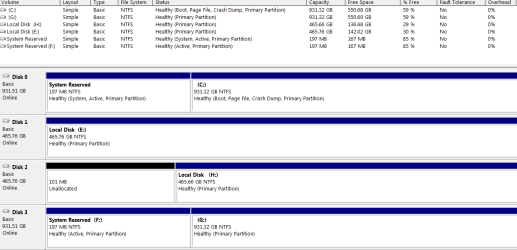
I looked at my Device Management screen, attached here, to look at the details. The Target HDD (cloned with Marcium Free a little earlier is "Disk 3" F, G in my Management list.

[edit addition]

I forgot to mention something that I observed in the "process status" Macrium screen as it was cloning.

I noticed something like this displayed that was referencing the Target HDD in that screen:

?\\volume xxxxxxxxxxxx where "xxxxxxxxxxx" appeared to me to be a Registry value, similar to what I see with most Registry keys.

 

Attachments

  • Capture.PNG
    Capture.PNG
    17.7 KB · Views: 1

My Computer My Computer

Computer type
PC/Desktop
Computer Manufacturer/Model Number
Built at Micro Center Richardson, TX
OS
Windows 7 Home Premium 64 bit
CPU
Intel i5 650 Dual Core 3.20 GHz Cache 4MB Threads: 4
Motherboard
ASUS PRO P7P55D-E
Memory
Corsair 16GB DDR3 1600MHz 9-9-9-24 P/N: CMZ8GX3M2A1600C
Graphics Card(s)
ZOTAC GeFORCE 9500 ZT-95TEK2M-FSL 1GB GDDR2
Sound Card
Mother Bd
Monitor(s) Displays
ASUS V228H 21.5” Diag
Screen Resolution
1440 x 900
Hard Drives
SEAGATE BARRACUDA (2ea) 3.5” INTERNAL 1Tb 16 MB SATA ST1000DM003-9YN162 7200RPM, 64MB, SATA 6Gb/s ** 2 Sata Hot-Swap Racks installed in Tower
PSU
Thermaltake Model TR2 RX 750W
Cooling
2 Tower Fans
Keyboard
Dell Quietkey PS/2 Windows 104 P/N 0463CD
Mouse
Kensington Mechanical Trackball USB Model 64217
Internet Speed
35/35
Antivirus
Norton 360 & MBAM Pro
Browser
IE10
Other Info
Printer: HP DeskJet 3520 USB 2.0 **
Speakers: ALTEC Model VS4621 2.1 28 W/Channel w/Sub-woofer **
IOGEAR HDMI Monitor Switcher Swx3 MODEL GHDSW3 ** Addonics ZDRWESU3 eSata/USB 3.0 external DVD Read/Write DVD Drive** SEAGATE GoFlex USB 2.0 Portable HD 500GB 5400 RPM P/N: 9ZF2A2-570
Whew! That's a lot of work! Here's how I clone a drive.

1. Plug the destination drive into the swap bay or external dock (depending on the computer I'm using). No need to format or otherwise prepare the disk; Reflect will take care of that.
2. Fire up Macrium Reflect.
3. Select the Source drive (I select the entire drive) and select Clone.
4. Select the Destination drive (ditto).
5. Start the clone. All the settings (Verify and Intelligent Sector) are already set and don't need to be set each time.
6. Go to bed and let the program do all the work.
 

My Computer My Computer

Computer type
PC/Desktop
Computer Manufacturer/Model Number
Custom Build
OS
Win 7 Ultimate 64 bit
CPU
Intel i7-3930K
Motherboard
ASUS P9X79 WS
Memory
Kingston HyperX Genesis 32GB Kit (8x4GB Modules) 1600MHz DDR
Graphics Card(s)
MSI R7850 Twin Frozr 2GD5/OC Radeon HD 7850 2GB 256-bit GDDR
Sound Card
Asus Xonar Essence STX
Monitor(s) Displays
3x Asus VG248QE 24", Vizio 32" TV
Screen Resolution
1920 x 1080, ?
Hard Drives
Samsung 128GB 840 Pro SSD (1),
Samsung 4TB 850 EVO SSDs (4)
Samsung 4TB 850 EVO SSDs (16) external backup drives used in 2.5" hot swap bays in the computer.
PSU
Corsair HX750w
Case
Antec Two Hundred v2 (modified)
Cooling
Cooler Master GeminII S524 120mm (fan replaced with a 140mm)
Keyboard
Logitech G510s
Mouse
Logitech M525 (two in use)
Internet Speed
=< 32Mbps down, 8Mbps up
Antivirus
AVAST!, MBAM, SAS, Spybot S&D (all but MBAM free) Glary Util
Browser
IE11
Other Info
LSI 9211-8i HBA card (8 SATA III ports), 2.5" & 3.5" Hot Swap Bays, HooToo HT-CR001 PCI-E to USB 3.0 Internal Hub + 6 Slot Card Reader, and LG Model CH12LS28 BD-ROM Optical Drive. Also, ScanSnap S1500 ADF duplexing scanner, Canon 9000F flat bed scanner, Corsair SP2500 2.1 speakers, Samsung CLP 415nw laser color printer, Cyberpower PP2200SW UPS
Whew! That's a lot of work! Here's how I clone a drive.

1. Plug the destination drive into the swap bay or external dock (depending on the computer I'm using). No need to format or otherwise prepare the disk; Reflect will take care of that.
2. Fire up Macrium Reflect.
3. Select the Source drive (I select the entire drive).
4. Select the Destination drive (ditto).
5. Start the clone. All the settings (verify and Intelligent Sector) are already set and don't need to be set each time.
6. Go to bed and let the program do all the work.

I'm used to it (work) :) I like using Gparted so I've continued that way but I understand your point. I'm on an "island" with my approach :) but that's not related to my booting issue since as you mentioned, Macrium (as well as all cloning tools, I imagine) will do that step automatically when the process begins.

I think you may have mentioned the reason that my cloned HDD didn't boot. I didn't see a "Select entire Source Drive", etc , on the Macruim setup screen, I did click on both partitions but I'm familiar with what you're referring to, ie, "select entire drive", since Acronis has that option when one clones from their "select partions" dialog screen.

I'll try it again to see where I missed the "select entire drive/disk" option.
 

My Computer My Computer

Computer type
PC/Desktop
Computer Manufacturer/Model Number
Built at Micro Center Richardson, TX
OS
Windows 7 Home Premium 64 bit
CPU
Intel i5 650 Dual Core 3.20 GHz Cache 4MB Threads: 4
Motherboard
ASUS PRO P7P55D-E
Memory
Corsair 16GB DDR3 1600MHz 9-9-9-24 P/N: CMZ8GX3M2A1600C
Graphics Card(s)
ZOTAC GeFORCE 9500 ZT-95TEK2M-FSL 1GB GDDR2
Sound Card
Mother Bd
Monitor(s) Displays
ASUS V228H 21.5” Diag
Screen Resolution
1440 x 900
Hard Drives
SEAGATE BARRACUDA (2ea) 3.5” INTERNAL 1Tb 16 MB SATA ST1000DM003-9YN162 7200RPM, 64MB, SATA 6Gb/s ** 2 Sata Hot-Swap Racks installed in Tower
PSU
Thermaltake Model TR2 RX 750W
Cooling
2 Tower Fans
Keyboard
Dell Quietkey PS/2 Windows 104 P/N 0463CD
Mouse
Kensington Mechanical Trackball USB Model 64217
Internet Speed
35/35
Antivirus
Norton 360 & MBAM Pro
Browser
IE10
Other Info
Printer: HP DeskJet 3520 USB 2.0 **
Speakers: ALTEC Model VS4621 2.1 28 W/Channel w/Sub-woofer **
IOGEAR HDMI Monitor Switcher Swx3 MODEL GHDSW3 ** Addonics ZDRWESU3 eSata/USB 3.0 external DVD Read/Write DVD Drive** SEAGATE GoFlex USB 2.0 Portable HD 500GB 5400 RPM P/N: 9ZF2A2-570
Make sure none of the partitions on the other drives are checked then just click on the box on the far left of the drive to be cloned. That will select all the partitions on that drive.

You may like working with Gparted but it's really unnecessary since Reflect is going to write over everything you did.
 

My Computer My Computer

Computer type
PC/Desktop
Computer Manufacturer/Model Number
Custom Build
OS
Win 7 Ultimate 64 bit
CPU
Intel i7-3930K
Motherboard
ASUS P9X79 WS
Memory
Kingston HyperX Genesis 32GB Kit (8x4GB Modules) 1600MHz DDR
Graphics Card(s)
MSI R7850 Twin Frozr 2GD5/OC Radeon HD 7850 2GB 256-bit GDDR
Sound Card
Asus Xonar Essence STX
Monitor(s) Displays
3x Asus VG248QE 24", Vizio 32" TV
Screen Resolution
1920 x 1080, ?
Hard Drives
Samsung 128GB 840 Pro SSD (1),
Samsung 4TB 850 EVO SSDs (4)
Samsung 4TB 850 EVO SSDs (16) external backup drives used in 2.5" hot swap bays in the computer.
PSU
Corsair HX750w
Case
Antec Two Hundred v2 (modified)
Cooling
Cooler Master GeminII S524 120mm (fan replaced with a 140mm)
Keyboard
Logitech G510s
Mouse
Logitech M525 (two in use)
Internet Speed
=< 32Mbps down, 8Mbps up
Antivirus
AVAST!, MBAM, SAS, Spybot S&D (all but MBAM free) Glary Util
Browser
IE11
Other Info
LSI 9211-8i HBA card (8 SATA III ports), 2.5" & 3.5" Hot Swap Bays, HooToo HT-CR001 PCI-E to USB 3.0 Internal Hub + 6 Slot Card Reader, and LG Model CH12LS28 BD-ROM Optical Drive. Also, ScanSnap S1500 ADF duplexing scanner, Canon 9000F flat bed scanner, Corsair SP2500 2.1 speakers, Samsung CLP 415nw laser color printer, Cyberpower PP2200SW UPS
Make sure none of the partitions on the other drives are checked then just click on the box on the far left of the drive to be cloned. That will select all the partitions on that drive.

You may like working with Gparted but it's really unnecessary since Reflect is going to write over everything you did.

Thanks, I know (Gparted). The main reason I do that is that it makes it almost impossible to clone in reverse since the cloning tool, whether it's Macrium, Acronis, or Clonezilla, will show that the Target HDD is empty during the Destination-select process.

It's more of one of those "early-days" cloning concerns that carried over for me to avoid cloning in reverse, which I've never done....so far :D
 

My Computer My Computer

Computer type
PC/Desktop
Computer Manufacturer/Model Number
Built at Micro Center Richardson, TX
OS
Windows 7 Home Premium 64 bit
CPU
Intel i5 650 Dual Core 3.20 GHz Cache 4MB Threads: 4
Motherboard
ASUS PRO P7P55D-E
Memory
Corsair 16GB DDR3 1600MHz 9-9-9-24 P/N: CMZ8GX3M2A1600C
Graphics Card(s)
ZOTAC GeFORCE 9500 ZT-95TEK2M-FSL 1GB GDDR2
Sound Card
Mother Bd
Monitor(s) Displays
ASUS V228H 21.5” Diag
Screen Resolution
1440 x 900
Hard Drives
SEAGATE BARRACUDA (2ea) 3.5” INTERNAL 1Tb 16 MB SATA ST1000DM003-9YN162 7200RPM, 64MB, SATA 6Gb/s ** 2 Sata Hot-Swap Racks installed in Tower
PSU
Thermaltake Model TR2 RX 750W
Cooling
2 Tower Fans
Keyboard
Dell Quietkey PS/2 Windows 104 P/N 0463CD
Mouse
Kensington Mechanical Trackball USB Model 64217
Internet Speed
35/35
Antivirus
Norton 360 & MBAM Pro
Browser
IE10
Other Info
Printer: HP DeskJet 3520 USB 2.0 **
Speakers: ALTEC Model VS4621 2.1 28 W/Channel w/Sub-woofer **
IOGEAR HDMI Monitor Switcher Swx3 MODEL GHDSW3 ** Addonics ZDRWESU3 eSata/USB 3.0 external DVD Read/Write DVD Drive** SEAGATE GoFlex USB 2.0 Portable HD 500GB 5400 RPM P/N: 9ZF2A2-570
You're overthinking it. As long as you select the correct drive before selecting "Clone", you won't reverse clone. If you were to select the empty disk to clone from, you would create an empty disk on the destination disk. Jumping through all those hoops wouldn't protect you from reverse cloning.
 

My Computer My Computer

Computer type
PC/Desktop
Computer Manufacturer/Model Number
Custom Build
OS
Win 7 Ultimate 64 bit
CPU
Intel i7-3930K
Motherboard
ASUS P9X79 WS
Memory
Kingston HyperX Genesis 32GB Kit (8x4GB Modules) 1600MHz DDR
Graphics Card(s)
MSI R7850 Twin Frozr 2GD5/OC Radeon HD 7850 2GB 256-bit GDDR
Sound Card
Asus Xonar Essence STX
Monitor(s) Displays
3x Asus VG248QE 24", Vizio 32" TV
Screen Resolution
1920 x 1080, ?
Hard Drives
Samsung 128GB 840 Pro SSD (1),
Samsung 4TB 850 EVO SSDs (4)
Samsung 4TB 850 EVO SSDs (16) external backup drives used in 2.5" hot swap bays in the computer.
PSU
Corsair HX750w
Case
Antec Two Hundred v2 (modified)
Cooling
Cooler Master GeminII S524 120mm (fan replaced with a 140mm)
Keyboard
Logitech G510s
Mouse
Logitech M525 (two in use)
Internet Speed
=< 32Mbps down, 8Mbps up
Antivirus
AVAST!, MBAM, SAS, Spybot S&D (all but MBAM free) Glary Util
Browser
IE11
Other Info
LSI 9211-8i HBA card (8 SATA III ports), 2.5" & 3.5" Hot Swap Bays, HooToo HT-CR001 PCI-E to USB 3.0 Internal Hub + 6 Slot Card Reader, and LG Model CH12LS28 BD-ROM Optical Drive. Also, ScanSnap S1500 ADF duplexing scanner, Canon 9000F flat bed scanner, Corsair SP2500 2.1 speakers, Samsung CLP 415nw laser color printer, Cyberpower PP2200SW UPS
  • Like
Reactions: whs
You're overthinking it. As long as you select the correct drive before selecting "Clone", you won't reverse clone. If you were to select the empty disk to clone from, you would create an empty disk on the destination disk. Jumping through all those hoops wouldn't protect you from reverse cloning.

Thanks. You're right. I think it's a holdover from the "Acronis Forum" days, where numerous experienced members cautioned against the mistake of reverse-cloning.

Regarding Gparted formatting before cloning and image-restore, it's just one of those things I choose to do to see a formatted Target HDD before the process begins.

I think the other reason that I've formatted prior to cloning is that I'm always cloning with identical (except for the serial #'s) Seagate 1 Tb HDD's so when any tool's cloning screen/dialog is displayed, it's a fast way to differentiate between the Source and Target drives if one of them shows no data content before cloning.

Since it only takes me about 5 minutes to do that step before using cloning/imaging tools, I'll probably stay with that decision.

Thanks for your help with Macrium cloning setup. I just completed the 2nd cloning attempt and it worked :D

Macrium is like just about any other product in that, once one goes through the setup screens the 1st time, it's a breeze after that.

What I was doing wrong was using the "drag/drop" partition method when setting up the Destination HDD on the screen. Interestingly, that's how it's taught with some of those YouTube videos... "How to Clone with Macrium", etc.

It's similar to Acronis's "disk signature" check-box when imaging with that tool.

With Macrium, it was subtle for me in that when I tick the "entire disk" box on the left-hand side of the screen, that also ticks all partitions on the Source HDD and they'll remain ticked (you can't un-check the partitions and keep the "entire disk" box ticked).

When I selected the Destination HDD on the screen, I ticked the disk icon on the left-hand side.

That did it. I booted up the Target HDD and gave it a little exercise :).

I wanted to pursue a 2nd option tool for cloning and imaging, along with another Rescue Media tool. Macrium provides me with this option.

Regarding the Acronis Forum, I recently posted a question about cloning since in most of their knowledge-base documention, their is mention about the risks to the Source HDD when cloning (vs Imaging).

I didn't receive any replies to that question. I admit that I don't see the point about risks to a Source HDD when cloning with various tools, Acronis, Clonezilla, and Macrium, as it's my understanding that the Source HDD is only being read during the cloning process.
 

My Computer My Computer

Computer type
PC/Desktop
Computer Manufacturer/Model Number
Built at Micro Center Richardson, TX
OS
Windows 7 Home Premium 64 bit
CPU
Intel i5 650 Dual Core 3.20 GHz Cache 4MB Threads: 4
Motherboard
ASUS PRO P7P55D-E
Memory
Corsair 16GB DDR3 1600MHz 9-9-9-24 P/N: CMZ8GX3M2A1600C
Graphics Card(s)
ZOTAC GeFORCE 9500 ZT-95TEK2M-FSL 1GB GDDR2
Sound Card
Mother Bd
Monitor(s) Displays
ASUS V228H 21.5” Diag
Screen Resolution
1440 x 900
Hard Drives
SEAGATE BARRACUDA (2ea) 3.5” INTERNAL 1Tb 16 MB SATA ST1000DM003-9YN162 7200RPM, 64MB, SATA 6Gb/s ** 2 Sata Hot-Swap Racks installed in Tower
PSU
Thermaltake Model TR2 RX 750W
Cooling
2 Tower Fans
Keyboard
Dell Quietkey PS/2 Windows 104 P/N 0463CD
Mouse
Kensington Mechanical Trackball USB Model 64217
Internet Speed
35/35
Antivirus
Norton 360 & MBAM Pro
Browser
IE10
Other Info
Printer: HP DeskJet 3520 USB 2.0 **
Speakers: ALTEC Model VS4621 2.1 28 W/Channel w/Sub-woofer **
IOGEAR HDMI Monitor Switcher Swx3 MODEL GHDSW3 ** Addonics ZDRWESU3 eSata/USB 3.0 external DVD Read/Write DVD Drive** SEAGATE GoFlex USB 2.0 Portable HD 500GB 5400 RPM P/N: 9ZF2A2-570
I'm glad you were able to get cloning working. While I still feel using Gparted is overkill, I also believe in not fixing something that's not broken and your process is now working.

One little tip; I always give my drives distinctive names so I'm not likely to forget which one is which.
 

My Computer My Computer

Computer type
PC/Desktop
Computer Manufacturer/Model Number
Custom Build
OS
Win 7 Ultimate 64 bit
CPU
Intel i7-3930K
Motherboard
ASUS P9X79 WS
Memory
Kingston HyperX Genesis 32GB Kit (8x4GB Modules) 1600MHz DDR
Graphics Card(s)
MSI R7850 Twin Frozr 2GD5/OC Radeon HD 7850 2GB 256-bit GDDR
Sound Card
Asus Xonar Essence STX
Monitor(s) Displays
3x Asus VG248QE 24", Vizio 32" TV
Screen Resolution
1920 x 1080, ?
Hard Drives
Samsung 128GB 840 Pro SSD (1),
Samsung 4TB 850 EVO SSDs (4)
Samsung 4TB 850 EVO SSDs (16) external backup drives used in 2.5" hot swap bays in the computer.
PSU
Corsair HX750w
Case
Antec Two Hundred v2 (modified)
Cooling
Cooler Master GeminII S524 120mm (fan replaced with a 140mm)
Keyboard
Logitech G510s
Mouse
Logitech M525 (two in use)
Internet Speed
=< 32Mbps down, 8Mbps up
Antivirus
AVAST!, MBAM, SAS, Spybot S&D (all but MBAM free) Glary Util
Browser
IE11
Other Info
LSI 9211-8i HBA card (8 SATA III ports), 2.5" & 3.5" Hot Swap Bays, HooToo HT-CR001 PCI-E to USB 3.0 Internal Hub + 6 Slot Card Reader, and LG Model CH12LS28 BD-ROM Optical Drive. Also, ScanSnap S1500 ADF duplexing scanner, Canon 9000F flat bed scanner, Corsair SP2500 2.1 speakers, Samsung CLP 415nw laser color printer, Cyberpower PP2200SW UPS
I'm glad you were able to get cloning working. While I still feel using Gparted is overkill, I also believe in not fixing something that's not broken and your process is now working.

One little tip; I always give my drives distinctive names so I'm not likely to forget which one is which.

Thanks :)

That's a great idea. How do you name a HDD? I haven't looked at that since I read something a couple of years ago, about avoiding assigning a drive letter prior to cloning. Supposedly that causes a non-bootable clone because Windows will look for a "C" drive when booting but that's only what I read in a few forums/blogs back then.

Your idea, if I'm understanding it right, isn't to assign a drive letter but to name a drive with a text string?
 

My Computer My Computer

Computer type
PC/Desktop
Computer Manufacturer/Model Number
Built at Micro Center Richardson, TX
OS
Windows 7 Home Premium 64 bit
CPU
Intel i5 650 Dual Core 3.20 GHz Cache 4MB Threads: 4
Motherboard
ASUS PRO P7P55D-E
Memory
Corsair 16GB DDR3 1600MHz 9-9-9-24 P/N: CMZ8GX3M2A1600C
Graphics Card(s)
ZOTAC GeFORCE 9500 ZT-95TEK2M-FSL 1GB GDDR2
Sound Card
Mother Bd
Monitor(s) Displays
ASUS V228H 21.5” Diag
Screen Resolution
1440 x 900
Hard Drives
SEAGATE BARRACUDA (2ea) 3.5” INTERNAL 1Tb 16 MB SATA ST1000DM003-9YN162 7200RPM, 64MB, SATA 6Gb/s ** 2 Sata Hot-Swap Racks installed in Tower
PSU
Thermaltake Model TR2 RX 750W
Cooling
2 Tower Fans
Keyboard
Dell Quietkey PS/2 Windows 104 P/N 0463CD
Mouse
Kensington Mechanical Trackball USB Model 64217
Internet Speed
35/35
Antivirus
Norton 360 & MBAM Pro
Browser
IE10
Other Info
Printer: HP DeskJet 3520 USB 2.0 **
Speakers: ALTEC Model VS4621 2.1 28 W/Channel w/Sub-woofer **
IOGEAR HDMI Monitor Switcher Swx3 MODEL GHDSW3 ** Addonics ZDRWESU3 eSata/USB 3.0 external DVD Read/Write DVD Drive** SEAGATE GoFlex USB 2.0 Portable HD 500GB 5400 RPM P/N: 9ZF2A2-570
I'm glad you were able to get cloning working. While I still feel using Gparted is overkill, I also believe in not fixing something that's not broken and your process is now working.

One little tip; I always give my drives distinctive names so I'm not likely to forget which one is which.

Thanks :)

That's a great idea. How do you name a HDD?...

Go to Computer, right click the drive you want to rename, and click on Rename.

...I read something a couple of years ago, about avoiding assigning a drive letter prior to cloning. Supposedly that causes a non-bootable clone because Windows will look for a "C" drive when booting but that's only what I read in a few forums/blogs back then...

Every drive I cloned to had a drive letter so that blows that theory out of the water. When cloning a drive that is to be booted, the drive letters on the clone will be wrong while still connected to the computer because drive letters can't be duplicated on the same machine but when the drive is installed in a different machine, the drive letters will revert to the original ones.

...Your idea, if I'm understanding it right, isn't to assign a drive letter but to name a drive with a text string?

I believe that you have to have a drive letter to be able to name it.

Correction: You do have to have a drive letter to name a drive because you have to do it in Computer and you can't see it in Computer if it doesn't have a letter.
 

My Computer My Computer

Computer type
PC/Desktop
Computer Manufacturer/Model Number
Custom Build
OS
Win 7 Ultimate 64 bit
CPU
Intel i7-3930K
Motherboard
ASUS P9X79 WS
Memory
Kingston HyperX Genesis 32GB Kit (8x4GB Modules) 1600MHz DDR
Graphics Card(s)
MSI R7850 Twin Frozr 2GD5/OC Radeon HD 7850 2GB 256-bit GDDR
Sound Card
Asus Xonar Essence STX
Monitor(s) Displays
3x Asus VG248QE 24", Vizio 32" TV
Screen Resolution
1920 x 1080, ?
Hard Drives
Samsung 128GB 840 Pro SSD (1),
Samsung 4TB 850 EVO SSDs (4)
Samsung 4TB 850 EVO SSDs (16) external backup drives used in 2.5" hot swap bays in the computer.
PSU
Corsair HX750w
Case
Antec Two Hundred v2 (modified)
Cooling
Cooler Master GeminII S524 120mm (fan replaced with a 140mm)
Keyboard
Logitech G510s
Mouse
Logitech M525 (two in use)
Internet Speed
=< 32Mbps down, 8Mbps up
Antivirus
AVAST!, MBAM, SAS, Spybot S&D (all but MBAM free) Glary Util
Browser
IE11
Other Info
LSI 9211-8i HBA card (8 SATA III ports), 2.5" & 3.5" Hot Swap Bays, HooToo HT-CR001 PCI-E to USB 3.0 Internal Hub + 6 Slot Card Reader, and LG Model CH12LS28 BD-ROM Optical Drive. Also, ScanSnap S1500 ADF duplexing scanner, Canon 9000F flat bed scanner, Corsair SP2500 2.1 speakers, Samsung CLP 415nw laser color printer, Cyberpower PP2200SW UPS
Go to Computer, right click the drive you want to rename, and click on Rename.

Every drive I cloned to had a drive letter so that blows that theory out of the water. When cloning a drive that is to be booted, the drive letters on the clone will be wrong while still connected to the computer because drive letters can't be duplicated on the same machine but when the drive is installed in a different machine, the drive letters will revert to the original ones.

I believe that you have to have a drive letter to be able to name it.

bj69hi.jpg
I recall now, I've done that in the past but memory's not that good now :D

Thanks again. I recall when I read that blog. There's a lot of misinformation out there, that's certain.
 

My Computer My Computer

Computer type
PC/Desktop
Computer Manufacturer/Model Number
Built at Micro Center Richardson, TX
OS
Windows 7 Home Premium 64 bit
CPU
Intel i5 650 Dual Core 3.20 GHz Cache 4MB Threads: 4
Motherboard
ASUS PRO P7P55D-E
Memory
Corsair 16GB DDR3 1600MHz 9-9-9-24 P/N: CMZ8GX3M2A1600C
Graphics Card(s)
ZOTAC GeFORCE 9500 ZT-95TEK2M-FSL 1GB GDDR2
Sound Card
Mother Bd
Monitor(s) Displays
ASUS V228H 21.5” Diag
Screen Resolution
1440 x 900
Hard Drives
SEAGATE BARRACUDA (2ea) 3.5” INTERNAL 1Tb 16 MB SATA ST1000DM003-9YN162 7200RPM, 64MB, SATA 6Gb/s ** 2 Sata Hot-Swap Racks installed in Tower
PSU
Thermaltake Model TR2 RX 750W
Cooling
2 Tower Fans
Keyboard
Dell Quietkey PS/2 Windows 104 P/N 0463CD
Mouse
Kensington Mechanical Trackball USB Model 64217
Internet Speed
35/35
Antivirus
Norton 360 & MBAM Pro
Browser
IE10
Other Info
Printer: HP DeskJet 3520 USB 2.0 **
Speakers: ALTEC Model VS4621 2.1 28 W/Channel w/Sub-woofer **
IOGEAR HDMI Monitor Switcher Swx3 MODEL GHDSW3 ** Addonics ZDRWESU3 eSata/USB 3.0 external DVD Read/Write DVD Drive** SEAGATE GoFlex USB 2.0 Portable HD 500GB 5400 RPM P/N: 9ZF2A2-570
I believe that you have to have a drive letter to be able to name it.

Correction: You do have to have a drive letter to name a drive because you have to do it in Computer and you can't see it in Computer if it doesn't have a letter.
Correction:-

Absolutely no need for a drive letter.

Use Windows Disk Management and select any partition, regardless of whether any letter is allocated;
Right click Properties;
This will show the partition properties and the System Volume Name is already highlighted and ready for change.
I have just changed my letter-less 100 MB partition
from "System Volume Name SAM" to "System Volume Name SAM HDD"
(That was my primary system HDD before I had an SSD)
 

My Computer My Computer

Computer Manufacturer/Model Number
ASUSTeK Computer INC. M3A32-MVP DELUXE (CPU 1)
OS
Windows 7 Ultimate 64 bit SP1 x64
CPU
AMD Phenom X4 9500
Motherboard
ASUSTeK M3A32-MVP Deluxe (CPU 1)
Memory
8 GB
Graphics Card(s)
ATI Radeon HD 4600 Series
Sound Card
AMD High Definition Audio Device
Monitor(s) Displays
SyncMaster (1680x1050@60Hz)
Hard Drives
59GB OCZ-VERTEX2 ATA Device
+
977GB SAMSUNG HD103SJ ATA Device
+
625GB WDC WD6401AALS-00L3B2 ATA Device
I believe that you have to have a drive letter to be able to name it.

Correction: You do have to have a drive letter to name a drive because you have to do it in Computer and you can't see it in Computer if it doesn't have a letter.
Correction:-

Absolutely no need for a drive letter.

Use Windows Disk Management and select any partition, regardless of whether any letter is allocated;
Right click Properties;
This will show the partition properties and the System Volume Name is already highlighted and ready for change.
I have just changed my letter-less 100 MB partition
from "System Volume Name SAM" to "System Volume Name SAM HDD"
(That was my primary system HDD before I had an SSD)

I stand...er...sit corrected. Thanks!
 

My Computer My Computer

Computer type
PC/Desktop
Computer Manufacturer/Model Number
Custom Build
OS
Win 7 Ultimate 64 bit
CPU
Intel i7-3930K
Motherboard
ASUS P9X79 WS
Memory
Kingston HyperX Genesis 32GB Kit (8x4GB Modules) 1600MHz DDR
Graphics Card(s)
MSI R7850 Twin Frozr 2GD5/OC Radeon HD 7850 2GB 256-bit GDDR
Sound Card
Asus Xonar Essence STX
Monitor(s) Displays
3x Asus VG248QE 24", Vizio 32" TV
Screen Resolution
1920 x 1080, ?
Hard Drives
Samsung 128GB 840 Pro SSD (1),
Samsung 4TB 850 EVO SSDs (4)
Samsung 4TB 850 EVO SSDs (16) external backup drives used in 2.5" hot swap bays in the computer.
PSU
Corsair HX750w
Case
Antec Two Hundred v2 (modified)
Cooling
Cooler Master GeminII S524 120mm (fan replaced with a 140mm)
Keyboard
Logitech G510s
Mouse
Logitech M525 (two in use)
Internet Speed
=< 32Mbps down, 8Mbps up
Antivirus
AVAST!, MBAM, SAS, Spybot S&D (all but MBAM free) Glary Util
Browser
IE11
Other Info
LSI 9211-8i HBA card (8 SATA III ports), 2.5" & 3.5" Hot Swap Bays, HooToo HT-CR001 PCI-E to USB 3.0 Internal Hub + 6 Slot Card Reader, and LG Model CH12LS28 BD-ROM Optical Drive. Also, ScanSnap S1500 ADF duplexing scanner, Canon 9000F flat bed scanner, Corsair SP2500 2.1 speakers, Samsung CLP 415nw laser color printer, Cyberpower PP2200SW UPS
I just put together a new system and finished installing everything. I imaged my drives with Reflect, and went to double check that the rescue media could see it. Already there is a major issue, because the mouse and keyboard are unusable.

- Yes legacy USB support is enabled in the BIOS.
- Yes Fast Boot (ie, and USB skipping) is disabled in the BIOS.
- Yes the mouse and keyboard are connected to the board's USB 2.0 port.
- I have no PS2 port so I cannot try that.
- I tried disconnecting and reconnecting whilst in the recovery environment: the keyboard just flashes for a second and remains unusable.

I'm using the Windows PE 3 version. Does anyone know what's going on?
 

My Computer My Computer

OS
Windows 7 x64 Home Premium
I just put together a new system and finished installing everything. I imaged my drives with Reflect, and went to double check that the rescue media could see it. Already there is a major issue, because the mouse and keyboard are unusable.

- Yes legacy USB support is enabled in the BIOS.
- Yes Fast Boot (ie, and USB skipping) is disabled in the BIOS.
- Yes the mouse and keyboard are connected to the board's USB 2.0 port.
- I have no PS2 port so I cannot try that.
- I tried disconnecting and reconnecting whilst in the recovery environment: the keyboard just flashes for a second and remains unusable.

I'm using the Windows PE 3 version. Does anyone know what's going on?
How did you install win7 without keyboard/mouse? Or is mouse/keyboard only not working from macrium recovery dvd? If you attach an external disk or flash disk to same usb2.0 port... does macrium see it?

Try machine's other usb2 ports
 

My Computer My Computer

Computer type
Laptop
Computer Manufacturer/Model Number
ACER ASPIRE 5742G
OS
Microsoft Windows 7 Home Premium 64-bits 7601 Multiprocessor Free Service Pack 1
CPU
Intel(R) Core(TM) i3 CPU M 370 @ 2.40GHz
Motherboard
Acer Aspire 5742G
Memory
4,00 GB
Graphics Card(s)
ATI Mobility Radeon HD 5400 Series
Sound Card
(1) AMD High Definition Audio Device (2) Realtek High Defi
Screen Resolution
1366 x 768 x 32 bits (4294967296 colors) @ 60 Hz
Hard Drives
WDC WD5000BEVT-22ZAT0
Back
Top