Solved Image your system with free Macrium

How did you install win7 without keyboard/mouse?

The mouse/keyboard work perfectly in the BIOS/UEFI environment, Windows environment and they worked fine during the installation of Windows (booted from Win7 SP1 disk). It's only the Macrium disk that has this problem

If you attach an external disk or flash disk to same usb2.0 port... does macrium see it?

How could I know that if i can't navigate the rescue media?

Try machine's other usb2 ports

There are only four, and they're all on the chipset's controller. None of them work.

When I boot from the disk, I get to the 'desktop' where I see a message saying I might need to install network (N/A for my purposes) and USB (these will be for the motherboards USB 3.0 controller which I don't need). The mouse doesn't work, the keyboard doesn't work, and all I can do is hard-reset the PC.
 

My Computer My Computer

OS
Windows 7 x64 Home Premium
Try making your macrium winpe with this: https://www.dropbox.com/s/21wh1sm9z4ua45k/PEALLx64v16.zip

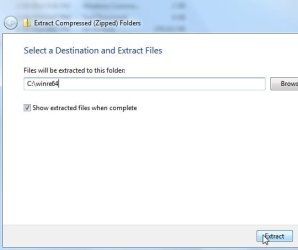
Just unzip it exactly like this:

PEALLV16-ZIP.jpg

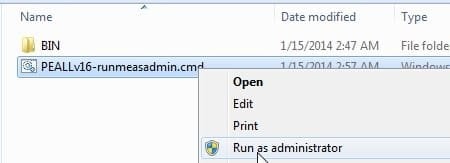
Then rt click and run as admin on the .cmd file:

PEALLV16-RUN.jpg

It will ask if you want to d/l a couple of tiny things to include. e.g. Recuva, not required, you can just say no to any questions if you like. Macrium will be included automatically.
 

My Computers My Computers

System One System Two

  • Computer type
    PC/Desktop
    OS
    7 X64
    CPU
    i5 8400
    Motherboard
    gigabyte b365m ds3h
    Memory
    2x8gb 3200mhz
    Hard Drives
    various
    PSU
    pure power 11 400w cm
    Case
    Coolermaster
    Cooling
    cryorig m9i
  • Computer type
    PC/Desktop
    OS
    7x64
    CPU
    g5400
    Motherboard
    ga b365m ds3h
    Memory
    8gb ddr4 2400
    PSU
    xfx pro 450w
You can try with my WinPE which works on many systems and with wired and wireless mices. Download the .iso from here and burn it to CD.
 

My Computer My Computer

Computer Manufacturer/Model Number
HP, Dell, Gateway, Toshiba - 4 laptops and 2 desktops
OS
Vista, Windows7, Mint Mate, Zorin, Windows 8
CPU
from 1.6GHz Duo to i7
Monitor(s) Displays
2x HP w2207
Hard Drives
5x HDD, 7x SSD, 12x Externals
Keyboard
with trackball - no mices
Mouse
Trackball mice
Internet Speed
DSL 6000
Mang Nux,

I hope you get it resolved. As whs suggested, try that link if you haven't done that yet. I recall having some difficulties creating the WinPE CD. It took 2-3 attempts but I was able to create a working bootable CD.

It was a little confusing for me at first as I was getting a query to load drivers during the ISO setup dialog in Macrium Reflect (free version). It loaded all but 1 driver for my Laptop, an Ethernet Adapter driver indicated that it didn't load but I don't need that to boot from the CD and to process clones or images.

I was able to create the CD from the ISO setup dialog on my Mom's older XP Desktop PC without any "drivers not loaded" dialog's and the CD tested ok. I've processed a couple of clones and an image on Mom's PC using the boot CD.

Another member here that's been using Macrium (free ver) for years helped me understand this "drivers not loaded" dialog box when booting to the CD. He mentioned that the message isn't uncommon to see when booting the CD.

I recall that I selected WinPE 3.0 instead of the latest version which, if I recall, is 4.0 or similar.

When I tried to setup the media-creation dialog with the latest WinPE version I had problems so I used the ealier PE version which worked on my Desktop and Laptop PC's.
 

My Computer My Computer

Computer type
PC/Desktop
Computer Manufacturer/Model Number
Built at Micro Center Richardson, TX
OS
Windows 7 Home Premium 64 bit
CPU
Intel i5 650 Dual Core 3.20 GHz Cache 4MB Threads: 4
Motherboard
ASUS PRO P7P55D-E
Memory
Corsair 16GB DDR3 1600MHz 9-9-9-24 P/N: CMZ8GX3M2A1600C
Graphics Card(s)
ZOTAC GeFORCE 9500 ZT-95TEK2M-FSL 1GB GDDR2
Sound Card
Mother Bd
Monitor(s) Displays
ASUS V228H 21.5” Diag
Screen Resolution
1440 x 900
Hard Drives
SEAGATE BARRACUDA (2ea) 3.5” INTERNAL 1Tb 16 MB SATA ST1000DM003-9YN162 7200RPM, 64MB, SATA 6Gb/s ** 2 Sata Hot-Swap Racks installed in Tower
PSU
Thermaltake Model TR2 RX 750W
Cooling
2 Tower Fans
Keyboard
Dell Quietkey PS/2 Windows 104 P/N 0463CD
Mouse
Kensington Mechanical Trackball USB Model 64217
Internet Speed
35/35
Antivirus
Norton 360 & MBAM Pro
Browser
IE10
Other Info
Printer: HP DeskJet 3520 USB 2.0 **
Speakers: ALTEC Model VS4621 2.1 28 W/Channel w/Sub-woofer **
IOGEAR HDMI Monitor Switcher Swx3 MODEL GHDSW3 ** Addonics ZDRWESU3 eSata/USB 3.0 external DVD Read/Write DVD Drive** SEAGATE GoFlex USB 2.0 Portable HD 500GB 5400 RPM P/N: 9ZF2A2-570
I recall that I selected WinPE 3.0 instead of the latest version which, if I recall, is 4.0 or similar
The latest verion is 5 - that's what is on my Skydrive (5.2)
 

My Computer My Computer

Computer Manufacturer/Model Number
HP, Dell, Gateway, Toshiba - 4 laptops and 2 desktops
OS
Vista, Windows7, Mint Mate, Zorin, Windows 8
CPU
from 1.6GHz Duo to i7
Monitor(s) Displays
2x HP w2207
Hard Drives
5x HDD, 7x SSD, 12x Externals
Keyboard
with trackball - no mices
Mouse
Trackball mice
Internet Speed
DSL 6000
I recall that I selected WinPE 3.0 instead of the latest version which, if I recall, is 4.0 or similar
The latest verion is 5 - that's what is on my Skydrive (5.2)

Thanks, I was going by memory which isn't near as good as my PC's RAM :).
 

My Computer My Computer

Computer type
PC/Desktop
Computer Manufacturer/Model Number
Built at Micro Center Richardson, TX
OS
Windows 7 Home Premium 64 bit
CPU
Intel i5 650 Dual Core 3.20 GHz Cache 4MB Threads: 4
Motherboard
ASUS PRO P7P55D-E
Memory
Corsair 16GB DDR3 1600MHz 9-9-9-24 P/N: CMZ8GX3M2A1600C
Graphics Card(s)
ZOTAC GeFORCE 9500 ZT-95TEK2M-FSL 1GB GDDR2
Sound Card
Mother Bd
Monitor(s) Displays
ASUS V228H 21.5” Diag
Screen Resolution
1440 x 900
Hard Drives
SEAGATE BARRACUDA (2ea) 3.5” INTERNAL 1Tb 16 MB SATA ST1000DM003-9YN162 7200RPM, 64MB, SATA 6Gb/s ** 2 Sata Hot-Swap Racks installed in Tower
PSU
Thermaltake Model TR2 RX 750W
Cooling
2 Tower Fans
Keyboard
Dell Quietkey PS/2 Windows 104 P/N 0463CD
Mouse
Kensington Mechanical Trackball USB Model 64217
Internet Speed
35/35
Antivirus
Norton 360 & MBAM Pro
Browser
IE10
Other Info
Printer: HP DeskJet 3520 USB 2.0 **
Speakers: ALTEC Model VS4621 2.1 28 W/Channel w/Sub-woofer **
IOGEAR HDMI Monitor Switcher Swx3 MODEL GHDSW3 ** Addonics ZDRWESU3 eSata/USB 3.0 external DVD Read/Write DVD Drive** SEAGATE GoFlex USB 2.0 Portable HD 500GB 5400 RPM P/N: 9ZF2A2-570
The macrium site said that 3.1 is based on Windows 7 and 4.0 is based on 8. I'm using Windows 7 x64, so I thought that 3.1 was the one I should use (when I first burned it through Macrium, it automatically selected 3.1, so that reinforced my suspicion). Is that wrong, or doesn't it matter?

Anyway, I tried the image you linked linked whs, but the same problem occurs. There's no more message about drivers, but the mouse and keyboard are still completely dead. I even tried a different keyboard and nothing. The keyboard is lit up right until I get to the 'desktop' of the rescue media, then all the lEDs go out.

Should I still try SIW2's method even though the other one failed?

I'm using a UEFI BIOS and Windows 7 is installed in UEFI mode with GPT formatting. I don't suppose the linux based rescue media supports UEFI booting?

The HDD light is constantly flashing mildly, so I hope it doesn't risk my data when I have to reset the system to get out of the rescue media every time.
 

My Computer My Computer

OS
Windows 7 x64 Home Premium
You can give the 4.0 version a go, I thought it was for a UEFI install. I could never boot it.
 

My Computer My Computer

Computer type
PC/Desktop
Computer Manufacturer/Model Number
Home Built Desktop By DataTech
OS
Windows 7 Ultimate X64 SP1
CPU
Intel i5-2550K, Differing ~4.4-4.8GHz No built in GPU
Motherboard
ASUS P8Z68-V PRO/GEN3
Memory
16GB G.Skill Sniper 1866MHz @ 2133MHz 2x8GB
Graphics Card(s)
ASUS GTX650TIB-DC2OC-2GD5, (650TI Boost)
Sound Card
Onboard Realtek 5-1
Monitor(s) Displays
Samsung P2570HD
Screen Resolution
1920x1080
Hard Drives
Samsung 840 Pro 256GB SSD for OS, 500GB Seagate Constellation (Enterprise drive) for Data
PSU
Corsair HX650W
Case
Inwin Dragon Rider
Cooling
Hyper 212 EVO w/two Noctua fans, push-pull, @1300 RPM
Keyboard
E-Z Eyes, bright yellow keys with large characters
Mouse
steelseries SENSEI Laser Pro Gaming
Internet Speed
48-51Mbs Mbs down, 11 Mbs up Xfinity Cable
Antivirus
Norton Internet Security 2013
Browser
IE 10, Opera, Pale Moon if needed
Other Info
4 case fans, LG BluRay-RE, ASUS DVD-RW, Mr. Fusion power supply, 1.21 gigawatts.
Don't mess with the Linux CD. Did you download the .iso from my Skydrive.

There is no restrictions using version 4 or 5. They work in 7 and 8 alike. And the recovery CD should not be effected by UEFI - at least I think so.
 

My Computer My Computer

Computer Manufacturer/Model Number
HP, Dell, Gateway, Toshiba - 4 laptops and 2 desktops
OS
Vista, Windows7, Mint Mate, Zorin, Windows 8
CPU
from 1.6GHz Duo to i7
Monitor(s) Displays
2x HP w2207
Hard Drives
5x HDD, 7x SSD, 12x Externals
Keyboard
with trackball - no mices
Mouse
Trackball mice
Internet Speed
DSL 6000
Don't mess with the Linux CD. Did you download the .iso from my Skydrive.

Yes, as I mentioned in my last post. Same problem with unusable M/K. Since your ISO appeared to include drivers for my USB 3.0 controller (no warning message), I even tried it a second time with everything connected to USB 3.0 ports, but again, no luck.
 

My Computer My Computer

OS
Windows 7 x64 Home Premium
Only USB 2.0 has worked for me.
 

My Computer My Computer

Computer type
PC/Desktop
Computer Manufacturer/Model Number
Home Built Desktop By DataTech
OS
Windows 7 Ultimate X64 SP1
CPU
Intel i5-2550K, Differing ~4.4-4.8GHz No built in GPU
Motherboard
ASUS P8Z68-V PRO/GEN3
Memory
16GB G.Skill Sniper 1866MHz @ 2133MHz 2x8GB
Graphics Card(s)
ASUS GTX650TIB-DC2OC-2GD5, (650TI Boost)
Sound Card
Onboard Realtek 5-1
Monitor(s) Displays
Samsung P2570HD
Screen Resolution
1920x1080
Hard Drives
Samsung 840 Pro 256GB SSD for OS, 500GB Seagate Constellation (Enterprise drive) for Data
PSU
Corsair HX650W
Case
Inwin Dragon Rider
Cooling
Hyper 212 EVO w/two Noctua fans, push-pull, @1300 RPM
Keyboard
E-Z Eyes, bright yellow keys with large characters
Mouse
steelseries SENSEI Laser Pro Gaming
Internet Speed
48-51Mbs Mbs down, 11 Mbs up Xfinity Cable
Antivirus
Norton Internet Security 2013
Browser
IE 10, Opera, Pale Moon if needed
Other Info
4 case fans, LG BluRay-RE, ASUS DVD-RW, Mr. Fusion power supply, 1.21 gigawatts.
I don't know what to say. This CD worked for me and for a few other people. I use it on 6 PCs and never had a problem. This is too bad.

Maybe try the Linux CD after all. It is different but maybe it works. It is easy to produce from the Macrium program. No WAIK required.
 

My Computer My Computer

Computer Manufacturer/Model Number
HP, Dell, Gateway, Toshiba - 4 laptops and 2 desktops
OS
Vista, Windows7, Mint Mate, Zorin, Windows 8
CPU
from 1.6GHz Duo to i7
Monitor(s) Displays
2x HP w2207
Hard Drives
5x HDD, 7x SSD, 12x Externals
Keyboard
with trackball - no mices
Mouse
Trackball mice
Internet Speed
DSL 6000
I tried the Linux disk and that wont work either. I get to first screen where you choose between 'Macrium rescue CD' or 'Macrium rescue CD (Verbose)' I can select either with the keyboard, but upon pressing enter it goes black for a second then back to the same screen, only now there's no input. Again, all I can do is switch the PC off using the case switch.

I'm not even sure if the Linux disk supports UEFI booting. I can't find a definite answer anywhere on the net. That's probably the problem.

I would have been happy with the linux disk if it was compatible with UEFI and restoring GPT disks. I don't need any advanced manipulation of images, just straight restore. I used to use it on my old standard BIOS systems and it was fine.

Anyway, I'm at a loss as to what to do now. I knew I would regret buying a mobo without PS2 ports.
 

My Computer My Computer

OS
Windows 7 x64 Home Premium

My Computers My Computers

System One System Two

  • Computer type
    PC/Desktop
    OS
    7 X64
    CPU
    i5 8400
    Motherboard
    gigabyte b365m ds3h
    Memory
    2x8gb 3200mhz
    Hard Drives
    various
    PSU
    pure power 11 400w cm
    Case
    Coolermaster
    Cooling
    cryorig m9i
  • Computer type
    PC/Desktop
    OS
    7x64
    CPU
    g5400
    Motherboard
    ga b365m ds3h
    Memory
    8gb ddr4 2400
    PSU
    xfx pro 450w

My Computer My Computer

Computer Manufacturer/Model Number
HP, Dell, Gateway, Toshiba - 4 laptops and 2 desktops
OS
Vista, Windows7, Mint Mate, Zorin, Windows 8
CPU
from 1.6GHz Duo to i7
Monitor(s) Displays
2x HP w2207
Hard Drives
5x HDD, 7x SSD, 12x Externals
Keyboard
with trackball - no mices
Mouse
Trackball mice
Internet Speed
DSL 6000
If you are using 64 bit, this should make a working winpe with macrium ( or aomei backupper ).

https://www.dropbox.com/s/7xjp8pznpt1tnl8/winre64.zip

Extract it onto your drive like this:

View attachment 302261

Then rt click and RUN AS ADMIN on the WINRE64-runmeasadmin.cmd

That doesn't work. I tell it to boot from the disk, but it just ignores it and boots to windows.

EDIT: and funnily enough, when I installed AOMEI and tried it's restore media, it acted exactly the same way. I don't think it's UEFI bootable, despite there being a UEFI folder on the disk.
 
Last edited:

My Computer My Computer

OS
Windows 7 x64 Home Premium
How did you install win7 without keyboard/mouse?

The mouse/keyboard work perfectly in the BIOS/UEFI environment, Windows environment and they worked fine during the installation of Windows (booted from Win7 SP1 disk). It's only the Macrium disk that has this problem

If you attach an external disk or flash disk to same usb2.0 port... does macrium see it?

How could I know that if i can't navigate the rescue media?

Try machine's other usb2 ports

There are only four, and they're all on the chipset's controller. None of them work.

When I boot from the disk, I get to the 'desktop' where I see a message saying I might need to install network (N/A for my purposes) and USB (these will be for the motherboards USB 3.0 controller which I don't need). The mouse doesn't work, the keyboard doesn't work, and all I can do is hard-reset the PC.
After winpe has been booted.... macrium runs automatically. If you attach an usb external drive prior to booting you can see it in the macrium window
 

My Computer My Computer

Computer type
Laptop
Computer Manufacturer/Model Number
ACER ASPIRE 5742G
OS
Microsoft Windows 7 Home Premium 64-bits 7601 Multiprocessor Free Service Pack 1
CPU
Intel(R) Core(TM) i3 CPU M 370 @ 2.40GHz
Motherboard
Acer Aspire 5742G
Memory
4,00 GB
Graphics Card(s)
ATI Mobility Radeon HD 5400 Series
Sound Card
(1) AMD High Definition Audio Device (2) Realtek High Defi
Screen Resolution
1366 x 768 x 32 bits (4294967296 colors) @ 60 Hz
Hard Drives
WDC WD5000BEVT-22ZAT0
Since those various different recovery media work fine for other people, there appears to be something wrong at your end.

Are you able to get everything functioning if you boot up winre? ( F8 -repair my computer)
 

My Computers My Computers

System One System Two

  • Computer type
    PC/Desktop
    OS
    7 X64
    CPU
    i5 8400
    Motherboard
    gigabyte b365m ds3h
    Memory
    2x8gb 3200mhz
    Hard Drives
    various
    PSU
    pure power 11 400w cm
    Case
    Coolermaster
    Cooling
    cryorig m9i
  • Computer type
    PC/Desktop
    OS
    7x64
    CPU
    g5400
    Motherboard
    ga b365m ds3h
    Memory
    8gb ddr4 2400
    PSU
    xfx pro 450w
Since those various different recovery media work fine for other people, there appears to be something wrong at your end.

Are you able to get everything functioning if you boot up winre? ( F8 -repair my computer)
I think so too. We must look somewhere else. Maybe it is the BIOS that is retarded.

I once bought a very expensive Sony Vaio laptop where the same problem existed. I was unable to move the cursor when booted with a live CD. After Sony had confirmed the problem from there test center, they took the laptop back.

OP - can you check whether the system can operate the cursor and keyboard with another live CD - maybe some Linux live CD.
 

My Computer My Computer

Computer Manufacturer/Model Number
HP, Dell, Gateway, Toshiba - 4 laptops and 2 desktops
OS
Vista, Windows7, Mint Mate, Zorin, Windows 8
CPU
from 1.6GHz Duo to i7
Monitor(s) Displays
2x HP w2207
Hard Drives
5x HDD, 7x SSD, 12x Externals
Keyboard
with trackball - no mices
Mouse
Trackball mice
Internet Speed
DSL 6000
I finally solved it. It was something to do with the XHCI setting in the BIOS. At the default of 'Smart Auto' or with it set to 'Enabled', there is no input with the rescue media. However, if I choose 'Disabled' or 'Auto', the USB mouse and keyboard work fine.

Thanks for all the help/suggestions.
 

My Computer My Computer

OS
Windows 7 x64 Home Premium
Back
Top