I posted this on the Vista forum. But since it works just as well on Windows7, I post it here too.
Image your system with free Macrium
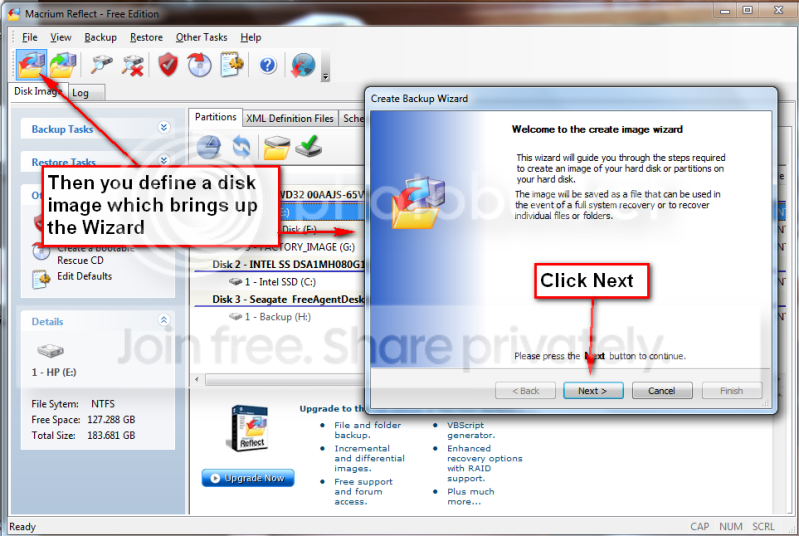
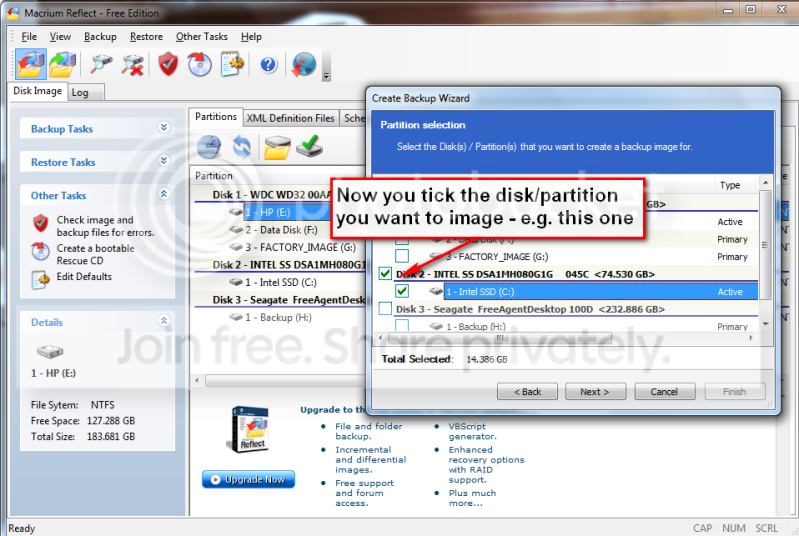
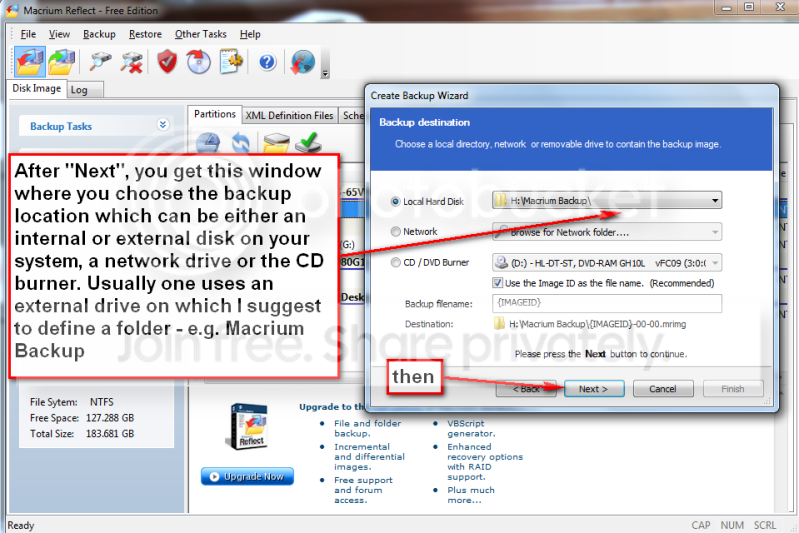
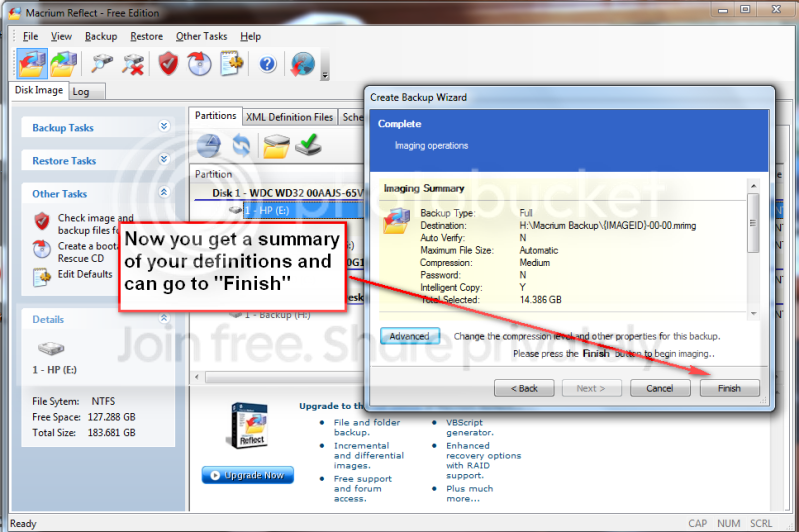
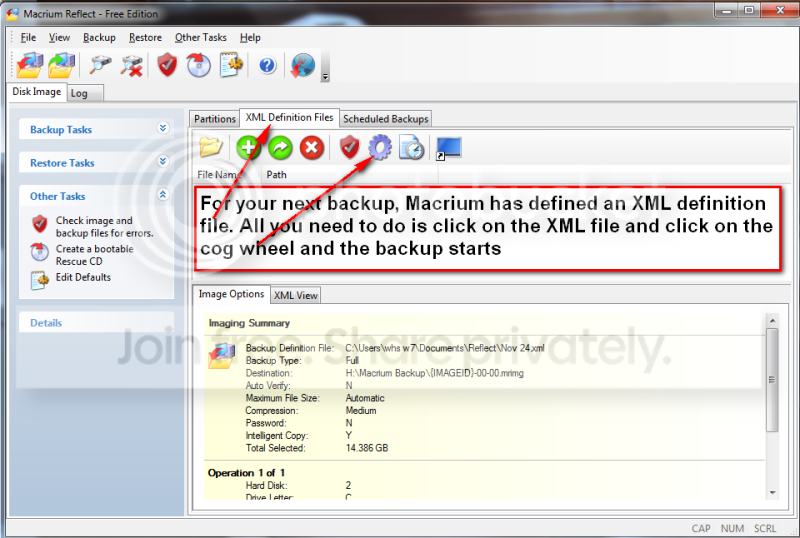
Over the years I have experimented with different imaging programs. I started out with Norton Ghost which works very well, but is quite heavy handed. Backup and restore cycles are usually approximately one hour and it takes quite some time before you understand the intricacies of the product. I have also used Paragon and Acronis true Image. Both of those are in the same league as Ghost. They do provide though a large collection of function – which, I guess, is part of the reason why they are complex and slow. One that is easy is the Maxtor One Touch Manager that comes with the Maxtor One Touch Disks. My wife loves it because once it is set up, all you have to do is push the button on the One Touch Disk and off it goes. Not quite the same but very easy is Macrium. Below you find the four steps to set it up and the one step to run it thereafter. You will notice that the handling of Macrium is as easy as can be. To download the free Macrium, you go to this site:
There is also a paid version with more functions. But for the normal backup/restore, the free version is sufficient. I did not document the restore function, in part, because I cannot take any screenshots during that phase. But it is very simple and self explanatory. All you need to do is set your BIOS boot sequence to boot from your CD reader, put the CD in (the one you burnt – see the first picture) and off it goes. The CD loads a Linux based Wizard that will guide you thru a few simple questions. Performance when you take the image should be in the 10 minute range for an average system. Restore is about 20 minutes without prior image verification and twice as long with prior image verification
My Computer
Computer Manufacturer/Model Number
HP, Dell, Gateway, Toshiba - 4 laptops and 2 desktops
I have never used Macrium, but if it's a true clone, there should be no need to restore anything. One simply installs or swaps the clone drive into the spot where the C: disk resides and fire up the machine and you should be up and running as if nothing happened.
As far as I know, Macrium Free does not clone. It makes images and restores them, but has no cloning feature like Acronis. But it has the best (uncluttered, user-friendly) interface of any imaging tool I have examined.
My Computer
Computer type
PC/Desktop
Computer Manufacturer/Model Number
Ignatz Special; 4 speed manual gearbox; factory air conditioning; one of one
OS
Windows 7 Home Premium SP1, 64-bit
CPU
Intel Skylake i5-6600K, not overclocked
Motherboard
AsRock Z170M Extreme 4, micro ATX
Memory
8 GB HyperX DDR4-2666 (2 x 4 GB)
Graphics Card(s)
none; graphics are integrated on CPU
Sound Card
onboard: Realtek ALC1150; external: USB Behringer UF0-202
Monitor(s) Displays
Dell S2340M 23 inch IPS
Screen Resolution
1600 x 900
Hard Drives
System: Crucial MX100 series SSD, 128 GB;
Data: Samsung Spinpoint 103SJ, 1 TB;
Backup: WD Caviar Green WD30EZRX-00D8PB0, 3 TB
Microsoft Security Essentials and Malwarebytes Premium
Browser
Pale Moon
Other Info
All fans PWM; speeds at idle: CPU circa 500 rpm; intake circa 600 rpm; exhaust circa 600 rpm; CPU temps 27 idle and 47 C load in a warm room (27 C/81 F) when running Intel Extreme Tuning Utility stress test.
Right, the free Macrium is an imaging facility. It is a no frills, easy to use way for anybody who wants a safeguard of his/her system. And it can be used often because it takes very little time to image (and restore) - as compared to the big guys like Ghost. It also compresses by about a factor 3 so that you need relatively little space on the backup volume.
My Computer
Computer Manufacturer/Model Number
HP, Dell, Gateway, Toshiba - 4 laptops and 2 desktops
If you have a Seagate or Maxtor hard drive, (internal or external), you can use either Disk Wizard or Maxblast. They both utilize a striped down version of Acronis's True Image and they are both are a free way to image your hard drive.
True, I have not tried it yet but some people reported problems with it. Maybe someone who has used it and actually done a recovery can give us an update. With Macrium I have done the whole cycle. It was easy, fast and without any problems - especially if I compare it to my Ghost which is big, complicated and VERY slow.
My Computer
Computer Manufacturer/Model Number
HP, Dell, Gateway, Toshiba - 4 laptops and 2 desktops
If you have a Seagate or Maxtor hard drive, (internal or external), you can use either Disk Wizard or Maxblast. They both utilize a striped down version of Acronis's True Image and they are both are a free way to image your hard drive.
Yes, my wife uses it on a Maxtor One Touch. Now after I set it up for her she only has to touch the button on the disk - she loves it. And it works on my Seagate also - but no button (I guess because they are the same company since about a year).
My Computer
Computer Manufacturer/Model Number
HP, Dell, Gateway, Toshiba - 4 laptops and 2 desktops
Several people have reported success with the Windows backup and restore utility in 7. Unfortunately it gave an error for me when I tried to restore an image I made with it which made me hesitant to rely on it. But if one tests it by attempting to restore an image made with it and the restore works, and if one is satisfied with the feature set and options available, then it's probably a great way to go.
There seems to a general problem with windows backup/recovery. Remember how many people (including myself) had problems with the Vista restore form a shadow. Then the imaging in Vista ultimate did not seem to be the yellow of the egg either. And now we get the reports in Win7. As long as they have not fixed it, I rather work with something that is reliable. - but, of course, it would be nice if they could get it to work.
My Computer
Computer Manufacturer/Model Number
HP, Dell, Gateway, Toshiba - 4 laptops and 2 desktops
Well me too, that's why I use and rely on Acronis. I've used it successfully for many years and since I know the program very well and it does everything I need (both cloning and imaging, plus the exciting new "plus pack" features which adds, among other things, the ability to restore to completely different hardware (different system, not just different hard drive), I'm pretty satisfied and comfortable with it.
Agree. Acronis is an excellent program. But like Ghost that I also use, it requires a lot more learning and is a lot slower and bulkier. For the person that just wants to do Backup/Restore, I think free Macrium is an easier solution because it is so easy and so fast. But if you have a requirememt for complex cloning, then it is not the right tool.
My Computer
Computer Manufacturer/Model Number
HP, Dell, Gateway, Toshiba - 4 laptops and 2 desktops
I have recently completed windows system restore from restore point with no problems (note it was just roll-back from restore point not from system image)
I have recently completed windows system restore from restore point with no problems (note it was just roll-back from restore point not from system image)
I can find posts here from people who have had problems with Acronis and no doubt can also find people who have experienced an issue with Macrium.
I have personally restored a backup of my Windows 7 box using the built-in "system image tool" at least a dozen times, including the beta, the rc1 and the RTM...all 64-bit. I've done it at home, at work on a desktop and on a laptop. I've backed up each time to a external USB 2.0 hard drive. Once I even restored it to a different physical hard drive...which was the same size. So, while I cannot speak for everyone...the built-in tool has worked 100% of the time for me.
My Computer
Computer Manufacturer/Model Number
Self-Built in July 2009
OS
Windows 7 Ultimate x64
CPU
Intel Q9550 2.83Ghz OC'd to 3.40Ghz
Motherboard
Gigabyte GA-EP45-UD3R rev. 1.1, F12 BIOS
Memory
8GB G.Skill PI DDR2-800, 4-4-4-12 timings
Graphics Card(s)
EVGA 1280MB Nvidia GeForce GTX570
Sound Card
Realtek ALC899A 8 channel onboard audio
Monitor(s) Displays
23" Acer x233H
Screen Resolution
1920x1080
Hard Drives
Intel X25-M 80GB Gen 2 SSD
Western Digital 1TB Caviar Black, 32MB cache. WD1001FALS
PSU
Corsair 620HX modular
Case
Antec P182
Cooling
stock
Keyboard
ABS M1 Mechanical
Mouse
Logitech G9 Laser Mouse
Internet Speed
15/2 cable modem
Other Info
Windows and Linux enthusiast. Logitech G35 Headset.
If you are talking the Macrium Linux-based Rescue CD you can use either a CD or DVD to boot to the restore program. The thing I liked about Macrium is 4.2 paid version supported my HP AMD Raid controller. I've verified that the new free version of Macrium uses the same Rescue CD image for the Linux Rescue CD as the 4.2 full version. Anyone who bought HP Pavilion m9515y Phenom machine with the AMD Raid controller this is the one for you. Restore with the Linux CD is smooth and simple esp. from a USB 2.0 external drive.
I think you could probably restore to an internal drive in a USB docking station using Macrium to create pop-in backups. Granted it's a 2 step process, but once you have the backup image you can restore several internal drives in the dock if you really want to be backed up.
My Computer
Computer Manufacturer/Model Number
HP Media Center
OS
Windows 7 32 bit
CPU
AMD 5200+ dual core
Memory
2 GB
Graphics Card(s)
NVidia GeForce 6150SE 128 MB
Monitor(s) Displays
CRT
Screen Resolution
1280x1024
Hard Drives
500 GB Sata internal :
SIIG USB 3.0 docking stations w/WD Caviar Black 6 Gb/s drives