Imaging "C:\"

beauparc

New member
Power User
VIP
Local time
4:03 PM
Messages
208
Location
Anglesey
First I must apologise if this is in the wrong forum and I will repost if necessary.

I have two HDDs in my computer. The boot drive "C:" is a Samsung HD103SI running at 5,400 rpm and connected to SATA1. Second drive "F:" is a Samsung HD103UJ running at 7,200 rpm and connected to SATA2.

Will I gain much by using the 7,220 HDD as the boot drive instead of the 5,400 HDD?

Am I correct in assuming that all I basically need to do is to format drive "F:", create an image of drive "C:" onto it and swap the SATA leads over?

Any help and advice will be most gratefully accepted and acknowledged.
 

My Computer

Computer Manufacturer/Model Number
Mesh 955 XGS
OS
Windows 7 64 bit
CPU
Athlon X4 955 Black edition
Motherboard
ASUS M4A78 Pro
Memory
8GB DDR2
Graphics Card(s)
1x Radeon 4890
Monitor(s) Displays
IIyama ProLite E2208HDS
Screen Resolution
1920X1080p
Hard Drives
2x 1TB Samsung SATA2
1x 320GB IDE
PSU
600 watt
Cooling
Standard
Keyboard
MS wireless 6000
Mouse
MS wireless laser 7000
Internet Speed
Not as fast as it should be......
You don't need to format the target HD as there is formatting already on the image. You want unallocated space, or wipe the HD first: Clean and Clean All with Diskpart Command

If your image is stored on external as is common, you can disconnect the source HD and plug target HD into SATA1 or DISK0, set it first to boot in BIOS Setup after CD/DVD drive. Otherwise save image to a Primary partition on source HD and leave it plugged in as secondary HD.

Boot the 7 DVD, REpair CD, or other imaging boot disk to reimage from external or source HD partition to target HD. System Image Recovery
 
Thank you for your kind response gregrocker.

I have decided to format drive F: (there's nothing worth keeping on it). Using Macrium reflect, I will then image drive C: onto F: and make it bootable. I will then restart, go into BIOS, reset the boot order and reboot. Provided all is OK after a couple of weeks running, I'll then format what is now C: and use it for something else.

Thanks again for taking the time to help me.
 

My Computer

Computer Manufacturer/Model Number
Mesh 955 XGS
OS
Windows 7 64 bit
CPU
Athlon X4 955 Black edition
Motherboard
ASUS M4A78 Pro
Memory
8GB DDR2
Graphics Card(s)
1x Radeon 4890
Monitor(s) Displays
IIyama ProLite E2208HDS
Screen Resolution
1920X1080p
Hard Drives
2x 1TB Samsung SATA2
1x 320GB IDE
PSU
600 watt
Cooling
Standard
Keyboard
MS wireless 6000
Mouse
MS wireless laser 7000
Internet Speed
Not as fast as it should be......
Just delete F in Disk Mgmt to prepare it for imaging. Formatting is the term for preparing partition for an install and is not used for preparing for imaging, since the image already contains formatting. You want a deleted or wiped HD or partition unallocated space for reimaging onto.
 
Ah, light dawns!! Now I understand!

Also....

When I said "imaging" I should have said "cloning" which, with Macrium will make the disk bootable.

Thanks again Gregrocker.
 

My Computer

Computer Manufacturer/Model Number
Mesh 955 XGS
OS
Windows 7 64 bit
CPU
Athlon X4 955 Black edition
Motherboard
ASUS M4A78 Pro
Memory
8GB DDR2
Graphics Card(s)
1x Radeon 4890
Monitor(s) Displays
IIyama ProLite E2208HDS
Screen Resolution
1920X1080p
Hard Drives
2x 1TB Samsung SATA2
1x 320GB IDE
PSU
600 watt
Cooling
Standard
Keyboard
MS wireless 6000
Mouse
MS wireless laser 7000
Internet Speed
Not as fast as it should be......
I don't know if Macrium has a cloning feature as do the WD and Seagate free Premium Acronis apps. But imaging will work fine if that's all you've got.
 
Don't forget to image and restore the 100MB system partition too. Free Macrium has no "cloning" facility as such.

You might even want to consider using the Windows7 imaging because that transports the 100MB system partition automatically.

I am usually not a real friend of Windows7 imaging, but in this particular case it may be more practical.
 

My Computer

Computer Manufacturer/Model Number
HP, Dell, Gateway, Toshiba - 4 laptops and 2 desktops
OS
Vista, Windows7, Mint Mate, Zorin, Windows 8
CPU
from 1.6GHz Duo to i7
Monitor(s) Displays
2x HP w2207
Hard Drives
5x HDD, 7x SSD, 12x Externals
Keyboard
with trackball - no mices
Mouse
Trackball mice
Internet Speed
DSL 6000
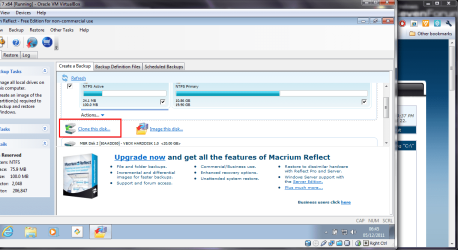
Free Macrium v5 has cloning.

screenshot65_2011-12-05.png
 

My Computer

Computer type
Laptop
Computer Manufacturer/Model Number
Hewlett-Packard/G62-107SA Notebook
OS
Microsoft Windows 7 Home Premium 64-bit Service Pack 1
CPU
Intel(R) Core(TM) i3 CPU M 330 @ 2.13GHz
Motherboard
Hewlett-Packard 1425
Memory
8 GB DDR3
Graphics Card(s)
Intel(R) HD Graphics
Sound Card
Realtek High Definition Audio
Monitor(s) Displays
Builtin
Screen Resolution
1366 x 768 x 32 bits (4294967296 colors) @ 60 Hz
Hard Drives
250 GB SATA Hard Disk Drive 7200 rpm
2TB Seagate GoFlex USB 2 Drive
1TB Iomega Prestige USB 2 Drive
1.5TB Iomega Prestige USB 2 Drive (Samsung)
2TB WD MyBook Live NAS.
Mouse
Logitech Anywhere MX
Internet Speed
152 Mbs download 10 Mbs upload
Antivirus
Norton 360
Browser
Chrome
  • Like
Reactions: whs
It always depends on the definition of cloning - some say cloning is a direct disk-to-disk copy.

Others, myself included, think of it as either directly copying or imaging a partition but in its entirety, with all sectors, regardless of whether they're used or unused by the filesystem on that partition.

To my knowledge, all versions of Macrium can do the latter (simply by not using "intelligent copy").
 

My Computer

Computer type
PC/Desktop
Computer Manufacturer/Model Number
Custom-built
OS
Windows 7 Professional SP1 32-bit
CPU
Intel Core 2 Duo E6600 2.4GHz
Motherboard
Asus PL5D2
Memory
4GB DDR2-667 (4x1GB in dual-channel config)
Graphics Card(s)
nVidia GeForce 9800 GT
Sound Card
Creative X-Fi XtremeMusic
Monitor(s) Displays
Acer P236H
Screen Resolution
1920x1200 (DVI)
Hard Drives
OCZ SSD Vertex Plus 60GB SATA (Firmware 3.55), 64MB cache
Hitachi HD321KJ SATA, 320GB, 7200rpm, 16MB cache
PSU
Antec TruePower 2.0
Case
Cooler Master Centurion
Cooling
Too many fans
Keyboard
Standard
Mouse
Microsoft wireless optical mouse
Internet Speed
AT&T U-verse (18mbit/sec)
Antivirus
Microsoft Security Essentials
Browser
Firefox
Other Info
Other devices:
Compaq CQ-60 laptop
Google Nexus 7 (2012) tablet
Nvidia SHIELD tablet (US/LTE)
Hardkernel ODROID-XU single-board computer (Samsung Exynos 5420)
In "macrium Speak" cloning is copying disk to disk but as you say you have the option of "intelligent copy" (much faster if there is not much on the disk) or sector by sector.
 

My Computer

Computer type
Laptop
Computer Manufacturer/Model Number
Hewlett-Packard/G62-107SA Notebook
OS
Microsoft Windows 7 Home Premium 64-bit Service Pack 1
CPU
Intel(R) Core(TM) i3 CPU M 330 @ 2.13GHz
Motherboard
Hewlett-Packard 1425
Memory
8 GB DDR3
Graphics Card(s)
Intel(R) HD Graphics
Sound Card
Realtek High Definition Audio
Monitor(s) Displays
Builtin
Screen Resolution
1366 x 768 x 32 bits (4294967296 colors) @ 60 Hz
Hard Drives
250 GB SATA Hard Disk Drive 7200 rpm
2TB Seagate GoFlex USB 2 Drive
1TB Iomega Prestige USB 2 Drive
1.5TB Iomega Prestige USB 2 Drive (Samsung)
2TB WD MyBook Live NAS.
Mouse
Logitech Anywhere MX
Internet Speed
152 Mbs download 10 Mbs upload
Antivirus
Norton 360
Browser
Chrome
Again, many thanks to you all for taking the time to reply.

Last night I downloaded V5 of Macrium Reflect and it does support cloning. There is a good demo on Youtube (can't find it now!) showing how to drag and drop all partitions of the boot disk for cloning.

I'm going to carry out this operation this week and will post back details on how things went.

One question which hasn't yet been answered is how much, if any, benefit may I expect from using a 7,200 rpm disk in place of a 5,400 disk?

Once again, many thanks to you all.
 

My Computer

Computer Manufacturer/Model Number
Mesh 955 XGS
OS
Windows 7 64 bit
CPU
Athlon X4 955 Black edition
Motherboard
ASUS M4A78 Pro
Memory
8GB DDR2
Graphics Card(s)
1x Radeon 4890
Monitor(s) Displays
IIyama ProLite E2208HDS
Screen Resolution
1920X1080p
Hard Drives
2x 1TB Samsung SATA2
1x 320GB IDE
PSU
600 watt
Cooling
Standard
Keyboard
MS wireless 6000
Mouse
MS wireless laser 7000
Internet Speed
Not as fast as it should be......

My Computer

Computer Manufacturer/Model Number
HP, Dell, Gateway, Toshiba - 4 laptops and 2 desktops
OS
Vista, Windows7, Mint Mate, Zorin, Windows 8
CPU
from 1.6GHz Duo to i7
Monitor(s) Displays
2x HP w2207
Hard Drives
5x HDD, 7x SSD, 12x Externals
Keyboard
with trackball - no mices
Mouse
Trackball mice
Internet Speed
DSL 6000

My Computer

Computer type
Laptop
Computer Manufacturer/Model Number
Hewlett-Packard/G62-107SA Notebook
OS
Microsoft Windows 7 Home Premium 64-bit Service Pack 1
CPU
Intel(R) Core(TM) i3 CPU M 330 @ 2.13GHz
Motherboard
Hewlett-Packard 1425
Memory
8 GB DDR3
Graphics Card(s)
Intel(R) HD Graphics
Sound Card
Realtek High Definition Audio
Monitor(s) Displays
Builtin
Screen Resolution
1366 x 768 x 32 bits (4294967296 colors) @ 60 Hz
Hard Drives
250 GB SATA Hard Disk Drive 7200 rpm
2TB Seagate GoFlex USB 2 Drive
1TB Iomega Prestige USB 2 Drive
1.5TB Iomega Prestige USB 2 Drive (Samsung)
2TB WD MyBook Live NAS.
Mouse
Logitech Anywhere MX
Internet Speed
152 Mbs download 10 Mbs upload
Antivirus
Norton 360
Browser
Chrome
One question which hasn't yet been answered is how much, if any, benefit may I expect from using a 7,200 rpm disk in place of a 5,400 disk?

Well obviously you will get faster read/writes, but not as noticeably as with an SSD.

I would not want a 5400rpm HD. A friend's has a 2 minute startup traced only to that. Dell paired a 5400 with Core2Duo which also tells a lot about Dell.
 
Thanks Gregrocker, just as I thought.
 

My Computer

Computer Manufacturer/Model Number
Mesh 955 XGS
OS
Windows 7 64 bit
CPU
Athlon X4 955 Black edition
Motherboard
ASUS M4A78 Pro
Memory
8GB DDR2
Graphics Card(s)
1x Radeon 4890
Monitor(s) Displays
IIyama ProLite E2208HDS
Screen Resolution
1920X1080p
Hard Drives
2x 1TB Samsung SATA2
1x 320GB IDE
PSU
600 watt
Cooling
Standard
Keyboard
MS wireless 6000
Mouse
MS wireless laser 7000
Internet Speed
Not as fast as it should be......
Transfer rate is quite a bit faster on the outer tracks. I would recommend an OS/ installed programs partition of around 100-200GB as the second partition after the system reserved (if you have one). If you have a system reserved it is better to make it ~200MB than the default 100MB to avoid shadow storage copy issues when using Windows imaging.

The 7200rpm vs 5400rpm and outer tracks is all about radial velocity/transfer speed.
 

My Computer

Computer type
PC/Desktop
Computer Manufacturer/Model Number
Own build
OS
Windows 7x64 Home Premium SP1
CPU
Intel i7 2600k
Motherboard
ASUS P8Z68 Deluxe
Memory
G.Skill Ripjaws (DDR3-1600) 2x4GB
Graphics Card(s)
Nvidia GeForce GTS 450; Intel HD Graphics 3000(GT2+)
Monitor(s) Displays
Dell Ultrasharp IPS panel U2311H, Samsung SyncMaster P2350
Screen Resolution
1920x1080
Hard Drives
Samsung 850 Pro SSD 256GB, Samsung SSD 840 120GB, Seagates 1TB Barracuda ST31000528AS x2
PSU
Seasonic M12II 520W
Case
Lian Li Lancool PC-K60
Cooling
Case: 1x120mm, 3x140mm CPU: Hyper 212+
Keyboard
Logitech MK520 (wireless)
Mouse
Logitech MK520
Internet Speed
6-7 Mbps
Antivirus
Norton Security Premium, Malwarebytes on 2 (MSE on 3rd PC)
Browser
FireFox
Other Info
Audio: Logitech Z523 2.1
Well.....that was a lot easier than I had expected!

First of all I cleaned the target disk as advised. I then ran the cloning tool in Macrium. It stopped with an error - something to do with "pipelines". Rebooted and ran it again with same error.

Looking on my machine I found a copy of Easeus. Found the cloning option and tried that.

Perfect. It took about an hour to do it's thing and all seemed good.

Restart, into BIOS and reset boot order.

Bingo! Here I am running off the cloned disk without any worries. I'll use it like this for a while to make sure everything is running properly before I do anything else.

Thanks to everyone for the help and advice. It really was greatly appreciated.
 

My Computer

Computer Manufacturer/Model Number
Mesh 955 XGS
OS
Windows 7 64 bit
CPU
Athlon X4 955 Black edition
Motherboard
ASUS M4A78 Pro
Memory
8GB DDR2
Graphics Card(s)
1x Radeon 4890
Monitor(s) Displays
IIyama ProLite E2208HDS
Screen Resolution
1920X1080p
Hard Drives
2x 1TB Samsung SATA2
1x 320GB IDE
PSU
600 watt
Cooling
Standard
Keyboard
MS wireless 6000
Mouse
MS wireless laser 7000
Internet Speed
Not as fast as it should be......
Back
Top