
You are using an out of date browser. It may not display this or other websites correctly.
You should upgrade or use an alternative browser.
You should upgrade or use an alternative browser.
Imaging strategies
- Thread starter whs
- Start date

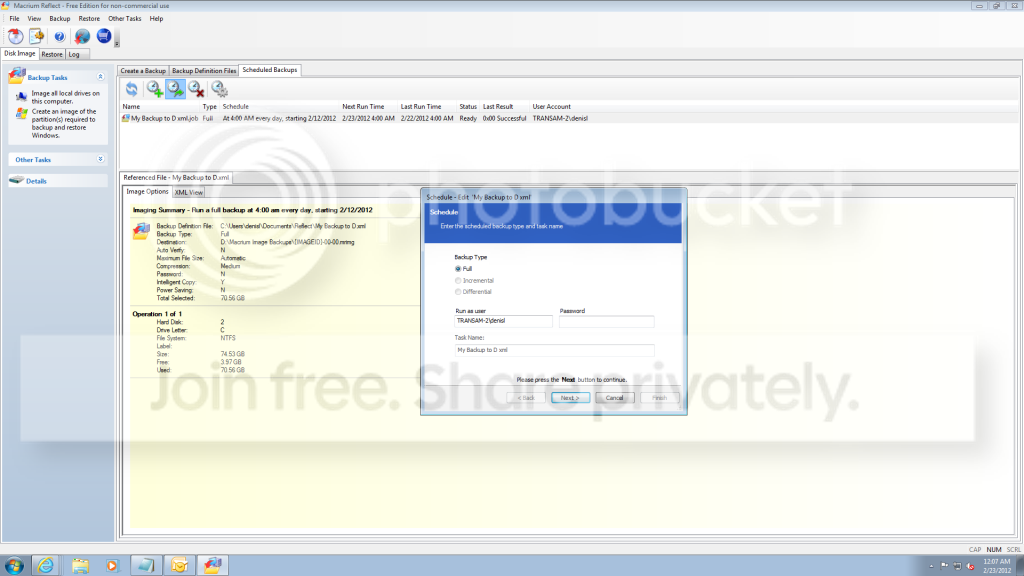
1. You can schedule it on any day of the week and any time. See picture. And it is nifty because you can also schedule the start date and you can skip weeks.
2. What you do is schedule each XML seperately.
3. There is no FiFo strategy - or any other space management. When the space is full, it refuses to make more images. The space you have to manage yourself.
4. To tell you the truth, I have never used the Pro version. Not sure what it offers in addition. See here whether there is anything you like: http://www.macrium.com/reflectfree.aspx
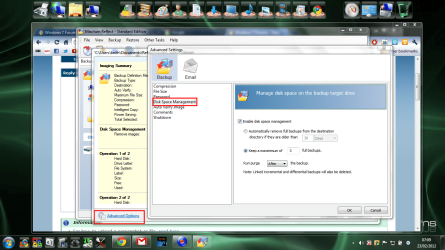
The pro version offers two retention policies.
1. You can keep an image for a certain number of days.
2. You can chose to retain a certain number of images.
It is not a part of the scheduler. It is in the definition file options
My Computer
- Computer type
- Laptop
- Computer Manufacturer/Model Number
- Hewlett-Packard/G62-107SA Notebook
- OS
- Microsoft Windows 7 Home Premium 64-bit Service Pack 1
- CPU
- Intel(R) Core(TM) i3 CPU M 330 @ 2.13GHz
- Motherboard
- Hewlett-Packard 1425
- Memory
- 8 GB DDR3
- Graphics Card(s)
- Intel(R) HD Graphics
- Sound Card
- Realtek High Definition Audio
- Monitor(s) Displays
- Builtin
- Screen Resolution
- 1366 x 768 x 32 bits (4294967296 colors) @ 60 Hz
- Hard Drives
- 250 GB SATA Hard Disk Drive 7200 rpm
2TB Seagate GoFlex USB 2 Drive
1TB Iomega Prestige USB 2 Drive
1.5TB Iomega Prestige USB 2 Drive (Samsung)
2TB WD MyBook Live NAS.
- Mouse
- Logitech Anywhere MX
- Internet Speed
- 152 Mbs download 10 Mbs upload
- Antivirus
- Norton 360
- Browser
- Chrome

Thanks Keith for the update. Maybe I buy the pro version after all. My problem is that I use the free version on 6 PCs, so going pro will be expensive.
My Computer
- Computer Manufacturer/Model Number
- HP, Dell, Gateway, Toshiba - 4 laptops and 2 desktops
- OS
- Vista, Windows7, Mint Mate, Zorin, Windows 8
- CPU
- from 1.6GHz Duo to i7
- Monitor(s) Displays
- 2x HP w2207
- Hard Drives
- 5x HDD, 7x SSD, 12x Externals
- Keyboard
- with trackball - no mices
- Mouse
- Trackball mice
- Internet Speed
- DSL 6000
Sure you have this option. You have to continue with the "Next" button.Interesting.... I don't have those options.
My Computer
- Computer Manufacturer/Model Number
- HP, Dell, Gateway, Toshiba - 4 laptops and 2 desktops
- OS
- Vista, Windows7, Mint Mate, Zorin, Windows 8
- CPU
- from 1.6GHz Duo to i7
- Monitor(s) Displays
- 2x HP w2207
- Hard Drives
- 5x HDD, 7x SSD, 12x Externals
- Keyboard
- with trackball - no mices
- Mouse
- Trackball mice
- Internet Speed
- DSL 6000
Thanks Keith for the update. Maybe I buy the pro version after all. My problem is that I use the free version on 6 PCs, so going pro will be expensive.
Yes about the best deal is a 4 pack for 90$
My Computer
- Computer type
- Laptop
- Computer Manufacturer/Model Number
- Hewlett-Packard/G62-107SA Notebook
- OS
- Microsoft Windows 7 Home Premium 64-bit Service Pack 1
- CPU
- Intel(R) Core(TM) i3 CPU M 330 @ 2.13GHz
- Motherboard
- Hewlett-Packard 1425
- Memory
- 8 GB DDR3
- Graphics Card(s)
- Intel(R) HD Graphics
- Sound Card
- Realtek High Definition Audio
- Monitor(s) Displays
- Builtin
- Screen Resolution
- 1366 x 768 x 32 bits (4294967296 colors) @ 60 Hz
- Hard Drives
- 250 GB SATA Hard Disk Drive 7200 rpm
2TB Seagate GoFlex USB 2 Drive
1TB Iomega Prestige USB 2 Drive
1.5TB Iomega Prestige USB 2 Drive (Samsung)
2TB WD MyBook Live NAS.
- Mouse
- Logitech Anywhere MX
- Internet Speed
- 152 Mbs download 10 Mbs upload
- Antivirus
- Norton 360
- Browser
- Chrome

- Local time
- 11:36 PM
- Messages
- 16,784
LOL - you beat me to it.
The 4 pack version is a lot cheaper than buying them separately.
It might be worth hanging on for a while.
Paragon has a new series coming.
You will be surprised - the interface looks the same -- but it is an entirely new engine, supports all the advanced formats and is the fastest imaging software I have ever used.
There will be a free version - also with the new engine. I think the free version will support gpt as well.
Don't know for sure yet.
Not sure how long before release.
The 4 pack version is a lot cheaper than buying them separately.
It might be worth hanging on for a while.
Paragon has a new series coming.
You will be surprised - the interface looks the same -- but it is an entirely new engine, supports all the advanced formats and is the fastest imaging software I have ever used.
There will be a free version - also with the new engine. I think the free version will support gpt as well.
Don't know for sure yet.
Not sure how long before release.
My Computers
System One System Two
-
- Computer type
- PC/Desktop
- OS
- 7 X64
- CPU
- i5 8400
- Motherboard
- gigabyte b365m ds3h
- Memory
- 2x8gb 3200mhz
- Hard Drives
- various
- PSU
- pure power 11 400w cm
- Case
- Coolermaster
- Cooling
- cryorig m9i
-
- Computer type
- PC/Desktop
- OS
- 7x64
- CPU
- g5400
- Motherboard
- ga b365m ds3h
- Memory
- 8gb ddr4 2400
- PSU
- xfx pro 450w
That sounds really interesting. I like Paragon, but they make it difficult to get the free key. Once had a 6 month free pro version for a test - that was nice.
My Computer
- Computer Manufacturer/Model Number
- HP, Dell, Gateway, Toshiba - 4 laptops and 2 desktops
- OS
- Vista, Windows7, Mint Mate, Zorin, Windows 8
- CPU
- from 1.6GHz Duo to i7
- Monitor(s) Displays
- 2x HP w2207
- Hard Drives
- 5x HDD, 7x SSD, 12x Externals
- Keyboard
- with trackball - no mices
- Mouse
- Trackball mice
- Internet Speed
- DSL 6000
- Local time
- 11:36 PM
- Messages
- 16,784
My Computers
System One System Two
-
- Computer type
- PC/Desktop
- OS
- 7 X64
- CPU
- i5 8400
- Motherboard
- gigabyte b365m ds3h
- Memory
- 2x8gb 3200mhz
- Hard Drives
- various
- PSU
- pure power 11 400w cm
- Case
- Coolermaster
- Cooling
- cryorig m9i
-
- Computer type
- PC/Desktop
- OS
- 7x64
- CPU
- g5400
- Motherboard
- ga b365m ds3h
- Memory
- 8gb ddr4 2400
- PSU
- xfx pro 450w
Ah ha! OK - that option is available when you select "Weekly" on the previous selection - NOT "Daily". Go figure, select Weekly and you can pick the days of the week.
Thanks for the help... again!
OK -
Who has a sample .bat script that reads a directory and deletes files older the X days that I can schedule to run on a daily basis and keep my HDD from filling up?
Thanks for the help... again!
OK -
Who has a sample .bat script that reads a directory and deletes files older the X days that I can schedule to run on a daily basis and keep my HDD from filling up?
My Computer
- Computer Manufacturer/Model Number
- HP HPE-210f
- OS
- Windows 7 64bit Home Premium
- CPU
- AMD Phenom II X4 945 3.0GHz
- Memory
- 8GB
- Hard Drives
- Intel 320 Series SSD - 80GB
WD Green - 1TB
I noticed that you had used Ghost at one point. I know someone who solved backup problems when he read a suggestion on the net. Backing up drive C: while Windows is running is questionable at best. Here is the solution he (and others) built. Put Ghost on a Window Preinstall environment on a CD. Then when you boot to the CD, Ghost will load into a ramdrive in memory and drive C: will not be used at all. Ghost will then duplicate drive C: as an exact file. This method works absolutely. I know of a fellow who updated it with current USB3 drivers for externals. It is unlikey you will find a copy that you don't build yourself. Once when I got bit by a virus, it took me 4 1/2 minutes to be back in business. Norton AV let the virus through. I have never had one with Trend.
My work files are ALWAYS on partitions and drives other than C: and I find the free SyncBack (Google: download free syncback) perfect and amazing for free. It is so reliable, I quit checking up on its backups. I have no idea why I need the purchased version of SyncBack. I am not on a business network.
My work files are ALWAYS on partitions and drives other than C: and I find the free SyncBack (Google: download free syncback) perfect and amazing for free. It is so reliable, I quit checking up on its backups. I have no idea why I need the purchased version of SyncBack. I am not on a business network.
My Computer
- Computer Manufacturer/Model Number
- Dell XPS
- OS
- Windows 7 Premium 64
- CPU
- i7 Quad
- Motherboard
- Dell
- Memory
- 8g
- Graphics Card(s)
- ATI 1g DDR5
- Sound Card
- THX
- Monitor(s) Displays
- Samsung
- Hard Drives
- 500G, 2T, 2T external USB3
- PSU
- ?
- Case
- XPS
- Cooling
- dual fans
I know it's a personal thing but I like full control of what images stay and go. I generally image after a significant update or software install.
If you image very often, say daily, then I guess a policy manager can be useful.
If you image very often, say daily, then I guess a policy manager can be useful.
My Computer
- Computer type
- PC/Desktop
- Computer Manufacturer/Model Number
- Own build
- OS
- Windows 7x64 Home Premium SP1
- CPU
- Intel i7 2600k
- Motherboard
- ASUS P8Z68 Deluxe
- Memory
- G.Skill Ripjaws (DDR3-1600) 2x4GB
- Graphics Card(s)
- Nvidia GeForce GTS 450; Intel HD Graphics 3000(GT2+)
- Monitor(s) Displays
- Dell Ultrasharp IPS panel U2311H, Samsung SyncMaster P2350
- Screen Resolution
- 1920x1080
- Hard Drives
- Samsung 850 Pro SSD 256GB, Samsung SSD 840 120GB, Seagates 1TB Barracuda ST31000528AS x2
- PSU
- Seasonic M12II 520W
- Case
- Lian Li Lancool PC-K60
- Cooling
- Case: 1x120mm, 3x140mm CPU: Hyper 212+
- Keyboard
- Logitech MK520 (wireless)
- Mouse
- Logitech MK520
- Internet Speed
- 6-7 Mbps
- Antivirus
- Norton Security Premium, Malwarebytes on 2 (MSE on 3rd PC)
- Browser
- FireFox
- Other Info
- Audio: Logitech Z523 2.1
Good stuff, and a good forum. My first time here. I'll add my comments.
As others have said, for various reasons most don't keep images as they should.
No help for those who just never will, but for those who do want to, here are some suggestions to make it more realistic to image.
First, you want HD space. I've seen many computers sold with one massive non-partitioned hard drive. Don't buy that. You want multiple hard drives.
If you have a laptop, or otherwise are stuck with one internal drive, get an external drive (or 2) for your images.
What's the purpose of your image?
I'll say right now mine is for my system and core apps.
I don't want to reinstall and reconfigure everything if something goes wrong with the software or hardware. All my data (non-system) is simple files, and I don't image that. I do have that backed up, but that's an entirely different strategy.
So I'll just talk imaging my system and core apps.
I can't speak to imaging with networking, SDD, RAID, or anything but vanilla stand-alone single system PC's with standard hardware.
The first thing to think about is the size of the image. The lowest level for an image is partition size. So let's say the sweet spot for HD prices is 500gb.
But I don't want to image a 500gb drive. So I partition 90gb as my C: system drive.
Nothing goes there but Win 7 and my apps. The remaining 410gb is used for data, or "temporary" apps, such as games.
My images have never been more than about 25gb, so I never worry about the partition being too small, and am never tempted to put non-system data in there.
Image size is important for a couple reasons; time to image, and space taken by images. Time is important to me because I only image using the CD executables and with Win 7 down. Wouldn't be so important for those who image with Win 7 running, but of course time and space used are closely related.
And the less time it takes to image, the more likely it gets done.
My images typically take about 15 minutes reboot to reboot.
But that's 2 images, one to each of 2 drives.
It's actually faster making a new image than copying one to a different drive on my setup. Probably safer as to data integrity too.
A restore takes about 5 minutes. I use Ghost 15.
Whatever imaging software you use should be thoroughly tested. Imaging and restoring should be "second nature." The first restore is the only "scary" part, because the first thing that happens is your partition gets hammered. I've used different imagers, but used Ghost for many years with no issues, so naturally went that way.
I was initially pleased with the built-in Win 7 imaging, but rejected it after testing portability of images. Don't know if I missed something, but I found that moving images around broke it. Can't remember the details, except it had something to do with disk id's, and I just didn't want any doubts or hassles. I'm really a KISS fan.
I'm sort of a fanatic about images, because I really got soured on reinstalling earlier version Windows and apps when Windows broke.
I hate reinstalling. I had my original XP install for 5-6 years because I imaged it. XP broke a few times, and probably caught something a few times.
This Win 7 is 2 1/2 years old, but hasn't ever broken.
I mainly restore as a "cleanup" after trying some apps, installing games I no longer want, or even suspect a virus. Maybe every 3 months or so.
Restores should never be rushed. Your partion is about to be hammered.
Have I backed up needed data?
I have 2 "core apps" that need that, but have developed the habit of backing up their data when it is created. I still slow down to think about it.
If I have the slightest doubt about anything, I make an image before I restore, and put temp in the image name. I can delete it later.
When I restore, some apps need their updates, so I get them.
Then if I have tried a new app I want as a core app, I install that.
Then I make an image, so that next time I restore that app will be there, and I won't be far behind on software updates.
Well, now that I've bored everybody to death with my personal habits, I'll make the point I came here to make.
Earlier today I was thinking about something that bothers me - when I think about it.
My MB (Asus P6T) isn't sold any more.
I roll my own, and the last PC I built 2 for the house with the same MB.
My plan then for a failure was to put my image to the second PC.
But I only built one of these P6T's.
If my MB fails all of my images are garbage. The only answer would be to find a used P6T on eBay or someplace else. Probably be down a long time.
Practically speaking, I would want to upgrade my MB anyway.
Making my images garbage.
So I was looking into how Win 7 handles hardware/drivers for systems put on a new machine, and ran across this very good tutorial posted here,
by Kari. Transfer your Windows 7 installation to a new PC « Windows 7 is easy!
I'm going to make an occasional sysprep'ed image to cover this weakness in my imaging strategy.
I'll try to enlist my son, an extreme overclocker with many boxes, to provide me a 64-bit capable box to test the image. Might try a "deleted driver" image too, as that has some advantages over sysprep.
Okay, just wanted to give the hard-core imagers something to chew on.
Have fun.
As others have said, for various reasons most don't keep images as they should.
No help for those who just never will, but for those who do want to, here are some suggestions to make it more realistic to image.
First, you want HD space. I've seen many computers sold with one massive non-partitioned hard drive. Don't buy that. You want multiple hard drives.
If you have a laptop, or otherwise are stuck with one internal drive, get an external drive (or 2) for your images.
What's the purpose of your image?
I'll say right now mine is for my system and core apps.
I don't want to reinstall and reconfigure everything if something goes wrong with the software or hardware. All my data (non-system) is simple files, and I don't image that. I do have that backed up, but that's an entirely different strategy.
So I'll just talk imaging my system and core apps.
I can't speak to imaging with networking, SDD, RAID, or anything but vanilla stand-alone single system PC's with standard hardware.
The first thing to think about is the size of the image. The lowest level for an image is partition size. So let's say the sweet spot for HD prices is 500gb.
But I don't want to image a 500gb drive. So I partition 90gb as my C: system drive.
Nothing goes there but Win 7 and my apps. The remaining 410gb is used for data, or "temporary" apps, such as games.
My images have never been more than about 25gb, so I never worry about the partition being too small, and am never tempted to put non-system data in there.
Image size is important for a couple reasons; time to image, and space taken by images. Time is important to me because I only image using the CD executables and with Win 7 down. Wouldn't be so important for those who image with Win 7 running, but of course time and space used are closely related.
And the less time it takes to image, the more likely it gets done.
My images typically take about 15 minutes reboot to reboot.
But that's 2 images, one to each of 2 drives.
It's actually faster making a new image than copying one to a different drive on my setup. Probably safer as to data integrity too.
A restore takes about 5 minutes. I use Ghost 15.
Whatever imaging software you use should be thoroughly tested. Imaging and restoring should be "second nature." The first restore is the only "scary" part, because the first thing that happens is your partition gets hammered. I've used different imagers, but used Ghost for many years with no issues, so naturally went that way.
I was initially pleased with the built-in Win 7 imaging, but rejected it after testing portability of images. Don't know if I missed something, but I found that moving images around broke it. Can't remember the details, except it had something to do with disk id's, and I just didn't want any doubts or hassles. I'm really a KISS fan.
I'm sort of a fanatic about images, because I really got soured on reinstalling earlier version Windows and apps when Windows broke.
I hate reinstalling. I had my original XP install for 5-6 years because I imaged it. XP broke a few times, and probably caught something a few times.
This Win 7 is 2 1/2 years old, but hasn't ever broken.
I mainly restore as a "cleanup" after trying some apps, installing games I no longer want, or even suspect a virus. Maybe every 3 months or so.
Restores should never be rushed. Your partion is about to be hammered.
Have I backed up needed data?
I have 2 "core apps" that need that, but have developed the habit of backing up their data when it is created. I still slow down to think about it.
If I have the slightest doubt about anything, I make an image before I restore, and put temp in the image name. I can delete it later.
When I restore, some apps need their updates, so I get them.
Then if I have tried a new app I want as a core app, I install that.
Then I make an image, so that next time I restore that app will be there, and I won't be far behind on software updates.
Well, now that I've bored everybody to death with my personal habits, I'll make the point I came here to make.
Earlier today I was thinking about something that bothers me - when I think about it.
My MB (Asus P6T) isn't sold any more.
I roll my own, and the last PC I built 2 for the house with the same MB.
My plan then for a failure was to put my image to the second PC.
But I only built one of these P6T's.
If my MB fails all of my images are garbage. The only answer would be to find a used P6T on eBay or someplace else. Probably be down a long time.
Practically speaking, I would want to upgrade my MB anyway.
Making my images garbage.
So I was looking into how Win 7 handles hardware/drivers for systems put on a new machine, and ran across this very good tutorial posted here,
by Kari. Transfer your Windows 7 installation to a new PC « Windows 7 is easy!
I'm going to make an occasional sysprep'ed image to cover this weakness in my imaging strategy.
I'll try to enlist my son, an extreme overclocker with many boxes, to provide me a 64-bit capable box to test the image. Might try a "deleted driver" image too, as that has some advantages over sysprep.
Okay, just wanted to give the hard-core imagers something to chew on.
Have fun.
My Computer
- Computer Manufacturer/Model Number
- Home Built
- OS
- Windows 7 Ultimate x64
- CPU
- QuadCore Intel Core i7 920, 2666 MHz (20 x 133)
- Motherboard
- Asus P6T
- Memory
- 6134 MB (DDR3-1333 DDR3 SDRAM)
- Graphics Card(s)
- (2 - SLI) NVIDIA GeForce GTS 250 (1024 MB)
- Sound Card
- Onboard Realtek ALC888/1200 @ Intel 82801JB IC
- Monitor(s) Displays
- HDMII
- Screen Resolution
- 1280 x 800
- Hard Drives
- Crucial M4 (64 GB SSD)
WD Caviar Blacks
WD5001AALS-00J7B1 ATA Device (465 GB)
WD5001AALS-00J7B1 ATA Device (465 GB)
WD5001AALS-00L3B2 ATA Device (465 GB)
WD Elements USB External (250 GB)
- PSU
- Corsair 550
- Case
- iStarUSA S-10000BL Black
Hi Victor and welcome to Seven Forums. That sounds like a thorough strategy to me. You might also want to add an image after "Patch Tuesday". There is nothing more annoying than having to dozens of Windows updates if you restore.
My Computer
- Computer type
- Laptop
- Computer Manufacturer/Model Number
- Hewlett-Packard/G62-107SA Notebook
- OS
- Microsoft Windows 7 Home Premium 64-bit Service Pack 1
- CPU
- Intel(R) Core(TM) i3 CPU M 330 @ 2.13GHz
- Motherboard
- Hewlett-Packard 1425
- Memory
- 8 GB DDR3
- Graphics Card(s)
- Intel(R) HD Graphics
- Sound Card
- Realtek High Definition Audio
- Monitor(s) Displays
- Builtin
- Screen Resolution
- 1366 x 768 x 32 bits (4294967296 colors) @ 60 Hz
- Hard Drives
- 250 GB SATA Hard Disk Drive 7200 rpm
2TB Seagate GoFlex USB 2 Drive
1TB Iomega Prestige USB 2 Drive
1.5TB Iomega Prestige USB 2 Drive (Samsung)
2TB WD MyBook Live NAS.
- Mouse
- Logitech Anywhere MX
- Internet Speed
- 152 Mbs download 10 Mbs upload
- Antivirus
- Norton 360
- Browser
- Chrome
Hi Victor and welcome to Seven Forums. That sounds like a thorough strategy to me. You might also want to add an image after "Patch Tuesday". There is nothing more annoying than having to dozens of Windows updates if you restore.
Thanks for the welcome, kado897, and the advice.
Unfortunately (not really), MS and I keep different schedules.
I only make images of a "clean" system, so I restore before I make a new image with any updates I want to keep.
BTW, I've tested a sysprep'ed image on a different box already, as my son was very fast in getting me a 64-bit capable cpu/MB set up. He wanted my AGP graphics card and Northwood 3.2 that were in that box.
Overclockers often like old gear to torture.
I'll mention the results of that in that thread when I get time.
My Computer
- Computer Manufacturer/Model Number
- Home Built
- OS
- Windows 7 Ultimate x64
- CPU
- QuadCore Intel Core i7 920, 2666 MHz (20 x 133)
- Motherboard
- Asus P6T
- Memory
- 6134 MB (DDR3-1333 DDR3 SDRAM)
- Graphics Card(s)
- (2 - SLI) NVIDIA GeForce GTS 250 (1024 MB)
- Sound Card
- Onboard Realtek ALC888/1200 @ Intel 82801JB IC
- Monitor(s) Displays
- HDMII
- Screen Resolution
- 1280 x 800
- Hard Drives
- Crucial M4 (64 GB SSD)
WD Caviar Blacks
WD5001AALS-00J7B1 ATA Device (465 GB)
WD5001AALS-00J7B1 ATA Device (465 GB)
WD5001AALS-00L3B2 ATA Device (465 GB)
WD Elements USB External (250 GB)
- PSU
- Corsair 550
- Case
- iStarUSA S-10000BL Black
OK Victor if that works for you that's fine.
My Computer
- Computer type
- Laptop
- Computer Manufacturer/Model Number
- Hewlett-Packard/G62-107SA Notebook
- OS
- Microsoft Windows 7 Home Premium 64-bit Service Pack 1
- CPU
- Intel(R) Core(TM) i3 CPU M 330 @ 2.13GHz
- Motherboard
- Hewlett-Packard 1425
- Memory
- 8 GB DDR3
- Graphics Card(s)
- Intel(R) HD Graphics
- Sound Card
- Realtek High Definition Audio
- Monitor(s) Displays
- Builtin
- Screen Resolution
- 1366 x 768 x 32 bits (4294967296 colors) @ 60 Hz
- Hard Drives
- 250 GB SATA Hard Disk Drive 7200 rpm
2TB Seagate GoFlex USB 2 Drive
1TB Iomega Prestige USB 2 Drive
1.5TB Iomega Prestige USB 2 Drive (Samsung)
2TB WD MyBook Live NAS.
- Mouse
- Logitech Anywhere MX
- Internet Speed
- 152 Mbs download 10 Mbs upload
- Antivirus
- Norton 360
- Browser
- Chrome

I think many of us are overdoing imaging.
Most of us who have been using computers for over 4 or 5 years have already settled down with the programs that we install. If this premise is reasonably correct then the only normal additions that we make are the updates for Windows, A-V, Firewall and a few other programs that need them. In addition we may perhaps be upgrading the Software already installed whenever their new versions are put out.
In these circumstances updating the image once a month should be more than enough. In reality because I fall amongst the persons in para 2, I image once a quarter and there has never been any problem. As one becomes more and more savvy, it is but natural that that person would devise his/her own imaging strategy. But for those who are beginners, the strategy that I have outlined should suffice.
This is just my 2-penny bit.
Most of us who have been using computers for over 4 or 5 years have already settled down with the programs that we install. If this premise is reasonably correct then the only normal additions that we make are the updates for Windows, A-V, Firewall and a few other programs that need them. In addition we may perhaps be upgrading the Software already installed whenever their new versions are put out.
In these circumstances updating the image once a month should be more than enough. In reality because I fall amongst the persons in para 2, I image once a quarter and there has never been any problem. As one becomes more and more savvy, it is but natural that that person would devise his/her own imaging strategy. But for those who are beginners, the strategy that I have outlined should suffice.
This is just my 2-penny bit.
My Computer
- Computer Manufacturer/Model Number
- Custom Built
- OS
- Windows 7 Pro with SP1 32bit
- Motherboard
- Intel D845GVS1 X86-based PC
- Memory
- 2 gigs of RAM
- Graphics Card(s)
- Intel(R) 82845G/GL/GE/PE/GV Graphics Controller
- Sound Card
- Realtek AC'97 Audio
- Monitor(s) Displays
- Samsung SyncMaster 931BF Black 19" LCD Monitor
- Screen Resolution
- 1280X960
- Hard Drives
- 1. SAMSUNG SP0822N ATA Device ~ 80 GigaBytes
2. Seagate FreeAgent Go USB Device ~ 500 GigaBytes
- Keyboard
- COMPAQ Standard PS/2 Keyboard
- Mouse
- iBall Laser Precise Speedster
- Internet Speed
- 4 mb/sec
It depends on how much you trust the image. I've never had one fail but even so I would be very uncomfortable with three months and an awful lot can change in that time. Three patch Tuesdays if nothing else.
My Computer
- Computer type
- Laptop
- Computer Manufacturer/Model Number
- Hewlett-Packard/G62-107SA Notebook
- OS
- Microsoft Windows 7 Home Premium 64-bit Service Pack 1
- CPU
- Intel(R) Core(TM) i3 CPU M 330 @ 2.13GHz
- Motherboard
- Hewlett-Packard 1425
- Memory
- 8 GB DDR3
- Graphics Card(s)
- Intel(R) HD Graphics
- Sound Card
- Realtek High Definition Audio
- Monitor(s) Displays
- Builtin
- Screen Resolution
- 1366 x 768 x 32 bits (4294967296 colors) @ 60 Hz
- Hard Drives
- 250 GB SATA Hard Disk Drive 7200 rpm
2TB Seagate GoFlex USB 2 Drive
1TB Iomega Prestige USB 2 Drive
1.5TB Iomega Prestige USB 2 Drive (Samsung)
2TB WD MyBook Live NAS.
- Mouse
- Logitech Anywhere MX
- Internet Speed
- 152 Mbs download 10 Mbs upload
- Antivirus
- Norton 360
- Browser
- Chrome
I trust the image almost 100% because in all these years I too have never had one that failed. Furthermore I always verify the integrity of the image immediately after it has been created but not before its restoration.
For my friends who have not learned to create images, I have restored over an year old image that I had initially created without any problem, after their computers stopped booting. Therefore I am not too worried creating an image every three months although my advise to others was to do it not more than once a month.
What is your imaging strategy, particularly in respect of frequency, Keith.
Amarnath
For my friends who have not learned to create images, I have restored over an year old image that I had initially created without any problem, after their computers stopped booting. Therefore I am not too worried creating an image every three months although my advise to others was to do it not more than once a month.
What is your imaging strategy, particularly in respect of frequency, Keith.
Amarnath
My Computer
- Computer Manufacturer/Model Number
- Custom Built
- OS
- Windows 7 Pro with SP1 32bit
- Motherboard
- Intel D845GVS1 X86-based PC
- Memory
- 2 gigs of RAM
- Graphics Card(s)
- Intel(R) 82845G/GL/GE/PE/GV Graphics Controller
- Sound Card
- Realtek AC'97 Audio
- Monitor(s) Displays
- Samsung SyncMaster 931BF Black 19" LCD Monitor
- Screen Resolution
- 1280X960
- Hard Drives
- 1. SAMSUNG SP0822N ATA Device ~ 80 GigaBytes
2. Seagate FreeAgent Go USB Device ~ 500 GigaBytes
- Keyboard
- COMPAQ Standard PS/2 Keyboard
- Mouse
- iBall Laser Precise Speedster
- Internet Speed
- 4 mb/sec
Mine is a full Macrium Image a week with daily differentials. I also do one Windows Image a month after patch Tuesday to a different disk. I know I am OCD about it but I had some interesting experiences rebuilding mainframe OSes that weren't backed up properly following disk crashes. 36 hours without sleep and the MD on the phone every hour is no fun.
My Computer
- Computer type
- Laptop
- Computer Manufacturer/Model Number
- Hewlett-Packard/G62-107SA Notebook
- OS
- Microsoft Windows 7 Home Premium 64-bit Service Pack 1
- CPU
- Intel(R) Core(TM) i3 CPU M 330 @ 2.13GHz
- Motherboard
- Hewlett-Packard 1425
- Memory
- 8 GB DDR3
- Graphics Card(s)
- Intel(R) HD Graphics
- Sound Card
- Realtek High Definition Audio
- Monitor(s) Displays
- Builtin
- Screen Resolution
- 1366 x 768 x 32 bits (4294967296 colors) @ 60 Hz
- Hard Drives
- 250 GB SATA Hard Disk Drive 7200 rpm
2TB Seagate GoFlex USB 2 Drive
1TB Iomega Prestige USB 2 Drive
1.5TB Iomega Prestige USB 2 Drive (Samsung)
2TB WD MyBook Live NAS.
- Mouse
- Logitech Anywhere MX
- Internet Speed
- 152 Mbs download 10 Mbs upload
- Antivirus
- Norton 360
- Browser
- Chrome
What you said is perhaps for your professional field. Is it the same policy for your own PC?
I am sorry I did not qualify this in the original message but what I have suggested is for lay users like I am.
I am sorry I did not qualify this in the original message but what I have suggested is for lay users like I am.
My Computer
- Computer Manufacturer/Model Number
- Custom Built
- OS
- Windows 7 Pro with SP1 32bit
- Motherboard
- Intel D845GVS1 X86-based PC
- Memory
- 2 gigs of RAM
- Graphics Card(s)
- Intel(R) 82845G/GL/GE/PE/GV Graphics Controller
- Sound Card
- Realtek AC'97 Audio
- Monitor(s) Displays
- Samsung SyncMaster 931BF Black 19" LCD Monitor
- Screen Resolution
- 1280X960
- Hard Drives
- 1. SAMSUNG SP0822N ATA Device ~ 80 GigaBytes
2. Seagate FreeAgent Go USB Device ~ 500 GigaBytes
- Keyboard
- COMPAQ Standard PS/2 Keyboard
- Mouse
- iBall Laser Precise Speedster
- Internet Speed
- 4 mb/sec