
IMAP (gmail) doesn't work - Office Outlook 2010

Oblomow58

New member
Local time
12:41 AM
Messages
47
Hi,

I have downloaded Office 2010 Pro Plus from MSDN, got my key after the 1st of May.

In Outlook 2007 SP2 receiving via IMAP from GMAIL worked okay.

Using exactly the same settings in Outlook 2010 I am not able to make a connection to imap.gmail.com, Port 993 using SSL. IMAP is enabled in GMAIL-Control panel, the Account/Password information is correct, sending the test mail via smtp.gmail.com, Port 587 via TLS works fine.

In the Outlook 2010 Beta that connection works as it does in Outlook 2007 SP2.

In Outlook 2010 Final from MSDN there is no chance to connect to the IMAP server - I just got a timeout all the time and had to use POP instead.

This disappoints me, I anticipate more quality coming from Redmont.

Did you have any suggestions what I can do to receive my mail via IMAP, any additional settings, registry hacks etc.?

Event the final Hotmail-Connector 14 does not work as the beta or version 12 in Outlook 2007: All time when synchronizing my mailboxes in Hotmail I receive an error message: Error when synchronizing your Mailbox [email protected]
Check whether your account is configured correctly by checking your mail in the browser.
I did that several time - But without any changes to those warnings. I think I receive all my mail.

After all, I am disappointed

Thanks for your comments, different experiences

Sincerly yours Oblomow

P.S.: I had to change to the german Office 2010 Pro Plus Package since the is no German spell checker included in the US version
 

My Computer My Computer

Computer Manufacturer/Model Number
ASUSTEK COMPUTER INC
OS
Win7 x64 SP1, Virtual Hackintosh
CPU
Intel(R) i7-2600K
Motherboard
ASUS P8Z68V PRO
Memory
16 GB
Graphics Card(s)
Gigabyte GeForce GTX 560 Ti
Monitor(s) Displays
Syncmaster 225 BW & Asus MW 2225
Screen Resolution
2x1680x1050
Hard Drives
Many
PSU
660 Watt 230Volt 80Plus Gold
Case
Corsair Obsidian
Cooling
6 Fans if I count well
Keyboard
Logitech not supported in Vista
Mouse
Logitech G7
Internet Speed
15000/1000 DSL practically just 90% of that value
If I were you I'd delete all mail accounts and try again. My Gmail IMAP (SSL 993) works perfectly as does Hotmail.
 

My Computer My Computer

Computer Manufacturer/Model Number
tw33k
OS
Windows 7 Ultimate (x64) SP1
CPU
Intel 3770k 4.6GHz
Motherboard
ASUS Maximus V Formula
Memory
8GB (2x 4GB) Crucial Ballistix
Graphics Card(s)
Sapphire 7950 (1060/1600)
Sound Card
On Board Realtek HD Audio
Monitor(s) Displays
27" Acer B273HU (via HDMI)
Screen Resolution
2048 x 1152
Hard Drives
Crucial M4 128GB
2TB WD Black
1TB Samsung F3 SATA
1TB WD Elite External
2TB WD USB 3.0
PSU
Corsair AX750 Gold
Case
Corsair Obsidian 800DW
Cooling
Corsair H100 (2x AP-121/2x UK-3000 push/pull)
Keyboard
Microsoft Wireless 5000
Mouse
Microsoft Wireless 5000
Internet Speed
5mb/s
Other Info
Logitech z-2300 2.1 speakers
Lamptron FC-5 v2
I've got two Gmail accounts and an Exchange account going in Outlook 2010 atm. I think you need to check your settings.
 

My Computer My Computer

OS
Windows 7
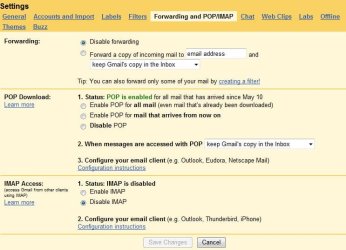
Did you enable IMAP in your GMAIL Account settings....
that has to be done before you can use it in outlook.
 

Attachments

  • IMAP Enable.JPG
    IMAP Enable.JPG
    56.6 KB · Views: 1,097

My Computer My Computer

Computer Manufacturer/Model Number
HP Pavilion Elite HPE-410f
OS
Windows 7 Ultimate x64
CPU
AMD Phenom x6 1045t
Motherboard
N/A
Memory
8 GB
Graphics Card(s)
ATI Radeon HD 5570
Sound Card
Realtek Highdefinition Audio / 5.1 Dolby Setup
Monitor(s) Displays
HP w2207h Widescreen
Screen Resolution
1680*1050
Hard Drives
1 TB (fixed), 320 Portable maxtor, Server Hard drives
PSU
350 Watt
Case
HP CASE
Cooling
Bass
Keyboard
Logitech MX 5500
Mouse
Logitech MX 5500
Internet Speed
ROAD RUNNER 16MB D/512 U
Solution

Try using the settings recommended by Gmail / Google.

Recommended IMAP client settings - Gmail Help

After you have it working properly you can try changing settings to customize it to your likings.

I hope this was helpful. Let us know if you get it working :-)
 

My Computer My Computer

Computer Manufacturer/Model Number
x
OS
xp, vista, seven
CPU
x
Motherboard
x
Memory
x
Graphics Card(s)
x
Sound Card
x
Monitor(s) Displays
x
Hard Drives
x
PSU
x
Case
x
Cooling
x
Still cannot receive Mail from GMail via IMAP

Hi,

I have recreated the account several time now.

IMAP is enabled in GMAIL settings panel.

My parameters are:

imap.gmail.com, Port 993 using SSL
smtp.gmail.com, Port 587, using TLS (this is working)

I have no idea, which is the reason for the problem, possible the german outlook 2010 MSDN version I have to use (spell checker)

Any additional ideas?

Thanks in Advance

Oblomow
 

My Computer My Computer

Computer Manufacturer/Model Number
ASUSTEK COMPUTER INC
OS
Win7 x64 SP1, Virtual Hackintosh
CPU
Intel(R) i7-2600K
Motherboard
ASUS P8Z68V PRO
Memory
16 GB
Graphics Card(s)
Gigabyte GeForce GTX 560 Ti
Monitor(s) Displays
Syncmaster 225 BW & Asus MW 2225
Screen Resolution
2x1680x1050
Hard Drives
Many
PSU
660 Watt 230Volt 80Plus Gold
Case
Corsair Obsidian
Cooling
6 Fans if I count well
Keyboard
Logitech not supported in Vista
Mouse
Logitech G7
Internet Speed
15000/1000 DSL practically just 90% of that value
Solved IMAP with GMAIL in Outlook 2010

Hi All,

In the meantime IMAP works fine for me.

I found out that the Avast! 4.8 Anti-Virus real time email protection prevents Outlook 2010 to connect to the IMAP server

After upgrading to Avast! 5.0.x solved that problem - IMAP works fine for me now.

With the new Hotmail connector I still have problems: Connection and synchronization works fine, but still get error messages permanentely:

Task 'MAPI: [email protected]' reported error (0x80004005) : 'There is an error synchronizing your mail account. Please verify your account is configured correctly by first accessing your mail on the web. Error: 4350. '

Others on the Internet have those problems too. I already created a new profile in Outlook.

Any other idea?

Thanks in Advance

Oblomow
 

My Computer My Computer

Computer Manufacturer/Model Number
ASUSTEK COMPUTER INC
OS
Win7 x64 SP1, Virtual Hackintosh
CPU
Intel(R) i7-2600K
Motherboard
ASUS P8Z68V PRO
Memory
16 GB
Graphics Card(s)
Gigabyte GeForce GTX 560 Ti
Monitor(s) Displays
Syncmaster 225 BW & Asus MW 2225
Screen Resolution
2x1680x1050
Hard Drives
Many
PSU
660 Watt 230Volt 80Plus Gold
Case
Corsair Obsidian
Cooling
6 Fans if I count well
Keyboard
Logitech not supported in Vista
Mouse
Logitech G7
Internet Speed
15000/1000 DSL practically just 90% of that value
Try disabling Avasts resident scanner - I've synced gmail into outlook on two different installations, and it works fine.

Also, are you using the x32 or x64 version of Outlook?
 

My Computer My Computer

Computer type
PC/Desktop
Computer Manufacturer/Model Number
Systems by SmartEyeball
OS
8 Pro x64
CPU
i7 3770K 4.6GHz
Motherboard
ASUS P8Z77 WS
Memory
16GB G.Skill Trident X 2666mhz
Graphics Card(s)
x2 EVGA 780 Ti Superclocked SLI
Sound Card
SB X-FI Surround 5.1 PRO USB / ATH-AD900 Headphones
Monitor(s) Displays
x3 Dell U2410 / 58" Samsung
Screen Resolution
5760*1200/ 1920*1200
Hard Drives
2x Intel 520 240GB (RAID 0) * 2x WD Caviar Blacks 2TB (RAID 0) * 2TB WD Caviar Black * Sony Optirac DVD
PSU
Silverstone Strider Evolution 1200W
Case
Thermaltake Level 10 GT Snow Edition
Cooling
Noctua NH-D14
Keyboard
Topre Realforce // Ducky Shine MX Black // Filco Ninja TKL
Mouse
Thermaltake Theron (Highly Recommended) + Razer Imperator
Antivirus
MSE
Browser
IE, FF, WaterFox
Other Info
GT Extreme V2 Sim Racing Cockpit + 40" LCD and K/B Mouse stand ▼
Fanatec CSR Elite Wheel + Clubsport V1 Pedals + CSR shifter/7G-H ▼Saitek X52 Pro ▼ TrackIR 5 Pro
Buttkicker v2 Seat Rumbler with Dedicated 5.1 and Sub Woofer attached to frame ▼
=
Bloody Big Grin
Issue

I was playing around with PGP and my DSL firewall at the same time and came to the same issue.

I took out PGP; since, I thought was the last thing that I changed. Still did not work.

Looked at my DSL changes and walked through the changes. The one that affected my access was the locking of IM. I honestly think that should be blocked.

Works now, Diagnosed it in 20 minutes.
 

My Computer My Computer

OS
Windows 7 Ulitimate X64
Back
Top