imapi4.ax probem (need help)

dinonik

New member
Local time
3:12 PM
Messages
8
Hello
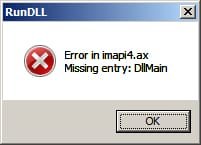
Since few days I get this message on each restart and every some time.
I try to clean for possible malware and viruses with various tools but no success.
I try also registry to clean, also Malwarebyte, CCleaner, but nothing.
Don't know who and why call this message box, which process.
If anyone of you have the same problem please help since I busting my head for few days.
Thanks.
if is possible on mail to be faster
 

Attachments
  • Image1.jpg
    Image1.jpg
    4.9 KB · Views: 19
Last edited by a moderator:

My Computer My Computer

At a glance

Windows 7 32 bitIntel Pentium 44GBinside
Computer type
PC/Desktop
Computer Manufacturer/Model Number
HP
OS
Windows 7 32 bit
CPU
Intel Pentium 4
Memory
4GB
Graphics Card(s)
inside
Hi dinonik,
Welcome to SevenForums!

Click :orb:
Searchbox: type
cmd
right-click it > choose run as administrator
copy and paste with mouse
sfc /scannow
press enter
You may have to run it more than once to replace/repair missing DLL.

If you still receive error
run
SURT Tool
when it completes post CheckSUR.log located at:
C:\Windows\Logs\CBS
 

My Computer My Computer

At a glance

Win 10 x64, Linux Lite, Win 7 x64, BlackArch,...
Computer type
PC/Desktop
Computer Manufacturer/Model Number
HP Desktop & Compaq Laptop
OS
Win 10 x64, Linux Lite, Win 7 x64, BlackArch, & Kali
Hard Drives
Samsung 850 Pro 256Gb,
Hitachi HDD 1Tb,
Crucial MX SSD 250Gb
Segate 3Tb USB 3.0 Ext. Backup HDD
Internet Speed
150Mbps dn, 20Mbps up
Antivirus
Avast Free, Malwarebytes Anti-Exploit & Anti-Ransomware
Browser
Firefox, Chrome, Opera, & VPN
I try this few times but nothing:
Click
Searchbox: type
cmd
right-click it > choose run as administrator
copy and paste with mouse
sfc /scannow
press enter
You may have to run it more than once to replace/repair missing DLL.

Can not understand who start this message box which process from where, any other tips.

thx
 

My Computer My Computer

At a glance

Windows 7 32 bitIntel Pentium 44GBinside
Computer type
PC/Desktop
Computer Manufacturer/Model Number
HP
OS
Windows 7 32 bit
CPU
Intel Pentium 4
Memory
4GB
Graphics Card(s)
inside
Hi dinonik,
Welcome to SevenForums!

Click :orb:
Searchbox: type
cmd
right-click it > choose run as administrator
copy and paste with mouse
sfc /scannow
press enter
You may have to run it more than once to replace/repair missing DLL.

If you still receive error
run
SURT Tool
when it completes post CheckSUR.log located at:
C:\Windows\Logs\CBS


Can you tell me for what is this tools:
System Update Readiness Tool for Windows 7
 

My Computer My Computer

At a glance

Windows 7 32 bitIntel Pentium 44GBinside
Computer type
PC/Desktop
Computer Manufacturer/Model Number
HP
OS
Windows 7 32 bit
CPU
Intel Pentium 4
Memory
4GB
Graphics Card(s)
inside
Hi dinonik, welcome to Seven Forums,

The System File Checker (SFC) is a utility in Windows that allows users to scan for corruptions in Windows system files and restore/repair corrupted files.

Do the following and only do what is highlighted in bold.

[1] Click Start.
[2] Click All Programs > Accessories > Right Click Command Prompt > Click Run As Administrattor.
[3] Copy & Paste (using the mouse) sfc /scannow into the Command Prompt where the cursor is flashing.
[4] Press Enter.
[5] Wait for it to finish.
[6] You may have to run this more than ONCE.

I hope this helps!
 

My Computer My Computer

At a glance

Win 7 HP SP1 64-bit Vista HB SP2 32-bit Linux...Intel(R) Pentium(R) CPU P6200 @ 2.13GHz4.00 GBIntel(R) Graphics Media Accelerator HD
Computer type
Laptop
Computer Manufacturer/Model Number
Fujitsu LIFEBOOK
OS
Win 7 HP SP1 64-bit Vista HB SP2 32-bit Linux Mint 18.3
CPU
Intel(R) Pentium(R) CPU P6200 @ 2.13GHz
Motherboard
FUJITSU FJNBB06
Memory
4.00 GB
Graphics Card(s)
Intel(R) Graphics Media Accelerator HD
Sound Card
[1] Realtek High Definition Audio [2] Intel(R) Display Audio
Screen Resolution
1366 x 768 x 32 bits (4294967296 colors) @ 59 Hz
Hard Drives
TOSHIBA MK5076GSX
Antivirus
AVG FREE
Last edited:

My Computer My Computer

At a glance

Win 10 x64, Linux Lite, Win 7 x64, BlackArch,...
Computer type
PC/Desktop
Computer Manufacturer/Model Number
HP Desktop & Compaq Laptop
OS
Win 10 x64, Linux Lite, Win 7 x64, BlackArch, & Kali
Hard Drives
Samsung 850 Pro 256Gb,
Hitachi HDD 1Tb,
Crucial MX SSD 250Gb
Segate 3Tb USB 3.0 Ext. Backup HDD
Internet Speed
150Mbps dn, 20Mbps up
Antivirus
Avast Free, Malwarebytes Anti-Exploit & Anti-Ransomware
Browser
Firefox, Chrome, Opera, & VPN
Hi Snick,

Can not understand who start this message box which process from where, any other tips.

From the OP's comment above I thought he was having trouble, all I did was to reiterate what you had said but in a different way!
Nice videos for the OP by the way :thumbsup:.
 

My Computer My Computer

At a glance

Win 7 HP SP1 64-bit Vista HB SP2 32-bit Linux...Intel(R) Pentium(R) CPU P6200 @ 2.13GHz4.00 GBIntel(R) Graphics Media Accelerator HD
Computer type
Laptop
Computer Manufacturer/Model Number
Fujitsu LIFEBOOK
OS
Win 7 HP SP1 64-bit Vista HB SP2 32-bit Linux Mint 18.3
CPU
Intel(R) Pentium(R) CPU P6200 @ 2.13GHz
Motherboard
FUJITSU FJNBB06
Memory
4.00 GB
Graphics Card(s)
Intel(R) Graphics Media Accelerator HD
Sound Card
[1] Realtek High Definition Audio [2] Intel(R) Display Audio
Screen Resolution
1366 x 768 x 32 bits (4294967296 colors) @ 59 Hz
Hard Drives
TOSHIBA MK5076GSX
Antivirus
AVG FREE
No problem Paul, I gathered same conclusion as you did. You beat me to OP's reply post!

Maybe I should always include video links, when available, in my dissertations. :huh:

Nic
 

My Computer My Computer

At a glance

Win 10 x64, Linux Lite, Win 7 x64, BlackArch,...
Computer type
PC/Desktop
Computer Manufacturer/Model Number
HP Desktop & Compaq Laptop
OS
Win 10 x64, Linux Lite, Win 7 x64, BlackArch, & Kali
Hard Drives
Samsung 850 Pro 256Gb,
Hitachi HDD 1Tb,
Crucial MX SSD 250Gb
Segate 3Tb USB 3.0 Ext. Backup HDD
Internet Speed
150Mbps dn, 20Mbps up
Antivirus
Avast Free, Malwarebytes Anti-Exploit & Anti-Ransomware
Browser
Firefox, Chrome, Opera, & VPN
Hi Nic,

Maybe I should always include video links, when available, in my dissertations.

You are like me, I always try and include links where possible and on occasions videos.
I also include numbered instructions and highlight the parts that are important.
I know that sometimes we can write what makes sense to us because we have knowledge about these sorts of things, but sometimes it might appear confusing to those we help!

Regards, Paul.
 

My Computer My Computer

At a glance

Win 7 HP SP1 64-bit Vista HB SP2 32-bit Linux...Intel(R) Pentium(R) CPU P6200 @ 2.13GHz4.00 GBIntel(R) Graphics Media Accelerator HD
Computer type
Laptop
Computer Manufacturer/Model Number
Fujitsu LIFEBOOK
OS
Win 7 HP SP1 64-bit Vista HB SP2 32-bit Linux Mint 18.3
CPU
Intel(R) Pentium(R) CPU P6200 @ 2.13GHz
Motherboard
FUJITSU FJNBB06
Memory
4.00 GB
Graphics Card(s)
Intel(R) Graphics Media Accelerator HD
Sound Card
[1] Realtek High Definition Audio [2] Intel(R) Display Audio
Screen Resolution
1366 x 768 x 32 bits (4294967296 colors) @ 59 Hz
Hard Drives
TOSHIBA MK5076GSX
Antivirus
AVG FREE
Paul :thumbsup:
 

My Computer My Computer

At a glance

Win 10 x64, Linux Lite, Win 7 x64, BlackArch,...
Computer type
PC/Desktop
Computer Manufacturer/Model Number
HP Desktop & Compaq Laptop
OS
Win 10 x64, Linux Lite, Win 7 x64, BlackArch, & Kali
Hard Drives
Samsung 850 Pro 256Gb,
Hitachi HDD 1Tb,
Crucial MX SSD 250Gb
Segate 3Tb USB 3.0 Ext. Backup HDD
Internet Speed
150Mbps dn, 20Mbps up
Antivirus
Avast Free, Malwarebytes Anti-Exploit & Anti-Ransomware
Browser
Firefox, Chrome, Opera, & VPN
Hi dinonik,
Welcome to SevenForums!

Click :orb:
Searchbox: type
cmd
right-click it > choose run as administrator
copy and paste with mouse
sfc /scannow
press enter
You may have to run it more than once to replace/repair missing DLL.

If you still receive error
run
SURT Tool
when it completes post CheckSUR.log located at:
C:\Windows\Logs\CBS


Answer, first I try sfc /scannow few times but nothing,
Second when I start SURT Tool I get this message
Don't know what to do.
Help
 

Attachments

  • Image2.jpg
    Image2.jpg
    9.7 KB · Views: 6

My Computer My Computer

At a glance

Windows 7 32 bitIntel Pentium 44GBinside
Computer type
PC/Desktop
Computer Manufacturer/Model Number
HP
OS
Windows 7 32 bit
CPU
Intel Pentium 4
Memory
4GB
Graphics Card(s)
inside
Hi dinonik, welcome to Seven Forums,

The System File Checker (SFC) is a utility in Windows that allows users to scan for corruptions in Windows system files and restore/repair corrupted files.

Do the following and only do what is highlighted in bold.

[1] Click Start.
[2] Click All Programs > Accessories > Right Click Command Prompt > Click Run As Administrattor.
[3] Copy & Paste (using the mouse) sfc /scannow into the Command Prompt where the cursor is flashing.
[4] Press Enter.
[5] Wait for it to finish.
[6] You may have to run this more than ONCE.

I hope this helps!

Try that several time, no use.
Don't know where to look anymore.
Any Tips, Help.
 

My Computer My Computer

At a glance

Windows 7 32 bitIntel Pentium 44GBinside
Computer type
PC/Desktop
Computer Manufacturer/Model Number
HP
OS
Windows 7 32 bit
CPU
Intel Pentium 4
Memory
4GB
Graphics Card(s)
inside
No problem dinonik, I am more than willing to walk you through the process of repairing your computer.
Great job by the way! :thumbsup:
Have you run Malwarebytes recently? If not, do so, you most likely are infected with a virus. Delete what it finds. Malwarebytes creates a log, a record of what it finds deletes, etc. If Malwarebytes did find viruses, etc., I would like you to post the log. The log will indicate what Malwarebytes has done (the particulars of what the infections were/are and if Malwarebytes successfully removed them). The log is located at:

C:\ProgramData\Malwarebytes\Malwarebytes Anti-Malware

Untitled.png
Untitled1.png

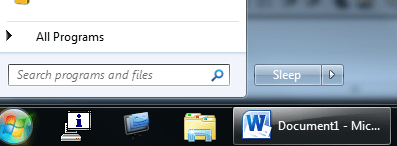
Copy and paste: C:\ProgramData\Malwarebytes\Malwarebytes Anti-Malware into the searchbox:
Search Programs and files

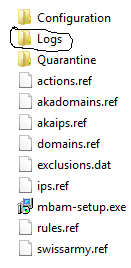
Click on Malwarebytes Anti-Malware, copy and paste the Log folder to your Desktop
To attach the logs to your post, click on Go Advanced, click on Manage Attachments, click on top Browse, click on Desktop, type Logs in the File name: searchbox , the Logs folder should appear in the dropdown menu, select it, click OK, click on Upload, then Close Window. You will see the Log folder above Manage Attachments.

On another post, OP (individual requesting assistance) had issue with same error. OP had a Trojan virus, which Malwarebytes removed. I didn't suggest that you run Malwarebytes as you indicated you already have it.

sfc /scannow is a system file checker. It scans your system for missing or corrupt system files. imapi4.ax.is a system file, located in the Main .dll (dynamic link library) folder.

Quite often a virus will disable Microsoft services, such as Background Intelligent Transfer Service [BITS] and the Windows Modules Installer Service. Those are programs that Windows uses to locate, download and install Updates. The error code you posted indicates that Window Update is not running.

 
Last edited:

My Computer My Computer

At a glance

Win 10 x64, Linux Lite, Win 7 x64, BlackArch,...
Computer type
PC/Desktop
Computer Manufacturer/Model Number
HP Desktop & Compaq Laptop
OS
Win 10 x64, Linux Lite, Win 7 x64, BlackArch, & Kali
Hard Drives
Samsung 850 Pro 256Gb,
Hitachi HDD 1Tb,
Crucial MX SSD 250Gb
Segate 3Tb USB 3.0 Ext. Backup HDD
Internet Speed
150Mbps dn, 20Mbps up
Antivirus
Avast Free, Malwarebytes Anti-Exploit & Anti-Ransomware
Browser
Firefox, Chrome, Opera, & VPN
No problem dinonik,

Have you run Malwarebytes recently? If not, do so, you may be infected with a virus. It it finds something, post a screenshot, like you did with the error messages & delete what it finds. Great job by the way! :thumbsup:


On another post, OP (individual requesting assistance) had issue with same error. OP had a Trojan virus, which Malwarebytes removed. I didn't suggest that you run Malwarebytes as you indicated you already have it.

sfc /scannow is a system file checker. It scans your system for missing or corrupt system files. imapi4.ax. Again, if it didn't run and complete, you may have a virus.

Quite often a virus will disable Microsoft services, such as Background Intelligent Transfer Service [BITS] and the Windows Modules Installer Service. Those are programs that Windows uses to locate, download and install Updates.

That's first I have done, also try few other anti viruses tools but nothing.
I try HitmanPro and some other recommended on this post, nothing.
Don't know what to do.
Any other tips-help.

thx
 

My Computer My Computer

At a glance

Windows 7 32 bitIntel Pentium 44GBinside
Computer type
PC/Desktop
Computer Manufacturer/Model Number
HP
OS
Windows 7 32 bit
CPU
Intel Pentium 4
Memory
4GB
Graphics Card(s)
inside
Great first step by you, running Malwarebytes! :thumbsup:
I have no problem with doing what it takes, and I have patience, see post footer 1st sentence, to correct your issue.

Yes, we can attempt to start the programs that your computer uses to run Window Update. I have to take my Father to his Doctor's appointment in a few minutes. I'll be back online after and walk you through the process, if you have problems.
Here's instruction on how to start Windows Update service.
Fix Windows 7 Update Error Code 0x80070422 - Help Desk Geek
Googling is an excellent way to obtain information and locate videos on most any subject, as you most likely already know!

Nic
 

My Computer My Computer

At a glance

Win 10 x64, Linux Lite, Win 7 x64, BlackArch,...
Computer type
PC/Desktop
Computer Manufacturer/Model Number
HP Desktop & Compaq Laptop
OS
Win 10 x64, Linux Lite, Win 7 x64, BlackArch, & Kali
Hard Drives
Samsung 850 Pro 256Gb,
Hitachi HDD 1Tb,
Crucial MX SSD 250Gb
Segate 3Tb USB 3.0 Ext. Backup HDD
Internet Speed
150Mbps dn, 20Mbps up
Antivirus
Avast Free, Malwarebytes Anti-Exploit & Anti-Ransomware
Browser
Firefox, Chrome, Opera, & VPN
Thanks all for help, I think I have resolve problem, it was viruses.
I upgrade my Malwarebyte to last version 3.5.1 and this version find some viruses and clean all.
For now looks OK,
Thanks all for help.

:)
 

My Computer My Computer

At a glance

Windows 7 32 bitIntel Pentium 44GBinside
Computer type
PC/Desktop
Computer Manufacturer/Model Number
HP
OS
Windows 7 32 bit
CPU
Intel Pentium 4
Memory
4GB
Graphics Card(s)
inside
Awesome News! :thumbsup:
Always a prudent idea to install the latest virus definitions for Malwarebytes. Malwarebytes is one of the best malware scanners on the market!

Would you post the Malwarebytes log, following aforementioned instructions, so I can have a look see at the specifics of your infection? I'm studying advanced virus removal and info would be most valuable!

Run sfc \scannow again, to replace your missing imapi4.ax dll file. May have to run it a few times to replace that file. If it doesn't SURT tool will indicate that.

Did you watch the video and check to see that WinUpdate services are set properly? Did you try manually running WinUpdate to see if it functions correctly?

If you would, run SURT tool, logs are temporary, i.e., they are only there for a short period of time, in the CBS folder.

C:\Windows\Logs\CBS

Again, if you copy paste C:\Windows\Logs\CBS into searchbox you will see the CheckSUR.log.

If you double click on it, it opens in Notepad. If you see that there are errors, i.e. missing or corrupt files, post the log and I'll see if I have the missing files in my 400,000, cat, mum, and manifest repository & provide the files, & instruction how to replace/repair them.

SURT (system update readiness tool) checks for the aforementioned file status, registry entries, etc., creates CheckSUR.log & CheckSUR.persist.log, but as I stated, they are temporary files.

Irregardless, please post again and indicate your findings.

Nic
 
Last edited:

My Computer My Computer

At a glance

Win 10 x64, Linux Lite, Win 7 x64, BlackArch,...
Computer type
PC/Desktop
Computer Manufacturer/Model Number
HP Desktop & Compaq Laptop
OS
Win 10 x64, Linux Lite, Win 7 x64, BlackArch, & Kali
Hard Drives
Samsung 850 Pro 256Gb,
Hitachi HDD 1Tb,
Crucial MX SSD 250Gb
Segate 3Tb USB 3.0 Ext. Backup HDD
Internet Speed
150Mbps dn, 20Mbps up
Antivirus
Avast Free, Malwarebytes Anti-Exploit & Anti-Ransomware
Browser
Firefox, Chrome, Opera, & VPN
Back
Top