Solved IMDB Trailers Won't Play - Is it the newly installed Chrome browser?

maranatha4u

New member
Member
VIP
Local time
1:21 PM
Messages
157
Location
Lakeland, Florida USA
Ever since I installed the Google Chrome browser, I can no longer play any of the IMDB trailers (??). Is this a common problem . . . or, is there something I need to configure in Chrome to restore this . . . or, is this something else entirely (and NOT the Chrome browser)? A real enigma. (????)
 

My Computer My Computer

At a glance

Windows 7 Pro, 64-bit
Computer Manufacturer/Model Number
Dell Optiplex 760
OS
Windows 7 Pro, 64-bit
It would help us to help you if you would mention the version of Chrome that you have installed.

It would also help if you posted a link to a specific IMDB trailer that you cannot play.

I can play this IMDB trailer...
The Shawshank Redemption Trailer - IMDb
...using Chrome Version 31.0.1650.63 m

Can you play that trailer using Chrome?

Can you play that trailer using Internet Explorer?
What version of Internet Explorer do you have?
http://www.sevenforums.com/browsers...8-9-10-i-got-my-windows-7-pc.html#post2395795
 

My Computer My Computer

At a glance

W7 Pro SP1 64biti78GBIntel HD Graphics
Computer type
Laptop
Computer Manufacturer/Model Number
Employer provided Dell Latitude
OS
W7 Pro SP1 64bit
CPU
i7
Memory
8GB
Graphics Card(s)
Intel HD Graphics
Hard Drives
crappy SSD
Antivirus
Employer mandated Symantec Endpoint Protection
Browser
Pale Moon 64bit, IE11 64bit & Chrome 64bit
Same Browser Version

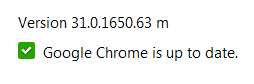
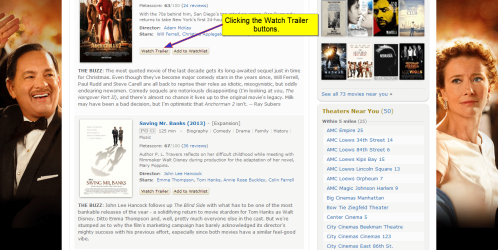
I'm using the same browser version of Chrome as you which is the most recent (see attached screenshot). Also, I'm pressing the Watch Trailer buttons for each movie from the IMDB "In Theaters" page at this site: New Movies In Theaters - IMDb. And, I'm going down from the top of the list. Not one of the Watch Trailer buttons produces any trailer - just a blank, white page on the screen.

Yes, I was able to view the Shawshank Redemption trailer you had sent me, but when I click the Watch Trailer button from the Shaw. Red. page (The Shawshank Redemption (1994) - IMDb), it once again produces the same blank, white page with no trailer whatsoever.
 

Attachments

  • CHROME VERSION.png
    CHROME VERSION.png
    1.4 KB · Views: 20
  • WATCH TRAILER BUTTONS.png
    WATCH TRAILER BUTTONS.png
    209.4 KB · Views: 0

My Computer My Computer

At a glance

Windows 7 Pro, 64-bit
Computer Manufacturer/Model Number
Dell Optiplex 760
OS
Windows 7 Pro, 64-bit
Well I can confirm the preview trailer works with ie10,
I can also confirm the previews use adobe flash/ shockwave player to operate,
Right click the black screen and see if Settings shows up,
If so click on it and drag the slider to the right end,
I've never tried this in Chrome but it works for Firefox and Internet explorer.
But of course flash is built in Chrome and not the other two.
 

My Computer My Computer

At a glance

Win-7-Pro64bit 7-H-Prem-64biti7-5930K 2nd i9-9940x both water blocked VRM'...Trident-z 3200C14 2nd Trident-z 3600C16EVGA 1080ti ftw3 2nd Titan Xp both water blocked
Computer type
PC/Desktop
Computer Manufacturer/Model Number
Custom assembled by me :}
OS
Win-7-Pro64bit 7-H-Prem-64bit
CPU
i7-5930K 2nd i9-9940x both water blocked VRM's too
Motherboard
ASUS SABERTOOTH X99 2nd ASUS x299 Apex
Memory
Trident-z 3200C14 2nd Trident-z 3600C16
Graphics Card(s)
EVGA 1080ti ftw3 2nd Titan Xp both water blocked
Sound Card
Built-in Realtek
Monitor(s) Displays
1-AOC G2460PG 24"G-Sync 144Hz/ 2nd 1-ASUS VG248QE 24" 144Hz
Screen Resolution
1920 x 1080 144Hz
Hard Drives
2-Samsung M.2 Evo & Evo Plus
2-Samsung 850 EVO 500GB SSD's/ 3-2.5 W.D. Black 1tb-&3-1tb/3-3.5 WD Black 1tb hdd's
PSU
EVGA SuperNOVA 1000-P2 2nd 1200-P2
Case
2-Corsair Obsidian Series 450D Black ATX Mid Tower
Cooling
Custom water loops
Keyboard
Logitech G710+/ 2nd Logitech G910
Mouse
2-RedDragon M901 Perdition 16400 dpi Gaming mouse = wired
Internet Speed
Comcast Ping 19ms 89.31mbps download speed 6.12mbps upload
Antivirus
Malwarebytes Pro/ Superantispyware Pro
Browser
FireFox & Pale moon
Other Info
2nd ASUS X299 Apex/Intel i9-9940x with Custom water loop/7H-Prem-x64/Corsair 450D case/Ram Trident-z 3600C16 4x8gb / Samsung970Evo plus 500gb SSD/Dual ssd EZ swap evo/PSU EVGA SuperNova 1200w-P2 80+Platinum/GPU Titan Xp /8-ML-140 on push-pull on 2-280GTX rads
Works Perfectly in IE 11

I tried clicking the Watch Trailer buttons in IE 11, and each one works perfectly; videos appear immediately and start playing. Sooooo, it seems that this is an inherent "glitch" with Chrome. (I didn't know where you were referring to when you mentioned "black screen," so I haven't tried that.)
 

My Computer My Computer

At a glance

Windows 7 Pro, 64-bit
Computer Manufacturer/Model Number
Dell Optiplex 760
OS
Windows 7 Pro, 64-bit
.......(I didn't know where you were referring to when you mentioned "black screen," so I haven't tried that.)

ThrashZone meant to say blank - not black.

You said in post #3:
Not one of the Watch Trailer buttons produces any trailer - just a blank, white page on the screen.

Right click in the middle of that blank screen.
 

My Computer My Computer

At a glance

W7 Pro SP1 64biti78GBIntel HD Graphics
Computer type
Laptop
Computer Manufacturer/Model Number
Employer provided Dell Latitude
OS
W7 Pro SP1 64bit
CPU
i7
Memory
8GB
Graphics Card(s)
Intel HD Graphics
Hard Drives
crappy SSD
Antivirus
Employer mandated Symantec Endpoint Protection
Browser
Pale Moon 64bit, IE11 64bit & Chrome 64bit
Oh & thanks for the screenshots and the good info.

I'm just not where I can test for a while.
 

My Computer My Computer

At a glance

W7 Pro SP1 64biti78GBIntel HD Graphics
Computer type
Laptop
Computer Manufacturer/Model Number
Employer provided Dell Latitude
OS
W7 Pro SP1 64bit
CPU
i7
Memory
8GB
Graphics Card(s)
Intel HD Graphics
Hard Drives
crappy SSD
Antivirus
Employer mandated Symantec Endpoint Protection
Browser
Pale Moon 64bit, IE11 64bit & Chrome 64bit
No Slider

I tried to find any navigation whatsoever on the blank pages but there's nothing there - no slider or anything else. And, if I right-click the area, also nothing appears in any type of menu. See screenshot attached. I did download Abobe Shockwave which made no difference whatsoever, knowing that Chrome already had built-in flash. I think I'll just have to "live" with this; it just REALLY surprises me that Chrome can't play these.
 

Attachments

  • BLANK PAGE.png
    BLANK PAGE.png
    2.2 KB · Views: 0

My Computer My Computer

At a glance

Windows 7 Pro, 64-bit
Computer Manufacturer/Model Number
Dell Optiplex 760
OS
Windows 7 Pro, 64-bit
No Prob

Thanks UsernameIssues for your help. I GREATLY appreciate your input to help me resolve this.
 

My Computer My Computer

At a glance

Windows 7 Pro, 64-bit
Computer Manufacturer/Model Number
Dell Optiplex 760
OS
Windows 7 Pro, 64-bit

My Computer My Computer

At a glance

Win-7-Pro64bit 7-H-Prem-64biti7-5930K 2nd i9-9940x both water blocked VRM'...Trident-z 3200C14 2nd Trident-z 3600C16EVGA 1080ti ftw3 2nd Titan Xp both water blocked
Computer type
PC/Desktop
Computer Manufacturer/Model Number
Custom assembled by me :}
OS
Win-7-Pro64bit 7-H-Prem-64bit
CPU
i7-5930K 2nd i9-9940x both water blocked VRM's too
Motherboard
ASUS SABERTOOTH X99 2nd ASUS x299 Apex
Memory
Trident-z 3200C14 2nd Trident-z 3600C16
Graphics Card(s)
EVGA 1080ti ftw3 2nd Titan Xp both water blocked
Sound Card
Built-in Realtek
Monitor(s) Displays
1-AOC G2460PG 24"G-Sync 144Hz/ 2nd 1-ASUS VG248QE 24" 144Hz
Screen Resolution
1920 x 1080 144Hz
Hard Drives
2-Samsung M.2 Evo & Evo Plus
2-Samsung 850 EVO 500GB SSD's/ 3-2.5 W.D. Black 1tb-&3-1tb/3-3.5 WD Black 1tb hdd's
PSU
EVGA SuperNOVA 1000-P2 2nd 1200-P2
Case
2-Corsair Obsidian Series 450D Black ATX Mid Tower
Cooling
Custom water loops
Keyboard
Logitech G710+/ 2nd Logitech G910
Mouse
2-RedDragon M901 Perdition 16400 dpi Gaming mouse = wired
Internet Speed
Comcast Ping 19ms 89.31mbps download speed 6.12mbps upload
Antivirus
Malwarebytes Pro/ Superantispyware Pro
Browser
FireFox & Pale moon
Other Info
2nd ASUS X299 Apex/Intel i9-9940x with Custom water loop/7H-Prem-x64/Corsair 450D case/Ram Trident-z 3600C16 4x8gb / Samsung970Evo plus 500gb SSD/Dual ssd EZ swap evo/PSU EVGA SuperNova 1200w-P2 80+Platinum/GPU Titan Xp /8-ML-140 on push-pull on 2-280GTX rads
Already Enabled

Thanks so much. The Adobe Flash has already been enabled on this settings page, so it rules that out. I'll continue to research this; it just makes me more determined! :) Thanks again for your help.
 

My Computer My Computer

At a glance

Windows 7 Pro, 64-bit
Computer Manufacturer/Model Number
Dell Optiplex 760
OS
Windows 7 Pro, 64-bit
I was able to test using Chrome Version 31.0.1650.63 m

The button/links that you mentioned work just fine :-(

The website pops up a lightbox and plays the video.

I see the "X" from the lightbox in your last screenshot.

Try right clicking on the Watch Trailer button and selecting "Open in new tab".

You could also try a new Windows user profile just as a test...
...and/or the safe mode with networking.
 

My Computer My Computer

At a glance

W7 Pro SP1 64biti78GBIntel HD Graphics
Computer type
Laptop
Computer Manufacturer/Model Number
Employer provided Dell Latitude
OS
W7 Pro SP1 64bit
CPU
i7
Memory
8GB
Graphics Card(s)
Intel HD Graphics
Hard Drives
crappy SSD
Antivirus
Employer mandated Symantec Endpoint Protection
Browser
Pale Moon 64bit, IE11 64bit & Chrome 64bit
Just Tried

I just tried right-clicking the buttons to open in new tab. It did so, only each new tab still just showed a light box with no video. Very, very odd. I can go to YouTube and play any video immediately with no issues whatsoever.
 

My Computer My Computer

At a glance

Windows 7 Pro, 64-bit
Computer Manufacturer/Model Number
Dell Optiplex 760
OS
Windows 7 Pro, 64-bit
Have you tried using the safe mode with networking? That might tell us if some other app is getting in the way.
 

My Computer My Computer

At a glance

W7 Pro SP1 64biti78GBIntel HD Graphics
Computer type
Laptop
Computer Manufacturer/Model Number
Employer provided Dell Latitude
OS
W7 Pro SP1 64bit
CPU
i7
Memory
8GB
Graphics Card(s)
Intel HD Graphics
Hard Drives
crappy SSD
Antivirus
Employer mandated Symantec Endpoint Protection
Browser
Pale Moon 64bit, IE11 64bit & Chrome 64bit
I'm sorry, but I don't think I have the technical know-how to do this. But, I'm certainly willing to try it.
 

My Computer My Computer

At a glance

Windows 7 Pro, 64-bit
Computer Manufacturer/Model Number
Dell Optiplex 760
OS
Windows 7 Pro, 64-bit
Turn the computer off and let it sit for a minute or so.

Once you turn it back on, repeatedly tap (press) the F8 key while it is starting.

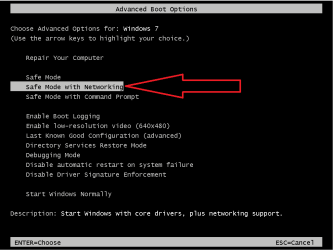
You should be presented with a screen that looks like this:

safe-mode.png

Select Safe Mode with Networking and watch the list of files scroll by the screen. Eventually, you should see an ugly version of your desktop (or you may be asked for your password and then the see the desktop). Open Chrome and see if it will play those videos via that button.

After the test, just restart the computer again and do nothing special. It should start up in the normal mode.

The safe mode does not load a bunch of extra stuff that normally runs. If Chrome plays the videos in the safe mode, then we know that the issue is probably not with Chrome.

Let's find out the results of that test before we try anything else.
 

My Computer My Computer

At a glance

W7 Pro SP1 64biti78GBIntel HD Graphics
Computer type
Laptop
Computer Manufacturer/Model Number
Employer provided Dell Latitude
OS
W7 Pro SP1 64bit
CPU
i7
Memory
8GB
Graphics Card(s)
Intel HD Graphics
Hard Drives
crappy SSD
Antivirus
Employer mandated Symantec Endpoint Protection
Browser
Pale Moon 64bit, IE11 64bit & Chrome 64bit
I appreciate your detail directives here! :) Thank you.

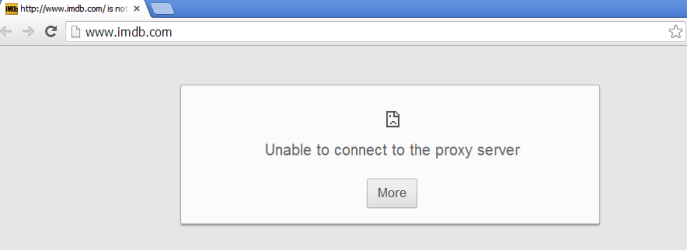
I did select the safe networking field but then couldn't pull up IMDB nor any site for that matter. A popup appeared, "Unable to connect to the proxy server." Screenshot is attached.
 

Attachments

  • UNABLE TO CONNECT.png
    UNABLE TO CONNECT.png
    5.4 KB · Views: 0

My Computer My Computer

At a glance

Windows 7 Pro, 64-bit
Computer Manufacturer/Model Number
Dell Optiplex 760
OS
Windows 7 Pro, 64-bit
That is not what I expected at all :-(

Did you happen to try IE while you were in that mode? Not that I mentioned doing so - but in light of Chrome not connecting at all - testing with IE is next in line. Could I trouble you to repeat the test using IE?
 

My Computer My Computer

At a glance

W7 Pro SP1 64biti78GBIntel HD Graphics
Computer type
Laptop
Computer Manufacturer/Model Number
Employer provided Dell Latitude
OS
W7 Pro SP1 64bit
CPU
i7
Memory
8GB
Graphics Card(s)
Intel HD Graphics
Hard Drives
crappy SSD
Antivirus
Employer mandated Symantec Endpoint Protection
Browser
Pale Moon 64bit, IE11 64bit & Chrome 64bit
Yes, I know. But in IE, I have no issues whatsoever. When I click a Watch Trailer button - any button - the video starts to play immediately. It's excellent. But . . . back to Chrome . . . all "whites!"
 

My Computer My Computer

At a glance

Windows 7 Pro, 64-bit
Computer Manufacturer/Model Number
Dell Optiplex 760
OS
Windows 7 Pro, 64-bit
Sorry that I was not clear about what info we might gain by testing IE in the safe mode:

In the safe mode, Chrome mentioned a proxy. I was wondering if IE had trouble connecting in the safe mode too. The test is an attempt to figure out how your computer is setup and connecting to the internet.

A proxy can be real (another computer) or virtual (software). Either way, all or some internet traffic from your computer passes thru it to get to the internet. This proxy might be setup by your Internet Service Provider or your antivirus software for security reasons. Or, their might not be any proxy at all & thus chrome was wrong while in the safe mode. Testing with IE should give us a second opinion on the proxy issue.

If there really is a proxy, then that might be stopping chrome from showing you the videos via that button in Chrome. It is possible to tell Chrome to use a proxy and tell IE not to use one. Again, testing IE in the safe mode might tell us a bit more about your setup.


It is okay if you want to give up on this issue and live with using IE for that one website. I'm not pushing you to keep troubleshoot things. I'm just offering things as they come to mind. I'm fine with bailing on the issue whenever you are. Or we can play with it some more. It is your call :-)
 

My Computer My Computer

At a glance

W7 Pro SP1 64biti78GBIntel HD Graphics
Computer type
Laptop
Computer Manufacturer/Model Number
Employer provided Dell Latitude
OS
W7 Pro SP1 64bit
CPU
i7
Memory
8GB
Graphics Card(s)
Intel HD Graphics
Hard Drives
crappy SSD
Antivirus
Employer mandated Symantec Endpoint Protection
Browser
Pale Moon 64bit, IE11 64bit & Chrome 64bit
Back
Top