I really have tried to find the answers to my questions but have found conflicting information all over the place. I am trying to set up a Windows 7 64 bit computer with Outlook 2010. My backups are from a Windows XP machine with Outlook 2007.
In looking around for the best way to transfer my email and browser files, some sites/forums advise using the import function of both Outlook 2010 and IE8. Others say to copy the files from the backup to the new machine.
Based on the advice from one site, I decided not to use Outlook's import function and instead I copied my backed-up .pst files to the Win7 \documents folder into a new folder i created called Outlook Files. Then I set up the account info in Outlook.
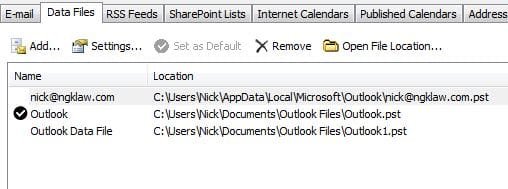
Now I have an outlook.pst and an outlook1.pst in the \documents\Outlook files folder AND i have a .pst file called [email protected] in the \nick\appdata\local\microsoft\outlook folder.
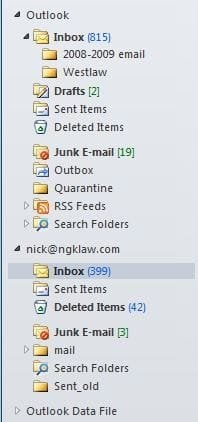
When I run outlook, I see in the navigation pane three email locations or folders.
My second issue is with transferring favorite. Before I copy the backed-up favorites folder from the old machine I want to make sure I use the right technique. Do I use the exported favorites and cookies from the XP machine and use IE8's import function or do i copy the actual favorites to the favorites folder in Win7? Oh, and if i am to copy them over, do i just copy them to the \username\favorites folder? Where do i put the cookies *.txt files?
Thanks for any info!
Deirdre Karambelas
In looking around for the best way to transfer my email and browser files, some sites/forums advise using the import function of both Outlook 2010 and IE8. Others say to copy the files from the backup to the new machine.
Based on the advice from one site, I decided not to use Outlook's import function and instead I copied my backed-up .pst files to the Win7 \documents folder into a new folder i created called Outlook Files. Then I set up the account info in Outlook.
Now I have an outlook.pst and an outlook1.pst in the \documents\Outlook files folder AND i have a .pst file called [email protected] in the \nick\appdata\local\microsoft\outlook folder.
When I run outlook, I see in the navigation pane three email locations or folders.
- I have the inbox and subfolders under "Outlook" and these appear to be the emails i transferred over.
- THEN, i have nick@emailaddress which is the same level as the first "outlook" folder. It is here that new mails are being received. However, when it got setup it somehow had about 400 emails in it, the dates of which overlap with the inbox in the first "outlook" folder.
- Finally, I have something called Outlook Data, which has nothing in it.
My second issue is with transferring favorite. Before I copy the backed-up favorites folder from the old machine I want to make sure I use the right technique. Do I use the exported favorites and cookies from the XP machine and use IE8's import function or do i copy the actual favorites to the favorites folder in Win7? Oh, and if i am to copy them over, do i just copy them to the \username\favorites folder? Where do i put the cookies *.txt files?
Thanks for any info!
Deirdre Karambelas
My Computer
At a glance
Windows 7 64 bit4GB
- Computer Manufacturer/Model Number
- Toshiba Portage R705
- OS
- Windows 7 64 bit
- Memory
- 4GB
- Hard Drives
- 500 GB