
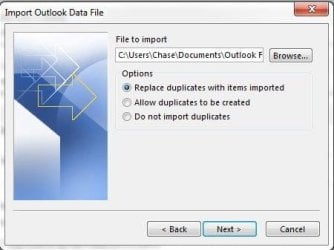
I'm wanting to import a PST file into my Outlook 2013 and the process looks rather straightforward except confused on which to select below. Should it be Option (1) or (3)?
I had to do an image restore and in the process lost some emails but Carbonite was there as a safety net with some PST files. The image restore did restore some of my emails just not all. The PST file I'm wanting to import should have all my emails up to the current date.
I had to do an image restore and in the process lost some emails but Carbonite was there as a safety net with some PST files. The image restore did restore some of my emails just not all. The PST file I'm wanting to import should have all my emails up to the current date.
Attachments
My Computer
- Computer type
- PC/Desktop
- Computer Manufacturer/Model Number
- Home Build
- OS
- Windows 7 Home Premium 64-bit; SP1
- CPU
- Intel Core i5 2500K
- Motherboard
- ASRock Z68 Extreme3 Gen3
- Memory
- Corsair Vengeance 16GB DDR3
- Graphics Card(s)
- Intel HD Graphics 3000
- Sound Card
- Integrated
- Monitor(s) Displays
- Samsung SyncMaster 943BX
- Screen Resolution
- 1280x1024
- Hard Drives
- Western Digital Caviar Black WD1002FAEX 1TB 7200 RPM 64MB Cache SATA 6.0Gb/s 3.5" Internal
Western Digital Caviar Black WD7501AALS 750GB 7200 RPM 32MB Cache SATA 3.0Gb/s 3.5" Internal
- PSU
- SeaSonic S12ll 520W Bronze
- Case
- Cooler Master Haf 912 Advanced
- Cooling
- Cooler Master Hyper 212 EVO
- Keyboard
- Logitech Wireless K800
- Mouse
- Logitech Wireless Performance MX
- Internet Speed
- 5.0 mb
- Other Info
- LG WH12LS30 Black SATA 12X Blu-ray
ASUS DRW-24B1ST/BLK/B/AS
AFT XM-5UE Card Reader


