Solved Improper low space warning for SDD due to symlink

BriKo

New member
Local time
5:58 PM
Messages
7
Hello All,

I have several drives on my computer. My main drive with Windows 7 is a SanDisk Extreme 240 GB SSD. I also have a 500 GB HDD. The SSD is my C: Drive, and the HDD is my D: Drive.

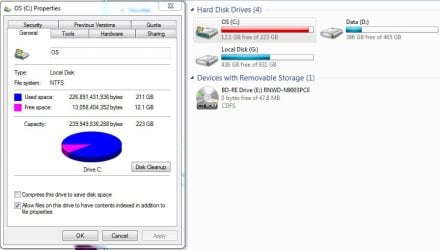
To save space, I have my User directory stored on my D: Drive. The folder is connected to my C: drive with a symlink. Everything seemed to be working at first, but now Windows is giving me a low storage space warning on my C: drive. It appears to be including the storage space of my Users folder from my D: drive on my C: drive. This is preventing me from installing new applications.

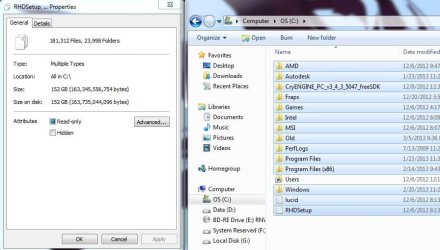
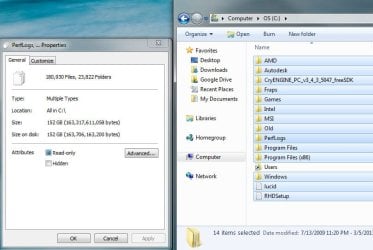
I attached some screen shots. You can see the disk claims it has 211 GB of used storage, but its contents only account for 152 GB.

Please help me fix this. I really want to be able to download my Steam games. :cry:
 

Attachments

  • storage1.jpg
    storage1.jpg
    56.4 KB · Views: 15
  • storage2.jpg
    storage2.jpg
    76.7 KB · Views: 13

My Computer My Computer

At a glance

Windows 7 Home Premium x64.AMD Phenom(tm) II X4 965 Processor 3.40 GHz B...8GB DDR3 (4 x 2GB)GAGABYTE(tm) ATI Radeon HD 5850 1GB GDDR5
Computer Manufacturer/Model Number
ME!
OS
Windows 7 Home Premium x64.
CPU
AMD Phenom(tm) II X4 965 Processor 3.40 GHz Black Edition
Motherboard
ASUS M4A89GTD PRO/USB3 Xtreme Design Motherboard
Memory
8GB DDR3 (4 x 2GB)
Graphics Card(s)
GAGABYTE(tm) ATI Radeon HD 5850 1GB GDDR5
Sound Card
Integrated Realtek High Definition Audio
Monitor(s) Displays
ASUS VH226H Black 21.5" HDMI 16:9 1080P LCD Monitor
Screen Resolution
1920 x 1080
Hard Drives
One Western Digital 1TB 7200 RPM 64MB Cache SATA 6.0Gb/s 3.5" Internal Hard Drive
PSU
Corsair TX 950 W Power Supply
Case
Thermaltake Xaser VI
Cooling
A bunch of fans
Keyboard
yes
Mouse
yes
Other Info
I built this computer myself. This is my first custom PC.
The size reported is not taking the symlink into account. The Used Space in drive properties is calculated from the drive bitmap which maps every ever bit. Its as accurate as any means. The contents of the symlink are not counted within that bitmap.
 

My Computer My Computer

At a glance

Windows 10 Pro (x64)Intel Core i7-3930K (3.2GHz - 4.5GHz)4x Samsung 4GB PC3-12800 DDR3 (16GB 1600MHz)Nvidia Geforce GTX 690
Computer type
PC/Desktop
Computer Manufacturer/Model Number
Alienware Aurora ALX R4
OS
Windows 10 Pro (x64)
CPU
Intel Core i7-3930K (3.2GHz - 4.5GHz)
Motherboard
Alienware Aurora-R4 x79
Memory
4x Samsung 4GB PC3-12800 DDR3 (16GB 1600MHz)
Graphics Card(s)
Nvidia Geforce GTX 690
Sound Card
SteelSeries Siberia Elite
Monitor(s) Displays
Dell UltraSharp U3011
Screen Resolution
2560x1600
Hard Drives
Samsung 850 Pro 256 GB, Seagate 1TB Desktop Hybrid HDD, 2x Western Digital 4TB Green HDD
PSU
875W Some Dell PSU <.<
Case
Alienware Aurora ALX
Cooling
Custom Liquid Cooling (EK CPU & GPU blocks) dual EK 480RAD
Keyboard
Logitech G710+ Mechanical
Mouse
Logitech G700s
Internet Speed
Verizon Fios (50 mbps average)
Other Info
Server: Intel NUC D54250WYK: i5-4250U, 16GB, 256 GB mSATA, Windows Server 2012 R2
The size reported is not taking the symlink into account. The Used Space in drive properties is calculated from the drive bitmap which maps every ever bit. Its as accurate as any means. The contents of the symlink are not counted within that bitmap.

Please explain to me the differences in these two screen shots. To me, it still looks like the Users file is the culprit of the missing 58 GB.
 

Attachments

  • storage3.jpg
    storage3.jpg
    70.2 KB · Views: 13
  • Storage4.jpg
    Storage4.jpg
    69.5 KB · Views: 11

My Computer My Computer

At a glance

Windows 7 Home Premium x64.AMD Phenom(tm) II X4 965 Processor 3.40 GHz B...8GB DDR3 (4 x 2GB)GAGABYTE(tm) ATI Radeon HD 5850 1GB GDDR5
Computer Manufacturer/Model Number
ME!
OS
Windows 7 Home Premium x64.
CPU
AMD Phenom(tm) II X4 965 Processor 3.40 GHz Black Edition
Motherboard
ASUS M4A89GTD PRO/USB3 Xtreme Design Motherboard
Memory
8GB DDR3 (4 x 2GB)
Graphics Card(s)
GAGABYTE(tm) ATI Radeon HD 5850 1GB GDDR5
Sound Card
Integrated Realtek High Definition Audio
Monitor(s) Displays
ASUS VH226H Black 21.5" HDMI 16:9 1080P LCD Monitor
Screen Resolution
1920 x 1080
Hard Drives
One Western Digital 1TB 7200 RPM 64MB Cache SATA 6.0Gb/s 3.5" Internal Hard Drive
PSU
Corsair TX 950 W Power Supply
Case
Thermaltake Xaser VI
Cooling
A bunch of fans
Keyboard
yes
Mouse
yes
Other Info
I built this computer myself. This is my first custom PC.
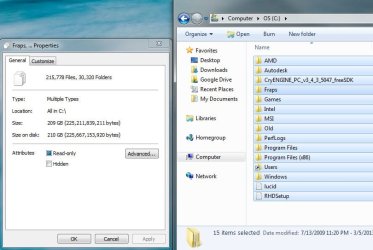
You have a folder labeled Old. What is that and how much is in it?
 

My Computer My Computer

At a glance

Windows 10 Pro. 64/ version 1709 Windows 7 Pr...Intel i7-6800K @ 4.3Corsair Platinum 16 gig @2400EVGA GTX 1070 OC
Computer type
PC/Desktop
Computer Manufacturer/Model Number
Home made Desktop
OS
Windows 10 Pro. 64/ version 1709 Windows 7 Pro/64
CPU
Intel i7-6800K @ 4.3
Motherboard
ASUS X-99 Deluxe II
Memory
Corsair Platinum 16 gig @2400
Graphics Card(s)
EVGA GTX 1070 OC
Monitor(s) Displays
Asus 27" LED LCD/VE278Q
Screen Resolution
1920-1080 or 1280-720 HDMI
Hard Drives
INTEL SSD 730-240 Gb Sata 3.0/
PSU
EVGA Platium 1200W
Case
Phanteks Luxe Tempered Glass 8 fans/ one radiator
Cooling
XSPC/ Water Cooled CPU
Keyboard
Das 4 Professional
Mouse
Logitech M705/MX Anywhere 2-S
Internet Speed
100 mbits
Antivirus
Microsoft Security Essentials/ Malwarebytes Premium 3.0/ SAS
Browser
I.E. 11 default/Firefox/ ISP Time Warner Cable/Spectrum
Other Info
LG BluRay Burner/
Sound system-KLipsch-THX/
Icy Dock ssd Hot Swap bays.
You have a folder labeled Old. What is that and how much is in it?

That folder contains a backup of my Users folder from before the symlink was created. It is 57.9 MB
 
Last edited:

My Computer My Computer

At a glance

Windows 7 Home Premium x64.AMD Phenom(tm) II X4 965 Processor 3.40 GHz B...8GB DDR3 (4 x 2GB)GAGABYTE(tm) ATI Radeon HD 5850 1GB GDDR5
Computer Manufacturer/Model Number
ME!
OS
Windows 7 Home Premium x64.
CPU
AMD Phenom(tm) II X4 965 Processor 3.40 GHz Black Edition
Motherboard
ASUS M4A89GTD PRO/USB3 Xtreme Design Motherboard
Memory
8GB DDR3 (4 x 2GB)
Graphics Card(s)
GAGABYTE(tm) ATI Radeon HD 5850 1GB GDDR5
Sound Card
Integrated Realtek High Definition Audio
Monitor(s) Displays
ASUS VH226H Black 21.5" HDMI 16:9 1080P LCD Monitor
Screen Resolution
1920 x 1080
Hard Drives
One Western Digital 1TB 7200 RPM 64MB Cache SATA 6.0Gb/s 3.5" Internal Hard Drive
PSU
Corsair TX 950 W Power Supply
Case
Thermaltake Xaser VI
Cooling
A bunch of fans
Keyboard
yes
Mouse
yes
Other Info
I built this computer myself. This is my first custom PC.
I sincerely apologize for bringing this up again. I'm just beginning to feel a bit desperate. It has been over 2 weeks since my last post, and I still haven't been able to resolve this issue. There are things that I would really love to be able to install on my computer. It is quite discouraging.

I would be ever so grateful if someone could shed some light on this issue. Thank you kindly.
 

My Computer My Computer

At a glance

Windows 7 Home Premium x64.AMD Phenom(tm) II X4 965 Processor 3.40 GHz B...8GB DDR3 (4 x 2GB)GAGABYTE(tm) ATI Radeon HD 5850 1GB GDDR5
Computer Manufacturer/Model Number
ME!
OS
Windows 7 Home Premium x64.
CPU
AMD Phenom(tm) II X4 965 Processor 3.40 GHz Black Edition
Motherboard
ASUS M4A89GTD PRO/USB3 Xtreme Design Motherboard
Memory
8GB DDR3 (4 x 2GB)
Graphics Card(s)
GAGABYTE(tm) ATI Radeon HD 5850 1GB GDDR5
Sound Card
Integrated Realtek High Definition Audio
Monitor(s) Displays
ASUS VH226H Black 21.5" HDMI 16:9 1080P LCD Monitor
Screen Resolution
1920 x 1080
Hard Drives
One Western Digital 1TB 7200 RPM 64MB Cache SATA 6.0Gb/s 3.5" Internal Hard Drive
PSU
Corsair TX 950 W Power Supply
Case
Thermaltake Xaser VI
Cooling
A bunch of fans
Keyboard
yes
Mouse
yes
Other Info
I built this computer myself. This is my first custom PC.
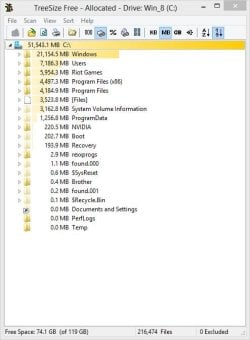
Can you install and run Treesize Free? It will give you a good picture of what is using space on your hard drive. For instance, looking at my C: drive:

TreesizeFree.jpg

You can navigate down the folder tree to see exactly where space is going. To get a complete picture, show hidden files and folders and hidden operating system files via Control Panel, Folder Options, View tab.
 

My Computer My Computer

At a glance

Windows 10 Pro X64Intel Quad Core i7-4770 @ 3.4Ghz16.0GB PC3-12800 DDR3 SDRAM 1600 MHzIntel Integrated HD Graphics
Computer type
PC/Desktop
Computer Manufacturer/Model Number
Lenovo IdeaCenter 450
OS
Windows 10 Pro X64
CPU
Intel Quad Core i7-4770 @ 3.4Ghz
Memory
16.0GB PC3-12800 DDR3 SDRAM 1600 MHz
Graphics Card(s)
Intel Integrated HD Graphics
Sound Card
Realtek HD Audio
Monitor(s) Displays
HP 22" LCD
Screen Resolution
1680 x 1050
Hard Drives
250GB Samsung EVO SATA-3 SSD
2TB Seagate ST2000DM001 SATA-2
1.5TB Seagate ST3150041AS SATA
Keyboard
Dell USB
Mouse
Lenovo USB
Internet Speed
Cable via Road Runner 3MB Upload, 30MB Download
Antivirus
Windows Defender, MBAM Pro, MBAE
Browser
Seamonkey
Other Info
UEFI/GPT
PLDS DVD-RW DH16AERSH
Can you install and run Treesize Free? It will give you a good picture of what is using space on your hard drive. For instance, looking at my C: drive:

View attachment 261011

You can navigate down the folder tree to see exactly where space is going. To get a complete picture, show hidden files and folders and hidden operating system files via Control Panel, Folder Options, View tab.

Oh Thank You! I can finally see where that missing storage has really gone thanks to this awesome little program. There are two hidden files taking up the room. One is pagefile.sys with 32 GB and the other is hiberfil.sys at 24 GB. I've disabled hybernation to get rid of hiberfil.sys. Now I just need to move my system's virtual memory to another drive. I should be able to figure that out from here.

Thanks again!
 

My Computer My Computer

At a glance

Windows 7 Home Premium x64.AMD Phenom(tm) II X4 965 Processor 3.40 GHz B...8GB DDR3 (4 x 2GB)GAGABYTE(tm) ATI Radeon HD 5850 1GB GDDR5
Computer Manufacturer/Model Number
ME!
OS
Windows 7 Home Premium x64.
CPU
AMD Phenom(tm) II X4 965 Processor 3.40 GHz Black Edition
Motherboard
ASUS M4A89GTD PRO/USB3 Xtreme Design Motherboard
Memory
8GB DDR3 (4 x 2GB)
Graphics Card(s)
GAGABYTE(tm) ATI Radeon HD 5850 1GB GDDR5
Sound Card
Integrated Realtek High Definition Audio
Monitor(s) Displays
ASUS VH226H Black 21.5" HDMI 16:9 1080P LCD Monitor
Screen Resolution
1920 x 1080
Hard Drives
One Western Digital 1TB 7200 RPM 64MB Cache SATA 6.0Gb/s 3.5" Internal Hard Drive
PSU
Corsair TX 950 W Power Supply
Case
Thermaltake Xaser VI
Cooling
A bunch of fans
Keyboard
yes
Mouse
yes
Other Info
I built this computer myself. This is my first custom PC.
Excellent! Glad that is resolved. Good luck.
 

My Computer My Computer

At a glance

Windows 10 Pro X64Intel Quad Core i7-4770 @ 3.4Ghz16.0GB PC3-12800 DDR3 SDRAM 1600 MHzIntel Integrated HD Graphics
Computer type
PC/Desktop
Computer Manufacturer/Model Number
Lenovo IdeaCenter 450
OS
Windows 10 Pro X64
CPU
Intel Quad Core i7-4770 @ 3.4Ghz
Memory
16.0GB PC3-12800 DDR3 SDRAM 1600 MHz
Graphics Card(s)
Intel Integrated HD Graphics
Sound Card
Realtek HD Audio
Monitor(s) Displays
HP 22" LCD
Screen Resolution
1680 x 1050
Hard Drives
250GB Samsung EVO SATA-3 SSD
2TB Seagate ST2000DM001 SATA-2
1.5TB Seagate ST3150041AS SATA
Keyboard
Dell USB
Mouse
Lenovo USB
Internet Speed
Cable via Road Runner 3MB Upload, 30MB Download
Antivirus
Windows Defender, MBAM Pro, MBAE
Browser
Seamonkey
Other Info
UEFI/GPT
PLDS DVD-RW DH16AERSH
Back
Top