improve windows7 start-up speed?

stuartrozier

New member
Hello, i have read a few posts on the on the windows7 forum in regards to improving the boot speed.
But not really found any improments.
Is their any software or patch you can download that might improve it slightly?

I thought it was norton, but had norton on my pc when i brought it, and it used to load superfast, but over the last year, has dramaticaly slowed down.

Ive unchecked a number of programs in the "msconfig" startup utility, but no change really.

I only have norton, gmail notifier, and peer guardian in my taskbar.

Their might not be any suggestions, but i thought id ask an see...

thanks in advance for any help guys, and girls.

stuart
 

My Computer

Computer Manufacturer/Model Number
HP
OS
Windows 7 Home Pre 64bit
CPU
i7 intel core 2.93GHZ
Motherboard
MSI
Memory
16.00GB
Graphics Card(s)
nVidia GT 220
Hi Stuart,

There isn't any software that will help with boot speed. I recommed trying Soluto to gather information on your boot time. Run it but don't apply the recommended fixes - all you are interested in is what is contributing to your start up times.

Post back here once you have some info on that and we will be pleased to help you.

Regards,
Golden
 

My Computer

Computer type
PC/Desktop
Computer Manufacturer/Model Number
Golden Mk. I.4
OS
Windows 10 Pro x64 ; Xubuntu x64
CPU
Intel i7 860 @ 2.80 GHz O/C'ed to 4.0GHz
Motherboard
Gigabyte P55A-UD3R Rev.1. Award BIOS F13
Memory
16GB Corsair Vengance DDR3 @ 661 MHz Dual Channel (9-9-9-24)
Graphics Card(s)
EVGA NVidia GTX 560 1024MB
Sound Card
Realtek Integrated
Monitor(s) Displays
Dual Samsung SyncMaster 2494HS
Screen Resolution
1920*1080 and 1920*1080
Hard Drives
1*Samsung 840 EVO 120GB SSD;
1*OCZ Vertex 2 60GB SSD;
2*Samsung F3 SpinPoint 1TB in RAID0;
1*Samsung F1 SpinPoint 1TB;
2*Western Digital 1TB External USB 3.0
1*Western Digital 500GB External USB 3.0
1*Seagate 500GB External USB 2.0
PSU
Thermaltake ToughPower QFan 750W
Case
Thermaltake Element S VK60001W2Z
Cooling
Corsair H60 Water Cooling, 2*230mm and 2*80mm case fans
Keyboard
Logitech G110
Mouse
Logitech MX518
What is your startup speed (seconds) and please give your system specs ?

Also, have you checked the Event Viewer in the System Section of the Control Panel ?
 

My Computer

OS
Win 7, 32bit, Premium
Hello, i installed soluto.

rebooted, and its showing me a list of programs that startup in the background...
86 in total, 3.05 mins to startup.

it says,
14 no-brainer apps that can be removed
23 apps that can be removed, if an advanced user
and then 49 apps, which soluto could not remove.

does this help? sorry if im not providing all the info, but this was all 'soluto' was showing me.

thanks
stuart
 

My Computer

Computer Manufacturer/Model Number
HP
OS
Windows 7 Home Pre 64bit
CPU
i7 intel core 2.93GHZ
Motherboard
MSI
Memory
16.00GB
Graphics Card(s)
nVidia GT 220
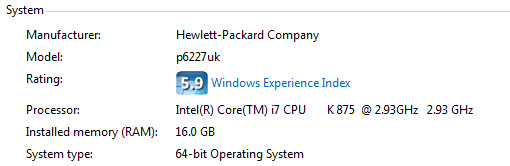
this was a screen-capture of the system specs.
Capture.PNG
 

My Computer

Computer Manufacturer/Model Number
HP
OS
Windows 7 Home Pre 64bit
CPU
i7 intel core 2.93GHZ
Motherboard
MSI
Memory
16.00GB
Graphics Card(s)
nVidia GT 220

My Computer

Computer Manufacturer/Model Number
HP, Dell, Gateway, Toshiba - 4 laptops and 2 desktops
OS
Vista, Windows7, Mint Mate, Zorin, Windows 8
CPU
from 1.6GHz Duo to i7
Monitor(s) Displays
2x HP w2207
Hard Drives
5x HDD, 7x SSD, 12x Externals
Keyboard
with trackball - no mices
Mouse
Trackball mice
Internet Speed
DSL 6000
Any reasonable 7200 RPM HDD should be able to boot an ordinary Windows 7 installation in 90 seconds or so.

What HDD do you have?

Is Windows updated?

86 applications running at startup?
 

My Computer

Computer type
PC/Desktop
Computer Manufacturer/Model Number
Ignatz Special; 4 speed manual gearbox; factory air conditioning; one of one
OS
Windows 7 Home Premium SP1, 64-bit
CPU
Intel Skylake i5-6600K, not overclocked
Motherboard
AsRock Z170M Extreme 4, micro ATX
Memory
8 GB HyperX DDR4-2666 (2 x 4 GB)
Graphics Card(s)
none; graphics are integrated on CPU
Sound Card
onboard: Realtek ALC1150; external: USB Behringer UF0-202
Monitor(s) Displays
Dell S2340M 23 inch IPS
Screen Resolution
1600 x 900
Hard Drives
System: Crucial MX100 series SSD, 128 GB;
Data: Samsung Spinpoint 103SJ, 1 TB;
Backup: WD Caviar Green WD30EZRX-00D8PB0, 3 TB
PSU
Rosewill SilentNight 500 watt fanless, semi-modular
Case
Antec Solo II
Cooling
Noctua NH-U12S; Noctua F12 intake, Noctua S12A exhaust
Keyboard
Microsoft 200 6JH-00001 USB
Mouse
Dell or Microsoft optical wired; USB
Antivirus
Microsoft Security Essentials and Malwarebytes Premium
Browser
Pale Moon
Other Info
All fans PWM; speeds at idle: CPU circa 500 rpm; intake circa 600 rpm; exhaust circa 600 rpm; CPU temps 27 idle and 47 C load in a warm room (27 C/81 F) when running Intel Extreme Tuning Utility stress test.
86 is a little high. But usually Soluto shows around 60.
 

My Computer

Computer Manufacturer/Model Number
HP, Dell, Gateway, Toshiba - 4 laptops and 2 desktops
OS
Vista, Windows7, Mint Mate, Zorin, Windows 8
CPU
from 1.6GHz Duo to i7
Monitor(s) Displays
2x HP w2207
Hard Drives
5x HDD, 7x SSD, 12x Externals
Keyboard
with trackball - no mices
Mouse
Trackball mice
Internet Speed
DSL 6000
Stuart,

Can you post a screen capture of the Soluto output and post it here? It would also be helpful to see the list of 86 programs.

Regards,
Golden
 

My Computer

Computer type
PC/Desktop
Computer Manufacturer/Model Number
Golden Mk. I.4
OS
Windows 10 Pro x64 ; Xubuntu x64
CPU
Intel i7 860 @ 2.80 GHz O/C'ed to 4.0GHz
Motherboard
Gigabyte P55A-UD3R Rev.1. Award BIOS F13
Memory
16GB Corsair Vengance DDR3 @ 661 MHz Dual Channel (9-9-9-24)
Graphics Card(s)
EVGA NVidia GTX 560 1024MB
Sound Card
Realtek Integrated
Monitor(s) Displays
Dual Samsung SyncMaster 2494HS
Screen Resolution
1920*1080 and 1920*1080
Hard Drives
1*Samsung 840 EVO 120GB SSD;
1*OCZ Vertex 2 60GB SSD;
2*Samsung F3 SpinPoint 1TB in RAID0;
1*Samsung F1 SpinPoint 1TB;
2*Western Digital 1TB External USB 3.0
1*Western Digital 500GB External USB 3.0
1*Seagate 500GB External USB 2.0
PSU
Thermaltake ToughPower QFan 750W
Case
Thermaltake Element S VK60001W2Z
Cooling
Corsair H60 Water Cooling, 2*230mm and 2*80mm case fans
Keyboard
Logitech G110
Mouse
Logitech MX518
I use CCleaner, with CCEnhancer, Advanced System Care and TuneUp Utilities to maintain speed (I definitely noticed improvements).

Netbook boots in 24 seconds.

Can't wait to get the SSD and 2GB Ram for it.
 

My Computer

Computer Manufacturer/Model Number
iRush Pro
OS
Windows 7 Ultimate x64
CPU
Intel Core i5 2500K Processor
Motherboard
Intel H67 Chipset Motherboard (Micro ATX)
Memory
2x4GB DDR3 1333Mhz Memory
Graphics Card(s)
Novatech Radeon 6770 1GB Graphics Card
Hard Drives
1TB
PSU
Novatech 500W
Case
Novatech ATX Gaming Case
Cooling
-
Keyboard
Novatech Wired Keyboard
Mouse
Novatech Wired Mouse
Internet Speed
VirginMedia 10MB/s
Any reasonable 7200 RPM HDD should be able to boot an ordinary Windows 7 installation in 90 seconds or so.

Surely. I have a RAID-0 array, W7 takes about 40 seconds to boot, and as far as I remember it didnt take much more before the RAID.
 
Last edited:

My Computer

Computer type
PC/Desktop
Computer Manufacturer/Model Number
My Build
OS
Windows 10 Build 9926
CPU
Core i7 4770k
Motherboard
Asus Z87 - Plus
Memory
32 GB DDR3 @ 1822 MHz
Graphics Card(s)
ATi 280X 3GB 384-Bit @ 1180/6840 MHz
Sound Card
Onboard 8 CH
Monitor(s) Displays
LCD 22" + CRT 17"
Screen Resolution
1920 x 1080 / 1600 x 1200
Hard Drives
SSD: 240 GB
HDD: 750GB (Media) + 2TB (Mass Storage)
PSU
1000W
Case
Self Modded
Cooling
Corsair H60 Triple Fan (Push-Push-Pull)
Keyboard
MS wireless
Mouse
MS wireless
Internet Speed
25M (down) 2M (up)
Antivirus
AVG Internet Security 2015
Browser
IE11 / FF / Chrome
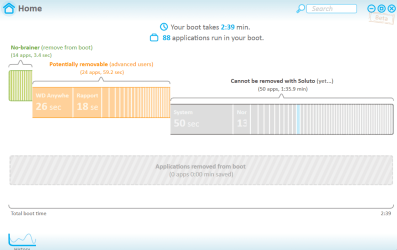
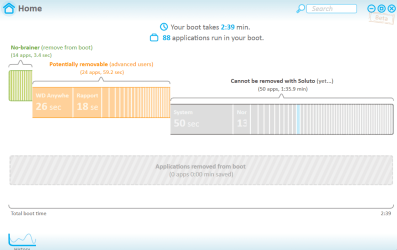
Sure things, 'soluto' is a little difficult to capture an image of all the programs, its a flash-run program, so only shows you when your holding the mouse over the bar, so it wont let me highlight the programs AND let me use the snipping tool to take an image capture. But i'll paste an image of the "soluto" home screen.

Im not sure what a 'SSD' is, but my hard drive is a maxtor...i'll paste an image of that also, thanks for all your helps guys....
So do i "APPLY" the help, when it comes to soluto ?
Capture1.PNG
Capture2.PNG
 

My Computer

Computer Manufacturer/Model Number
HP
OS
Windows 7 Home Pre 64bit
CPU
i7 intel core 2.93GHZ
Motherboard
MSI
Memory
16.00GB
Graphics Card(s)
nVidia GT 220
^^^^^^ in regards to my last post, the start-up time was less this morning when i turned on the PC, considerably less! almost by a a whole minute! strange!

thanks,
Stuart
 

My Computer

Computer Manufacturer/Model Number
HP
OS
Windows 7 Home Pre 64bit
CPU
i7 intel core 2.93GHZ
Motherboard
MSI
Memory
16.00GB
Graphics Card(s)
nVidia GT 220
Im not sure what a 'SSD' is
It is a Solid State Disk. They have no moving parts. Access times are appr. 150 times faster than on HDDs and data transfer rates are significantly higher than on HDDs too.

To place the OS, you need a 60GB model which costs around $100. User files would still go on the HDD, but that is little impact on performance. Here is more: http://www.sevenforums.com/tutorials/149969-ssd-install-transfer-operating-system.html

This is my boot time with an SSD - that is 16 seconds.
 

Attachments

  • 2011-03-02_1937.png
    2011-03-02_1937.png
    72.9 KB · Views: 4

My Computer

Computer Manufacturer/Model Number
HP, Dell, Gateway, Toshiba - 4 laptops and 2 desktops
OS
Vista, Windows7, Mint Mate, Zorin, Windows 8
CPU
from 1.6GHz Duo to i7
Monitor(s) Displays
2x HP w2207
Hard Drives
5x HDD, 7x SSD, 12x Externals
Keyboard
with trackball - no mices
Mouse
Trackball mice
Internet Speed
DSL 6000
Sure thing, 'soluto' is a little difficult to capture an image of all the programs, its a flash-run program, so only shows you when your holding the mouse over the bar, so it wont let me highlight the programs AND let me use the snipping tool to take an image capture. But i'll paste an image of the "soluto" home screen.
Im not sure what a 'SSD' is, but my hard drive is a maxtor...i'll paste an image of that also, thanks for all your helps guys....
So do i "APPLY" the help, when it comes to soluto ?

Capture1.PNG

Capture2.PNG
 

My Computer

Computer Manufacturer/Model Number
HP
OS
Windows 7 Home Pre 64bit
CPU
i7 intel core 2.93GHZ
Motherboard
MSI
Memory
16.00GB
Graphics Card(s)
nVidia GT 220
^^^^^^ in regards to my last post, the start-up time was less this morning when i turned on the PC, considerably less! almost by a a whole minute! strange!
thanks,
Stuart
 

My Computer

Computer Manufacturer/Model Number
HP
OS
Windows 7 Home Pre 64bit
CPU
i7 intel core 2.93GHZ
Motherboard
MSI
Memory
16.00GB
Graphics Card(s)
nVidia GT 220
sorry i posted that again, it wasnt showing this morning once i posted it.

so is all i need to do is buy a new gard drive then ? an ssd one?

or, will soluto help me with any performance,

thanks,
stuart
 

My Computer

Computer Manufacturer/Model Number
HP
OS
Windows 7 Home Pre 64bit
CPU
i7 intel core 2.93GHZ
Motherboard
MSI
Memory
16.00GB
Graphics Card(s)
nVidia GT 220
this is the disk drive i have my pc at the moe...
Capture3.PNG
 

My Computer

Computer Manufacturer/Model Number
HP
OS
Windows 7 Home Pre 64bit
CPU
i7 intel core 2.93GHZ
Motherboard
MSI
Memory
16.00GB
Graphics Card(s)
nVidia GT 220
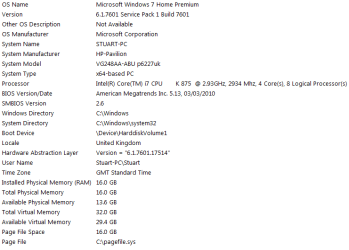
If you type in "system information", without the quotes, it will give you and us the spec.'s we need to help you more. (Or you could use Speccy or the one on this site)
Have you tried Ccleaner? It could help some I'm sure. The Soluto thing is very helpful too. If you are unsure of some of the things it suggests you turn off or delay,don't and either google them or ask here. Have you been to BlackVipers website? Very useful information on services you can turn off and/or set to manual instead of automatic. Yes an SSD will dramatically improve Boot times but if you cannot afford one (and the installation since you seem to be a fairly new user) there are plenty of other ways to speed up your Boot.
 

My Computer

Computer type
Laptop
Computer Manufacturer/Model Number
MSI GE72VR Apache Pro-416
OS
Windows 10x64 Build 1709
CPU
Intel i7 7700HQ Kaby Lake
Motherboard
Micro-Star Intl. MS-179B (U3C1)
Memory
16 GB DDR4 @2400
Graphics Card(s)
Nvidia Geforce GTX 1060
Screen Resolution
1920x1080 120Hz
Hard Drives
256 GB Nvme M.2 SSD

1TB HDD@7200
Cooling
Cooler Blast 4
Keyboard
Steel Series
Antivirus
Bit Defender Free
Browser
Edge
Hello indiana,
i was checking out the crucial website, and it gives you a step by step how to giude when it comes to transfering your current HDD to a SSD, just using a sata to usb cable, and virtually cloning everything onto the SSD.
I might give this a go.
My only problem, is it states that you need to have a copy of your OS, but my OS came pre-instaled with my pc, would this be an issue do you think?
Also, my main HD has been partitioned in two drives, one for programs, software etc, and the 2nd partition is something called a factory image, would i need to clone this also do you think?
Thanks for your help,
i have posted a screen capture of the system information you asked for below...
Capture4.PNG
 

My Computer

Computer Manufacturer/Model Number
HP
OS
Windows 7 Home Pre 64bit
CPU
i7 intel core 2.93GHZ
Motherboard
MSI
Memory
16.00GB
Graphics Card(s)
nVidia GT 220
Back
Top