In Explore Double Clicking a Folder gives Properties

weka

New member
Local time
1:28 AM
Messages
10
Hi

When I am in Explorer and Double Click a Folder to open it the folder doesn't open but the Properties Dialog box appears...

How can I stop this when it happens.

Perhaps I am hitting a key combination to cause this behavior. I'm not to sure..

Thank you..
 

My Computer My Computer

Computer Manufacturer/Model Number
Intel 8400
OS
Windows 7
Sounds like your left click is reversed with the right. If you are doing a left clikc do a right click instead. This can be changed in Conrtrol Panel Mouse
 

My Computer My Computer

Computer type
PC/Desktop
Computer Manufacturer/Model Number
Dell XPS 420
OS
Windows 10, Home Clean Install
CPU
Intel Core2 processsor Q8200(2.33Ghz 1333FSB) Quad Core Tech
Motherboard
Dell
Memory
6 gb
Graphics Card(s)
ATI Radeon 256MB HD3650
Sound Card
Intergrated 7.1 Channel Audio
Monitor(s) Displays
Dell SP2009W 20"
Hard Drives
640 GB Serial ATA Hard drive
Cooling
Fan
Keyboard
Dell USB Keyboard
Mouse
Dell Premium Optical USB
Internet Speed
DSL 2.85
The Left click gives me the standard pop-up menu...

thx
 

My Computer My Computer

Computer Manufacturer/Model Number
Intel 8400
OS
Windows 7
You can reverse left with right, if easier for you. Go to control panel and then mouse.

Take care.
 

My Computer My Computer

Computer type
PC/Desktop
Computer Manufacturer/Model Number
Dell XPS 420
OS
Windows 10, Home Clean Install
CPU
Intel Core2 processsor Q8200(2.33Ghz 1333FSB) Quad Core Tech
Motherboard
Dell
Memory
6 gb
Graphics Card(s)
ATI Radeon 256MB HD3650
Sound Card
Intergrated 7.1 Channel Audio
Monitor(s) Displays
Dell SP2009W 20"
Hard Drives
640 GB Serial ATA Hard drive
Cooling
Fan
Keyboard
Dell USB Keyboard
Mouse
Dell Premium Optical USB
Internet Speed
DSL 2.85
I've had this happen on my Win 7 Pro X64 system, no idea why. I do not want anything hidden on my computer so I show everything. When they appear, usually in twos, I simply delete them. Never caused me any problem to date.

Would be nice to know where they come from though. Has to be something I do but no idea what.
 

My Computer My Computer

Computer type
PC/Desktop
Computer Manufacturer/Model Number
Lenovo IdeaCenter 450
OS
Windows 10 Pro X64
CPU
Intel Quad Core i7-4770 @ 3.4Ghz
Memory
16.0GB PC3-12800 DDR3 SDRAM 1600 MHz
Graphics Card(s)
Intel Integrated HD Graphics
Sound Card
Realtek HD Audio
Monitor(s) Displays
HP 22" LCD
Screen Resolution
1680 x 1050
Hard Drives
250GB Samsung EVO SATA-3 SSD
2TB Seagate ST2000DM001 SATA-2
1.5TB Seagate ST3150041AS SATA
Keyboard
Dell USB
Mouse
Lenovo USB
Internet Speed
Cable via Road Runner 3MB Upload, 30MB Download
Antivirus
Windows Defender, MBAM Pro, MBAE
Browser
Seamonkey
Other Info
UEFI/GPT
PLDS DVD-RW DH16AERSH

My Computer My Computer

Computer type
Laptop
Computer Manufacturer/Model Number
HP EliteBook 8530w Mobile Workstation
OS
Windows 7 Ultimate x64 (XP, 98SE, 95, 3.11, DOS 7.10 on VM) + Ubuntu 10.04 LTS Lucid Lynx
CPU
Intel Core 2 Duo Processor P8600 (2.40 GHz, 3 MB L2 cache)
Motherboard
Mobile Intel PM45 Express Chipset ICH9M-Enhanced
Memory
4GB 800 MHz DDR2 SDRAM
Graphics Card(s)
ATI Mobility FireGL V5700 with 256 MB
Sound Card
SoundMAX Integrated Digital HD Audio
Monitor(s) Displays
15.4-inch WXGA anti-glare (1280 x 800 resolution)
Screen Resolution
1280 x 800
Hard Drives
500GB + 1TB
Mouse
Synaptics PS/2 Port Touchpad, USB Mouse
Internet Speed
4 Mbps
Antivirus
MSE
Browser
Firefox, Chrome, IE
Other Info
Authentec AES2810 Fingerprint Reader
just thinking if it has something to do with regional settings.

Mouse control panel will fix it for sure.
 

My Computer My Computer

OS
xp
I follows all above advice.. but I'm not sure Ive fixed the problem

I do have the habit of resting on keys for long periods (I can press keys for 5 seconds or longer)

Perhaps I am causing some obscure windows setting to be initialed..
 

My Computer My Computer

Computer Manufacturer/Model Number
Intel 8400
OS
Windows 7
There is a Sticky Keys setting but I don't think that is what is happening.
 

My Computer My Computer

Computer type
PC/Desktop
Computer Manufacturer/Model Number
Lenovo IdeaCenter 450
OS
Windows 10 Pro X64
CPU
Intel Quad Core i7-4770 @ 3.4Ghz
Memory
16.0GB PC3-12800 DDR3 SDRAM 1600 MHz
Graphics Card(s)
Intel Integrated HD Graphics
Sound Card
Realtek HD Audio
Monitor(s) Displays
HP 22" LCD
Screen Resolution
1680 x 1050
Hard Drives
250GB Samsung EVO SATA-3 SSD
2TB Seagate ST2000DM001 SATA-2
1.5TB Seagate ST3150041AS SATA
Keyboard
Dell USB
Mouse
Lenovo USB
Internet Speed
Cable via Road Runner 3MB Upload, 30MB Download
Antivirus
Windows Defender, MBAM Pro, MBAE
Browser
Seamonkey
Other Info
UEFI/GPT
PLDS DVD-RW DH16AERSH
I follows all above advice.. but I'm not sure Ive fixed the problem

I do have the habit of resting on keys for long periods (I can press keys for 5 seconds or longer)

Perhaps I am causing some obscure windows setting to be initialed..

Have you tried using a different keyboard temporarily, maybe borrow from a friend ?
 

My Computer My Computer

Computer type
Laptop
Computer Manufacturer/Model Number
HP EliteBook 8530w Mobile Workstation
OS
Windows 7 Ultimate x64 (XP, 98SE, 95, 3.11, DOS 7.10 on VM) + Ubuntu 10.04 LTS Lucid Lynx
CPU
Intel Core 2 Duo Processor P8600 (2.40 GHz, 3 MB L2 cache)
Motherboard
Mobile Intel PM45 Express Chipset ICH9M-Enhanced
Memory
4GB 800 MHz DDR2 SDRAM
Graphics Card(s)
ATI Mobility FireGL V5700 with 256 MB
Sound Card
SoundMAX Integrated Digital HD Audio
Monitor(s) Displays
15.4-inch WXGA anti-glare (1280 x 800 resolution)
Screen Resolution
1280 x 800
Hard Drives
500GB + 1TB
Mouse
Synaptics PS/2 Port Touchpad, USB Mouse
Internet Speed
4 Mbps
Antivirus
MSE
Browser
Firefox, Chrome, IE
Other Info
Authentec AES2810 Fingerprint Reader
Any chance you're using StrokeIt? I find that when I use the close gesture it leads to the alt key sticking. It doesn't do it every time either. Unfortunately none of the alternatives mention in their forums works for me.
 

My Computer My Computer

OS
Windows 7
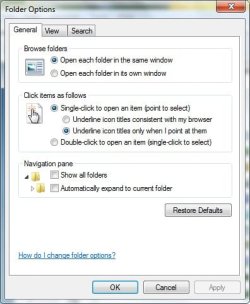
Hi teamyoyo, instead of double clicking a folder/file to open, have you tried to use single click? Which is in 'Folder Options'?
 

Attachments

  • single click file.jpg
    single click file.jpg
    29.3 KB · Views: 14

My Computer My Computer

Computer type
PC/Desktop
Computer Manufacturer/Model Number
Bruce ... somewhere in his 40's
OS
Windows 7 Ultimate 32bit SP1
CPU
Intel(R) Core(TM)2 Quad CPU @ 2.40GHz, 2400 MHz
Motherboard
INTEL/D975XBX2
Memory
4 GB
Graphics Card(s)
ATI Radeon HD 2600 Pro
Monitor(s) Displays
Samsung SyncMaster 914v
Screen Resolution
1280 x 1024
Hard Drives
2/500GB each ... ST3500630AS ATA Device.
One is not connected
PSU
Rocketfish 700 W
Case
G.Skill Gigabyte Chassis
Keyboard
Standard PS/2 Keyboard
Mouse
Microsoft PS/2 Mouse
Internet Speed
DSL
Antivirus
Avira Internet Security
Browser
IE 11
Other Info
ATI HDMI Audio
Just tried it and the alt key still sticks. I believe it's a problem with Strokeit (and maybe other programs) not properly releasing the alt key. It's easy enough to clear by pressing the alt key but it's a pain in the pi gu especially when you try and type.
 

My Computer My Computer

OS
Windows 7
I didn't see any final solutions here.
I've got the same issue, but it's definitely nothing to do with my hardware or any settings on my local machine.
I VNC into 2 servers which are running substantially the same setup.
Obviously, I'm using the same laptop, touchpad, settings etc to access both servers.
A few weeks ago one of these two servers started doing exactly this - double-click brings up 'Properties' instead of opening.
I checked the mouse settings for the offending server but they're still set to normal right-handed mode, nothing different.
One of Life's Little Mysteries so far.
 

My Computer My Computer

Computer Manufacturer/Model Number
Dell Latitude
OS
Windows 7 Pro 23 bit
CPU
CORE i5
Memory
5GB
Fixed!

Hi There,

I don't know if this will fix all scenarios but I had the exact same symptoms, mouse settings as normal, properties menu when left clicking any folder.

Fix: Double tap the alt key.

Do this and if still the same try shift + alt.

I joined to post this fix.
 

My Computer My Computer

Computer type
PC/Desktop
OS
Win 7 64-bit Professional
attachments

That is great tutorial with files by ours Big Bos Irreplaceable Brink: Default File Type Associations - Restore - Windows 7 Help Forums - You need to add / merge only key Default_LNK_(Shortcut).reg It's content is: ======================================================================== Windows Registry Editor Version 5.00 [-HKEY_CLASSES_ROOT\.lnk] [HKEY_CLASSES_ROOT\.lnk] @="lnkfile" [HKEY_CLASSES_ROOT\.lnk\ShellEx] [HKEY_CLASSES_ROOT\.lnk\ShellEx\{000214EE-0000-0000-C000-000000000046}] @="{00021401-0000-0000-C000-000000000046}" [HKEY_CLASSES_ROOT\.lnk\ShellEx\{000214F9-0000-0000-C000-000000000046}] @="{00021401-0000-0000-C000-000000000046}" [HKEY_CLASSES_ROOT\.lnk\ShellEx\{00021500-0000-0000-C000-000000000046}] @="{00021401-0000-0000-C000-000000000046}" [HKEY_CLASSES_ROOT\.lnk\ShellEx\{BB2E617C-0920-11d1-9A0B-00C04FC2D6C1}] @="{00021401-0000-0000-C000-000000000046}" [HKEY_CLASSES_ROOT\.lnk\ShellNew] "Handler"="{ceefea1b-3e29-4ef1-b34c-fec79c4f70af}" "IconPath"=hex(2):25,00,53,00,79,00,73,00,74,00,65,00,6d,00,52,00,6f,00,6f,00,\ 74,00,25,00,5c,00,73,00,79,00,73,00,74,00,65,00,6d,00,33,00,32,00,5c,00,73,\ 00,68,00,65,00,6c,00,6c,00,33,00,32,00,2e,00,64,00,6c,00,6c,00,2c,00,2d,00,\ 31,00,36,00,37,00,36,00,39,00,00,00 "ItemName"="@shell32.dll,-30397" "MenuText"="@shell32.dll,-30318" "NullFile"="" [HKEY_CLASSES_ROOT\.lnk\ShellNew\Config] "DontRename"="" [-HKEY_CLASSES_ROOT\lnkfile] [HKEY_CLASSES_ROOT\lnkfile] @="Shortcut" "EditFlags"=dword:00000001 "FriendlyTypeName"="@shell32.dll,-4153" "IsShortcut"="" "NeverShowExt"="" [HKEY_CLASSES_ROOT\lnkfile\CLSID] @="{00021401-0000-0000-C000-000000000046}" [HKEY_CLASSES_ROOT\lnkfile\shellex] [HKEY_CLASSES_ROOT\lnkfile\shellex\ContextMenuHandlers] [HKEY_CLASSES_ROOT\lnkfile\shellex\ContextMenuHandlers\Compatibility] @="{1d27f844-3a1f-4410-85ac-14651078412d}" [HKEY_CLASSES_ROOT\lnkfile\shellex\ContextMenuHandlers\OpenContainingFolderMenu] @="{37ea3a21-7493-4208-a011-7f9ea79ce9f5}" [HKEY_CLASSES_ROOT\lnkfile\shellex\ContextMenuHandlers\{00021401-0000-0000-C000-000000000046}] @="" [HKEY_CLASSES_ROOT\lnkfile\shellex\DropHandler] @="{00021401-0000-0000-C000-000000000046}" [HKEY_CLASSES_ROOT\lnkfile\shellex\IconHandler] @="{00021401-0000-0000-C000-000000000046}" [HKEY_CLASSES_ROOT\InternetShortcut] "IsShortcut"="" [HKEY_CLASSES_ROOT\piffile] "IsShortcut"="" [HKEY_CLASSES_ROOT\WSHFile] "IsShortcut"="" [HKEY_LOCAL_MACHINE\SOFTWARE\Microsoft\Windows\CurrentVersion\Explorer\Shell Icons] "29"=- [-HKEY_CLASSES_ROOT\SystemFileAssociations\.lnk] [HKEY_CLASSES_ROOT\SystemFileAssociations\.lnk] "FileOperationPrompt"="prop:System.ItemTypeText;System.FileOwner;System.Author;System.Title;System.Subject;System.Comment;System.DateModified;System.Link.TargetParsingPath" "FullDetails"="prop:System.PropGroup.Description;System.ItemTypeText" [-HKEY_CURRENT_USER\Software\Microsoft\Windows\CurrentVersion\Explorer\FileExts\.lnk] [HKEY_CURRENT_USER\Software\Microsoft\Windows\CurrentVersion\Explorer\FileExts\.lnk] [HKEY_CURRENT_USER\Software\Microsoft\Windows\CurrentVersion\Explorer\FileExts\.lnk\OpenWithProgids] "lnkfile"=hex(0): ========================================================================= - And LogOff !!!! Restart explorer don't helps That is all except if you remoce, desktop shorcuts will resset to windows default, that it's annother problem what many software tweaks can repair, but only one without restart:shorcut editor from windows club, this part of set now, but i send it as attachment !!!

 

Attachments

Last edited:

My Computer My Computer

Computer type
PC/Desktop
Computer Manufacturer/Model Number
HP
OS
Windows 7 Ultimate x64
Back
Top