In Need of Help Realtek will not install in my Device Manager

CrunchyThunder

New member
Local time
3:23 PM
Messages
7
Hello Recently I've been trying to work out this problem I have stumbled across.

The other day my Audio was working perfectly fine but as of now I've have no audio what so ever. At the bottom right hand corner it just shows the volume icon with an x.

I've read pretty much every article every forum on other similar scenarios and every one has failed me so far. I've ran out of options and was hoping so one could please shed some light on this issue. As far as audio I can still obtain sound only when I plug my HDMI cord into my monitor, but if not that there will be no sound. I've gone to my manufacturers website and downloaded the exact specifications and still nothing. I clearly see that it is installed properly to my laptop, but it never shows up in my Device Manager. When I do manually attempt to add the Realtek Drivers all I get is this device cannot start (code 10). I'm beginning to wonder if this is an issue with my sound card because I went into cmd run and looked in the dxdiag says No sound card was found. If one is expected, you should install a sound driver provided by the hardware manufacturer. Doesn't even list or label any of my soundcards information. I have attempted to reinstall, uninstall, and update. Absolutely no progress, I've hit a wall and I really do not know what to do.
 

My Computer My Computer

At a glance

Windows 7 pro x64
Computer Manufacturer/Model Number
vpcsa390x
OS
Windows 7 pro x64
Have you gone into your BIOS to see if your sound card has been disabled?
 

My Computer My Computer

At a glance

Windows 7 Home Premium 64 bitIntel Core i7-4790G.SKILL 8GB (2 x 4GB) DDR3 F3-10666CL9D-8GBNTAMD Radeon R7 250
Computer type
PC/Desktop
Computer Manufacturer/Model Number
Custom Build
OS
Windows 7 Home Premium 64 bit
CPU
Intel Core i7-4790
Motherboard
GA-Z87X-D3H
Memory
G.SKILL 8GB (2 x 4GB) DDR3 F3-10666CL9D-8GBNT
Graphics Card(s)
AMD Radeon R7 250
Sound Card
Realtek ALC892
Monitor(s) Displays
Samsung UN32EH5000, Dell 1703FPT
Screen Resolution
1920 x 1080, 1280 x 1024
Hard Drives
WD5003AZEX
WD10EZEX
Samsung HD103SJ
Samsung 128 GB 840 PRO
PSU
SeaSonic M12II SS-500GM
Case
Fractal Design Define R4
Cooling
Zalman CNPS9900ALED
Keyboard
Logitech K800
Mouse
Logitech M705
Internet Speed
16 Mbps
Antivirus
Avast
Browser
Firefox
Other Info
Bose Companion 2 Multimedia Speakers
Yes I have gone into my Bios I have a Sony Vaio laptop but whenever I enter Bios there is never a configuration for either disabling or enabling audio features which was very peculiar and led me to believe I wasn't in Bios. However it says Bios then what version it is running. The options are very limited there. Idk if it is just because of the laptop I have or I'm perhaps doing something wrong?
 

My Computer My Computer

At a glance

Windows 7 pro x64
Computer Manufacturer/Model Number
vpcsa390x
OS
Windows 7 pro x64
Hi CrunchyThunder and welcome to W7 Forums :party:

Unfortunately, I cannot ascertain whether you have Realtek audio or some other audio device (other than the HDMI output, which, as you say, is working). A quick search on the model number, vcpsa 390x, reveals it to be a Sony laptop, however no audio information is available.

With reference to http://www.sevenforums.com/tutorials/73420-hardware-identification.html, can you supply the information shown in RED and BLUE for each item shown in the Sound, video and game controllers category.
 

My Computer My Computer

At a glance

Windows 8.1 Pro RTM x64Intel Core-i5-3570K 4-core @ 3.4GHz (Ivy Brid...4 x 4GB DDR3-1600 Corsair Vengeance CMZ8GX3M2...MSI GeForce GTX770 Gaming OC 2GB
Computer type
PC/Desktop
Computer Manufacturer/Model Number
Dwarf Dwf/11/2012 r09/2013
OS
Windows 8.1 Pro RTM x64
CPU
Intel Core-i5-3570K 4-core @ 3.4GHz (Ivy Bridge) (OC 4.4GHz)
Motherboard
ASRock Z77 Extreme4-M
Memory
4 x 4GB DDR3-1600 Corsair Vengeance CMZ8GX3M2A1600C9B (16GB)
Graphics Card(s)
MSI GeForce GTX770 Gaming OC 2GB
Sound Card
Realtek High Definition on board solution (ALC 898)
Monitor(s) Displays
ViewSonic VA1912w Widescreen (VGA)
Screen Resolution
1440x900
Hard Drives
OCZ Agility 3 SSD 120GB SATA III x2 (RAID 0)
Samsung HD501LJ 500GB SATA II x2
Hitachi HDS721010CLA332 1TB SATA II
Iomega 1.5TB Ext USB 2.0
WD 2.0TB Ext USB 3.0
PSU
XFX Pro Series 850W Semi-Modular
Case
Gigabyte IF233
Cooling
1 x 120mm Front Inlet 1 x 120mm Rear Exhaust
Keyboard
Microsoft Comfort Curve Keyboard 3000 (USB)
Mouse
Microsoft Comfort Mouse 3000 for Business (USB)
Internet Speed
NetGear DG834Gv3 ADSL Modem/Router (Ethernet) ~4.0 Mb/s (O2)
Antivirus
Avast! 8.0.1497
Browser
IE 11
Other Info
Optical Drive: HL-DT-ST BD-RE BH10LS30 SATA Bluray
Lexmark S305 Printer/Scanner/Copier (USB)
WEI Score: 8.1/8.1/8.5/8.5/8.25
Asus Eee PC 1011PX Netbook (Windows 7 x86 Starter)
Yes I have gone into my Bios I have a Sony Vaio laptop but whenever I enter Bios there is never a configuration for either disabling or enabling audio features which was very peculiar and led me to believe I wasn't in Bios. However it says Bios then what version it is running. The options are very limited there. Idk if it is just because of the laptop I have or I'm perhaps doing something wrong?
Not unusal for laptops. Typically, many options that you would expect to see on desktop computers are not present in laptops and netbooks. The reason is that you have no provision for installing audio cards in these computers and thus the BIOS option for enabling/disabling the on-board audio would be redundant. In addition, many manufacturers, such as Dell, Sony, et al, limit BIOS tweaking functionality in laptops and netbooks (and, in some cases, desktops as well).
 

My Computer My Computer

At a glance

Windows 8.1 Pro RTM x64Intel Core-i5-3570K 4-core @ 3.4GHz (Ivy Brid...4 x 4GB DDR3-1600 Corsair Vengeance CMZ8GX3M2...MSI GeForce GTX770 Gaming OC 2GB
Computer type
PC/Desktop
Computer Manufacturer/Model Number
Dwarf Dwf/11/2012 r09/2013
OS
Windows 8.1 Pro RTM x64
CPU
Intel Core-i5-3570K 4-core @ 3.4GHz (Ivy Bridge) (OC 4.4GHz)
Motherboard
ASRock Z77 Extreme4-M
Memory
4 x 4GB DDR3-1600 Corsair Vengeance CMZ8GX3M2A1600C9B (16GB)
Graphics Card(s)
MSI GeForce GTX770 Gaming OC 2GB
Sound Card
Realtek High Definition on board solution (ALC 898)
Monitor(s) Displays
ViewSonic VA1912w Widescreen (VGA)
Screen Resolution
1440x900
Hard Drives
OCZ Agility 3 SSD 120GB SATA III x2 (RAID 0)
Samsung HD501LJ 500GB SATA II x2
Hitachi HDS721010CLA332 1TB SATA II
Iomega 1.5TB Ext USB 2.0
WD 2.0TB Ext USB 3.0
PSU
XFX Pro Series 850W Semi-Modular
Case
Gigabyte IF233
Cooling
1 x 120mm Front Inlet 1 x 120mm Rear Exhaust
Keyboard
Microsoft Comfort Curve Keyboard 3000 (USB)
Mouse
Microsoft Comfort Mouse 3000 for Business (USB)
Internet Speed
NetGear DG834Gv3 ADSL Modem/Router (Ethernet) ~4.0 Mb/s (O2)
Antivirus
Avast! 8.0.1497
Browser
IE 11
Other Info
Optical Drive: HL-DT-ST BD-RE BH10LS30 SATA Bluray
Lexmark S305 Printer/Scanner/Copier (USB)
WEI Score: 8.1/8.1/8.5/8.5/8.25
Asus Eee PC 1011PX Netbook (Windows 7 x86 Starter)
Have you gone to Services to see if Windows Audio is started, set to Automatic?
 

My Computer My Computer

At a glance

Windows 7 Home Premium 64 bitIntel Core i7-4790G.SKILL 8GB (2 x 4GB) DDR3 F3-10666CL9D-8GBNTAMD Radeon R7 250
Computer type
PC/Desktop
Computer Manufacturer/Model Number
Custom Build
OS
Windows 7 Home Premium 64 bit
CPU
Intel Core i7-4790
Motherboard
GA-Z87X-D3H
Memory
G.SKILL 8GB (2 x 4GB) DDR3 F3-10666CL9D-8GBNT
Graphics Card(s)
AMD Radeon R7 250
Sound Card
Realtek ALC892
Monitor(s) Displays
Samsung UN32EH5000, Dell 1703FPT
Screen Resolution
1920 x 1080, 1280 x 1024
Hard Drives
WD5003AZEX
WD10EZEX
Samsung HD103SJ
Samsung 128 GB 840 PRO
PSU
SeaSonic M12II SS-500GM
Case
Fractal Design Define R4
Cooling
Zalman CNPS9900ALED
Keyboard
Logitech K800
Mouse
Logitech M705
Internet Speed
16 Mbps
Antivirus
Avast
Browser
Firefox
Other Info
Bose Companion 2 Multimedia Speakers
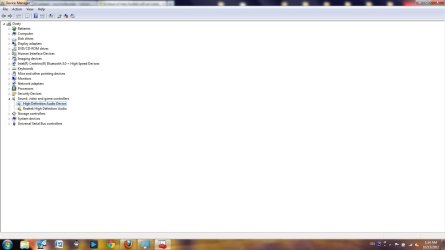
Here is a photo of what you're looking for.


As I mentioned early I had to add the Realtek hardware into the Sound, Video and Game controller category. I do remember that I had a problem similar to this, but in that case all I did was reinstalled a realtek driver and it worked.
Originally what was left when I first discovered this problem was Intel(R) Audio Display. It is now labeled as High Def Audio Device if that's any help.
 

Attachments

  • Sound,Video and Game controllers.jpg
    Sound,Video and Game controllers.jpg
    56.4 KB · Views: 27

My Computer My Computer

At a glance

Windows 7 pro x64
Computer Manufacturer/Model Number
vpcsa390x
OS
Windows 7 pro x64
Yes I have checked to see if Windows audio was set to automatic. Even when I do attempt to have windows automatically install the drivers they still inevitably fail.
 

My Computer My Computer

At a glance

Windows 7 pro x64
Computer Manufacturer/Model Number
vpcsa390x
OS
Windows 7 pro x64
Here is a photo of what you're looking for.


As I mentioned early I had to add the Realtek hardware into the Sound, Video and Game controller category. I do remember that I had a problem similar to this, but in that case all I did was reinstalled a realtek driver and it worked.
Originally what was left when I first discovered this problem was Intel(R) Audio Display. It is now labeled as High Def Audio Device if that's any help.
OK. Can you refer back to my previous post and provide the IDs for both items shown?
 

My Computer My Computer

At a glance

Windows 8.1 Pro RTM x64Intel Core-i5-3570K 4-core @ 3.4GHz (Ivy Brid...4 x 4GB DDR3-1600 Corsair Vengeance CMZ8GX3M2...MSI GeForce GTX770 Gaming OC 2GB
Computer type
PC/Desktop
Computer Manufacturer/Model Number
Dwarf Dwf/11/2012 r09/2013
OS
Windows 8.1 Pro RTM x64
CPU
Intel Core-i5-3570K 4-core @ 3.4GHz (Ivy Bridge) (OC 4.4GHz)
Motherboard
ASRock Z77 Extreme4-M
Memory
4 x 4GB DDR3-1600 Corsair Vengeance CMZ8GX3M2A1600C9B (16GB)
Graphics Card(s)
MSI GeForce GTX770 Gaming OC 2GB
Sound Card
Realtek High Definition on board solution (ALC 898)
Monitor(s) Displays
ViewSonic VA1912w Widescreen (VGA)
Screen Resolution
1440x900
Hard Drives
OCZ Agility 3 SSD 120GB SATA III x2 (RAID 0)
Samsung HD501LJ 500GB SATA II x2
Hitachi HDS721010CLA332 1TB SATA II
Iomega 1.5TB Ext USB 2.0
WD 2.0TB Ext USB 3.0
PSU
XFX Pro Series 850W Semi-Modular
Case
Gigabyte IF233
Cooling
1 x 120mm Front Inlet 1 x 120mm Rear Exhaust
Keyboard
Microsoft Comfort Curve Keyboard 3000 (USB)
Mouse
Microsoft Comfort Mouse 3000 for Business (USB)
Internet Speed
NetGear DG834Gv3 ADSL Modem/Router (Ethernet) ~4.0 Mb/s (O2)
Antivirus
Avast! 8.0.1497
Browser
IE 11
Other Info
Optical Drive: HL-DT-ST BD-RE BH10LS30 SATA Bluray
Lexmark S305 Printer/Scanner/Copier (USB)
WEI Score: 8.1/8.1/8.5/8.5/8.25
Asus Eee PC 1011PX Netbook (Windows 7 x86 Starter)
Uninstall the driver from the Device Manager. Reinstall it.
This may be one of those situations where you can only use the original driver.
Download it from Sony.
Sony eSupport - VPCSA390X - Support
 

My Computer My Computer

At a glance

Windows 7 Home Premium 64 bitIntel Core i7-4790G.SKILL 8GB (2 x 4GB) DDR3 F3-10666CL9D-8GBNTAMD Radeon R7 250
Computer type
PC/Desktop
Computer Manufacturer/Model Number
Custom Build
OS
Windows 7 Home Premium 64 bit
CPU
Intel Core i7-4790
Motherboard
GA-Z87X-D3H
Memory
G.SKILL 8GB (2 x 4GB) DDR3 F3-10666CL9D-8GBNT
Graphics Card(s)
AMD Radeon R7 250
Sound Card
Realtek ALC892
Monitor(s) Displays
Samsung UN32EH5000, Dell 1703FPT
Screen Resolution
1920 x 1080, 1280 x 1024
Hard Drives
WD5003AZEX
WD10EZEX
Samsung HD103SJ
Samsung 128 GB 840 PRO
PSU
SeaSonic M12II SS-500GM
Case
Fractal Design Define R4
Cooling
Zalman CNPS9900ALED
Keyboard
Logitech K800
Mouse
Logitech M705
Internet Speed
16 Mbps
Antivirus
Avast
Browser
Firefox
Other Info
Bose Companion 2 Multimedia Speakers
The other "High Definition Audio Device" is for Intel audio.
You can install the AMD Radeon™ HD 6470M / 6630M and Intel® HD Graphics Family Driver to add "Intel Display Audio driver 6.14.0.3074".

You can then install the AMD Radeon™ HD 6470M / 6630M and Intel® HD Graphics 3000 Update, if you like.

Those drivers can be downloaded from the same link, under Video.
 

My Computer My Computer

At a glance

Windows 7 Home Premium 64 bitIntel Core i7-4790G.SKILL 8GB (2 x 4GB) DDR3 F3-10666CL9D-8GBNTAMD Radeon R7 250
Computer type
PC/Desktop
Computer Manufacturer/Model Number
Custom Build
OS
Windows 7 Home Premium 64 bit
CPU
Intel Core i7-4790
Motherboard
GA-Z87X-D3H
Memory
G.SKILL 8GB (2 x 4GB) DDR3 F3-10666CL9D-8GBNT
Graphics Card(s)
AMD Radeon R7 250
Sound Card
Realtek ALC892
Monitor(s) Displays
Samsung UN32EH5000, Dell 1703FPT
Screen Resolution
1920 x 1080, 1280 x 1024
Hard Drives
WD5003AZEX
WD10EZEX
Samsung HD103SJ
Samsung 128 GB 840 PRO
PSU
SeaSonic M12II SS-500GM
Case
Fractal Design Define R4
Cooling
Zalman CNPS9900ALED
Keyboard
Logitech K800
Mouse
Logitech M705
Internet Speed
16 Mbps
Antivirus
Avast
Browser
Firefox
Other Info
Bose Companion 2 Multimedia Speakers
Uninstall the driver from the Device Manager. Reinstall it.
This may be one of those situations where you can only use the original driver.
Download it from Sony.
Sony eSupport - VPCSA390X - Support

Like I mentioned I have already reinstalled it and downloaded from the Sony's support page the exact driver required It does not show up on my Device manager I would have to manually add the Realtek driver which then gives me the error.
 

My Computer My Computer

At a glance

Windows 7 pro x64
Computer Manufacturer/Model Number
vpcsa390x
OS
Windows 7 pro x64
Hi CrunchyThunder and welcome to W7 Forums :party:

Unfortunately, I cannot ascertain whether you have Realtek audio or some other audio device (other than the HDMI output, which, as you say, is working). A quick search on the model number, vcpsa 390x, reveals it to be a Sony laptop, however no audio information is available.

With reference to http://www.sevenforums.com/tutorials/73420-hardware-identification.html, can you supply the information shown in RED and BLUE for each item shown in the Sound, video and game controllers category.

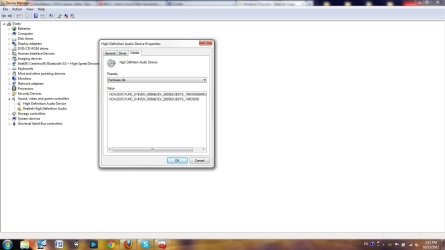
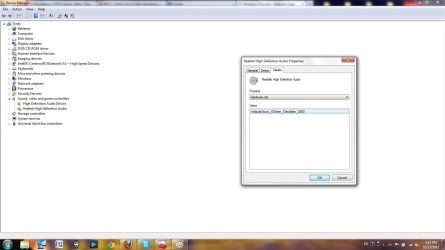
I may have given you the wrong photo sorry.

Hardware Id's 1.jpg

Hardware Id's 2.jpg
 

My Computer My Computer

At a glance

Windows 7 pro x64
Computer Manufacturer/Model Number
vpcsa390x
OS
Windows 7 pro x64
Uninstall the driver from the Device Manager. Reinstall it.
This may be one of those situations where you can only use the original driver.
Download it from Sony.
Sony eSupport - VPCSA390X - Support

Like I mentioned I have already reinstalled it and downloaded from the Sony's support page the exact driver required It does not show up on my Device manager I would have to manually add the Realtek driver which then gives me the error.

Hopefully you're getting what I'm saying. Uninstall or delete the device from the Device Manager. Restart. Windows will install a driver or try to. You can then install the driver from the Sony page.

If you've done it that way, then disregard this post.
 

My Computer My Computer

At a glance

Windows 7 Home Premium 64 bitIntel Core i7-4790G.SKILL 8GB (2 x 4GB) DDR3 F3-10666CL9D-8GBNTAMD Radeon R7 250
Computer type
PC/Desktop
Computer Manufacturer/Model Number
Custom Build
OS
Windows 7 Home Premium 64 bit
CPU
Intel Core i7-4790
Motherboard
GA-Z87X-D3H
Memory
G.SKILL 8GB (2 x 4GB) DDR3 F3-10666CL9D-8GBNT
Graphics Card(s)
AMD Radeon R7 250
Sound Card
Realtek ALC892
Monitor(s) Displays
Samsung UN32EH5000, Dell 1703FPT
Screen Resolution
1920 x 1080, 1280 x 1024
Hard Drives
WD5003AZEX
WD10EZEX
Samsung HD103SJ
Samsung 128 GB 840 PRO
PSU
SeaSonic M12II SS-500GM
Case
Fractal Design Define R4
Cooling
Zalman CNPS9900ALED
Keyboard
Logitech K800
Mouse
Logitech M705
Internet Speed
16 Mbps
Antivirus
Avast
Browser
Firefox
Other Info
Bose Companion 2 Multimedia Speakers
Uninstall the driver from the Device Manager. Reinstall it.
This may be one of those situations where you can only use the original driver.
Download it from Sony.
Sony eSupport - VPCSA390X - Support

Like I mentioned I have already reinstalled it and downloaded from the Sony's support page the exact driver required It does not show up on my Device manager I would have to manually add the Realtek driver which then gives me the error.

Hopefully you're getting what I'm saying. Uninstall or delete the device from the Device Manager. Restart. Windows will install a driver or try to. You can then install the driver from the Sony page.

If you've done it that way, then disregard this post.


Yea I have done exactly what you instructed. Windows does not automatically download Realtek for me instead Intel(R) Audio display. I appreciate the help though thank you.
 

My Computer My Computer

At a glance

Windows 7 pro x64
Computer Manufacturer/Model Number
vpcsa390x
OS
Windows 7 pro x64
Back
Top