In need of simplified install instructions for SSD (please read).

Well done, enjoy the time-off! ;)


Here's a start for tomorrow.

You can always extend the Windows partition to include the remaining unallocated space on the HDD / SSD or create additional Primary partitions or an Extended partition after the installation completes if you choose.
 

My Computer My Computer

At a glance

W 7 64-bit UltimateIntel Q9550 Yorkfield8GB Dominator 8500C5DATI : XFX 5870
Computer Manufacturer/Model Number
* BFK Customs *
OS
W 7 64-bit Ultimate
CPU
Intel Q9550 Yorkfield
Motherboard
ASUS P5Q Pro
Memory
8GB Dominator 8500C5D
Graphics Card(s)
ATI : XFX 5870
Sound Card
Realtek HD Audio 7-1
Monitor(s) Displays
1x 47" LCD HDMI & 3x 26" LCD HDMI
Screen Resolution
1920x1080P & 1920x1200
Hard Drives
1x 80GB Intel X25-M G2 SSD : 1x 500GB & 1x 640GB WD Caviar Black(s)
PSU
Corsair 620HX
Case
Cooler Master RC-690
Cooling
Tuniq Tower 120, 2x 140mm and 3x 120mm case fans
Keyboard
Microsoft 500
Mouse
Razer Diamondback 3G
Internet Speed
14 Mb/s
Other Info
1x Koutech 3Gb/s SATA HDD Hot Swap Rack
Glad you have it the way you want it. Go play some games and enjoy it.

I can't yet, unfortunately. The GPU was faulty Awaiting a collection of this one, and then a replacement to arrive. On-board graphics at the moment! Still, got a few little ones that'll run on on-board graphics if I do bet bored on this very uneventful Sunday :)

Well done, enjoy the time-off! ;)


Here's a start for tomorrow.

You can always extend the Windows partition to include the remaining unallocated space on the HDD / SSD or create additional Primary partitions or an Extended partition after the installation completes if you choose.

Okay, question time! I may have asked these before, but I've lost track of what I have and havn't asked, so I'm gonna start fresh it to get all the information I feel I need.

So, why would someone want to create partitions in the first place? Is there a reason why the full size of the SSD or HDD can't be one big partition, as opposed to two or three smaller ones?

Also, to Steve. I recall you saying to leave Program Files and Program Files (x86) on the SSD, but move all the user folders (Documents, Music, Videos etc.) to the HDD. What if I wanted to install a program on the HDD?

Did you just mean it in a way that I can create my own Program Files folder on the HDD, but not to move the current Program Files folder from the SSD with all it's contents to the HDD? So I can have a Program Files folder on each, and install those I want on the SSD to teh SSD, and those I want on the HDD to the HDD?

Thanks again guys :)
 

My Computer My Computer

At a glance

Windows 7 Home Premium 64bit.Intel i5 2500kG Skill Ripjaws X 8GBEVGA GTX 580
OS
Windows 7 Home Premium 64bit.
CPU
Intel i5 2500k
Motherboard
ASRock Z68 Extreme4
Memory
G Skill Ripjaws X 8GB
Graphics Card(s)
EVGA GTX 580
Hard Drives
OCZ Vertex 2 60GB SSD
Samsung Spinpoint F3 1TB HDD
PSU
Seasonic X Series 760W
Case
Cooler Master HAF X
Cooling
Noctua NH-D14
Okay, question time! I may have asked these before, but I've lost track of what I have and havn't asked, so I'm gonna start fresh it to get all the information I feel I need.

So, why would someone want to create partitions in the first place? Is there a reason why the full size of the SSD or HDD can't be one big partition, as opposed to two or three smaller ones?

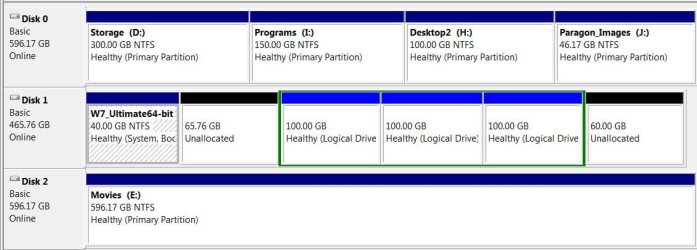
A picture is worth a thousand words, it is a very good practice, along with current backups, that personal data be compartmentalized to help protect against loss, here is my HDD layout but what works for me may not work for you.


click to enlarge
333.JPG
 

My Computer My Computer

At a glance

W 7 64-bit UltimateIntel Q9550 Yorkfield8GB Dominator 8500C5DATI : XFX 5870
Computer Manufacturer/Model Number
* BFK Customs *
OS
W 7 64-bit Ultimate
CPU
Intel Q9550 Yorkfield
Motherboard
ASUS P5Q Pro
Memory
8GB Dominator 8500C5D
Graphics Card(s)
ATI : XFX 5870
Sound Card
Realtek HD Audio 7-1
Monitor(s) Displays
1x 47" LCD HDMI & 3x 26" LCD HDMI
Screen Resolution
1920x1080P & 1920x1200
Hard Drives
1x 80GB Intel X25-M G2 SSD : 1x 500GB & 1x 640GB WD Caviar Black(s)
PSU
Corsair 620HX
Case
Cooler Master RC-690
Cooling
Tuniq Tower 120, 2x 140mm and 3x 120mm case fans
Keyboard
Microsoft 500
Mouse
Razer Diamondback 3G
Internet Speed
14 Mb/s
Other Info
1x Koutech 3Gb/s SATA HDD Hot Swap Rack
So, why would someone want to create partitions in the first place? Is there a reason why the full size of the SSD or HDD can't be one big partition, as opposed to two or three smaller ones?


Thanks again guys :)

A hard drive can't be used until it has a partition.

Worldwide, I'm pretty sure most drives have a partition that contains both the OS and data. Users then just organize their data with a folder structure in that single partition.

The conventional wisdom on this forum is to make at least 2 partitions, so you can put the OS on one and just your data on another.

That's what I do, but I'm not a hard-core believer in it. Nothing wrong with a single partition that I can see. If your hard drive fails, you lose all of its partitions. If you have to restore Windows, you can do so regardless of the number of partitions you have. Any sane user has separate backups of all data on an entirely separate hard drive anyway. Separate partitions might save a little time in some situations.

It's one of those never-ending arguments like defragging and swap files. When the smoke clears, it's mostly personal preference, habit, and dogma. Discussing it rarely leads to any changed minds.
 

My Computer My Computer

At a glance

Windows 7 Home Premium SP1, 64-bitIntel Skylake i5-6600K, not overclocked8 GB HyperX DDR4-2666 (2 x 4 GB)none; graphics are integrated on CPU
Computer type
PC/Desktop
Computer Manufacturer/Model Number
Ignatz Special; 4 speed manual gearbox; factory air conditioning; one of one
OS
Windows 7 Home Premium SP1, 64-bit
CPU
Intel Skylake i5-6600K, not overclocked
Motherboard
AsRock Z170M Extreme 4, micro ATX
Memory
8 GB HyperX DDR4-2666 (2 x 4 GB)
Graphics Card(s)
none; graphics are integrated on CPU
Sound Card
onboard: Realtek ALC1150; external: USB Behringer UF0-202
Monitor(s) Displays
Dell S2340M 23 inch IPS
Screen Resolution
1600 x 900
Hard Drives
System: Crucial MX100 series SSD, 128 GB;
Data: Samsung Spinpoint 103SJ, 1 TB;
Backup: WD Caviar Green WD30EZRX-00D8PB0, 3 TB
PSU
Rosewill SilentNight 500 watt fanless, semi-modular
Case
Antec Solo II
Cooling
Noctua NH-U12S; Noctua F12 intake, Noctua S12A exhaust
Keyboard
Microsoft 200 6JH-00001 USB
Mouse
Dell or Microsoft optical wired; USB
Antivirus
Microsoft Security Essentials and Malwarebytes Premium
Browser
Pale Moon
Other Info
All fans PWM; speeds at idle: CPU circa 500 rpm; intake circa 600 rpm; exhaust circa 600 rpm; CPU temps 27 idle and 47 C load in a warm room (27 C/81 F) when running Intel Extreme Tuning Utility stress test.
User Folders Change locations
Another User folders change locations

The Program files folder and Program Files X86 folder are an integral part os the OS and must stay on the OS. I have rarely installed a program to another hard drive so maybe someone else will help. The times that I have, I simply created a folder and named it the name of the program. During the install process, most of the time you have an option of where to install the program. I navigate to the new folder I created on the HDD and install it there. I have not had any problems doing it that way, but again have only done it a few times.

When you move the user folders, create a file on the hard drive called Users. Within that file, create another file named your user name. Navigate to C/users. open that folder. you will see your user name, Public, any other users you have set up and may see a default file. You are only going to move your user name folders to the new location. I just open up the folder C/users/my username and copy that to the other hard drive E/users/my username open my username folder I created and paste them there. Now, when you go to move the individual folers in C/Users/your user name/my Documents you will have a folder by the same name on the other hard drive to move it to. The public folder in C/users is used to keep the folders you have shared with others. normally, if you are not a member of a group and have not shared folders with that group, the public folder will have little to nothing in it. You can go through the same process to move public folders to the other HD.

I hope I answered you questions and explained it clearly. If not, those links should do a better job. The short explanation is you want to move the folder C/user/bret/my music to E/user/bret/my music. and the same for each folder you move.
 

My Computers My Computers

  • At a glance

    Windows 11 ProRyzen 9 5900X32GB G Skill DDR4-3600EVGA RTX 3080 FTW 3 Ultra
    Computer type
    PC/Desktop
    Computer Manufacturer/Model Number
    ALWAYS UNDER CONSTRUCTION
    OS
    Windows 11 Pro
    CPU
    Ryzen 9 5900X
    Motherboard
    Asus X570 Crosshair Viii Hero
    Memory
    32GB G Skill DDR4-3600
    Graphics Card(s)
    EVGA RTX 3080 FTW 3 Ultra
    Sound Card
    On Board/Sennheiser PC37X Headset
    Monitor(s) Displays
    3 X Asus 27"
    Screen Resolution
    2560x1440
    Hard Drives
    2 X 1 TB NVME drives
    PSU
    EVGA 850
    Case
    Phanteks Eclipse P400A
    Cooling
    EVGA 280 AIO
    Keyboard
    Logitech G510s/ Logitech G13
    Mouse
    Logitech G502
    Internet Speed
    24/1
    Antivirus
    ESET/MBAM Pro/SAS Pro
    Browser
    Chrome/ Firefox/ Edge
  • At a glance

    Windows 11 ProIntel Ultra 9 288V32 GB LPDDR5X 8533
    Computer type
    Laptop
    System Manufacturer/Model Number
    Dell 16 Plus
    OS
    Windows 11 Pro
    CPU
    Intel Ultra 9 288V
    Memory
    32 GB LPDDR5X 8533
    Monitor(s) Displays
    16" Mini-LED HDR600 Touch 90 Hz
    Screen Resolution
    2560X1600
    Hard Drives
    1 TB NVME
Teds explanation was very good. He is right, a picture is worth a 1000 words. From looking at it, he uses partitions to seperate different things and serves as a good example of the reason for partitions.
 

My Computers My Computers

  • At a glance

    Windows 11 ProRyzen 9 5900X32GB G Skill DDR4-3600EVGA RTX 3080 FTW 3 Ultra
    Computer type
    PC/Desktop
    Computer Manufacturer/Model Number
    ALWAYS UNDER CONSTRUCTION
    OS
    Windows 11 Pro
    CPU
    Ryzen 9 5900X
    Motherboard
    Asus X570 Crosshair Viii Hero
    Memory
    32GB G Skill DDR4-3600
    Graphics Card(s)
    EVGA RTX 3080 FTW 3 Ultra
    Sound Card
    On Board/Sennheiser PC37X Headset
    Monitor(s) Displays
    3 X Asus 27"
    Screen Resolution
    2560x1440
    Hard Drives
    2 X 1 TB NVME drives
    PSU
    EVGA 850
    Case
    Phanteks Eclipse P400A
    Cooling
    EVGA 280 AIO
    Keyboard
    Logitech G510s/ Logitech G13
    Mouse
    Logitech G502
    Internet Speed
    24/1
    Antivirus
    ESET/MBAM Pro/SAS Pro
    Browser
    Chrome/ Firefox/ Edge
  • At a glance

    Windows 11 ProIntel Ultra 9 288V32 GB LPDDR5X 8533
    Computer type
    Laptop
    System Manufacturer/Model Number
    Dell 16 Plus
    OS
    Windows 11 Pro
    CPU
    Intel Ultra 9 288V
    Memory
    32 GB LPDDR5X 8533
    Monitor(s) Displays
    16" Mini-LED HDR600 Touch 90 Hz
    Screen Resolution
    2560X1600
    Hard Drives
    1 TB NVME
So, why would someone want to create partitions in the first place? Is there a reason why the full size of the SSD or HDD can't be one big partition, as opposed to two or three smaller ones?


Thanks again guys :)

A hard drive can't be used until it has a partition.

Worldwide, I'm pretty sure most drives have a partition that contains both the OS and data. Users then just organize their data with a folder structure in that single partition.

The conventional wisdom on this forum is to make at least 2 partitions, so you can put the OS on one and just your data on another.

That's what I do, but I'm not a hard-core believer in it. Nothing wrong with a single partition that I can see. If your hard drive fails, you lose all of its partitions. If you have to restore Windows, you can do so regardless of the number of partitions you have. Any sane user has separate backups of all data on an entirely separate hard drive anyway. Separate partitions might save a little time in some situations.

It's one of those never-ending arguments like defragging and swap files. When the smoke clears, it's mostly personal preference, habit, and dogma. Discussing it rarely leads to any changed minds.
You are certainly right. It is a personal preference whether you seperate the data from the OS or not.

I do it mainly because the backup cycle for my data is different than for my system. I make frequent changes to my system but hardly ever add or delete any of my data, Thus I image the system more frequently than my data. The images are smaller too when they are in seperate partitions..
For other people it may be just the other way around. So the data needs to be backed up more frequently.

I do leave, however, the standard user folders that come with the system in the OS partition. For my own data I define new folders on the data partition and Include those into the respective libraries. The reason for that approach is because many programs need e.g. the Documents folder as a repository for their own files. Examples are Macrium, Norton, Format Factory and others. So those do not get mixed into my own folders and will be imaged with the system.

So yes, seperating my own data from the OS is a personal preference, but for a number of good reasons.
 

My Computer My Computer

At a glance

Vista, Windows7, Mint Mate, Zorin, Windows 8from 1.6GHz Duo to i7
Computer Manufacturer/Model Number
HP, Dell, Gateway, Toshiba - 4 laptops and 2 desktops
OS
Vista, Windows7, Mint Mate, Zorin, Windows 8
CPU
from 1.6GHz Duo to i7
Monitor(s) Displays
2x HP w2207
Hard Drives
5x HDD, 7x SSD, 12x Externals
Keyboard
with trackball - no mices
Mouse
Trackball mice
Internet Speed
DSL 6000
Okay, question time! I may have asked these before, but I've lost track of what I have and havn't asked, so I'm gonna start fresh it to get all the information I feel I need.

So, why would someone want to create partitions in the first place? Is there a reason why the full size of the SSD or HDD can't be one big partition, as opposed to two or three smaller ones?

A picture is worth a thousand words, it is a very good practice, along with current backups, that personal data be compartmentalized to help protect against loss, here is my HDD layout but what works for me may not work for you.

click to enlarge
View attachment 160562

So, organization? Couldn't you have done that anyway on one big partition with folders?

So, why would someone want to create partitions in the first place? Is there a reason why the full size of the SSD or HDD can't be one big partition, as opposed to two or three smaller ones?


Thanks again guys :)

A hard drive can't be used until it has a partition.

Worldwide, I'm pretty sure most drives have a partition that contains both the OS and data. Users then just organize their data with a folder structure in that single partition.

The conventional wisdom on this forum is to make at least 2 partitions, so you can put the OS on one and just your data on another.

That's what I do, but I'm not a hard-core believer in it. Nothing wrong with a single partition that I can see. If your hard drive fails, you lose all of its partitions. If you have to restore Windows, you can do so regardless of the number of partitions you have. Any sane user has separate backups of all data on an entirely separate hard drive anyway. Separate partitions might save a little time in some situations.

It's one of those never-ending arguments like defragging and swap files. When the smoke clears, it's mostly personal preference, habit, and dogma. Discussing it rarely leads to any changed minds.

Right. So that sounds like something I'd like to do for the SSD. One partition for the OS, and one for any programs I do install on the SSD. But looking at my partitions, I have this right now:

29z7m7b.png


Can you give me a quick rundown of what the 'System Reserved 100MB NTFS' part is? And the OS, that's on the remaining 58.50GB right? Is there no way to put the OS into a partition now, or is that something that should have been done before the install?

Also, I don't have another storage device to make a backup on yet. So what I could do when I have everything where I want it is make a backup of everything in it's current form on the SSD onto a partition on the HDD just incase the SSD ever fails, right? I'll pick up a small external HDD another time then for backups.
 

My Computer My Computer

At a glance

Windows 7 Home Premium 64bit.Intel i5 2500kG Skill Ripjaws X 8GBEVGA GTX 580
OS
Windows 7 Home Premium 64bit.
CPU
Intel i5 2500k
Motherboard
ASRock Z68 Extreme4
Memory
G Skill Ripjaws X 8GB
Graphics Card(s)
EVGA GTX 580
Hard Drives
OCZ Vertex 2 60GB SSD
Samsung Spinpoint F3 1TB HDD
PSU
Seasonic X Series 760W
Case
Cooler Master HAF X
Cooling
Noctua NH-D14
So that sounds like something I'd like to do for the SSD. One partition for the OS, and one for any programs I do install on the SSD.
I fail to see what you are trying to accomplish with that. Moving the programs to another partition will just complicate your life. E,g. when you image, you always have to image 2 partitions - and for the restore it is the same. I would leave the programs with the OS.

The 100MB system reserved partition contains your bootmgr. Do not touch it because else you system will not boot any more. If you image with Macrium, I recommend to image it only once and put it into a seperate folder - just in case. With a system restore of the C partition, you usually need not restore the 100MB partition. But make sure that you do NOT mark the C partition as "active" during the restore.

An external disk is essential. Buy one asap - minimum 500GB. In the interim you can image to your HDD. Once you have the external disk, alternate the images between the external and the HDD. That gives you extra security.
 

My Computer My Computer

At a glance

Vista, Windows7, Mint Mate, Zorin, Windows 8from 1.6GHz Duo to i7
Computer Manufacturer/Model Number
HP, Dell, Gateway, Toshiba - 4 laptops and 2 desktops
OS
Vista, Windows7, Mint Mate, Zorin, Windows 8
CPU
from 1.6GHz Duo to i7
Monitor(s) Displays
2x HP w2207
Hard Drives
5x HDD, 7x SSD, 12x Externals
Keyboard
with trackball - no mices
Mouse
Trackball mice
Internet Speed
DSL 6000
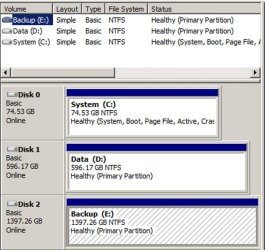
Few people would advise you to put your programs and OS on separate partitions. No reason for it. Put your programs on C with the OS.

I think that little 100 mb system partition contains your boot files. That's a standard thing that you normally get with Win 7. It can be avoided if you use diskpart during the installation. See my disk management below. My boot files are on C because I used diskpart to avoid that little system partition. It's no big deal. Your way works fine.

No reason you can't make an image of C and put it on D. That's what I have done. You don't need a separate small external HDD.
 

Attachments

  • Untitled-1.jpg
    Untitled-1.jpg
    81.5 KB · Views: 2

My Computer My Computer

At a glance

Windows 7 Home Premium SP1, 64-bitIntel Skylake i5-6600K, not overclocked8 GB HyperX DDR4-2666 (2 x 4 GB)none; graphics are integrated on CPU
Computer type
PC/Desktop
Computer Manufacturer/Model Number
Ignatz Special; 4 speed manual gearbox; factory air conditioning; one of one
OS
Windows 7 Home Premium SP1, 64-bit
CPU
Intel Skylake i5-6600K, not overclocked
Motherboard
AsRock Z170M Extreme 4, micro ATX
Memory
8 GB HyperX DDR4-2666 (2 x 4 GB)
Graphics Card(s)
none; graphics are integrated on CPU
Sound Card
onboard: Realtek ALC1150; external: USB Behringer UF0-202
Monitor(s) Displays
Dell S2340M 23 inch IPS
Screen Resolution
1600 x 900
Hard Drives
System: Crucial MX100 series SSD, 128 GB;
Data: Samsung Spinpoint 103SJ, 1 TB;
Backup: WD Caviar Green WD30EZRX-00D8PB0, 3 TB
PSU
Rosewill SilentNight 500 watt fanless, semi-modular
Case
Antec Solo II
Cooling
Noctua NH-U12S; Noctua F12 intake, Noctua S12A exhaust
Keyboard
Microsoft 200 6JH-00001 USB
Mouse
Dell or Microsoft optical wired; USB
Antivirus
Microsoft Security Essentials and Malwarebytes Premium
Browser
Pale Moon
Other Info
All fans PWM; speeds at idle: CPU circa 500 rpm; intake circa 600 rpm; exhaust circa 600 rpm; CPU temps 27 idle and 47 C load in a warm room (27 C/81 F) when running Intel Extreme Tuning Utility stress test.
User Folders Change locations
Another User folders change locations

The Program files folder and Program Files X86 folder are an integral part os the OS and must stay on the OS. I have rarely installed a program to another hard drive so maybe someone else will help. The times that I have, I simply created a folder and named it the name of the program. During the install process, most of the time you have an option of where to install the program. I navigate to the new folder I created on the HDD and install it there. I have not had any problems doing it that way, but again have only done it a few times.

When you move the user folders, create a file on the hard drive called Users. Within that file, create another file named your user name. Navigate to C/users. open that folder. you will see your user name, Public, any other users you have set up and may see a default file. You are only going to move your user name folders to the new location. I just open up the folder C/users/my username and copy that to the other hard drive E/users/my username open my username folder I created and paste them there. Now, when you go to move the individual folers in C/Users/your user name/my Documents you will have a folder by the same name on the other hard drive to move it to. The public folder in C/users is used to keep the folders you have shared with others. normally, if you are not a member of a group and have not shared folders with that group, the public folder will have little to nothing in it. You can go through the same process to move public folders to the other HD.

I hope I answered you questions and explained it clearly. If not, those links should do a better job. The short explanation is you want to move the folder C/user/bret/my music to E/user/bret/my music. and the same for each folder you move.

So, why would someone want to create partitions in the first place? Is there a reason why the full size of the SSD or HDD can't be one big partition, as opposed to two or three smaller ones?


Thanks again guys :)

A hard drive can't be used until it has a partition.

Worldwide, I'm pretty sure most drives have a partition that contains both the OS and data. Users then just organize their data with a folder structure in that single partition.

The conventional wisdom on this forum is to make at least 2 partitions, so you can put the OS on one and just your data on another.

That's what I do, but I'm not a hard-core believer in it. Nothing wrong with a single partition that I can see. If your hard drive fails, you lose all of its partitions. If you have to restore Windows, you can do so regardless of the number of partitions you have. Any sane user has separate backups of all data on an entirely separate hard drive anyway. Separate partitions might save a little time in some situations.

It's one of those never-ending arguments like defragging and swap files. When the smoke clears, it's mostly personal preference, habit, and dogma. Discussing it rarely leads to any changed minds.
You are certainly right. It is a personal preference whether you seperate the data from the OS or not.

I do it mainly because the backup cycle for my data is different than for my system. I make frequent changes to my system but hardly ever add or delete any of my data, Thus I image the system more frequently than my data. The images are smaller too when they are in seperate partitions..
For other people it may be just the other way around. So the data needs to be backed up more frequently.

I do leave, however, the standard user folders that come with the system in the OS partition. For my own data I define new folders on the data partition and Include those into the respective libraries. The reason for that approach is because many programs need e.g. the Documents folder as a repository for their own files. Examples are Macrium, Norton, Format Factory and others. So those do not get mixed into my own folders and will be imaged with the system.

So yes, seperating my own data from the OS is a personal preference, but for a number of good reasons.

Between these two quotes, I understand this better now. So I actually know what I need to do here, even without explanation.

Cheers guys :D
 

My Computer My Computer

At a glance

Windows 7 Home Premium 64bit.Intel i5 2500kG Skill Ripjaws X 8GBEVGA GTX 580
OS
Windows 7 Home Premium 64bit.
CPU
Intel i5 2500k
Motherboard
ASRock Z68 Extreme4
Memory
G Skill Ripjaws X 8GB
Graphics Card(s)
EVGA GTX 580
Hard Drives
OCZ Vertex 2 60GB SSD
Samsung Spinpoint F3 1TB HDD
PSU
Seasonic X Series 760W
Case
Cooler Master HAF X
Cooling
Noctua NH-D14
WHS and ignatzatsonic, I think what is concerning him is he has a lot of games that won't fit on his SSD. Correct me if I am wrong Bret. I see no problem with installing games on the data drive. How you do it is your preference. You can make a seperate partition for them or you can have 1 partition on the data drive and seperate everything with folders. Is that correct guys?
 

My Computers My Computers

  • At a glance

    Windows 11 ProRyzen 9 5900X32GB G Skill DDR4-3600EVGA RTX 3080 FTW 3 Ultra
    Computer type
    PC/Desktop
    Computer Manufacturer/Model Number
    ALWAYS UNDER CONSTRUCTION
    OS
    Windows 11 Pro
    CPU
    Ryzen 9 5900X
    Motherboard
    Asus X570 Crosshair Viii Hero
    Memory
    32GB G Skill DDR4-3600
    Graphics Card(s)
    EVGA RTX 3080 FTW 3 Ultra
    Sound Card
    On Board/Sennheiser PC37X Headset
    Monitor(s) Displays
    3 X Asus 27"
    Screen Resolution
    2560x1440
    Hard Drives
    2 X 1 TB NVME drives
    PSU
    EVGA 850
    Case
    Phanteks Eclipse P400A
    Cooling
    EVGA 280 AIO
    Keyboard
    Logitech G510s/ Logitech G13
    Mouse
    Logitech G502
    Internet Speed
    24/1
    Antivirus
    ESET/MBAM Pro/SAS Pro
    Browser
    Chrome/ Firefox/ Edge
  • At a glance

    Windows 11 ProIntel Ultra 9 288V32 GB LPDDR5X 8533
    Computer type
    Laptop
    System Manufacturer/Model Number
    Dell 16 Plus
    OS
    Windows 11 Pro
    CPU
    Intel Ultra 9 288V
    Memory
    32 GB LPDDR5X 8533
    Monitor(s) Displays
    16" Mini-LED HDR600 Touch 90 Hz
    Screen Resolution
    2560X1600
    Hard Drives
    1 TB NVME
WHS and ignatzatsonic, I think what is concerning him is he has a lot of games that won't fit on his SSD. Correct me if I am wrong Bret. I see no problem with installing games on the data drive. How you do it is your preference. You can make a seperate partition for them or you can have 1 partition on the data drive and seperate everything with folders. Is that correct guys?

I'm not a gamer and have never installed apps anywhere but C.

But I know it can be done for games, although I don't know the details.

Yeah--a 64 gig SSD is fairly small, so with a lot of games, you may need to put them on D. I don't know whether it is better to put them on D or to create an E partition for games only.
 

My Computer My Computer

At a glance

Windows 7 Home Premium SP1, 64-bitIntel Skylake i5-6600K, not overclocked8 GB HyperX DDR4-2666 (2 x 4 GB)none; graphics are integrated on CPU
Computer type
PC/Desktop
Computer Manufacturer/Model Number
Ignatz Special; 4 speed manual gearbox; factory air conditioning; one of one
OS
Windows 7 Home Premium SP1, 64-bit
CPU
Intel Skylake i5-6600K, not overclocked
Motherboard
AsRock Z170M Extreme 4, micro ATX
Memory
8 GB HyperX DDR4-2666 (2 x 4 GB)
Graphics Card(s)
none; graphics are integrated on CPU
Sound Card
onboard: Realtek ALC1150; external: USB Behringer UF0-202
Monitor(s) Displays
Dell S2340M 23 inch IPS
Screen Resolution
1600 x 900
Hard Drives
System: Crucial MX100 series SSD, 128 GB;
Data: Samsung Spinpoint 103SJ, 1 TB;
Backup: WD Caviar Green WD30EZRX-00D8PB0, 3 TB
PSU
Rosewill SilentNight 500 watt fanless, semi-modular
Case
Antec Solo II
Cooling
Noctua NH-U12S; Noctua F12 intake, Noctua S12A exhaust
Keyboard
Microsoft 200 6JH-00001 USB
Mouse
Dell or Microsoft optical wired; USB
Antivirus
Microsoft Security Essentials and Malwarebytes Premium
Browser
Pale Moon
Other Info
All fans PWM; speeds at idle: CPU circa 500 rpm; intake circa 600 rpm; exhaust circa 600 rpm; CPU temps 27 idle and 47 C load in a warm room (27 C/81 F) when running Intel Extreme Tuning Utility stress test.
WHS and ignatzatsonic, I think what is concerning him is he has a lot of games that won't fit on his SSD. Correct me if I am wrong Bret. I see no problem with installing games on the data drive. How you do it is your preference. You can make a seperate partition for them or you can have 1 partition on the data drive and seperate everything with folders. Is that correct guys?
OK, but even in that case I would make that an exception for only the really big games. 64GB is still a lot of room.

I would rather put the user data into a seperate partition on the HDD - as per the approach I explained above.
 

My Computer My Computer

At a glance

Vista, Windows7, Mint Mate, Zorin, Windows 8from 1.6GHz Duo to i7
Computer Manufacturer/Model Number
HP, Dell, Gateway, Toshiba - 4 laptops and 2 desktops
OS
Vista, Windows7, Mint Mate, Zorin, Windows 8
CPU
from 1.6GHz Duo to i7
Monitor(s) Displays
2x HP w2207
Hard Drives
5x HDD, 7x SSD, 12x Externals
Keyboard
with trackball - no mices
Mouse
Trackball mice
Internet Speed
DSL 6000
As long as you are aware that any games / programs / apps, whether installed to C: or another separate partition, will also have to be reinstalled if ever you reinstall the OS as they all write Windows registry entries and cannot be moved in any way once installed.
 

My Computer My Computer

At a glance

W 7 64-bit UltimateIntel Q9550 Yorkfield8GB Dominator 8500C5DATI : XFX 5870
Computer Manufacturer/Model Number
* BFK Customs *
OS
W 7 64-bit Ultimate
CPU
Intel Q9550 Yorkfield
Motherboard
ASUS P5Q Pro
Memory
8GB Dominator 8500C5D
Graphics Card(s)
ATI : XFX 5870
Sound Card
Realtek HD Audio 7-1
Monitor(s) Displays
1x 47" LCD HDMI & 3x 26" LCD HDMI
Screen Resolution
1920x1080P & 1920x1200
Hard Drives
1x 80GB Intel X25-M G2 SSD : 1x 500GB & 1x 640GB WD Caviar Black(s)
PSU
Corsair 620HX
Case
Cooler Master RC-690
Cooling
Tuniq Tower 120, 2x 140mm and 3x 120mm case fans
Keyboard
Microsoft 500
Mouse
Razer Diamondback 3G
Internet Speed
14 Mb/s
Other Info
1x Koutech 3Gb/s SATA HDD Hot Swap Rack
So that sounds like something I'd like to do for the SSD. One partition for the OS, and one for any programs I do install on the SSD.
I fail to see what you are trying to accomplish with that. Moving the programs to another partition will just complicate your life. E,g. when you image, you always have to image 2 partitions - and for the restore it is the same. I would leave the programs with the OS.

The 100MB system reserved partition contains your bootmgr. Do not touch it because else you system will not boot any more. If you image with Macrium, I recommend to image it only once and put it into a seperate folder - just in case. With a system restore of the C partition, you usually need not restore the 100MB partition. But make sure that you do NOT mark the C partition as "active" during the restore.

An external disk is essential. Buy one asap - minimum 500GB. In the interim you can image to your HDD. Once you have the external disk, alternate the images between the external and the HDD. That gives you extra security.

Few people would advise you to put your programs and OS on separate partitions. No reason for it. Put your programs on C with the OS.

I think that little 100 mb system partition contains your boot files. That's a standard thing that you normally get with Win 7. It can be avoided if you use diskpart during the installation. See my disk management below. My boot files are on C because I used diskpart to avoid that little system partition. It's no big deal. Your way works fine.

No reason you can't make an image of C and put it on D. That's what I have done. You don't need a separate small external HDD.

Ah okay. I'll just leave my SSD as is then. One big partition for the OS and a few choice apps. That was the primary reason for it anyway. Games and video files are going to be installed on the HDD. Games themselves these days can take quite a big of install space, then you factor in mods and such, it quickly mounts up. As for videos, a bit of light editing, and lots of FRAPS (which in itself can take up a ton of room in recorded video files).

That's pretty much my only uses for this computer. So I'd be fine as is then? OS and choice programs on one, games and videos on the HDD.
 

My Computer My Computer

At a glance

Windows 7 Home Premium 64bit.Intel i5 2500kG Skill Ripjaws X 8GBEVGA GTX 580
OS
Windows 7 Home Premium 64bit.
CPU
Intel i5 2500k
Motherboard
ASRock Z68 Extreme4
Memory
G Skill Ripjaws X 8GB
Graphics Card(s)
EVGA GTX 580
Hard Drives
OCZ Vertex 2 60GB SSD
Samsung Spinpoint F3 1TB HDD
PSU
Seasonic X Series 760W
Case
Cooler Master HAF X
Cooling
Noctua NH-D14
As long as you are aware that any games / programs / apps, whether installed to C: or another separate partition, will also have to be reinstalled if ever you reinstall the OS as they all write Windows registry entries and cannot be moved in any way once installed.

Yeah, I'm aware. Most of my games are retail on discs anyway, and the rest are digitial via Steam, so all can be reinstalled with no issues. But I shouldn't need to reinstall windows now for a long time (didn't need to once in the 4 years of using my last PC).
 

My Computer My Computer

At a glance

Windows 7 Home Premium 64bit.Intel i5 2500kG Skill Ripjaws X 8GBEVGA GTX 580
OS
Windows 7 Home Premium 64bit.
CPU
Intel i5 2500k
Motherboard
ASRock Z68 Extreme4
Memory
G Skill Ripjaws X 8GB
Graphics Card(s)
EVGA GTX 580
Hard Drives
OCZ Vertex 2 60GB SSD
Samsung Spinpoint F3 1TB HDD
PSU
Seasonic X Series 760W
Case
Cooler Master HAF X
Cooling
Noctua NH-D14
WHS and ignatzatsonic, I think what is concerning him is he has a lot of games that won't fit on his SSD. Correct me if I am wrong Bret. I see no problem with installing games on the data drive. How you do it is your preference. You can make a seperate partition for them or you can have 1 partition on the data drive and seperate everything with folders. Is that correct guys?

I'm not a gamer and have never installed apps anywhere but C.

But I know it can be done for games, although I don't know the details.

Yeah--a 64 gig SSD is fairly small, so with a lot of games, you may need to put them on D. I don't know whether it is better to put them on D or to create an E partition for games only.

You just choose the destination of the install files before hitting the 'install' button :)

As far as I'm aware, a lot of gamers use this approach. SSD for OS, HDD for games.
 

My Computer My Computer

At a glance

Windows 7 Home Premium 64bit.Intel i5 2500kG Skill Ripjaws X 8GBEVGA GTX 580
OS
Windows 7 Home Premium 64bit.
CPU
Intel i5 2500k
Motherboard
ASRock Z68 Extreme4
Memory
G Skill Ripjaws X 8GB
Graphics Card(s)
EVGA GTX 580
Hard Drives
OCZ Vertex 2 60GB SSD
Samsung Spinpoint F3 1TB HDD
PSU
Seasonic X Series 760W
Case
Cooler Master HAF X
Cooling
Noctua NH-D14
WHS and ignatzatsonic, I think what is concerning him is he has a lot of games that won't fit on his SSD. Correct me if I am wrong Bret. I see no problem with installing games on the data drive. How you do it is your preference. You can make a seperate partition for them or you can have 1 partition on the data drive and seperate everything with folders. Is that correct guys?
OK, but even in that case I would make that an exception for only the really big games. 64GB is still a lot of room.

I would rather put the user data into a seperate partition on the HDD - as per the approach I explained above.

Games can be really big these days! 15GB or so for some. Even more when factoring in mods :)
 

My Computer My Computer

At a glance

Windows 7 Home Premium 64bit.Intel i5 2500kG Skill Ripjaws X 8GBEVGA GTX 580
OS
Windows 7 Home Premium 64bit.
CPU
Intel i5 2500k
Motherboard
ASRock Z68 Extreme4
Memory
G Skill Ripjaws X 8GB
Graphics Card(s)
EVGA GTX 580
Hard Drives
OCZ Vertex 2 60GB SSD
Samsung Spinpoint F3 1TB HDD
PSU
Seasonic X Series 760W
Case
Cooler Master HAF X
Cooling
Noctua NH-D14
Back
Top