In-place upgrade?

ADG

New member
Local time
6:06 PM
Messages
9
I am a strong advocate of clean installs. Having said that, I have too many programs that would require reinstallation, so I'm seriously considering an in-place upgrade from Vista Ultimate 32 to Windows 7 Ultimate 32. I was wondering if anyone here has done this upgrade and can provide some inupt regarding how it went and whether or not there are any ensuing problems.

I'd rather not turn this into a discussion on the pros & cons of upgrade vs clean install. Just interested in hearing from folks who have done the upgrade. Thanks much.
 

My Computer

OS
Vista
I have heard horror stories that the process took hours, that it imported garbage from vista ... in short, it didnt save any time....
 

My Computer

Computer type
PC/Desktop
Computer Manufacturer/Model Number
LENOVO K450 @3.0GHZ
OS
64-bit Windows 8.1 Pro
CPU
Core(TM) i5 CPU 4330 Haswell @ 3.20GHz
Motherboard
LENOVO
Memory
12.00 GB
Graphics Card(s)
Intel(R) HD Graphics
Sound Card
Intel HD integtrated
Monitor(s) Displays
HP 25' ISP Monitor
Screen Resolution
1900/1020
Hard Drives
(1) ST1000DM003-1CH162 (2) Generic STORAGE DEVICE USB Device (3) Generic STORAGE DEVICE USB Device
Internet Speed
100mb down/10mb up
Thanks for the promopt response Tews

Still hope to hear from those who have done it first hand :)
 

My Computer

OS
Vista
Just as there have been horror stories, there have been plenty of accounts that it works fine as well.

Personally I would do a clean install. But that's because I don't have issues with quickly reinstalling my favorite apps.
 

My Computer

Computer Manufacturer/Model Number
Too many to list.
OS
XP, Seven, 2008R2
CPU
AMD, Intel, VIA
Motherboard
Various
Memory
Corsair, Kingston, etc.
Graphics Card(s)
ATI, NVIDIA
Monitor(s) Displays
Samsung
Hard Drives
Maxtor, Western Digital
Keyboard
qwerty
Internet Speed
22 Mb/s @ home, 1 Gb/s @ server
Other Info
All of my systems still run fastest on XP 32-bit for the most part. Win7 is fun to play with, but I still prefer XP for raw speed, security, and functionality.
I will be receiving myWindows 7 Ultimate today and will be doing a in place upgrade on my Vista Ultimate after work, both are 64Bit versions, I will give you a heads up tonight after It upgrades....
 

My Computer

OS
Windows 7 Ultimate
CPU
i7Core 920 2.67
Motherboard
MSI X58Pro
Memory
12Gig OCZ DDR3
Graphics Card(s)
EVGA GTX 296
Sound Card
Auzentech Prelude 7.1
Monitor(s) Displays
24" Acer HDMI
Hard Drives
3-1TB Seagate
PSU
800 WAtt
Case
Thermaltake Spedo
Polite bump

ADG

Polite bump <g>

Im a clean install advocate, but my clients aren't. I have done >20 "upgrades" and have had only minor problems. usually it is a function of how bad the OS was before. If they were having problems before they continued to have them. If not not .

Ken
 

My Computer

Computer Manufacturer/Model Number
HP Pavillion dv-7 1005 Tx
OS
Win 8 Release candidate 8400
CPU
[email protected]
Memory
4 gigs
Graphics Card(s)
Nvidia 9600M
Sound Card
HD built-in
Monitor(s) Displays
17" Wxga
Screen Resolution
1440x900
Cooling
none
Internet Speed
45Mb down 5Mb up
I've done a lot of in-place upgrades, belonging to that minority here of devoted upgraders who believe a well planned and done upgrade is OK.

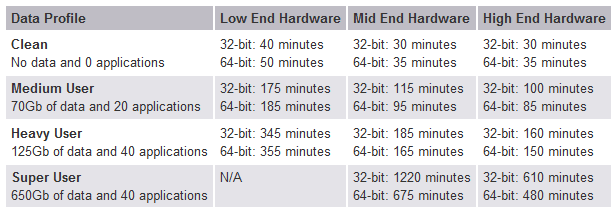
I yesterday upgraded my wife's Vista to Seven, only problem being the time consumed: over six hours. This diagram shows estimated time needed for a Vista - Seven inplace upgrade:

upgrade_time.PNG

With my wife's computer I had not a single problem, after installation everything worked as it should. This computer I'm writing now was upgraded in-place some months ago, Vista Ultimate to RC build 7100 without a single problem and in about one hour I start to upgrade this to Ultimate Retail using this trick.

Before you start, make a full backup of your system. Even I have only positive experiences, an installation can always go wrong. I also recommend in-place upgraders to check they have all the latest drivers before the installation, as well as to check BIOS is up to date.

You have not filled your system specs. Without knowing your hardware setup it is impossible to say where you might find problems. Anyway, upgrade is a good alternative if it is done right and well prepared.

Kari
 

My Computer

Computer type
Laptop
Computer Manufacturer/Model Number
HP ENVY 17-1150eg
OS
Windows 10 Pro x64 EN-GB
CPU
1.6 GHz Intel Core i7-720QM Processor
Memory
6 GB
Graphics Card(s)
ATI Mobility Radeon HD 5850 Graphics
Sound Card
Beats sound system with integrated subwoofer
Monitor(s) Displays
17" laptop display, 22" LED and 32" Full HD TV through HDMI
Screen Resolution
1600*900 (1), 1920*1080 (2&3)
Hard Drives
Internal: 2 x 500 GB SATA Hard Disk Drive 7200 rpm
External: 2TB for backups, 3TB USB3 network drive for media
Cooling
As Envy runs a bit warm, I have it on a Cooler Master pad
Keyboard
Logitech diNovo Media Desktop Laser (bluetooth)
Mouse
Logitech Performance Mouse MX
Internet Speed
50/10 Mbps VDSL
Antivirus
Windows Defender 4.3.9431.0
Browser
Maxthon 3.5.2., IE11
I upgraded from Vista Business 32 to the RC, Windows 7 Ultimate. It took about an hour, and I experienced no issues after other than there wasn't a Canon driver for my printer yet, although the Vista driver worked.

Honestly, I cannot see where these horror stories of taking hours and hours to upgrade are coming from. My machine is modest, Q6600 Quad core, 4 GB DDR 800, twin 500GB HDDs.

Either they are dinosaurs, haven't been updated, I have no idea why it took them so long. I have 13GB music, and at least 100GB family movies if not more, and it only too me an hour.
 

My Computer

Computer type
PC/Desktop
Computer Manufacturer/Model Number
Alienware Aurora-R4
OS
Windows 7 Professional x64
CPU
Intel(R) Core(TM) i7-3820 CPU, 4 Cores, 8 Logical Cores
Motherboard
Alienware
Memory
32 GB DDR3 1600
Graphics Card(s)
ATI Radeon HD 8950 3GB vDDR5 & ATI Radeon HD 7950 3GB vDDR5
Sound Card
Realtek 7.1 Audio
Monitor(s) Displays
Dell SP2309W 23 inch
Screen Resolution
2048x1152
Hard Drives
7.3 TB in 4 drives (Raid 0), 2TB NAS backup drive.
PSU
875w
Case
ALX Chasis with active venting
Cooling
Liquid cooled with active venting and fans.
Keyboard
Alienware TactX
Mouse
Alienware TactX
Internet Speed
15mb Cable
Antivirus
Malwarebytes
Browser
Pale Moon (Optimized Mozilla Based)
Other Info
http://www.y0himba.net
Thanks to everyone who has responded so far. And Warriorking - I look forward to your update :)

BTW, I run a well known support forum similar to this one so I'm technically proficient and will, of course create a couple of images of my system partition before doing ANYTHING. I came here for advice because you guys are more into Windows 7 than we are at this point and I wanted to hear from the experts. I very much appreciate the prompt and intelligent responses - nice first experience here :)
 

My Computer

OS
Vista
Just upgraded from Vista Ultimate to Windows 7 Ultimate via my OEM disc, upgrade took about 1Hr 30 Minutes, no problems whatsoever during upgrade or on any programs other than Bit Defender having Firewall issues with 7, should have a fix soon from Bit defender...System running smooth and fast...all programs running trouble free.....

Specs: Windows 7 Ultimate 64Bit
i7Core 920 2.67
MSI X58Pro
12Gig OCZ DDR3
EVGA GTX295
Auzentech 7.1 Prelude
3-1TB Hds Seagate
2 Blu-Ray Burners LG
800Watt PS
24" Acer HDMI LCD
 

My Computer

OS
Windows 7 Ultimate
CPU
i7Core 920 2.67
Motherboard
MSI X58Pro
Memory
12Gig OCZ DDR3
Graphics Card(s)
EVGA GTX 296
Sound Card
Auzentech Prelude 7.1
Monitor(s) Displays
24" Acer HDMI
Hard Drives
3-1TB Seagate
PSU
800 WAtt
Case
Thermaltake Spedo
Thanks - and glad it went well for you :)
 

My Computer

OS
Vista
Just did the upgrade - took about 90 minutes and so far so good.
 

My Computer

OS
Vista
Quick question for the experts - I really like Windows 7 now after using it for about 4 months.

I have Home Premium running 64-bit. I want to upgrade to Ultimate 64-bit. I have a fairly
new Toshiba L655 laptop that has served me well except for battery life.... and an occasional
hard disk warning about no boot media found..... generally I can reboot by forcing a power off,
waiting a little while and restarting start into Windows without any further warnings or errors.

I had the standard Toshiba / Best Buy bloatware that was "pre-loaded" into my laptop when I
bought it. I went to great pains to remove all of this bloatware (no more Best Buy app that was
buried deep inside the registry - almost like a root kit)....
I have had some occasional hard disk warnings or failures and the occasional reboot media failure
from the hard drive. These are rare however and right now I have run for several weeks without
any errors or warnings whatsoever.

My basic question concerns performance. I am sure that upgrading with a "clean" install will end
up "cleaner" by removing extraneous junk pointers, data files, and other trash that may have been
left from the original factory home premimum 64 install. My question comes down to performance -
is there a performance (hard disk or cpu) gain to be found by performing a "clean" install. I am
strongly tempted to go the "clean" install routine - but wanted some extra motivation from perhaps
a performance edge between an in-place upgrade (which I have lots of experience from the XP world) -
or doing a "clean" installation. I am of the minimalist philosophy and I surely won't be reinstalling the
Toshiba crapware and gobs of programs that they throw into start-up to "help you" either - no thanks.
My machine works just fine without that - and if I want the latest drivers - I will simply log into the
Toshiba site (or elsewhere) to get it. I do have all of the latest drivers. I do also partition my hard drive for performance by adding a D: for Temp files, an E: for most of my program installations, and an F: for my data type files. I also have setup properly the temp variables, cache forced to be fixed on the D: drive, etc. So I know of these tricks already and they still work well.

So what to the experts say? Does a "clean" install perform any faster (on average) than an upgrade
installation? I would think so because the OS doesn't have trash files in the way (at least in the OS partition) slowing down basic I/O operations. Any other thoughts on this topic? It would be interesting to see if anyone has ever done a good comparison test using benchmark software to compare a "clean" vs "in-place upgrade" of Win7 - and I'm interested in Ultimate 7.

BTW - I will be swapping out my hard disk for an SSD sometime after the Ultimate 7 upgrade.

Thanks in advance..........
R / - John :)
 

My Computer

OS
Windows 7 Home Premium 64bit
Thanks for the good advice and the SSD links. I will read those over prior to upgrading.
R / - John
 

My Computer

OS
Windows 7 Home Premium 64bit
Back
Top