Inaccesible partitions after Windows 7 install

laikinasis

New member
Local time
7:16 AM
Messages
5
I have installed Windows 7 next to my old Windows XP (so it's a dualboot situation). I have 2 physical HDD's (320 GB each) and 6 logical drives (2 + 4 primary partitions, all NTFS). After installing Windows 7, two of 4 partitions in one hdd have become inaccessible - disk manager still shows them, but I can't neither set a drive letter, nor view properties. I get the following error:

"The operation failed to complete because the Disk Management console view is not up-to-date. Refresh the view by usin the refresh task. If the problem persists close the Disk Management console, then restart Disk Management or restart computer."

Both of the inaccessible partitions are fine in Windows XP. Any ideas or solutions ? ;/
 

My Computer My Computer

OS
Windows 7
Both of the inaccessible partitions are fine in Windows XP. Any ideas or solutions ? ;/
Check permissions to these partitions of course from Win 7 level
Folder Permissions - Vista Forums

Users group should have following permissions to parttions: read,read & executete,list folder contents

Administrators grup and System account -full control (checked all)
 

My Computer My Computer

Computer Manufacturer/Model Number
Custom made
OS
Windows 7 Professional x64 PL
CPU
AMD Athlon 4450e
Motherboard
Giga-Byte GA-MA69G-S3H
Memory
GoodRam DDR2 2x2048MB (FSB 800MHz)
Graphics Card(s)
nVidia GeForce 9600GT (G94-300) 1024 MB
Monitor(s) Displays
SAMSUNG SyncMaster HS2P301688
Hard Drives
Seagate ST3750330AS 750GB
PSU
Corsair 550W
Cooling
AeroCool ExtremeEngine 3T
As far as I understand, you have to give the partition letter before doing that and I can't...

Both of the inaccessible partitions are fine in Windows XP. Any ideas or solutions ? ;/
Check permissions to these partitions of course from Win 7 level
Folder Permissions - Vista Forums

Users group should have following permissions to parttions: read,read & executete,list folder contents

Administrators grup and System account -full control (checked all)
 

My Computer My Computer

OS
Windows 7
Holy Over-Partitioning, Batman! This is yet another reason why I despise dual-booting.

Depending on your system specs (they aren't filled out yet), this advice might not be valid, but here goes anyway. If it was my system, I'd back the data up, wipe both drives clean, and install Windows 7 on one. I'd make the second one my data drive (D:\) and then go about using my system. Anything that's needed in XP can be virtualized one way or another, and you'd easily avoid these issues because your setup would be far simpler.
 

My Computer My Computer

OS
Windows 7 Ultimate x64 SP1
CPU
Intel Core i7-2600
Motherboard
Gigabyte GA-P67A-UD3P-B3
Memory
12 GB Patriot Extreme DDR3-1333
Graphics Card(s)
Nvidia GTX 470
Monitor(s) Displays
Dell UltraSharp 2209WA
Hard Drives
OCZ Agility3 240 GB, WD5001AALS, WD7501AALS
PSU
OCZ ModStream 700W
Case
CoolerMaster HAF 912 Advanced
Cooling
CoolerMaster Hyper 212 Plus
As far as I understand, you have to give the partition letter before doing that and I can't...
Sorry I didn't notice before...

Open regedit and navigate to key

HKEY_LOCALE_MACHINE\System\MountedDevices


Show image of this key or import this key but in *.txt format (not in *.reg format!) and attache to post
 

My Computer My Computer

Computer Manufacturer/Model Number
Custom made
OS
Windows 7 Professional x64 PL
CPU
AMD Athlon 4450e
Motherboard
Giga-Byte GA-MA69G-S3H
Memory
GoodRam DDR2 2x2048MB (FSB 800MHz)
Graphics Card(s)
nVidia GeForce 9600GT (G94-300) 1024 MB
Monitor(s) Displays
SAMSUNG SyncMaster HS2P301688
Hard Drives
Seagate ST3750330AS 750GB
PSU
Corsair 550W
Cooling
AeroCool ExtremeEngine 3T
Key Name: HKEY_LOCAL_MACHINE\SYSTEM\MountedDevices
Class Name: <NO CLASS>
Last Write Time: 2009.09.14 - 20:48
Value 0
Name: \DosDevices\C:
Type: REG_BINARY
Data:
00000000 44 52 20 69 00 c0 76 e2 - 04 00 00 00 DR i.Àvâ....

Value 1
Name: \??\Volume{f838b3e6-a154-11de-ad82-806e6f6e6963}
Type: REG_BINARY
Data:
00000000 2e 68 13 a3 00 90 7d 00 - 00 00 00 00 .h.£..}.....

Value 2
Name: \??\Volume{f838b3e7-a154-11de-ad82-806e6f6e6963}
Type: REG_BINARY
Data:
00000000 2e 68 13 a3 00 a0 9e 8b - 08 00 00 00 .h.£. ......

Value 3
Name: \??\Volume{f838b3e8-a154-11de-ad82-806e6f6e6963}
Type: REG_BINARY
Data:
00000000 44 52 20 69 00 7e 00 00 - 00 00 00 00 DR i.~......

Value 4
Name: \??\Volume{f838b3e9-a154-11de-ad82-806e6f6e6963}
Type: REG_BINARY
Data:
00000000 44 52 20 69 00 c0 76 e2 - 04 00 00 00 DR i.Àvâ....

Value 5
Name: \??\Volume{f838b3ec-a154-11de-ad82-806e6f6e6963}
Type: REG_BINARY
Data:
00000000 5c 00 3f 00 3f 00 5c 00 - 49 00 44 00 45 00 23 00 \.?.?.\.I.D.E.#.
00000010 43 00 64 00 52 00 6f 00 - 6d 00 54 00 53 00 53 00 C.d.R.o.m.T.S.S.
00000020 54 00 63 00 6f 00 72 00 - 70 00 5f 00 43 00 44 00 T.c.o.r.p._.C.D.
00000030 23 00 44 00 56 00 44 00 - 57 00 5f 00 53 00 48 00 #.D.V.D.W._.S.H.
00000040 2d 00 53 00 31 00 38 00 - 32 00 4d 00 5f 00 5f 00 -.S.1.8.2.M._._.
00000050 5f 00 5f 00 5f 00 5f 00 - 5f 00 5f 00 5f 00 5f 00 _._._._._._._._.
00000060 5f 00 5f 00 5f 00 5f 00 - 5f 00 53 00 42 00 30 00 _._._._._.S.B.0.
00000070 33 00 5f 00 5f 00 5f 00 - 5f 00 23 00 35 00 26 00 3._._._._.#.5.&.
00000080 31 00 39 00 66 00 34 00 - 37 00 38 00 26 00 30 00 1.9.f.4.7.8.&.0.
00000090 26 00 30 00 2e 00 30 00 - 2e 00 30 00 23 00 7b 00 &.0...0...0.#.{.
000000a0 35 00 33 00 66 00 35 00 - 36 00 33 00 30 00 64 00 5.3.f.5.6.3.0.d.
000000b0 2d 00 62 00 36 00 62 00 - 66 00 2d 00 31 00 31 00 -.b.6.b.f.-.1.1.
000000c0 64 00 30 00 2d 00 39 00 - 34 00 66 00 32 00 2d 00 d.0.-.9.4.f.2.-.
000000d0 30 00 30 00 61 00 30 00 - 63 00 39 00 31 00 65 00 0.0.a.0.c.9.1.e.
000000e0 66 00 62 00 38 00 62 00 - 7d 00 f.b.8.b.}.

Value 6
Name: \DosDevices\D:
Type: REG_BINARY
Data:
00000000 2e 68 13 a3 00 90 7d 00 - 00 00 00 00 .h.£..}.....

Value 7
Name: \DosDevices\G:
Type: REG_BINARY
Data:
00000000 5c 00 3f 00 3f 00 5c 00 - 49 00 44 00 45 00 23 00 \.?.?.\.I.D.E.#.
00000010 43 00 64 00 52 00 6f 00 - 6d 00 54 00 53 00 53 00 C.d.R.o.m.T.S.S.
00000020 54 00 63 00 6f 00 72 00 - 70 00 5f 00 43 00 44 00 T.c.o.r.p._.C.D.
00000030 23 00 44 00 56 00 44 00 - 57 00 5f 00 53 00 48 00 #.D.V.D.W._.S.H.
00000040 2d 00 53 00 31 00 38 00 - 32 00 4d 00 5f 00 5f 00 -.S.1.8.2.M._._.
00000050 5f 00 5f 00 5f 00 5f 00 - 5f 00 5f 00 5f 00 5f 00 _._._._._._._._.
00000060 5f 00 5f 00 5f 00 5f 00 - 5f 00 53 00 42 00 30 00 _._._._._.S.B.0.
00000070 33 00 5f 00 5f 00 5f 00 - 5f 00 23 00 35 00 26 00 3._._._._.#.5.&.
00000080 31 00 39 00 66 00 34 00 - 37 00 38 00 26 00 30 00 1.9.f.4.7.8.&.0.
00000090 26 00 30 00 2e 00 30 00 - 2e 00 30 00 23 00 7b 00 &.0...0...0.#.{.
000000a0 35 00 33 00 66 00 35 00 - 36 00 33 00 30 00 64 00 5.3.f.5.6.3.0.d.
000000b0 2d 00 62 00 36 00 62 00 - 66 00 2d 00 31 00 31 00 -.b.6.b.f.-.1.1.
000000c0 64 00 30 00 2d 00 39 00 - 34 00 66 00 32 00 2d 00 d.0.-.9.4.f.2.-.
000000d0 30 00 30 00 61 00 30 00 - 63 00 39 00 31 00 65 00 0.0.a.0.c.9.1.e.
000000e0 66 00 62 00 38 00 62 00 - 7d 00 f.b.8.b.}.

Value 8
Name: \DosDevices\S:
Type: REG_BINARY
Data:
00000000 2e 68 13 a3 00 a0 9e 8b - 08 00 00 00 .h.£. ......

Value 9
Name: \DosDevices\X:
Type: REG_BINARY
Data:
00000000 44 52 20 69 00 7e 00 00 - 00 00 00 00 DR i.~......
 

My Computer My Computer

OS
Windows 7

My Computer My Computer

Computer Manufacturer/Model Number
Custom made
OS
Windows 7 Professional x64 PL
CPU
AMD Athlon 4450e
Motherboard
Giga-Byte GA-MA69G-S3H
Memory
GoodRam DDR2 2x2048MB (FSB 800MHz)
Graphics Card(s)
nVidia GeForce 9600GT (G94-300) 1024 MB
Monitor(s) Displays
SAMSUNG SyncMaster HS2P301688
Hard Drives
Seagate ST3750330AS 750GB
PSU
Corsair 550W
Cooling
AeroCool ExtremeEngine 3T

My Computers My Computers

System One System Two

  • Computer type
    PC/Desktop
    OS
    7 X64
    CPU
    i5 8400
    Motherboard
    gigabyte b365m ds3h
    Memory
    2x8gb 3200mhz
    Hard Drives
    various
    PSU
    pure power 11 400w cm
    Case
    Coolermaster
    Cooling
    cryorig m9i
  • Computer type
    PC/Desktop
    OS
    7x64
    CPU
    g5400
    Motherboard
    ga b365m ds3h
    Memory
    8gb ddr4 2400
    PSU
    xfx pro 450w

My Computer My Computer

Computer Manufacturer/Model Number
Custom made
OS
Windows 7 Professional x64 PL
CPU
AMD Athlon 4450e
Motherboard
Giga-Byte GA-MA69G-S3H
Memory
GoodRam DDR2 2x2048MB (FSB 800MHz)
Graphics Card(s)
nVidia GeForce 9600GT (G94-300) 1024 MB
Monitor(s) Displays
SAMSUNG SyncMaster HS2P301688
Hard Drives
Seagate ST3750330AS 750GB
PSU
Corsair 550W
Cooling
AeroCool ExtremeEngine 3T
You could see if a 3rd party partition manager would add a drive letters and update the system information for you.

Paragon is my preferred partition manager - but it's not free.

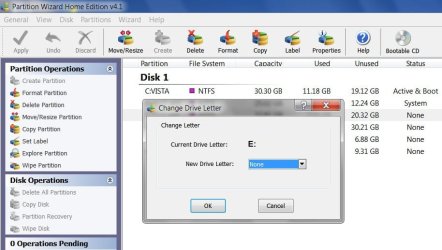
There is the free one from MT that Flavius posted - looks like it would do the job :

PW-DRIVE-LETTER-2009-09-17_142331.jpg
 

My Computers My Computers

System One System Two

  • Computer type
    PC/Desktop
    OS
    7 X64
    CPU
    i5 8400
    Motherboard
    gigabyte b365m ds3h
    Memory
    2x8gb 3200mhz
    Hard Drives
    various
    PSU
    pure power 11 400w cm
    Case
    Coolermaster
    Cooling
    cryorig m9i
  • Computer type
    PC/Desktop
    OS
    7x64
    CPU
    g5400
    Motherboard
    ga b365m ds3h
    Memory
    8gb ddr4 2400
    PSU
    xfx pro 450w
Tried EASEUS Partition Master, got an error about "mounting failed"...

You could see if a 3rd party partition manager would add a drive letters and update the system information for you.

Paragon is my preferred partition manager - but it's not free.

There is the free one from MT that Flavius posted - looks like it would do the job :

View attachment 28359
 

My Computer My Computer

OS
Windows 7
Try something different

It may be any error in partition table

Boot Win7 DVD

Choose language>>repair computer>>command prompt and type

bootrec /fixmbr
 

My Computer My Computer

Computer Manufacturer/Model Number
Custom made
OS
Windows 7 Professional x64 PL
CPU
AMD Athlon 4450e
Motherboard
Giga-Byte GA-MA69G-S3H
Memory
GoodRam DDR2 2x2048MB (FSB 800MHz)
Graphics Card(s)
nVidia GeForce 9600GT (G94-300) 1024 MB
Monitor(s) Displays
SAMSUNG SyncMaster HS2P301688
Hard Drives
Seagate ST3750330AS 750GB
PSU
Corsair 550W
Cooling
AeroCool ExtremeEngine 3T
I doubt that would be a good idea, since win7 could screw everything up and those partitions would not be accessible to windows xp also... But yet again, I'll have that in my mind.

Try something different

It may be any error in partition table

Boot Win7 DVD

Choose language>>repair computer>>command prompt and type

bootrec /fixmbr
 

My Computer My Computer

OS
Windows 7
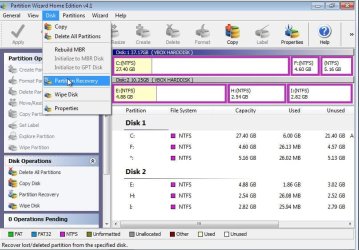
You can also try diagnose partitions by using Partitions Wizard.

Disk>>Partition Recovery>>scan full disk ->it will scan all partitions.
In this program there is also option rebuilding MBR
 

Attachments

  • PW1.jpg
    PW1.jpg
    72.1 KB · Views: 23

My Computer My Computer

Computer Manufacturer/Model Number
Custom made
OS
Windows 7 Professional x64 PL
CPU
AMD Athlon 4450e
Motherboard
Giga-Byte GA-MA69G-S3H
Memory
GoodRam DDR2 2x2048MB (FSB 800MHz)
Graphics Card(s)
nVidia GeForce 9600GT (G94-300) 1024 MB
Monitor(s) Displays
SAMSUNG SyncMaster HS2P301688
Hard Drives
Seagate ST3750330AS 750GB
PSU
Corsair 550W
Cooling
AeroCool ExtremeEngine 3T
You can also try diagnose partitions by using Partitions Wizard.

Disk>>Partition Recovery>>scan full disk ->it will scan all partitions.
In this program there is also option rebuilding MBR

Great information,
Thanks
 

My Computer My Computer

Computer type
PC/Desktop
Computer Manufacturer/Model Number
76~2.0
OS
Windows 7 Ult x64 - SP1/ Windows 8 Pro x64
CPU
Intel Core i5-3570K 4.6GHz
Motherboard
Gigabyte GA-Z77X UD3H, f18
Memory
8GB (2X4GB) DDR3 1600 Corsair Vengeance CL8 1.5v
Graphics Card(s)
Sapphire HD 7770 Vapor-X OC 1GB DDR5
Sound Card
Onboard VIA VT2021
Monitor(s) Displays
22" LCD Dell
Screen Resolution
1680x1050
Hard Drives
Samsung 840Pro 128GB SSD,
Seagate Barracuda 500GB SATA2 7200rpm 32MB cache, Seagate Barracuda 1TB SATA2 7200rpm 32MB cache,
PSU
Corsair HX650W
Case
Cooler Master Storm Scout
Cooling
Corsair H80 2x12cm Noctua NF P12 , 2x14cm case fans
Keyboard
Logitech Wave
Mouse
CM Sentinel
Internet Speed
Dismal
Antivirus
Avast
Browser
Opera Next
Other Info
Haswell laptop: HP Envy 17t-j, i7-4700MQ, GeForce 740M 2GB DDR3, 17.3" Full HD 1920x1080, 16GB RAM, Samsung 840 Pro 128GB, 1TB Hitachi 7200 HDD,
Desktop: eSATA ports,
External eSATA Seagate 500GB SATA2 7200rpm,
External WD USB 500GB

My Computer My Computer

Computer Manufacturer/Model Number
MasterB/Custom
OS
Windows 7 Professional x64
CPU
QuadCore AMD Phenom II X4 Black Edition 955 3.2 GHz
Motherboard
Asus M4A785TD-V Evo
Memory
8 GB Crucial DDR3
Graphics Card(s)
SAPPHIRE Radeon HD 4890 1GB HDMI New Edition
Sound Card
VIA VT1708S HD Audio 7.1 onboard/ ATI HDMI video card
Monitor(s) Displays
Acer H233H 23'' LCD HDMI
Screen Resolution
1920x1080
Hard Drives
1x 500GB and 1x 1TB 7200RPM 32MB Cache WD Caviar Black
PSU
CORSAIR CMPSU-620HX 620W
Case
COOLER MASTER Storm Scout SGC-2000
Cooling
2x 140mm and 1x 120mm case fans, Stock CPU fan
Keyboard
Logitech MX 3200
Mouse
Logitech MX 3200
Internet Speed
15 Mbps
Other Info
My first build!
Back
Top